GPT Image 1.5

AI Image Editing Model

OpenAI's state-of-the-art image generation model with better instruction following and adherence to prompts

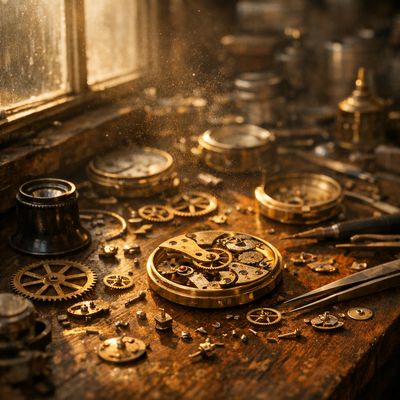
GPT Image 1.5 generated image of A hyper-realistic close-up of a weathered craftsman's workbench, featuring a ...
GPT Image 1.5 generated image of A hyper-realistic cinematic close-up of an elderly watchmaker’s workspace, su...
1536 x 1536
Max Resolution
Supported Modes
Text to Image Image Edit
Active

Details

Model ID
gpt-image-1.5
Creator
Family
gpt-image
Released
December 2025
Max Input Images
10
Tags
image-generation text-to-image image-editing
// Get Started

Ready to integrate?

Access gpt-image-1.5 via our unified API.

Create Account
Available at 3 providers

Starting from

$0.0090 /image via fal.ai, OpenAI · +1 more

By quality

Low
~$0.010
Medium
~$0.039
High
~$0.134

Prices shown are in USD

See all providers

Provider Performance

Fastest generation through replicate at 34,702ms median latency with 94.1% success rate.

Aggregated from real API requests over the last 30 days.

Generation Time

replicate
34,702ms p95: 42,566ms
openai
39,330ms p95: 58,033ms
fal
49,823ms p95: 87,593ms

Success Rate

replicate
94.1%
16 / 17 requests
openai
75.9%
308 / 406 requests
fal
100.0%
60 / 60 requests

Time to First Byte

replicate
35,276ms
p95: 38,198ms
openai
38,727ms
p95: 57,434ms
fal
50,112ms
p95: 87,205ms

Provider Rankings

# Provider p50 Gen Time p95 Gen Time Success Rate TTFB (p50)
1 replicate 34,702ms 42,566ms 94.1% 35,276ms
2 openai 39,330ms 58,033ms 75.9% 38,727ms
3 fal 49,823ms 87,593ms 100.0% 50,112ms
Data updated every 15 minutes. Based on all API requests through Lumenfall over the last 30 days.

Providers & Pricing (3)

GPT Image 1.5 is available from 3 providers, with per-image pricing starting at $0.009 through fal.ai.

fal.ai
Text to Image
fal/gpt-image-1.5
Provider Model ID: fal-ai/gpt-image-1.5

Output

Image 1024x1024, High
$0.133 per image
Image 1024x1024, Low
$0.0090 per image
Image 1024x1024, Medium
$0.034 per image
Image 1024x1536, High
$0.200 per image
Image 1024x1536, Low
$0.013 per image
Image 1024x1536, Medium
$0.051 per image
Image 1536x1024, High
$0.199 per image
Image 1536x1024, Low
$0.013 per image
Image 1536x1024, Medium
$0.050 per image
Pricing Notes (1)
  • Per-image prices vary by quality (low/medium/high) and size
View official pricing • As of
Replicate
Text to Image Image Edit
replicate/gpt-image-1.5
Provider Model ID: openai/gpt-image-1.5

Output

Image High
$0.136 per image
Image Low
$0.013 per image
Image Medium
$0.050 per image
Pricing Notes (1)
  • Per-image prices vary by quality level
View official pricing • As of
OpenAI
Text to Image Image Edit
openai/gpt-image-1.5
Provider Model ID: gpt-image-1.5

Input

Token text
$5.00 per 1M
Token text Cached
$1.25 per 1M
Token image
$8.00 per 1M
Token image Cached
$2.00 per 1M

Output

Token text
$10.00 per 1M
Token image
$32.00 per 1M
Image 1024x1024, High
$0.133 per image
Image 1024x1024, Low
$0.0090 per image
Image 1024x1024, Medium
$0.034 per image
Image 1024x1536, High
$0.200 per image
Image 1024x1536, Low
$0.013 per image
Image 1024x1536, Medium
$0.050 per image
Image 1536x1024, High
$0.200 per image
Image 1536x1024, Low
$0.013 per image
Image 1536x1024, Medium
$0.050 per image
Pricing Notes (3)
  • Pricing available in both token-based and per-image formats
  • Per-image prices vary by quality (low/medium/high) and size
  • Supports up to 10 input images; first 5 preserved with higher fidelity

GPT Image 1.5 API OpenAI-compatible

Developers can integrate GPT Image 1.5 through the Lumenfall OpenAI-compatible API to automate text-to-image generation and complex image editing workflows. This single endpoint provides programmatic access to OpenAI's state-of-the-art vision capabilities for scalable media production.

Base URL
https://api.lumenfall.ai/openai/v1
Model
gpt-image-1.5

Code Examples

Text to Image

/v1/images/generations
curl -X POST \
  https://api.lumenfall.ai/openai/v1/images/generations \
  -H "Authorization: Bearer $LUMENFALL_API_KEY" \
  -H "Content-Type: application/json" \
  -d '{
    "model": "gpt-image-1.5",
    "prompt": "",
    "size": "1024x1024"
  }'
# Response:
# { "created": 1234567890, "data": [{ "url": "https://...", "revised_prompt": "..." }] }

Parameter Reference

Required Supported Not available

Core Parameters

Parameter Type Description Modes
prompt string Required. Text prompt for image generation
T2I Edit
quality string Image quality level
high low medium
T2I Edit

Size & Layout

Parameter Type Description Modes
size string Image dimensions as WxH pixels (e.g. "1024x1024") or aspect ratio (e.g. "16:9")
1254x836 836x1254 1024x1024 1536x1024 1024x1536
WxH determines both shape and scale (aspect_ratio and resolution are ignored when size is provided). W:H format is equivalent to aspect_ratio.
T2I Edit
aspect_ratio string Aspect ratio of the output image (e.g. "16:9", "1:1")
2:3 1:1 3:2
Controls shape independently of scale. Use with resolution to control both. If size is also provided, size takes precedence. Any ratio is accepted and mapped to the nearest supported value.
T2I Edit
resolution string Output resolution tier (e.g. "1K", "4K")
1K
Controls scale independently of shape. Higher tiers produce larger images and cost more. If size is also provided, size takes precedence for scale. Any tier is accepted and mapped to the nearest supported value.
T2I Edit
Output size aspect_ratio + resolution
Flexible
Custom
1024–1536px per side
"WxH" Any pixel dimensions within model constraints
1K 5 sizes
Output size aspect_ratio + resolution
1024 × 1536 "1024x1536" or "2:3" + "1K"
1536 × 1024 "1536x1024" or "3:2" + "1K"
1024 × 1024 "1024x1024" or "1:1" + "1K"
836 × 1254 "836x1254" or "2:3" + "1K"
1254 × 836 "1254x836" or "3:2" + "1K"

How these parameters work

size

Exact pixel dimensions

"1920x1080"
aspect_ratio

Shape only, default scale

"16:9"
resolution

Scale tier, preserves shape

"1K"

Priority when combined

size aspect_ratio + resolution aspect_ratio resolution

size is most specific and always wins. aspect_ratio and resolution control shape and scale independently.

How matching works

Shape matching – we pick the closest supported ratio. Ask for 7:1 on a model with 4:1 and 8:1, you get 8:1.
Scale matching – providers use different tier formats: K tiers (0.5K 1K 2K 4K) or megapixel tiers (0.25 1). If the exact tier isn't available, you get the nearest one.
Dimension clamping – if a model has pixel limits, we clamp dimensions to fit and keep the aspect ratio intact.

Media Inputs

Parameter Type Description Modes

Output & Format

Parameter Type Description Modes
response_format string How to return the image
url b64_json
Default: "url"
T2I Edit
output_format string Output image format
png jpeg gif webp avif
Gateway converts to requested format if provider doesn't support it natively.
T2I Edit
output_compression replicate integer Compression level (0-100%)
Default: 90
T2I Edit
n integer Number of images to generate
Default: 1
Gateway generates multiple images in parallel even if provider only supports 1.
T2I Edit

Additional Parameters

Provider-specific passthrough fields, available only when the request is routed to the listed provider.

Parameter Type Description Modes
Universal
background string Set whether the background is transparent or opaque or choose automatically
opaque transparent
T2I Edit
input_fidelity string Control how much effort the model will exert to match the style and features, especially facial features, of input images
high low
T2I Edit
moderation string Content moderation level
low
T2I Edit
fal
sync_mode boolean If `True`, the media will be returned as a data URI and the output data won't be available in the request history.
T2I Edit
openai
partial_images integer Number of partial images to generate in streaming responses.
T2I Edit
stream boolean Whether to stream image generation or edit events as they become available.
T2I Edit
user string Stable end-user identifier used by OpenAI abuse monitoring.
T2I Edit
replicate
openai_api_key string Your OpenAI API key (optional - uses proxy if not provided)
T2I Edit
user_id string An optional unique identifier representing your end-user. This helps OpenAI monitor and detect abuse.
T2I Edit

Parameter Normalization

How we handle parameters across different providers

Not every provider speaks the same language. When you send a parameter, we handle it in one of four ways depending on what the model supports:

Behavior What happens Example
passthrough Sent as-is to the provider style, quality
renamed Same value, mapped to the field name the provider expects prompt
converted Transformed to the provider's native format size
emulated Works even if the provider has no concept of it n, response_format

Parameters we don't recognize pass straight through to the upstream API, so provider-specific options still work.

GPT Image 1.5 Benchmarks

GPT Image 1.5 holds an Elo rating of 1285 in text-to-image generation, ranking #2 globally, and maintains a #3 rank for image editing with an Elo of 1230. These scores reflect its superior instruction following and competitive performance across major open-vision leaderboards.

Lumenfall Arena
#7
Text-to-Image
1267 Elo
Lumenfall Arena
#3
Image Editing
1229 Elo

Text-to-Image Landscape

1 model without pricing omitted

Elo vs Speed

26 models waiting for enough speed data

Competition Results

Text-to-Image

Text Rendering

View leaderboard
#1
Vintage Cafe Logo
24 models
Text-to-Image
Prompt

“Vintage minimalist restaurant logo for "Caffè Florian", retro cloche dome with steam and "Est. 1720" banner, classic typography, warm brown and cream tones, subtle texture on light background, vector emblem style.”

#2
Modern Clean Menu
24 models
Text-to-Image
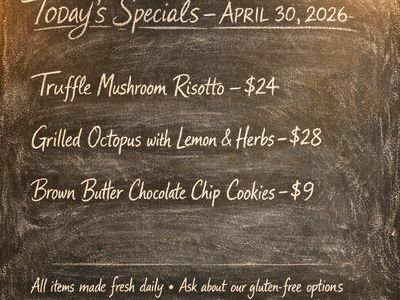
Prompt

“Modern minimalist restaurant menu design, white background with colorful food photos in grid, sections for appetizers/pizza/mains, bold sans-serif fonts, vibrant accents, clean professional layout for casual dining.”

Text-to-Image
Prompt

“Create a clean, modern vector infographic poster about the Apollo 11 mission. NASA-inspired palette (navy, white, muted red, light gray). Flat-vector style, crisp lines, consistent iconography, subtle gradients only. Steps (stop at landing): 1. Launch (Saturn Vicon) 2. Earth Orbit (Earth + orbit ring icon) 3. Translunar (trajectory arc icon) 4. Lunar Orbit (Moon + orbit ring icon) 5. Descent (lunar module descending icon) 6. Landing (lunar module on the surface icon) Small supporting elements (minimal text): • Crew strip: three silhouette icons with only last names: Armstrong, Aldrin, Collins. • Landing site marker: Moon pin labeled "Tranquility" only. Layout constraints: generous margins, large readable labels, clean background with subtle stars. Vector-only, print-poster look, high resolution.”

Text-to-Image

Photorealism

View leaderboard
Text-to-Image
Prompt

“A candid street photo of an elderly Japanese man repairing a red bicycle in light rain, reflections on wet pavement, shallow depth of field, 50mm lens, natural skin texture, imperfect framing, motion blur from passing cars, cinematic but realistic, no stylization.”

Text-to-Image

Product, Branding & Commercial

View leaderboard
#1
Vintage Cafe Logo
24 models
Text-to-Image
Prompt

“Vintage minimalist restaurant logo for "Caffè Florian", retro cloche dome with steam and "Est. 1720" banner, classic typography, warm brown and cream tones, subtle texture on light background, vector emblem style.”

Text-to-Image

Portrait

View leaderboard
#9
Fantasy Warrior
23 models
Text-to-Image
Prompt

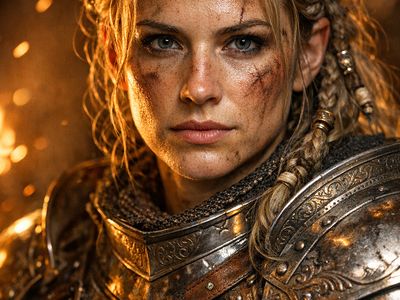
“Close portrait of a battle-worn paladin in ornate engraved plate armor, hair braided with small beads, faint scars and dirt on the skin, warm torchlight reflecting off metal, shallow depth of field, bokeh sparks, lifelike eyes, highly detailed texture on leather straps and cloth underlayer.”

Uncategorized

Text-to-Image
Prompt

“Hyper-photorealistic scene of fluffy baby animals—a golden retriever puppy, tabby kitten, baby bunny, and red fox kit—with big expressive eyes and ultra-detailed soft fur, playfully chasing butterflies and tumbling together in a lush wildflower meadow, warm golden sunrise light with god rays and dew sparkles, joyful wholesome vibe, 8K masterpiece.”

#11
Geometric Composition
26 models
Text-to-Image
Prompt

“A glass cube on a wooden table. Inside the cube is a small blue sphere. On top of the cube sits a red book. A green plant is behind the cube, partially visible through the glass. Soft window light from the left.”

Text-to-Image
Prompt

“Hyper-photorealistic interior of a lush Victorian glass greenhouse filled with exotic tropical plants, vibrant blooming orchids, tall ferns, colorful butterflies in flight, sunlight filtering through ornate glass roof creating realistic caustics and dew on leaves, intricate iron framework visible, misty atmosphere, 8K masterpiece.”

3 attempts – showing best result
Text-to-Image
Prompt

“Hyper-photorealistic full-body portrait of a female superhero standing triumphantly on a New York skyscraper rooftop at golden sunset, wearing a classic modest superhero costume with flowing cape, chest emblem, gloves, and boots in red and blue colors, practical design, short hair, strong determined heroic expression looking into the distance, powerful confident stance with hands on hips and cape billowing dramatically in the wind, detailed urban cityscape background, warm natural sunlight with sharp shadows and fabric highlights, ultra-sharp textures on suit, hair, and concrete, 8K masterpiece, empowering family-friendly style.”

3 attempts – showing best result
#12
Intricate Floral Mandala
15 models
Text-to-Image
Prompt

“Perfectly symmetrical mandala made entirely of real flowers, petals, leaves, fruits, and seeds in vibrant natural colors, intricate layered patterns with radial symmetry, top-down view on a soft neutral background, hyper-detailed organic textures and subtle shadows, photorealistic, 8K masterpiece.”

3 attempts – showing best result
#4
Fantasy Warrior
14 models
Text-to-Image
Prompt

“Close portrait of a battle-worn paladin in ornate engraved plate armor, hair braided with small beads, faint scars and dirt on the skin, warm torchlight reflecting off metal, shallow depth of field, bokeh sparks, lifelike eyes, highly detailed texture on leather straps and cloth underlayer.”

3 attempts – showing best result
Help rank GPT Image 1.5 Pick the better image in blind matchups. Results update rankings in real time.
Start Voting

GPT Image 1.5 is best for

See all Use Cases

GPT Image 1.5 leads the Portrait category with a first-place rank and 84.6% win rate, while also ranking #3 for Text Rendering and Product/Commercial usage. It performs significantly weaker in Anime generation, where it currently ranks #13 with a 26.3% win rate.

GPT Image 1.5 FAQ

How much does GPT Image 1.5 cost?

GPT Image 1.5 starts at $0.009 per image through Lumenfall. Pricing varies by provider. Lumenfall does not add any markup to provider pricing.

How do I use GPT Image 1.5 via API?

You can use GPT Image 1.5 through Lumenfall's OpenAI-compatible API. Send requests to the unified endpoint with model ID "gpt-image-1.5". Code examples are available in Python, JavaScript, and cURL.

Which providers offer GPT Image 1.5?

GPT Image 1.5 is available through Replicate, OpenAI, and fal.ai on Lumenfall. Lumenfall automatically routes requests to the best available provider.

What is the maximum resolution for GPT Image 1.5?

GPT Image 1.5 supports images up to 1536x1536 resolution.

Overview

GPT Image 1.5 is OpenAI’s latest flagship image generation model, designed to transform complex text descriptions into high-fidelity visual assets. It represents a significant iteration in the GPT-image family, focusing on narrowing the gap between user intent and generated output. The model is distinctive for its high level of steerability, allowing users to define specific spatial arrangements and intricate details that previous iterations often elided.

Strengths

  • Complex Instruction Following: The model excels at parsing long, multi-part prompts, ensuring that every requested element is present in the final composition without losing track of secondary details.
  • Spatial and Relational Accuracy: It maintains high consistency when placing objects in specific locations (e.g., “in the bottom left corner”) or defining relationships between subjects (e.g., “leaning against” or “half-obscured by”).
  • Text Rendering Accuracy: GPT Image 1.5 shows marked improvement in rendering legible, correctly spelled text within images, making it suitable for graphic design mockups and signage.
  • Diverse Aspect Ratios: Unlike earlier generative models restricted to square outputs, this model natively supports a wide range of aspect ratios while maintaining structural integrity and avoiding anatomical distortion.

Limitations

  • Photorealistic Nuance: While highly capable, it may still struggle with specific “uncanny valley” effects in human skin textures or micro-expressions compared to specialized diffusion models tuned specifically for photography.
  • Prompt Literalism: Because the model prioritizes strict adherence to instructions, it can occasionally lack the “artistic flair” or unexpected creativity found in models that interpret prompts more loosely.
  • Inference Latency: Given the complexity of the architecture required to achieve high instruction following, generation times may be slightly higher than smaller, distilled latent diffusion models.

Technical Background

GPT Image 1.5 is built upon a transformer-based diffusion architecture, leveraging OpenAI’s advancements in large-scale multimodal pre-training. By utilizing a sophisticated text encoder similar to those found in the GPT-4 family, the model can internalize nuanced semantic meanings before translating them into the visual latent space. This architecture enables the model to treat image generation as a sequence-informed task, improving the alignment between the text tokens and the resulting pixels.

Best For

GPT Image 1.5 is ideal for professional workflows including advertising concept art, architectural visualization, and detailed character design where precision is non-negotiable. Its ability to follow strict formatting makes it a strong candidate for automated content pipelines and social media asset generation.

You can experiment with GPT Image 1.5 and compare its outputs with other top-tier models through the Lumenfall playground or integrate it into your production environment using the Lumenfall unified API.

Try GPT Image 1.5 in Playground

Generate images with custom prompts — no API key needed.

Open Playground