GPT Image 1.5 vs Grok Imagine Image
Head-to-head across 17 challenges
GPT Image 1.5
56.0%
win rate
Ties
4.0%
Grok Imagine Image
40.0%
win rate
Challenge Results
Pose & Character Mashup
Editing“Use Image 1 as the exact pose reference and Image 2 as the character reference. Recreate the person/character from Image 2 in the exact dynamic pose and body position from Image 1. Keep the exact face, hair, clothing style/details, and expression from Image 2. Match the lighting and environment of Image 1. The final image must show the character from Image 2 performing the precise action/pose from Image 1 with perfect anatomy and natural integration.”
AI Judge Analysis
GPT Image 1.5
- + Excellent character preservation including face, sunglasses, scarf, and clothing details.
- + Accurately recreates the pose from Image 1 with the man from Image 2.
- + Matches the yellow environment and red stool perfectly.
- − The head and neck alignment looks slightly stiff and pasted-on.
- − The feet have inconsistent toe counts and anatomical minor errors.
Grok Imagine Image
- + Successfully preserved the original Image 1.
- − Completely failed the edit instruction; it did not incorporate any elements from Image 2.
- − The image is just a slightly processed copy of the first source image.
Verdict: GPT Image 1.5 successfully followed the complex instruction to merge the character from Image 2 into the pose and setting of Image 1, maintaining significant detail in the scarf and facial likeness despite some anatomical awkwardness. Grok Imagine Image failed the task entirely by simply returning Image 1 without any modifications.
Geometric Composition
Text-to-Image“A glass cube on a wooden table. Inside the cube is a small blue sphere. On top of the cube sits a red book. A green plant is behind the cube, partially visible through the glass. Soft window light from the left.”
AI Judge Analysis
GPT Image 1.5
- + Perfect adherence to all spatial requirements in the prompt.
- + Excellent rendering of materials, especially the glass texture and the book's fabric cover.
- + Very realistic lighting and reflections on the sphere and table.
- − The plant in the background is quite dense, making it slightly harder to see the 'partially visible' effect through the glass compared to Model B.
- − The cube is a bit wide, though still a cube shape.
Grok Imagine Image
- + Beautiful lighting and soft focus depth-of-field.
- + The plant is clearly visible through the glass as requested.
- + Good wooden table texture.
- − The blue sphere is floating inexplicably in the center of the cube, which feels physically unnatural.
- − The cube has a rectangular, vertical orientation rather than a standard cube shape.
- − The left edge of the glass cube looks slightly warped.
Verdict: GPT Image 1.5 is the superior choice because it captures the physical logic of the scene correctly, placing the sphere on the bottom surface of the cube rather than letting it float. While Grok Imagine Image has a very pleasing photographic quality and soft lighting, its failure to maintain a cube shape and the floating sphere make it less grounded and accurate to the prompt than GPT Image 1.5.
Fantasy Warrior
Text-to-Image“Close portrait of a battle-worn paladin in ornate engraved plate armor, hair braided with small beads, faint scars and dirt on the skin, warm torchlight reflecting off metal, shallow depth of field, bokeh sparks, lifelike eyes, highly detailed texture on leather straps and cloth underlayer.”
AI Judge Analysis
GPT Image 1.5
- + Exceptional skin texture with realistic dirt and faint scarring.
- + Superior rendering of metal materials, showing realistic wear, grime, and torchlight reflections.
- + Accurate interpretation of 'close portrait' with high-fidelity detail on the braids and beads.
- − The bokeh sparks are very large and slightly distracting.
- − A bit of an anatomical glitch where a braid appears to merge into the shoulder armor.
Grok Imagine Image
- + Elegant engraving patterns on the armor plates.
- + Good use of actual torches in the background to justify the lighting.
- + Well-executed braids with clear beads as requested.
- − Skin texture is too smooth and 'plastic' for a battle-worn character.
- − The armor looks too clean and lacks the 'battle-worn' feel requested in the prompt.
- − The leather strap detail is less realistic compared to the other model.
Verdict: GPT Image 1.5 captures the 'battle-worn' aesthetic much more effectively with realistic skin texture, grime, and weathered armor. While Grok Imagine Image has beautiful engravings and clear prompt adherence for the beads and braids, it feels too much like a clean studio photoshoot and lacks the lifelike grit found in GPT Image 1.5.
Outfit Transfer Challenge
Editing“Use Image 1 as the base person. Dress them in the exact elaborate outfit from Image 2 (including all layers, accessories, jewelry, and shoes). Carefully adapt the clothing to the body shape and pose in Image 1 while maintaining realistic fabric behavior, correct proportions, and perfect lighting/shadow matching. Keep the person’s exact face, hair, and background completely unchanged.”
AI Judge Analysis
GPT Image 1.5
- + Successfully transferred the specific outfit elements (peacoat, plaid scarf, jeans, watch, and sunglasses) from Image 2.
- + Maintains excellent lighting and shadow consistency between the subject and the beach environment.
- + Preserves the skin markings and facial features of the original person quite well.
- − The background was subtly altered, losing some of the detail in the wooden structure compared to Image 1.
- − The person's pose was changed from a lean to a more upright standing position.
Grok Imagine Image
- + Perfectly preserves the background, wooden structure, and exact pose of the person from Image 1.
- + Maintains the integrity of the original person's face and hair without any modifications.
- − Completely failed the instruction to use the outfit from Image 2, instead generating a generic regal costume.
- − The lighting on the ornate blue fabric does not naturally match the outdoor beach lighting of the scene.
Verdict: GPT Image 1.5 is the clear winner because it correctly followed the primary instruction to transfer the outfit from Image 2 to the subject in Image 1. While Grok Imagine Image did a superior job of preserving the original photo's background and pose, it failed the core task by generating an entirely different, unrelated costume.
Modern Clean Menu
Text-to-Image“Modern minimalist restaurant menu design, white background with colorful food photos in grid, sections for appetizers/pizza/mains, bold sans-serif fonts, vibrant accents, clean professional layout for casual dining.”
AI Judge Analysis
GPT Image 1.5
- + Excellent text rendering with clear, legible fonts and descriptions.
- + Highly realistic and professional food photography that matches the menu items.
- + Very usable layout that feels like a real graphic design asset.
- − The grid is only on the right side rather than the whole layout being a grid.
- − Missing some requested sections like 'pizza' being placed under a shared header style but limited list size.
Grok Imagine Image
- + Creative integration of food photos scattered within the text layout.
- + Strong minimalist aesthetic with a good use of white space.
- + Follows the 'sections' prompt more strictly by including all requested titles.
- − Text is largely illegible gibberish, especially the small descriptions.
- − Repetitive menu items (e.g., 'Steak Frites' and 'Grilled Salmon' appear multiple times).
- − Food photos are small and lack the high-detail clarity seen in the competitor.
Verdict: GPT Image 1.5 produced a highly professional, production-ready menu with perfect text legibility and mouth-watering photography. Grok Imagine Image followed the structural layout of a full page better but failed significantly on text rendering, producing repetitive and nonsensical placeholder text that makes the menu unusable.
The Capybara Taxi Driver
Text-to-Image“Photorealistic scene inside a yellow New York taxi at night. A capybara is driving, wearing a yellow taxi driver cap and a dark jacket. It has a calm, professional expression and both front paws on the steering wheel. In the back seat sits a human businesswoman in a coat, looking at her phone with a completely normal, bored expression (as if this is just another normal ride). Through the windows you can see the streets of Manhattan at night with blurred lights. Realistic taxi interior, photorealistic, detailed fur and fabric, 35mm lens, night lighting with reflections, shallow depth of field.”
AI Judge Analysis
GPT Image 1.5
- + Excellent photorealistic texture on the capybara's fur
- + Compositing of the interior and exterior bokeh is very cinematic
- + Strong adherence to the perspective of being inside the taxi
- − The capybara's paws look more like bird talons or distorted claws
Grok Imagine Image
- + Wide composition clearly shows both characters and the city environment
- + Excellent realization of the 'bored businesswoman' expression
- + Accurate depiction of the yellow taxi cap and dark jacket
- − The perspective makes it look like the passenger is in the front seat or the taxi has no middle partition
- − The capybara's paws on the wheel are poorly rendered and look like sharp claws
Verdict: GPT Image 1.5 provides a much more believable and cinematic 'inside the taxi' feel with superior lighting and texture. While Grok Imagine captures the businesswoman's expression perfectly, the composition places her in an ambiguous position relative to the driver, whereas GPT Image 1.5 maintains the requested back-seat perspective.
Candid Street Photography
Text-to-Image“A candid street photo of an elderly Japanese man repairing a red bicycle in light rain, reflections on wet pavement, shallow depth of field, 50mm lens, natural skin texture, imperfect framing, motion blur from passing cars, cinematic but realistic, no stylization.”
AI Judge Analysis
GPT Image 1.5
- + Excellent adherence to the request for 'imperfect framing' with a tight, grounded composition.
- + Very realistic skin textures and wet fabric details.
- + Bicycle anatomy is complex and reasonably high-quality for AI.
- − The motion blur on the car is minimal, appearing more like a static parked car.
- − The person's hands are slightly merged and messy upon close inspection.
Grok Imagine Image
- + Captured the 'motion blur from passing cars' perfectly, giving a true sense of a busy street.
- + Higher fidelity to the 'candid street photo' aesthetic with a more natural snapshot feel.
- + Includes authentic details like the face mask and Japanese signage.
- − The bicycle frame is physically impossible, with the down tube missing and the seat post floating.
- − Rain is less visible compared to Model A.
Verdict: GPT Image 1.5 produces a much more detailed and technically sound image in terms of the subject and the bicycle, featuring great textures. However, Grok Imagine much better captures the 'candid street' atmosphere and the specific 'motion blur' request, even if the bicycle's geometry falls apart. GPT Image 1.5 is the winner for overall visual coherence and following the 'no stylization' instruction without sacrificing structural integrity.
Magic Burger Explosion: Fiery Photorealism Challenge
Text-to-Image“Ad for 'Magic Burger'. Dynamic, exploded burger with all components (bun, patty, cheese, lettuce, tomato, sauce) suspended in mid-air. Emphasize photorealistic detail and a sense of motion. Dark, fiery background with glowing embers. Integrate text: 'MAGIC BURGER' as a prominent title, 'LIMITED TIME ONLY' as a secondary message, and '€6.99' in a starburst, all rendered with a fiery, glowing effect.”
AI Judge Analysis
GPT Image 1.5
- + Excellent typography integrated naturally into the fiery theme
- + High-quality, realistic food textures on the bun and patty
- + Great sense of energy and chaos with the sparks and splashing sauce
- − The 'exploded' effect is a bit condensed compared to the vertical separation in Model B
Grok Imagine Image
- + Stronger 'exploded' composition with clear separation of ingredients
- + Very clean and readable price starburst
- + Vibrant colors and high contrast
- − The fire effects look somewhat like clip-art compared to the food
- − The lettuce and sauce droplets have a slightly plastic, CG appearance
Verdict: GPT Image 1.5 wins due to its superior photorealistic textures and masterful integration of text into the environment. While Grok Imagine Image has a better 'exploded' layout, its overall visual quality feels more like a digital illustration than a professional advertisement.
Chalkboard Menu
Text-to-Image“Handwritten-style chalkboard menu in a cozy café, all text rendered in the exact same realistic chalk handwriting style with natural variations in letter size, slight slant, and chalk texture — no printed or digital fonts anywhere on the board. Title at the top in elegant cursive chalk handwriting: ‘TODAY’S SPECIALS – APRIL 30, 2026’. Below it, three menu items also in the same handwritten chalk style: ‘Truffle Mushroom Risotto – $24’, ‘Grilled Octopus with Lemon & Herbs – $28’, ‘Brown Butter Chocolate Chip Cookies – $9’. At the very bottom, smaller text in the identical handwritten chalk style (slightly smaller but still clearly legible with the same handwriting characteristics): ‘All items made fresh daily • Ask about our gluten-free options’. Warm ambient café lighting, visible chalk dust and smudges, realistic handwriting imperfections, no clean printed text anywhere.”
AI Judge Analysis
GPT Image 1.5
- + Excellent chalk texture with realistic smudging and dusting on the board.
- + Flawless spelling and adherence to the specific date and price points.
- + Consistently elegant and flowing cursive style for the header.
- − The handwriting feels a bit too uniform, bordering on a digital font look in the bottom text.
Grok Imagine Image
- + Captures a more authentic 'hand-drawn' feel with varied letter shapes and natural inconsistencies.
- + Better environmental context showing the café background.
- + Perfect spelling and text accuracy.
- − The header text is not in 'elegant cursive' as requested, but rather a print style.
- − The chalk texture is slightly less granular and realistic compared to Image A.
Verdict: Both models followed the complex text requirements perfectly, which is impressive. GPT Image 1.5 has the superior chalk texture and followed the 'cursive' instruction for the header, whereas Grok Imagine used a printed style for the header but achieved a more believable 'human' variance in the letterforms.
Man and Car in California
Editing“Make a photo of the man driving the car down the California coastline”
AI Judge Analysis
GPT Image 1.5
- + Expertly preserves the likeness of the man from the source image, including his unique hairstyle and accessories.
- + Correctly maintains the specific interior and exterior details of the white Rolls-Royce Phantom Drophead Coupe.
- + Shows high source image preservation by keeping the man's scarf and coat details visible in the seat.
- − The man is sitting on the right side of the car, which for a North American coastline setting (California) would typically be the passenger side, though the car is right-hand drive.
- − The composition is heavily cropped, losing much of the car's body.
Grok Imagine Image
- + Captures the entire car in motion with a dynamic low-angle composition.
- + Accurately renders the California coastline background with realistic lighting and motion blur on the wheels.
- − Complete failure to preserve the man from the source image, replacing him with a generic older white man.
- − The car model was changed from a Phantom Drophead Coupe to a newer Rolls-Royce Dawn/Wraith variant.
- − Failed the primary objective of the image editing task by ignoring the provided subjects.
Verdict: GPT Image 1.5 successfully performed the edit by combining the two source images, maintaining the specific identity of the man and the exact model of the car. In contrast, Grok Imagine Image ignored the provided subjects entirely, generating a generic stock photo of a different man and a different car model, failing the fundamental requirement of an image editing task.
Bald man challenge
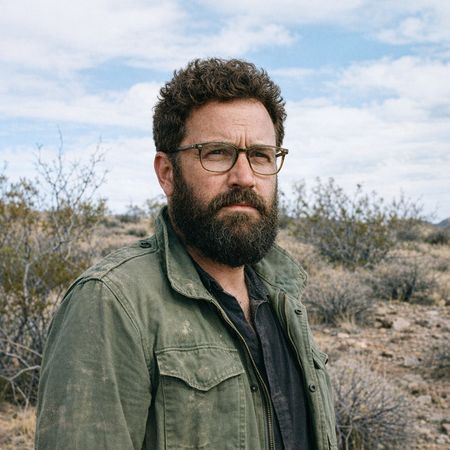
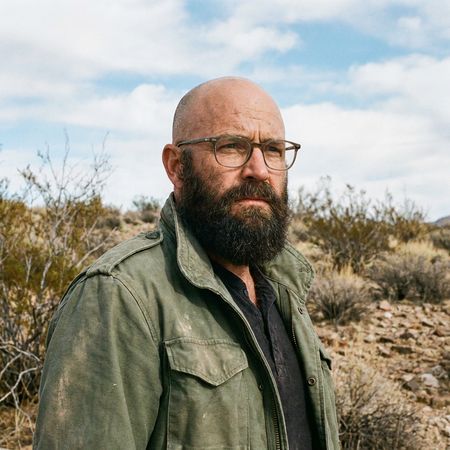
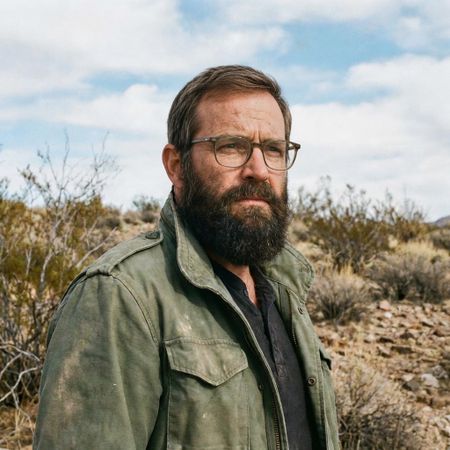
Image Editing“Give the person a full, thick head of natural hair with realistic texture, density, and a natural hairline. Preserve facial features and lighting.”
AI Judge Analysis
GPT Image 1.5
- + Excellent preservation of facial features and textures.
- + The hair texture and color match the existing beard perfectly.
- + Flawlessly maintains the background and clothing from the source image.
- − The hair volume is very high, which may slightly alter the head shape's silhouette compared to the original.
Grok Imagine Image
- + Good integration of a realistic hairstyle that fits the character's age.
- + Preserves the vast majority of the source image correctly.
- − Noticeable change to the facial features, particularly around the eyes and bridge of the nose.
- − The hair texture is slightly finer and lighter than the beard, creating a minor mismatch in appearance.
Verdict: GPT Image 1.5 is the clear winner as it successfully adds natural-looking hair that matches the beard perfectly while leaving the face and background untouched. Grok Imagine Image introduces subtle but noticeable changes to the man's facial features and glasses, failing to fully preserve the source identity.
Over-the-top cartoon caricature
Editing“Create a caricature of me and my job. Make it exaggerated and humorous, incorporating my profession as a tv show anchor and my love for dogs and hockey.”
AI Judge Analysis
GPT Image 1.5
- + Excellent caricature style with exaggerated features that still maintain the subject's likeness.
- + Very detailed composition including a news desk, microphone, cameras, and multiple dogs.
- + Great integration of the hockey theme with a live game on the screen and a dog wearing a helmet.
- − The hands have some classic AI anatomical issues (varying finger counts and merging shapes).
Grok Imagine Image
- + Successfully captures all prompt elements: news anchor, dogs, and hockey.
- + Clean, professional-looking illustration style.
- + Humorous depiction of a dog ice skating in the background.
- − The facial features are less 'caricatured' and more like a standard bobblehead, losing some of the subject's personality.
- − The composition feels a bit flatter and more generic than Model A.
Verdict: GPT Image 1.5 wins this challenge by providing a much more expressive caricature that captures the subject's energy and smile more accurately than the competition. While Grok Imagine Image followed the prompt perfectly, its 'big head' style feels a bit more like a stiff template compared to the dynamic and richly detailed scene created by GPT Image 1.5.
Adorable Baby Animals in Sunny Meadow
Text-to-Image“Hyper-photorealistic scene of fluffy baby animals—a golden retriever puppy, tabby kitten, baby bunny, and red fox kit—with big expressive eyes and ultra-detailed soft fur, playfully chasing butterflies and tumbling together in a lush wildflower meadow, warm golden sunrise light with god rays and dew sparkles, joyful wholesome vibe, 8K masterpiece.”
AI Judge Analysis
GPT Image 1.5
- + Excellent depiction of dynamic movement, with the kitten playfully tumbling on its back.
- + Detailed fur textures and lighting that feels integrated with the golden sunrise.
- + Realistic animal anatomy that captures the specific 'baby' proportions of all four species.
- − One of the kitten's front paws has an irregular number of digits/pads.
- − The background is quite busy with bokeh highlights that slightly distract from the subjects.
Grok Imagine Image
- + Strong implementation of the 'god rays' emanating from the sun.
- + Clean composition with animals framed nicely by tall wildflowers.
- + Vibrant color palette that emphasizes the 'wholesome' vibe.
- − The animals look more like stylized plush toys than 'hyper-photorealistic' creatures.
- − Missing the 'tumbling' and 'chasing' action requested in the prompt, as the animals are mostly sitting still.
- − The insects (butterflies/bees) are very small and lack the detail seen in Model A.
Verdict: GPT Image 1.5 followed the prompt much more effectively by capturing the 'tumbling' and 'chasing' action of the animals, whereas Grok Imagine Image produced a more static, posed portrait. Additionally, GPT Image 1.5 achieved a higher level of photorealism and texture detail, while Grok Imagine Image had a smoother, more artificial finish on the animals' fur and eyes.
Studio Ghibli Anime Style
Editing“Transform this photo into a Studio Ghibli–inspired illustration. Use soft pastel colors, hand-painted textures, gentle lighting, dreamy backgrounds, and a warm, nostalgic mood”
AI Judge Analysis
GPT Image 1.5
- + Excellent soft pastel color palette and warm, nostalgic mood.
- + Captures the dreamy, glowy lighting often found in Ghibli films.
- + Successfully styles the background with a painterly, impressionistic feel.
- − The facial features of the woman in red are significantly altered from the original.
- − The character designs lean more towards generic modern anime than the specific Ghibli aesthetic.
- − Loss of some spatial depth due to the heavy texture overlay.
Grok Imagine Image
- + Better preservation of character likeness while translating to an illustrative style.
- + Excellent adherence to actual Studio Ghibli character design (features, eyes, hair shading).
- + Maintains clear structural elements of the original photo while applying the hand-painted texture.
- − The sky and lighting are a bit flatter than the 'dreamy' request specified.
- − The red truck in the background is a bit of a literal addition not present in the original.
Verdict: Both models did an excellent job of stylizing the famous meme. GPT Image 1.5 captured the requested 'dreamy' and 'warm' mood more effectively through its lighting, but Grok Imagine Image provided a much more accurate 'Studio Ghibli' character aesthetic while better preserving the physical traits of the people in the original photo. Grok is the winner for its superior balance of artistic transformation and source preservation.
Golden Hour Stroll
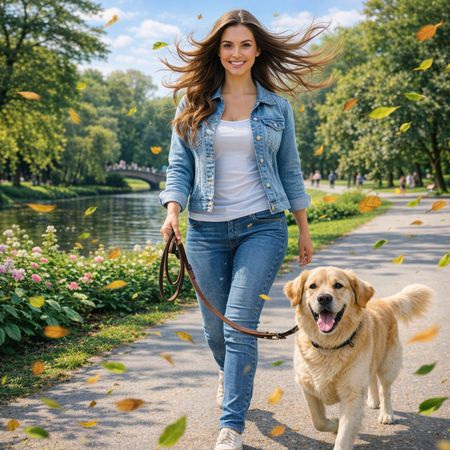
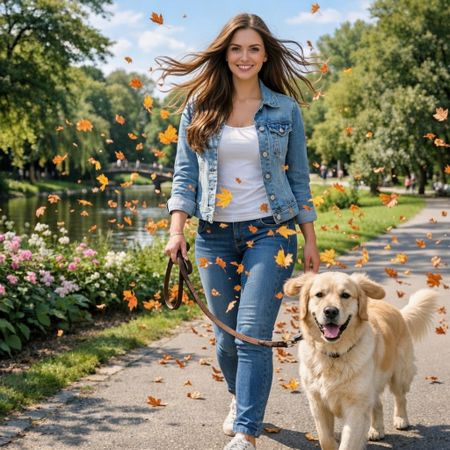
Image Editing“Add dynamic motion to this photo: make hair blow in the wind, add leaves flying, energetic and lively feel.”
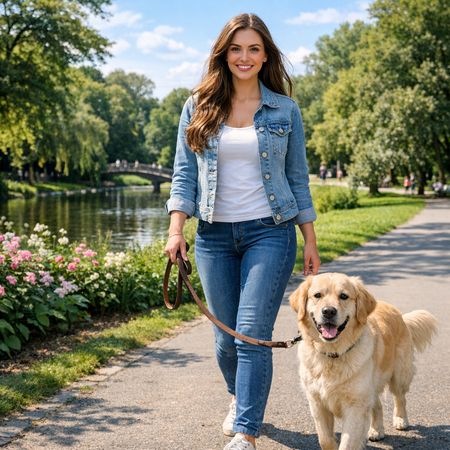
AI Judge Analysis
GPT Image 1.5
- + Excellent hair motion that flows naturally from the model's head
- + Motion blur on the leaves enhances the sense of dynamic movement
- + Leaves match the green/yellow summer palette of the original background
- − The leaf placement feels a bit cluttered in the foreground
- − Slight change to the model's facial features compared to the source
Grok Imagine Image
- + Successfully adds blowing hair and flying leaves
- + Maintains better facial consistency with the source image woman
- + Adds motion to the dog's ears, which contributes to the 'energetic' feel
- − The leaves are an autumnal orange/brown which clashes with the lush green background
- − The hair edit has some transparency issues where the background is visible through solid strands
- − Leaves appear static and 'pasted on' without much motion blur
Verdict: GPT Image 1.5 is the winner because it better captures the 'dynamic motion' request with effective use of motion blur on the leaves and a very natural flow to the hair. While Grok Imagine Image does a great job of adding movement to the dog's ears and preserving the face, the choice of autumn leaves in a green summer setting feels incongruous, and the lack of blur makes the effect feel less energetic.
Vintage Cafe Logo
Text-to-Image“Vintage minimalist restaurant logo for "Caffè Florian", retro cloche dome with steam and "Est. 1720" banner, classic typography, warm brown and cream tones, subtle texture on light background, vector emblem style.”
AI Judge Analysis
GPT Image 1.5
- + Excellent typography with a classic, hand-lettered vintage feel.
- + Very accurate rendering of the 'Est. 1720' banner as requested.
- + High-quality vector aesthetic with appropriate stippled shading texture.
- − The steam effect is a bit simple compared to the detailed cloche dome.
Grok Imagine Image
- + Strong minimalist vector lines and clean composition.
- + Good use of subtle paper texture in the background.
- − Redundant text, repeating 'Est. 1720' twice.
- − The cloche includes an odd handle or spoon artifact protruding from the side.
- − Typography is a bit generic for a 'vintage' request.
Verdict: GPT Image 1.5 followed the prompt much more effectively, specifically concerning the request for a banner and unique vintage typography. Grok Imagine Image included redundant text and a strange visual artifact protruding from the side of the cloche, detracting from the logo's professional quality.
Apollo 11: Journey to Tranquility
Text-to-Image“Create a clean, modern vector infographic poster about the Apollo 11 mission. NASA-inspired palette (navy, white, muted red, light gray). Flat-vector style, crisp lines, consistent iconography, subtle gradients only. Steps (stop at landing): 1. Launch (Saturn Vicon) 2. Earth Orbit (Earth + orbit ring icon) 3. Translunar (trajectory arc icon) 4. Lunar Orbit (Moon + orbit ring icon) 5. Descent (lunar module descending icon) 6. Landing (lunar module on the surface icon) Small supporting elements (minimal text): • Crew strip: three silhouette icons with only last names: Armstrong, Aldrin, Collins. • Landing site marker: Moon pin labeled "Tranquility" only. Layout constraints: generous margins, large readable labels, clean background with subtle stars. Vector-only, print-poster look, high resolution.”
AI Judge Analysis
GPT Image 1.5
- + Excellent typography with clean, readable sans-serif fonts
- + Perfect adherence to the requested NASA-inspired color palette
- + Professional hierarchy with clear horizontal sectioning
- − Step 1 and 2 icons are combined/confused in the top section
- − The rocket in the first section doesn't match the Saturn V silhouette as closely as Model B
Grok Imagine Image
- + Accurate, distinct icons for all 6 requested steps
- + Clean, spaced-out layout that works well for an infographic
- + Incorporated a high-quality NASA logo and crew names correctly
- − Several typos in secondary text, such as '3rajcoory' and 'Transluiory'
- − The colors are a bit more saturated than the requested 'muted' palette
Verdict: GPT Image 1.5 produces a much more polished and professional design that looks like a real infographic, whereas Grok Imagine Image contains several distracting typos. While Grok Imagine Image followed the specific step-by-step numbering more accurately, the superior visual quality and clean text of GPT Image 1.5 make it the better choice.
GPT Image 1.5
OpenAI's state-of-the-art image generation model with better instruction following and adherence to prompts
Grok Imagine Image
An image generation model by xAI designed to generate highly aesthetic images from text descriptions.