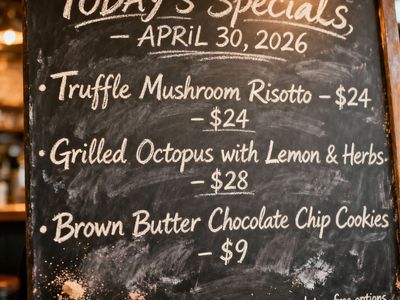
“Handwritten-style chalkboard menu in a cozy café, all text rendered in the exact same realistic chalk handwriting style with natural variations in letter size, slight slant, and chalk texture — no printed or digital fonts anywhere on the board. Title at the top in elegant cursive chalk handwriting: ‘TODAY’S SPECIALS – APRIL 30, 2026’. Below it, three menu items also in the same handwritten chalk style: ‘Truffle Mushroom Risotto – $24’, ‘Grilled Octopus with Lemon & Herbs – $28’, ‘Brown Butter Chocolate Chip Cookies – $9’. At the very bottom, smaller text in the identical handwritten chalk style (slightly smaller but still clearly legible with the same handwriting characteristics): ‘All items made fresh daily • Ask about our gluten-free options’. Warm ambient café lighting, visible chalk dust and smudges, realistic handwriting imperfections, no clean printed text anywhere.”
Wan 2.6
AI Image & Video Model
Alibaba's multimodal generation model from the Wan AI suite, supporting text-to-video, image-to-video, reference-to-video with audio, and text-to-image, in both Chinese and English
Details
wan-2.6
Starting from
Prices shown are in USD
See all providersProvider Performance
Fastest generation through alibaba at 5,375ms median latency with 100.0% success rate.
Aggregated from real API requests over the last 30 days.
Generation Time
Success Rate
Time to First Byte
Provider Rankings
| # | Provider | p50 Gen Time | p95 Gen Time | Success Rate | TTFB (p50) |
|---|---|---|---|---|---|
| 1 | alibaba | 5,375ms | 39,328ms | 100.0% | 9,092ms |
Providers & Pricing (2)
Wan 2.6 is available from 2 providers, with per-video pricing starting at $0.03 through Alibaba Cloud.
alibaba/wan-2.6-image
fal/wan-2.6-image
Wan 2.6 API OpenAI-compatible
Integrate Wan 2.6 into your workflow for text-to-image generation and advanced image editing via Lumenfall's unified OpenAI-compatible API. This endpoint supports both direct text prompting and reference image guidance to maintain stylistic consistency across your generated media.
https://api.lumenfall.ai/openai/v1
wan-2.6
Code Examples
Text to Image
/v1/images/generationscurl -X POST \ https://api.lumenfall.ai/openai/v1/images/generations \ -H "Authorization: Bearer $LUMENFALL_API_KEY" \ -H "Content-Type: application/json" \ -d '{ "model": "wan-2.6", "prompt": "", "size": "1024x1024" }'# Response:# { "created": 1234567890, "data": [{ "url": "https://...", "revised_prompt": "..." }] }import OpenAI from 'openai';const client = new OpenAI({ apiKey: 'YOUR_API_KEY', baseURL: 'https://api.lumenfall.ai/openai/v1'});const response = await client.images.generate({ model: 'wan-2.6', prompt: '', size: '1024x1024'});// { created: 1234567890, data: [{ url: "https://...", revised_prompt: "..." }] }console.log(response.data[0].url);from openai import OpenAIclient = OpenAI( api_key="YOUR_API_KEY", base_url="https://api.lumenfall.ai/openai/v1")response = client.images.generate( model="wan-2.6", prompt="", size="1024x1024")# { created: 1234567890, data: [{ url: "https://...", revised_prompt: "..." }] }print(response.data[0].url)Parameter Reference
Core Parameters
| Parameter | Type | Description | Modes |
|---|---|---|---|
prompt
|
string | Required. Text prompt for video generation |
T2I
Edit
T2V
I2V
V2V
|
negative_prompt
|
string | Negative prompt to guide generation away from undesired content |
T2I
Edit
T2V
I2V
V2V
|
seed
|
integer | Random seed for reproducibility |
T2I
Edit
T2V
I2V
V2V
|
Size & Layout
| Parameter | Type | Description | Modes |
|---|---|---|---|
size
|
string |
Video dimensions as WxH pixels (e.g. "1920x1080") or aspect ratio (e.g. "16:9")
WxH determines both shape and scale (aspect_ratio and resolution are ignored when size is provided). W:H format is equivalent to aspect_ratio.
|
T2I
Edit
T2V
I2V
V2V
|
aspect_ratio
|
string |
Aspect ratio of the output video (e.g. "16:9", "1:1")
Controls shape independently of scale. Use with resolution to control both. If size is also provided, size takes precedence. Any ratio is accepted and mapped to the nearest supported value.
|
T2I
Edit
T2V
I2V
V2V
|
resolution
|
string |
Output resolution tier (e.g. "1K", "4K")
Controls scale independently of shape. Higher tiers produce larger videos and cost more. If size is also provided, size takes precedence for scale. Any tier is accepted and mapped to the nearest supported value.
|
T2I
Edit
T2V
I2V
V2V
|
size
Exact pixel dimensions
"1920x1080"
aspect_ratio
Shape only, default scale
"16:9"
resolution
Scale tier, preserves shape
"1K"
Priority when combined
size is most specific and always wins. aspect_ratio and resolution control shape and scale independently.
How matching works
7:1 on a model with
4:1 and 8:1,
you get 8:1.
0.5K 1K 2K 4K)
or megapixel tiers (0.25 1).
If the exact tier isn't available, you get the nearest one.
Media Inputs
| Parameter | Type | Description | Modes |
|---|
Multi-Shot Control
| Parameter | Type | Description | Modes |
|---|
Output & Format
| Parameter | Type | Description | Modes |
|---|---|---|---|
response_format
|
string |
How to return the image
url
b64_json
Default:
"url" |
T2I
Edit
T2V
I2V
V2V
|
output_format
|
string |
Output image format
png
jpeg
gif
webp
avif
Gateway converts to requested format if provider doesn't support it natively.
|
T2I
Edit
T2V
I2V
V2V
|
output_compression
|
integer | Compression level for lossy formats (JPEG, WebP, AVIF) |
T2I
Edit
T2V
I2V
V2V
|
n
|
integer |
Number of videos to generate
Default:
1Gateway generates multiple videos in parallel even if provider only supports 1.
|
T2I
Edit
T2V
I2V
V2V
|
Additional Parameters
Provider-specific passthrough fields, available only when the request is routed to the listed provider.
| Parameter | Type | Description | Modes |
|---|---|---|---|
|
Universal
|
|||
prompt_enhancement
|
string |
Whether an LLM rewrites/expands the prompt before generation (off, on)
off
on
|
T2I
Edit
T2V
I2V
V2V
|
|
alibaba
|
|||
watermark
|
boolean | Whether to add the provider watermark to the generated media. |
T2I
Edit
T2V
I2V
V2V
|
|
fal
|
|||
enable_safety_checker
|
boolean | Enable content moderation for input and output. |
T2I
Edit
T2V
I2V
V2V
|
Parameter Normalization
How we handle parameters across different providers
Not every provider speaks the same language. When you send a parameter, we handle it in one of four ways depending on what the model supports:
| Behavior | What happens | Example |
|---|---|---|
passthrough |
Sent as-is to the provider | style, quality |
renamed |
Same value, mapped to the field name the provider expects | prompt |
converted |
Transformed to the provider's native format | size |
emulated |
Works even if the provider has no concept of it | n, response_format |
Parameters we don't recognize pass straight through to the upstream API, so provider-specific options still work.
Wan 2.6 Benchmarks
Wan 2.6 ranks 23rd in global text-to-image performance with a 1214 Elo, while achieving a significantly higher 7th place ranking in image editing with a 1220 Elo. The model demonstrates competitive stability across the Wan AI suite for both English and Chinese prompt instructions.
Text-to-Image Landscape
Elo vs Cost
1 model without pricing omitted.
Elo vs Speed
26 models waiting for enough speed data.
Competition Results
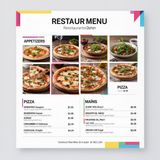
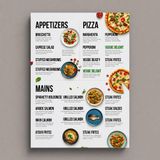
“Modern minimalist restaurant menu design, white background with colorful food photos in grid, sections for appetizers/pizza/mains, bold sans-serif fonts, vibrant accents, clean professional layout for casual dining.”
“Vintage minimalist restaurant logo for "Caffè Florian", retro cloche dome with steam and "Est. 1720" banner, classic typography, warm brown and cream tones, subtle texture on light background, vector emblem style.”
“Create a clean, modern vector infographic poster about the Apollo 11 mission. NASA-inspired palette (navy, white, muted red, light gray). Flat-vector style, crisp lines, consistent iconography, subtle gradients only. Steps (stop at landing): 1. Launch (Saturn Vicon) 2. Earth Orbit (Earth + orbit ring icon) 3. Translunar (trajectory arc icon) 4. Lunar Orbit (Moon + orbit ring icon) 5. Descent (lunar module descending icon) 6. Landing (lunar module on the surface icon) Small supporting elements (minimal text): • Crew strip: three silhouette icons with only last names: Armstrong, Aldrin, Collins. • Landing site marker: Moon pin labeled "Tranquility" only. Layout constraints: generous margins, large readable labels, clean background with subtle stars. Vector-only, print-poster look, high resolution.”
“Photorealistic scene inside a yellow New York taxi at night. A capybara is driving, wearing a yellow taxi driver cap and a dark jacket. It has a calm, professional expression and both front paws on the steering wheel. In the back seat sits a human businesswoman in a coat, looking at her phone with a completely normal, bored expression (as if this is just another normal ride). Through the windows you can see the streets of Manhattan at night with blurred lights. Realistic taxi interior, photorealistic, detailed fur and fabric, 35mm lens, night lighting with reflections, shallow depth of field.”
“Handwritten-style chalkboard menu in a cozy café, all text rendered in the exact same realistic chalk handwriting style with natural variations in letter size, slight slant, and chalk texture — no printed or digital fonts anywhere on the board. Title at the top in elegant cursive chalk handwriting: ‘TODAY’S SPECIALS – APRIL 30, 2026’. Below it, three menu items also in the same handwritten chalk style: ‘Truffle Mushroom Risotto – $24’, ‘Grilled Octopus with Lemon & Herbs – $28’, ‘Brown Butter Chocolate Chip Cookies – $9’. At the very bottom, smaller text in the identical handwritten chalk style (slightly smaller but still clearly legible with the same handwriting characteristics): ‘All items made fresh daily • Ask about our gluten-free options’. Warm ambient café lighting, visible chalk dust and smudges, realistic handwriting imperfections, no clean printed text anywhere.”
“Vintage minimalist restaurant logo for "Caffè Florian", retro cloche dome with steam and "Est. 1720" banner, classic typography, warm brown and cream tones, subtle texture on light background, vector emblem style.”
Uncategorized
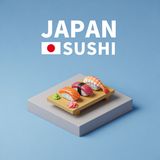
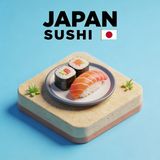
“Create a clear, 45° top-down isometric miniature 3D cartoon scene of Japan's signature dish: sushi, with soft refined textures, realistic PBR materials, gentle lighting, on a small raised diorama base with minimal garnish and plate. Solid light blue background. At top-center: 'JAPAN' in large bold text, 'SUSHI' below it, small flag icon. Perfectly centered, ultra-clean, high-clarity, square format.”
“Hyper-photorealistic interior of a lush Victorian glass greenhouse filled with exotic tropical plants, vibrant blooming orchids, tall ferns, colorful butterflies in flight, sunlight filtering through ornate glass roof creating realistic caustics and dew on leaves, intricate iron framework visible, misty atmosphere, 8K masterpiece.”
“Perfectly symmetrical mandala made entirely of real flowers, petals, leaves, fruits, and seeds in vibrant natural colors, intricate layered patterns with radial symmetry, top-down view on a soft neutral background, hyper-detailed organic textures and subtle shadows, photorealistic, 8K masterpiece.”
Top Matchups
See how Wan 2.6 performs head-to-head against other AI models, ranked by community votes in blind comparisons.




Wan 2.6 is best for
See all Use CasesAlibaba's Wan 2.6 excels in photorealism where it ranks 6th with a 48.8% win rate, though it struggles with text rendering ranking 20th and portrait generation at an 18.2% win rate. It serves as a middle-tier option for anime and commercial branding tasks, ranking 10th and 13th in those respective categories.
Gallery
View all 8 imagesWan 2.6 FAQ
How much does Wan 2.6 cost?
Wan 2.6 starts at $0.03 per image through Lumenfall. Pricing varies by provider. Lumenfall does not add any markup to provider pricing.
How do I use Wan 2.6 via API?
You can use Wan 2.6 through Lumenfall's OpenAI-compatible API. Send requests to the unified endpoint with model ID "wan-2.6". Code examples are available in Python, JavaScript, and cURL.
Which providers offer Wan 2.6?
Wan 2.6 is available through Alibaba Cloud and fal.ai on Lumenfall. Lumenfall automatically routes requests to the best available provider.
Overview
Wan 2.6 is a text-to-image generation model developed by Alibaba as part of the broader Wan AI suite. It is designed for high-fidelity image synthesis from bilingual prompts (English and Chinese) and supports image-to-image workflows through optional reference guidance. The model’s primary distinction lies in its balanced handling of complex prompt adherence and its ability to maintain stylistic consistency when provided with an initial image.
Strengths
- Bilingual Prompt Processing: The model demonstrates native-level understanding of both Chinese and English, allowing for nuanced cultural references and idiomatic descriptions without translation artifacts.
- Style Reference Integration: Unlike basic text-to-image models, Wan 2.6 can ingest a reference image to guide the aesthetic, lighting, and composition of the generated output while departing from the source content based on text instructions.
- Spatial and Compositional Control: It excels at placing subjects accurately within a frame according to descriptive spatial prompts (e.g., “in the bottom-left foreground”).
- Texture and Surface Detail: The model is particularly capable of rendering varied surface materials, such as metallic reflections, fabric weaves, and skin textures, with high clarity.
Limitations
- Text Rendering: While proficient at photorealistic imagery, the model may struggle with rendering complex, long-form legible text within images compared to models specifically optimized for typography.
- Contextual Complexity: In scenes with a high number of distinct interacting subjects (e.g., a crowd where everyone is performing a unique action), the model may occasionally blend attributes between subjects.
- Compute Requirements: Due to the complexity of its dual-modality input (text and image), inference times may be slightly higher than simpler, prompt-only diffusion models.
Technical Background
Wan 2.6 is built upon a Diffusion Transformer (DiT) architecture, which scales more effectively with data than traditional U-Net structures. It utilizes a large-scale multimodal pre-training strategy that aligns visual features with a bilingual LLM-based encoder to ensure precise semantic mapping. The model’s reference image capability is implemented via a dedicated vision encoder that injects latent style features into the diffusion process without overwriting the text-driven intent.
Best For
Alibaba’s Wan 2.6 is best suited for cross-cultural creative projects, localized marketing assets for both Western and Asian markets, and iterative design workflows where a “mood board” image is used to set the visual tone. It is particularly effective for concept art where stylistic consistency across a series of images is required.
Wan 2.6 is available for immediate testing and integration through Lumenfall’s unified API and playground, allowing developers to experiment with bilingual prompting and image-guided generation in a single interface.
Try Wan 2.6 in Playground
Generate images with custom prompts — no API key needed.