
PrunaAI's sub-1-second multi-image editing model supporting up to 5 reference images with state-of-the-art quality
Settled by community votes across 7 shared challenges, with an AI judge weighing in on each.
P-Image Edit
14.9
arena score
#30 of 37 in Image Editing
Skill signature
· Image Editing
Qwen Image Edit 2511
20.4
arena score
#15 of 37 in Image Editing
Vote tally
Where the votes landed
P-Image Edit
0%
win rate
Ties
0%
Qwen Image Edit 2511
0%
win rate
Shared challenges
7
Challenge by challenge
The strongest take from each model on every shared challenge, with the AI judge's read.
Man and Car in California
EditingEdit instruction
“Make a photo of the man driving the car down the California coastline”
Source
P-Image Edit
Qwen Image Edit 2511
AI Judge Analysis
P-Image Edit
- + Excellent preservation of the original car model and orientation.
- + Convincing motion blur on the road and wheels creates a sense of driving.
- + Smooth integration of the subject into the driver's seat.
- − The man is very small and distant in the frame.
- − The character's clothing from the source image is lost.
Qwen Image Edit 2511
- + High fidelity to the man's facial features and distinctive hairstyle.
- + Excellent preservation of the source clothing (plaid coat and scarf).
- + Cinematic composition with clear view of both the subject and the coastline.
- − The steering wheel and dashboard are modified from the original Rolls Royce.
- − The car appears to be parked or stationary rather than driving due to the lack of motion blur.
Verdict: P-Image Edit focuses on car accuracy and the action of driving, but it loses the specific details of the man's clothing. Qwen Image Edit 2511 does a far superior job of preserving the identity and wardrobe of the subject, though it alters the interior of the vehicle. Qwen Image Edit 2511 is the preferred winner for better capturing the 'essence' of both source images in a high-quality composition.
Pose & Character Mashup
EditingEdit instruction
“Use Image 1 as the exact pose reference and Image 2 as the character reference. Recreate the person/character from Image 2 in the exact dynamic pose and body position from Image 1. Keep the exact face, hair, clothing style/details, and expression from Image 2. Match the lighting and environment of Image 1. The final image must show the character from Image 2 performing the precise action/pose from Image 1 with perfect anatomy and natural integration.”
Source
P-Image Edit
Qwen Image Edit 2511
AI Judge Analysis
P-Image Edit
- + Successfully merges the character from Image 2 with the pose from Image 1.
- + Incorporates the scarf and sunglasses from the character reference into the final pose.
- + Maintains the environment and lighting of the pose source image.
- − Anatomy is nonsensical with the leg extending directly out of the head/shoulder area.
- − The long hair from Image 1 was kept instead of using the short hair from the character in Image 2.
Qwen Image Edit 2511
- + High resolution and clear image quality.
- − Failed the main task by simply layering the two images on top of each other.
- − The character from Image 2 is not performing the pose; they are just standing in the background.
- − Source preservation is poor as the background and character are just composited together blindly.
Verdict: P-Image Edit attempted the complex task of merging the character and the pose, and while it suffered from significant anatomical errors (especially the leg placement), it followed the instructions. Qwen Image Edit 2511 failed the prompt entirely by just placing the two figures in the same frame without any interaction or pose-matching. Therefore, P-Image Edit is preferred for attempting the actual edit, despite the logical flaws in the resultant body structure.
Outfit Transfer Challenge
EditingEdit instruction
“Use Image 1 as the base person. Dress them in the exact elaborate outfit from Image 2 (including all layers, accessories, jewelry, and shoes). Carefully adapt the clothing to the body shape and pose in Image 1 while maintaining realistic fabric behavior, correct proportions, and perfect lighting/shadow matching. Keep the person’s exact face, hair, and background completely unchanged.”
Source
P-Image Edit
Qwen Image Edit 2511
AI Judge Analysis
P-Image Edit
- + Successfully preserved the unique vitiligo patterns on the person's face.
- + Accurately captured the specific plaid scarf and coat style from Image 2.
- + Followed the instruction to keep the base person's identity perfectly.
- − The shoes are an inaccurate addition not found in either source image.
- − Included a large gold chain that was not in Image 2.
- − The lighting on the person's skin is slightly washed out compared to the original.
Qwen Image Edit 2511
- + Excellent integration of the clothing onto the model with realistic shadows.
- + Captured the pose and lean of the original image well.
- − Completely failed to preserve the person's face, replacing them with the man from Image 2.
- − Ignored the instruction to keep the person's exact hair and vitiligo patterns.
- − Misinterpreted 'keep the person's exact face... unchanged' entirely.
Verdict: P-Image Edit is the clear winner because it followed the difficult core instruction of preserving the base person's unique identity, including their vitiligo and facial structure. Qwen Image Edit 2511 failed the primary objective of the edit by simply pasting the face and hair of the person from Image 2 onto the scene, violating the 'Source preservation' criteria completely.
Bald man challenge
Image EditingEdit instruction
“Give the person a full, thick head of natural hair with realistic texture, density, and a natural hairline. Preserve facial features and lighting.”
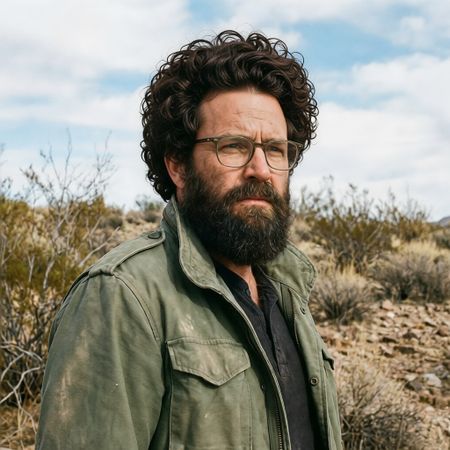

P-Image Edit
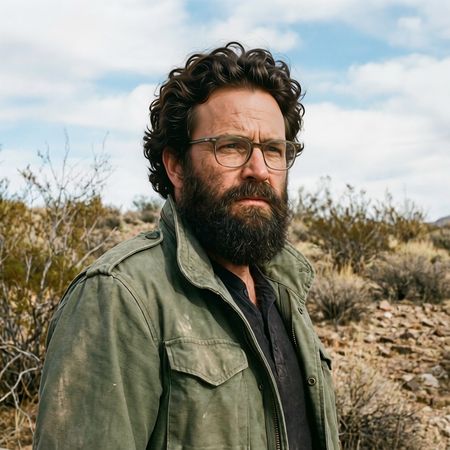
Qwen Image Edit 2511
AI Judge Analysis
P-Image Edit
- + Successfully added high-density, curly hair as requested.
- + Preserved the background and clothing perfectly.
- + The lighting on the curls matches the environment reasonably well.
- − The hairline is very abrupt and lacks natural transition/gradience.
- − The curls have a slightly repetitive, digital appearance toward the edges.
- − Changed the shape of the upper forehead slightly too much.
Qwen Image Edit 2511
- + Created a much more realistic, natural-looking hairline with subtle baby hairs.
- + The hair texture and wave patterns are highly realistic and varied.
- + Excellent preservation of the original facial features and lighting integration.
- − The hair volume is slightly lower than Model A, though still fits the prompt.
Verdict: Both models did an excellent job of preserving the original image's background, lighting, and facial features. However, Qwen Image Edit 2511 is the superior choice because it rendered a far more convincing and natural hairline, whereas P-Image Edit's hairline looks like a wig pasted onto the skin. Qwen's hair texture is also more varied and realistic compared to the uniform curls of P-Image.
Over-the-top cartoon caricature
EditingEdit instruction
“Create a caricature of me and my job. Make it exaggerated and humorous, incorporating my profession as a tv show anchor and my love for dogs and hockey.”
Source
P-Image Edit
Qwen Image Edit 2511
AI Judge Analysis
P-Image Edit
- + Successfully incorporates all elements: TV anchor, dog, and hockey players.
- + Maintains the subject's denim shirt from the original photo as requested for source preservation.
- + Cleverly sets the TV desk in front of a hockey rink backdrop.
- − The dog has a strange red heart-shaped structure growing out of its back.
- − The hand holding the microphone has some anatomical distortion.
Qwen Image Edit 2511
- + Captures a strong, humorous caricature facial expression while maintaining likeness.
- + The dog is rendered very cleanly and integrates well into the scene.
- + The composition is clean and follows the 'TV anchor' prompt closely.
- − Completely misses the 'hockey' requirement of the prompt.
- − The text in the speech bubble is nonsensical gibberish.
- − A strange candle on the desk feels out of place with the modern studio setting.
Verdict: P-Image Edit successfully included every requested element, including the hockey specific request which Qwen Image Edit 2511 completely omitted. Additionally, P-Image Edit better preserved the clothing from the source image, whereas Qwen changed it to a blue suit, making P-Image Edit the clear winner for prompt adherence and source preservation.
Studio Ghibli Anime Style
EditingEdit instruction
“Transform this photo into a Studio Ghibli–inspired illustration. Use soft pastel colors, hand-painted textures, gentle lighting, dreamy backgrounds, and a warm, nostalgic mood”
Source
P-Image Edit
Qwen Image Edit 2511
AI Judge Analysis
P-Image Edit
- + Successfully captures the requested dreamlike background with fluffy clouds and gardens.
- + Maintains the distinct poses and layout of the original meme perfectly.
- + The color palette is vibrant yet soft, fitting the requested nostalgic mood.
- − The facial expressions are slightly softened, losing some of the sharp intensity of the woman on the right.
Qwen Image Edit 2511
- + Preserved the background architecture of the original image with high accuracy.
- + Captures the facial expressions, especially the intense glare of the woman on the right, more accurately.
- + Excellent hand-painted textures on the clothing and skin.
- − The background is less 'dreamy' and Ghibli-esque than Model A, retaining more of the realistic urban street.
- − Includes some small white artifacts/sparkles scattered across the image that weren't requested.
Verdict: Both models did an excellent job of translating the iconic 'Distracted Boyfriend' meme into an illustration. P-Image Edit captured the whimsical Studio Ghibli essence more effectively by transforming the mundane street background into a lush garden with stylized clouds. However, Qwen Image Edit 2511 is the winner for its superior preservation of the source image's character expressions and structural details while still applying a lovely painted texture.
Golden Hour Stroll
Image EditingEdit instruction
“Add dynamic motion to this photo: make hair blow in the wind, add leaves flying, energetic and lively feel.”
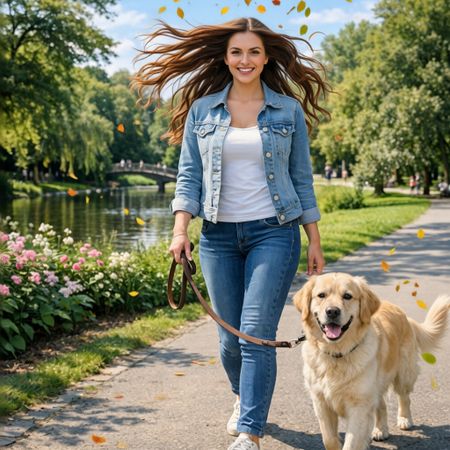

P-Image Edit
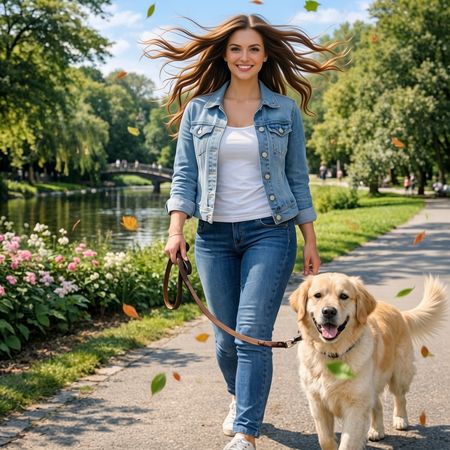
Qwen Image Edit 2511
AI Judge Analysis
P-Image Edit
- + Excellent preservation of the woman's face and body from the source image
- + High identity consistency for the dog
- + Accurately places many small flying leaves throughout the scene
- − The hair edit appears slightly more stiff/less flowing compared to Model B
Qwen Image Edit 2511
- + Very natural and energetic hair motion that looks well-integrated
- + Leaves are varied in size and color, adding to the depth of the scene
- + Exceptional preservation of the source image details and person's likeness
- − Minor distortion in the dog's left eye compared to the source
Verdict: Both models performed exceptionally well on this task, maintaining almost perfect pixel-level consistency with the source image for the majority of the frame. Qwen Image Edit 2511 is the winner because the edited hair looks slightly more natural and flowing, whereas P-Image Edit's hair stands out a bit more as an overlay. Qwen also provides a better variety of flying leaves which enhances the 'lively' feel requested in the prompt.
Next steps
Explore each model
Alibaba's Qwen image editing model for instruction-based image modifications and transformations