
An image generation model by xAI designed to generate highly aesthetic images from text descriptions.
Settled by community votes across 7 shared challenges, with an AI judge weighing in on each.
Grok Imagine Image
22.7
arena score
#35 of 62 in Text-to-Image
Skill signature
· Text-to-Image
P-Image Edit
14.9
arena score
#30 of 37 in Image Editing
Vote tally
Where the votes landed
Grok Imagine Image
0%
win rate
Ties
0%
P-Image Edit
0%
win rate
Shared challenges
7
Challenge by challenge
The strongest take from each model on every shared challenge, with the AI judge's read.
Man and Car in California
EditingEdit instruction
“Make a photo of the man driving the car down the California coastline”
Source
Grok Imagine Image
P-Image Edit
AI Judge Analysis
Grok Imagine Image
- + Excellent visual quality and realistic lighting
- + High adherence to the coastline request with well-rendered scenery
- + The car model is consistent with the source but modernized smoothly
- − Completely failed to use the specific man from the second source image
- − The driver is a generic older Caucasian man instead of the man provided
P-Image Edit
- + Successfully included the specific man from the source image
- + Maintained the man's hairstyle and general appearance in the driver's seat
- + Excellent background composition for a California coastline
- − Slightly less crisp facial details on the driver due to scaling
- − Small artifacts on the car's headlights compared to the source
Verdict: Grok Imagine failed the multi-image editing task by replacing the subject with a generic person, whereas P-Image Edit correctly identified and integrated the man from the second source image. P-Image Edit preserved the identities of both the car and the person while executing a complex background replacement, making it the clear winner for edit accuracy.
Pose & Character Mashup
EditingEdit instruction
“Use Image 1 as the exact pose reference and Image 2 as the character reference. Recreate the person/character from Image 2 in the exact dynamic pose and body position from Image 1. Keep the exact face, hair, clothing style/details, and expression from Image 2. Match the lighting and environment of Image 1. The final image must show the character from Image 2 performing the precise action/pose from Image 1 with perfect anatomy and natural integration.”
Source
Grok Imagine Image
P-Image Edit
AI Judge Analysis
Grok Imagine Image
- + Successfully modified the leg position of the original subject to a more balletic extension.
- + Maintains very high photographic realism and perfect anatomical coherence.
- − Completely failed to use the character reference from Image 2.
- − Ignored all instructions regarding face, hair, and clothing from the second image.
P-Image Edit
- + Successfully integrated the face, sunglasses, and scarf from Image 2.
- + Followed the instruction to recreate the character from Image 2 in the pose of Image 1.
- − Suffers from severe anatomical glitches, particularly around the hands and neck area.
- − Inconsistent clothing blending, with a mix of the red hoodie and the black shirt that looks like a collage error.
- − Left the original female subject's long hair behind the male character's head, creating a surreal and unintended look.
Verdict: Grok Imagine Image failed the core task by completely ignoring the character reference (Image 2), providing only a slight variation of Image 1. P-Image Edit attempted the complex task of merging both images, successfully bringing over the face and accessories, but the resulting anatomical errors and poor blending make it a visually flawed image. P-Image Edit is the winner solely for attempting the prompt, whereas Grok Imagine Image did not perform the requested edit at all.
Outfit Transfer Challenge
EditingEdit instruction
“Use Image 1 as the base person. Dress them in the exact elaborate outfit from Image 2 (including all layers, accessories, jewelry, and shoes). Carefully adapt the clothing to the body shape and pose in Image 1 while maintaining realistic fabric behavior, correct proportions, and perfect lighting/shadow matching. Keep the person’s exact face, hair, and background completely unchanged.”
Source
Grok Imagine Image
P-Image Edit
AI Judge Analysis
Grok Imagine Image
- + Excellent preservation of the subject's face, hair, and vitiligo patterns
- + High-quality rendering of fabric textures and gold embroidery
- − Failed the second part of the prompt by generating a random royal outfit instead of the one in Image 2
- − The clothing style is completely unrelated to the provided source image
P-Image Edit
- + Highly accurate adherence to the specific outfit provided in Image 2 including the coat, scarf, and jeans
- + Successfully preserved the face, hair, and beach background of the source person
- + Good integration of the pose and pocket placement from the original references
- − The proportions of the legs seem slightly shortened compared to the original person's height
- − The shoes do not match Image 2, appearing as generic yellow-laced boots instead of the implied footwear style
Verdict: P-Image Edit followed the complex instructions much better by actually using the outfit from Image 2, including the specific plaid scarf and navy pea coat. Grok Imagine Image hallucinated a completely different royal costume, failing the primary task of cross-image outfit transfer despite high visual quality. P-Image Edit maintained the identity of the person in Image 1 while successfully adapting the casual street style clothing to the new environment and pose.
Bald man challenge
Image EditingEdit instruction
“Give the person a full, thick head of natural hair with realistic texture, density, and a natural hairline. Preserve facial features and lighting.”
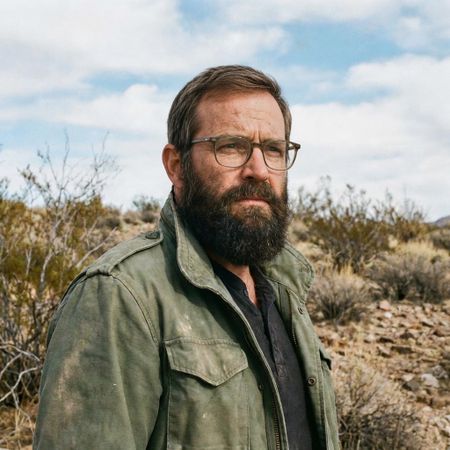

Grok Imagine Image
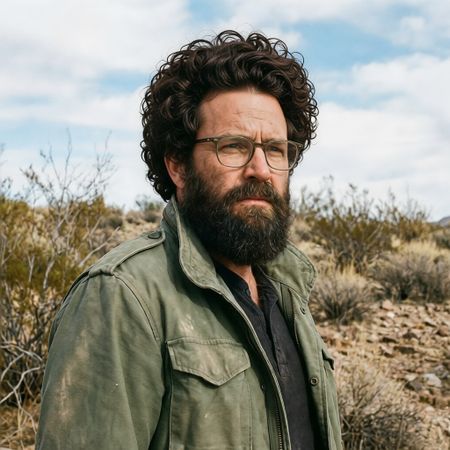
P-Image Edit
AI Judge Analysis
Grok Imagine Image
- + Excellent integration of the new hair with the existing beard and skin texture
- + Highly realistic hairline that looks completely natural
- + Perfectly preserves all facial features and background details from the source
- − The hair choice is quite conservative and subtle compared to the 'full, thick' request
P-Image Edit
- + Successfully provides a very 'full' and 'thick' head of hair as requested
- + Maintains the original facial features and background
- − The curls look repetitive and contain digital artifacts/looping patterns
- − The hairline integration is less natural and looks placed on top of the head
- − The hair color and texture contrast slightly too much with the original beard
Verdict: Grok Imagine Image provides a much more convincing and realistic edit, seamlessly blending the added hair with the man's existing beard and skin. While P-Image Edit creates a larger volume of hair, the texture is repetitive and the attachment to the forehead is less believable, making it look like a wig. Grok Imagine Image is the winner for its superior realism and natural-looking hairline.
Over-the-top cartoon caricature
EditingEdit instruction
“Create a caricature of me and my job. Make it exaggerated and humorous, incorporating my profession as a tv show anchor and my love for dogs and hockey.”
Source
Grok Imagine Image
P-Image Edit
AI Judge Analysis
Grok Imagine Image
- + Strong facial resemblance to the source image while applying a caricature style
- + Excellent integration of the 'anchor' role with a clear news desk and readable text
- + Cleverly combines the themes by putting a hockey helmet and skates on the dog
- − The hands on the desk are slightly small and less detailed
P-Image Edit
- + Preserved the denim jacket from the source image
- + High-energy composition with lots of thematic elements like the hockey rink background
- + Fun interpretation of a sports anchor handling a microphone
- − Facial resemblance to the source image is significantly weaker than the other model
- − Text on the background screens is nonsensical AI gibberish
- − The 'dog' element is small and features strange red artifacts/objects above it
Verdict: Grok Imagine Image successfully balances the request for a caricature with strong preservation of the subject's identity, making her easily recognizable from the source. It neatly incorporates all three themes—news anchor, dogs, and hockey—in a clean and humorous way. P-Image Edit preserves the subject's clothing better but fails to capture her likeness as accurately and has more visual artifacts in the background.
Studio Ghibli Anime Style
EditingEdit instruction
“Transform this photo into a Studio Ghibli–inspired illustration. Use soft pastel colors, hand-painted textures, gentle lighting, dreamy backgrounds, and a warm, nostalgic mood”
Source
Grok Imagine Image
P-Image Edit
AI Judge Analysis
Grok Imagine Image
- + Perfectly captures the Studio Ghibli art style with hand-painted watercolor textures and distinct character line work.
- + Preserves the original composition and expressions while translating them into a nostalgic anime aesthetic.
- + Background detail accurately reflects Ghibli's painterly urban environments.
- − The facial stubble on the man is slightly inconsistent with the smooth Ghibli aesthetic.
P-Image Edit
- + Maintains the recognizable composition and character poses from the source image.
- + Uses a soft, colorful pastel palette as requested in the prompt.
- − The art style leans more towards generic modern digital illustration/webtoon rather than Ghibli's hand-drawn look.
- − The background clouds and trees lack the specific texture and depth characteristic of the target studio.
Verdict: Grok Imagine Image is the clear winner as it successfully mimics the specific hand-painted, watercolor aesthetic of Studio Ghibli, whereas P-Image Edit produces a more generic digital art style. Grok Imagine Image also does a better job of preserving the architectural context of the source image while transforming it into a cohesive illustration.
Golden Hour Stroll
Image EditingEdit instruction
“Add dynamic motion to this photo: make hair blow in the wind, add leaves flying, energetic and lively feel.”
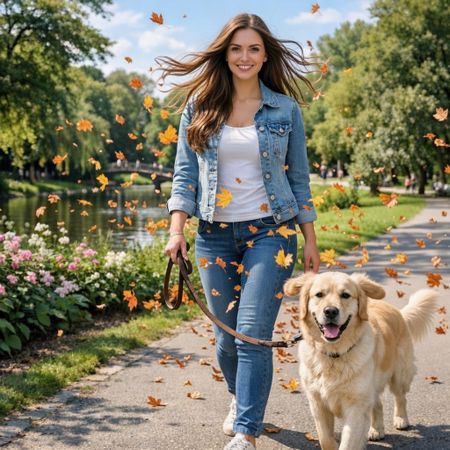

Grok Imagine Image
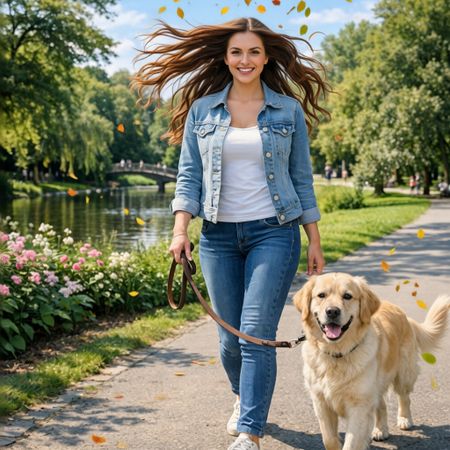
P-Image Edit
AI Judge Analysis
Grok Imagine Image
- + Successfully adds a large volume of autumn leaves to create energy
- + Preserves the subject's face and clothing with high fidelity
- + The dog's ears are adjusted to show movement
- − The wind effect on the hair is subtle compared to the amount of leaves
- − The leaves are somewhat repetitive in shape and color
P-Image Edit
- + Excellent depiction of wind-blown hair that looks natural yet dramatic
- + The leaves have varied colors (yellow and green) suggesting a more natural breeze
- + Maintains near-perfect preservation of the background and characters
- − The leaf placement looks slightly sparse in some areas
- − The dog's ears do not show as much motion as in model A
Verdict: Both models did an excellent job of following the edit instructions while preserving the original image's character. Grok Imagine Image created a very energetic feel with a high density of leaves and subtle ear movement on the dog, but P-Image Edit's rendering of the hair blowing in the wind was much more convincing and felt more integrated into the scene's physics.
Next steps
Explore each model
PrunaAI's sub-1-second multi-image editing model supporting up to 5 reference images with state-of-the-art quality