

xAI's premium image generation model offering higher fidelity output and stronger performance on single-image editing benchmarks compared to the standard Grok Imagine model
Settled by community votes across 7 shared challenges, with an AI judge weighing in on each.
Grok Imagine Image Pro
24.3
arena score
#22 of 62 in Text-to-Image
Skill signature
· Text-to-Image
Qwen Image Edit 2511
20.5
arena score
#17 of 37 in Image Editing
Vote tally
Where the votes landed
Grok Imagine Image Pro
54.5%
win rate
Ties
0.0%
Qwen Image Edit 2511
45.5%
win rate
54.5%
0.0% ties
45.5%
Shared challenges
7
Challenge by challenge
The strongest take from each model on every shared challenge, with the AI judge's read.
Man and Car in California
EditingEdit instruction
“Make a photo of the man driving the car down the California coastline”
Source
Grok Imagine Image Pro
Qwen Image Edit 2511
AI Judge Analysis
Grok Imagine Image Pro
- + Excellent preservation of the original car's exterior design and branding.
- + Natural integration of the car into a motion-blurred coastal landscape.
- − Failed to preserve the appearance of the man from the source image, replacing him with a different person.
- − The man's scale inside the car looks slightly small/disconnected.
Qwen Image Edit 2511
- + Successfully preserved the specific man's face, hair, and clothing from the source image.
- + Accurately rendered the coastal environment as requested.
- + Good character-to-environment lighting matchup.
- − The car interior and rearview mirror area are geographically confusing and distorted.
- − Modified the car design into a generic model rather than the specific one provided in the source.
Verdict: Grok Imagine Image Pro executes a better artistic composition by keeping the original car and placing it in a realistic action shot, but it completely ignores the person provided in the source image. Qwen Image Edit 2511 is the superior editing model for this task because it successfully transfers the specific person into the scene, maintaining his unique characteristics, even if the car's interior details suffer some distortion.
Pose & Character Mashup
EditingEdit instruction
“Use Image 1 as the exact pose reference and Image 2 as the character reference. Recreate the person/character from Image 2 in the exact dynamic pose and body position from Image 1. Keep the exact face, hair, clothing style/details, and expression from Image 2. Match the lighting and environment of Image 1. The final image must show the character from Image 2 performing the precise action/pose from Image 1 with perfect anatomy and natural integration.”
Source
Grok Imagine Image Pro
Qwen Image Edit 2511
AI Judge Analysis
Grok Imagine Image Pro
- + Excellent preservation of the source image 1 environment and pose.
- + Smooth, photorealistic facial replacement.
- − Failed the prompt completely by ignoring Image 2's character identity.
- − Kept the woman from Image 1 instead of replacing her with the man from Image 2.
Qwen Image Edit 2511
- + Successfully extracted features from both source images.
- + Retained the character identity and clothing elements from Image 2.
- − Badly failed the body position instruction by showing the man standing behind the woman.
- − Poor visual integration with noticeable cut-and-paste artifacts.
- − Failed to match the lighting and environment of Image 1.
Verdict: Both models failed significantly on this complex multi-image task. Grok Imagine Image Pro produced a high-quality image but completely ignored the instruction to swap characters, essentially just recreating Image 1 with slight facial tweaks. Qwen Image Edit 2511 understood that both characters should be present but failed to execute the pose transfer, resulting in a low-quality collage that did not follow the primary request of putting the man in the woman's pose.
Outfit Transfer Challenge
EditingEdit instruction
“Use Image 1 as the base person. Dress them in the exact elaborate outfit from Image 2 (including all layers, accessories, jewelry, and shoes). Carefully adapt the clothing to the body shape and pose in Image 1 while maintaining realistic fabric behavior, correct proportions, and perfect lighting/shadow matching. Keep the person’s exact face, hair, and background completely unchanged.”
Source
Grok Imagine Image Pro
Qwen Image Edit 2511
AI Judge Analysis
Grok Imagine Image Pro
- + Excellent preservation of the person's face, skin condition, and hair from the original image.
- + Maintains the background perfectly as requested.
- + High quality and realistic lighting on the added clothing.
- − Completely ignored the clothing in Image 2, substituting it with a generic royal outfit.
- − The hands are pale and do not match the person's skin tone.
Qwen Image Edit 2511
- + Successfully applied the exact outfit (coat, scarf, jeans, sunglasses) from Image 2.
- + Maintains the background and environment from Image 1.
- + Correctly adapts the pose and clothing behavior to the scene.
- − Completely failed to preserve the person's face and unique skin features from Image 1.
- − Changed the person's hair and identity to match the man in Image 2.
Verdict: This was a difficult trade-off: Grok Imagine Image Pro successfully preserved the person's identity and specific features but failed to use the correct clothing from the reference image. Qwen Image Edit 2511 followed the clothing instructions perfectly but failed the preservation task by replacing the original subject's face and skin with the man from the second image. Qwen is slightly more useful as an editor here because it understood the transfer task, whereas Grok hallucinated a random costume.
Bald man challenge
Image EditingEdit instruction
“Give the person a full, thick head of natural hair with realistic texture, density, and a natural hairline. Preserve facial features and lighting.”
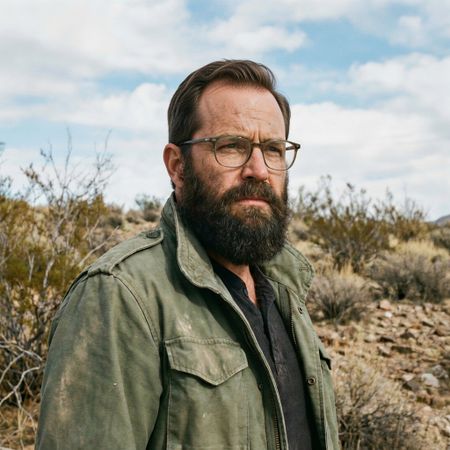

Grok Imagine Image Pro
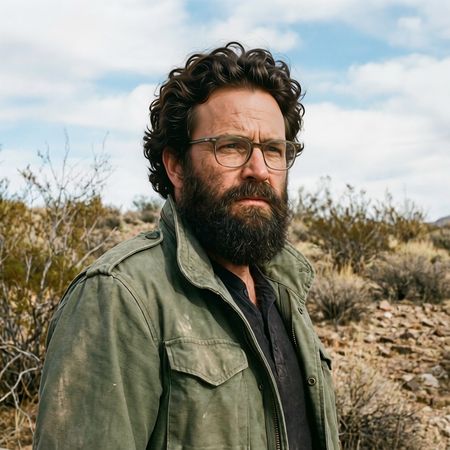
Qwen Image Edit 2511
50% wins
0% ties
50% wins
AI Judge Analysis
Grok Imagine Image Pro
- + Excellent source preservation of facial features and textures.
- + Highly realistic hairline and hair texture that integrates naturally with the existing ear and sideburns.
- + Perfectly matches the lighting and color of the original beard.
- − None notable.
Qwen Image Edit 2511
- + Successfully provides a full, thick head of hair.
- + Maintains the background and clothing accurately.
- − The hair appears too voluminous and 'placed on top', slightly distorting the shape of the head.
- − The texture of the hair is slightly less realistic than the source's beard texture.
- − The hairline integration on the forehead is less seamless than Model A.
Verdict: Grok Imagine Image Pro is the winner because it provides a modification that looks completely indistinguishable from a real photograph, seamlessly integrating the new hair with the original sideburns and lighting. Qwen Image Edit 2511 also performs well but the hair volume feels slightly artificial and the hairline is less convincingly merged with the skin.
Over-the-top cartoon caricature
EditingEdit instruction
“Create a caricature of me and my job. Make it exaggerated and humorous, incorporating my profession as a tv show anchor and my love for dogs and hockey.”
Source
Grok Imagine Image Pro
Qwen Image Edit 2511
AI Judge Analysis
Grok Imagine Image Pro
- + Excellent adherence to all instructions including hockey and dogs.
- + Highly detailed objects like the Stanley Cup and hockey stick.
- + Clear, legible, and relevant text rendering.
- − The caricature style is a bit busy and crowded compared to traditional caricatures.
Qwen Image Edit 2511
- + Clean cartoonish art style with good line work.
- + Successful translation of the subject's face into a caricature style.
- + Includes the TV anchor and dog elements.
- − Completely missed the 'hockey' part of the prompt.
- − Contains gibberish text in the speech bubble.
- − Nonsensical objects on the desk like a single lit candle.
Verdict: Grok Imagine Image Pro is the clear winner as it followed every part of the prompt, successfully incorporating the TV anchor job, the dogs, and the hockey elements into a cohesive scene. Qwen Image Edit 2511 failed to include the hockey request and added distracting elements like nonsensical text and a candle.
Studio Ghibli Anime Style
EditingEdit instruction
“Transform this photo into a Studio Ghibli–inspired illustration. Use soft pastel colors, hand-painted textures, gentle lighting, dreamy backgrounds, and a warm, nostalgic mood”
Source
Grok Imagine Image Pro
Qwen Image Edit 2511
50% wins
0% ties
50% wins
AI Judge Analysis
Grok Imagine Image Pro
- + Excellent adherence to the Ghibli art style including facial features and linework.
- + Strong watercolor texture consistent with hand-painted backgrounds.
- + Preserves the composition and character poses perfectly while translating to anime.
- − The facial expression of the central man is slightly more surprised than 'distracted longing'.
Qwen Image Edit 2511
- + Successfully maintains the character likeness of the original faces.
- + Good use of warm lighting and pastel colors.
- − The style feels like a generic digital filter rather than a hand-painted Studio Ghibli illustration.
- − The addition of white sparkling dots is distracting and not typical of the requested style.
- − Faces look more like 3D renders with lines over them than classic 2D Ghibli art.
Verdict: Grok Imagine Image Pro successfully transformed the source image into a convincing Studio Ghibli aesthetic, utilizing authentic hand-painted textures and facial proportions characteristic of the studio's films. Qwen Image Edit 2511 retained more facial detail from the original photo but failed to capture the specific artistic essence of the prompt, resulting in a more generic digital illustration.
Golden Hour Stroll
Image EditingEdit instruction
“Add dynamic motion to this photo: make hair blow in the wind, add leaves flying, energetic and lively feel.”
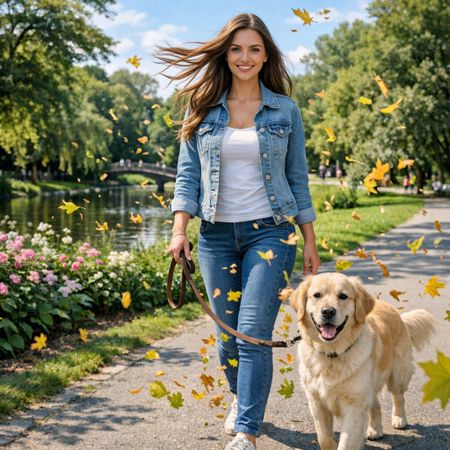

Grok Imagine Image Pro
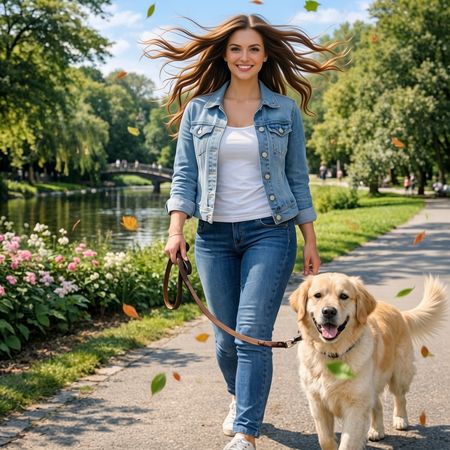
Qwen Image Edit 2511
60% wins
0% ties
40% wins
AI Judge Analysis
Grok Imagine Image Pro
- + Excellent preservation of the original woman's face and body features
- + Natural hair movement that flows consistently in one direction
- + Includes a large amount of flying leaves to create the requested 'lively' feel
Qwen Image Edit 2511
- + Successfully adds motion to both the woman's hair and the dog's tail
- + High-quality rendering of individual flying leaves
- + Good preservation of the background and original subjects
- − The hair appears too symmetrical and gravity-defying, looking slightly unnatural
- − Minor changes to facial features compared to the source image
Verdict: Grok Imagine Image Pro performed better at preserving the original woman's identity while adding believable hair movement that flows naturally with the wind. Qwen Image Edit 2511 correctly added motion to the dog's tail as well, but the woman's hair composition feels more like a static 'explosion' than a breeze, and her face was slightly altered from the source.
Next steps
Explore each model
Alibaba's Qwen image editing model for instruction-based image modifications and transformations