
xAI's premium image generation model offering higher fidelity output and stronger performance on single-image editing benchmarks compared to the standard Grok Imagine model
Settled by community votes across 7 shared challenges, with an AI judge weighing in on each.
Grok Imagine Image Pro
24.7
arena score
#20 of 62 in Text-to-Image
Skill signature
· Text-to-Image
P-Image Edit
14.9
arena score
#30 of 37 in Image Editing
Vote tally
Where the votes landed
Grok Imagine Image Pro
100.0%
win rate
Ties
0.0%
P-Image Edit
0.0%
win rate
100.0%
0.0% ties
0.0%
Shared challenges
7
Challenge by challenge
The strongest take from each model on every shared challenge, with the AI judge's read.
Man and Car in California
EditingEdit instruction
“Make a photo of the man driving the car down the California coastline”
Source
Grok Imagine Image Pro
P-Image Edit
100% wins
0% ties
0% wins
AI Judge Analysis
Grok Imagine Image Pro
- + Excellent photographic quality with realistic motion blur.
- + Perfectly preserves the specific silver and white detail of the original Rolls Royce.
- + Captures the iconic California coastline aesthetic with high fidelity.
- − Completely loses the identity of the man from the source image, replacing him with a different person.
P-Image Edit
- + Successfully preserves the identity and hairstyle of the man from the second source image.
- + Correctly places the car and the man in the requested coastline environment.
- + Maintains the structural details and color of the source vehicle.
- − The man is slightly too small in scale relative to the interior of the car.
- − The lighting on the man's face does not perfectly match the bright outdoor environment.
Verdict: This was an image composition task requiring the merging of two source images. Grok Imagine Image Pro produced a more visually stunning and realistic photo but failed the prompt's implicit requirement to use the specific man provided in the source file. P-Image Edit successfully combined both source elements, accurately preserving the man's unique hairstyle and features, making it the better edit overall.
Pose & Character Mashup
EditingEdit instruction
“Use Image 1 as the exact pose reference and Image 2 as the character reference. Recreate the person/character from Image 2 in the exact dynamic pose and body position from Image 1. Keep the exact face, hair, clothing style/details, and expression from Image 2. Match the lighting and environment of Image 1. The final image must show the character from Image 2 performing the precise action/pose from Image 1 with perfect anatomy and natural integration.”
Source
Grok Imagine Image Pro
P-Image Edit
AI Judge Analysis
Grok Imagine Image Pro
- + Maintains the exact background and lighting of the source photo.
- − Completely ignored the pulse of the character reference image.
- − Failed to change the gender, face, or clothing of the subject in Image 1.
P-Image Edit
- + Successfully integrated specific character features including sunglasses, facial hair, and the scarf.
- + Attempts to blend the clothing styles of both images.
- + Adapts the subject's gender and face to match the character reference.
- − Anatomy is significantly broken with an extra leg appearing and a hand growing out of the shin.
- − The hair length is inconsistent with the male character reference in Image 2.
- − Face and sunglasses look like a flat 2D sticker applied over the 3D model.
Verdict: Grok Imagine Image Pro failed the task entirely, returning an image that is virtually identical to the pose reference without any character changes. P-Image Edit followed the instructions by transposing the identity and clothing from Image 2 onto the pose from Image 1, but the resulting image has catastrophic anatomical errors and poor visual blending.
Outfit Transfer Challenge
EditingEdit instruction
“Use Image 1 as the base person. Dress them in the exact elaborate outfit from Image 2 (including all layers, accessories, jewelry, and shoes). Carefully adapt the clothing to the body shape and pose in Image 1 while maintaining realistic fabric behavior, correct proportions, and perfect lighting/shadow matching. Keep the person’s exact face, hair, and background completely unchanged.”
Source
Grok Imagine Image Pro
P-Image Edit
AI Judge Analysis
Grok Imagine Image Pro
- + Excellent preservation of the subject's face, hair, and background details.
- + High-quality, realistic textures on the fabric and embroidery.
- − Failed completely to use the outfit from Image 2, instead generating a generic regal costume.
- − The person's hands have become pale and mismatched with their actual skin tone.
P-Image Edit
- + Successfully used the exact outfit from Image 2, including the coat, plaid scarf, and jeans.
- + Perserved the subject's face and unique vitiligo patterns accurately.
- + Maintained the original background and lighting environment.
- − Added thick yellow chains and boots that were not present in either source image.
- − The body proportions are slightly stunted compared to the lean build of the person in Image 1.
Verdict: P-Image Edit was the only model to follow the specific instruction to use the outfit from Image 2, capturing the coat, scarf, and jeans perfectly. Grok Imagine Image Pro completely ignored the outfit reference, generating a generic purple royal robe instead, and failed to maintain skin tone consistency on the hands. While P-Image Edit added some unnecessary accessories, its adherence to the core editing task makes it the clear winner.
Bald man challenge
Image EditingEdit instruction
“Give the person a full, thick head of natural hair with realistic texture, density, and a natural hairline. Preserve facial features and lighting.”
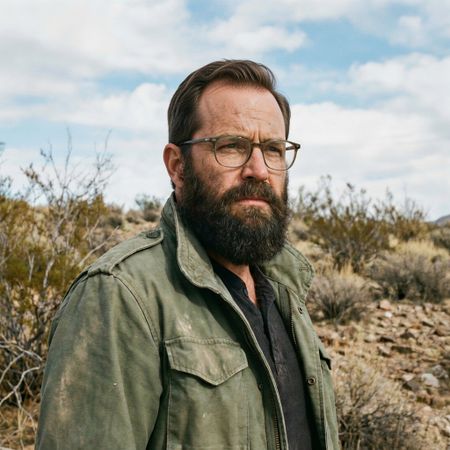

Grok Imagine Image Pro
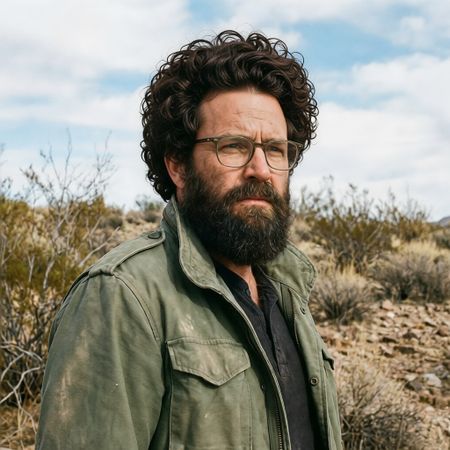
P-Image Edit
AI Judge Analysis
Grok Imagine Image Pro
- + Excellent source preservation, keeping the face and background identical to the original.
- + The hair texture and color perfectly match the existing beard and eyebrows.
- + The hairline and hair shadow on the forehead are highly realistic.
- − The hair volume is relatively conservative despite the request for a 'full, thick' head of hair.
P-Image Edit
- + Successfully added a very thick, full volume of hair as requested.
- + The texture of the curls is very detailed.
- − The hairline is blunt and lacks natural transitional hairs.
- − The hair appears like a wig placed on top rather than growing naturally from the scalp.
- − The lighting on the hair does not perfectly match the directional light in the rest of the scene.
Verdict: Grok Imagine Image Pro provided a much more realistic result by seamlessly integrating the new hair with the subject's existing features and lighting. While P-Image Edit definitely followed the 'thick' part of the prompt more literally with an afro-style cut, the hairline and integration lack the naturalism found in the Grok output.
Over-the-top cartoon caricature
EditingEdit instruction
“Create a caricature of me and my job. Make it exaggerated and humorous, incorporating my profession as a tv show anchor and my love for dogs and hockey.”
Source
Grok Imagine Image Pro
P-Image Edit
AI Judge Analysis
Grok Imagine Image Pro
- + Excellent adherence to all prompts: news anchor, dogs, and hockey.
- + High caricature exaggeration with a humorous, polished style.
- + Clear, legible text and several witty background details like 'Pups & Pucks'.
- − The facial features of the woman have changed significantly from the source image.
P-Image Edit
- + Maintains a better likeness to the original woman's face while stylizing it.
- + Creative integration of a hockey arena setting for the TV news desk.
- + Consistent comic-book art style throughout the image.
- − The 'love for dogs' element is very minor, represented only by one small puppy and small icons.
- − Nonsensical text and symbols on the scrolling banners and displays.
Verdict: Grok Imagine Image Pro was much more successful at incorporating all specific requests (hockey, dogs, and news anchor) into a cohesive and funny caricature, though it modified the subject's face significantly. P-Image Edit preserved the woman's likeness better but failed to emphasize the 'love for dogs' as requested, making it a very secondary detail.
Studio Ghibli Anime Style
EditingEdit instruction
“Transform this photo into a Studio Ghibli–inspired illustration. Use soft pastel colors, hand-painted textures, gentle lighting, dreamy backgrounds, and a warm, nostalgic mood”
Source
Grok Imagine Image Pro
P-Image Edit
AI Judge Analysis
Grok Imagine Image Pro
- + Perfectly captures the Studio Ghibli watercolor texture and hand-painted aesthetic
- + Excellent preservation of the original source image's composition and poses
- + The eyes and facial expressions are very characteristic of the requested style
- − The background is a bit washed out, though this fits the watercolor aesthetic
P-Image Edit
- + Good use of the pastel color palette requested in the prompt
- + Clearer line work on the character features
- − The background was completely changed from a city street to a generic park with clouds
- − The art style feels more like modern digital fan art than the specific Ghibli hand-painted style
Verdict: Grok Imagine Image Pro is the clear winner as it authentically replicates the Studio Ghibli hand-painted watercolor style while maintaining the integrity of the original street background. P-Image Edit changes the setting of the photo significantly and results in a more generic digital illustration style that misses the 'hand-painted' texture instruction.
Golden Hour Stroll
Image EditingEdit instruction
“Add dynamic motion to this photo: make hair blow in the wind, add leaves flying, energetic and lively feel.”
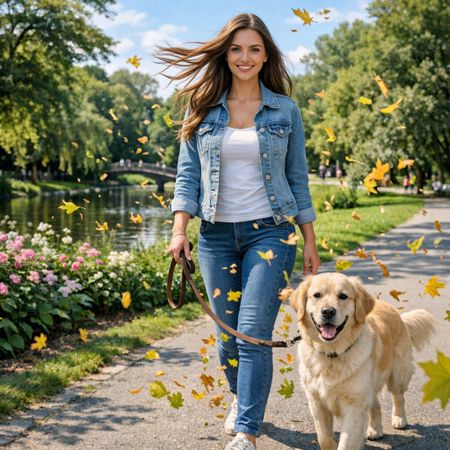

Grok Imagine Image Pro
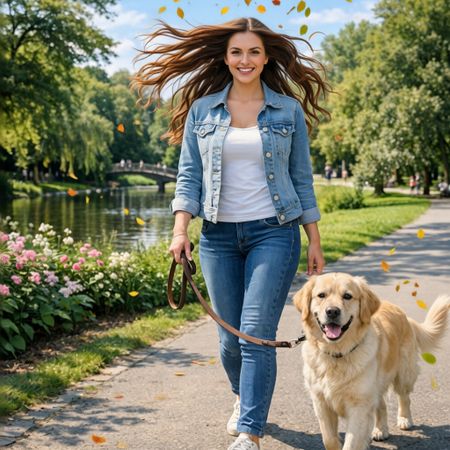
P-Image Edit
AI Judge Analysis
Grok Imagine Image Pro
- + Excellent quantity of leaves that creates a more immersive wind effect
- + High source preservation with minimal changes to the subject or background
- + The hair movement looks natural and directional
- − The wind direction seems slightly inconsistent between the hair and the floating leaves
P-Image Edit
- + Successfully adds dramatic motion to the hair
- + Maintains nearly perfect pixel-level identity compared to the original image
- − The number of flying leaves is sparse compared to the request for an 'energetic' feel
- − A strange green leaf artifact appears near the dog's tail
Verdict: Both models handled the image editing task well, with high source preservation. Grok Imagine Image Pro is the winner because its addition of a larger number of falling leaves across the foreground and background creates a much more convincing sense of dynamic motion and energy, whereas P-Image Edit's attempt feels slightly more static.
Next steps
Explore each model
PrunaAI's sub-1-second multi-image editing model supporting up to 5 reference images with state-of-the-art quality