
OpenAI's previous image generation model that accepts both text and image inputs and produces image outputs
Settled by community votes across 7 shared challenges, with an AI judge weighing in on each.
GPT Image 1
25.1
arena score
#13 of 62 in Text-to-Image
Skill signature
· Text-to-Image
P-Image Edit
14.9
arena score
#30 of 37 in Image Editing
Vote tally
Where the votes landed
GPT Image 1
0%
win rate
Ties
0%
P-Image Edit
0%
win rate
Shared challenges
7
Challenge by challenge
The strongest take from each model on every shared challenge, with the AI judge's read.
Man and Car in California
EditingEdit instruction
“Make a photo of the man driving the car down the California coastline”
Source
GPT Image 1
P-Image Edit
AI Judge Analysis
GPT Image 1
- + Excellent preservation of the car's specific details and model features
- + High-quality rendering of the man's face and hairstyle while retaining his identity
- + Dynamic motion blur on the wheels and road creates a realistic sense of speed
- − The man appears slightly too small seated in the cabin for a car of this scale
P-Image Edit
- + Strong California coastline aesthetic with palms and atmospheric perspective
- + Good composition using the leading line of the road
- + Maintains the overall look of the car from the source
- − The driver is very small and lost in shadow, making identity difficult to verify
- − The car's proportions look slightly flatter or wider than the source image
- − Less detail in the interior of the vehicle compared to the source
Verdict: Both models successfully combined the two source images into the requested scene. GPT Image 1 is the superior edit because it maintains a much higher level of detail on both the car and the man, whereas P-Image Edit makes the driver so small and dark that the second source image is barely recognizable in the final result. GPT Image 1 also does a better job of integrating the lighting on the car with the outdoor environment.
Pose & Character Mashup
EditingEdit instruction
“Use Image 1 as the exact pose reference and Image 2 as the character reference. Recreate the person/character from Image 2 in the exact dynamic pose and body position from Image 1. Keep the exact face, hair, clothing style/details, and expression from Image 2. Match the lighting and environment of Image 1. The final image must show the character from Image 2 performing the precise action/pose from Image 1 with perfect anatomy and natural integration.”
Source
GPT Image 1
P-Image Edit
AI Judge Analysis
GPT Image 1
- + Successfully replicates the complex crossing leg pose from the source image.
- + Correctly integrates the character's clothing style including the scarf and sunglasses.
- − The facial likeness is significantly degraded compared to the character reference.
- − The anatomy of the right hand is distorted and unfinished.
P-Image Edit
- + Maintains a much higher degree of facial likeness and hair texture from the character reference.
- + Correctly translates the black outfit and scarf onto the new pose while keeping the red accents from the original sweatshirt.
- − Completely fails the leg positioning, creating a nonsensical third limb/foot and a floating leg.
- − Includes long flowing hair that contradicts the short hair of the character reference.
Verdict: GPT Image 1 succeeded in replicating the difficult pose and leg positioning of the source image but failed significantly on face and hand details. P-Image Edit maintained a much better facial likeness for the character but suffered from critical anatomical failures, including a floating third leg. GPT Image 1 is the winner for providing a physically coherent composition that respects the primary instruction of matching the pose.
Outfit Transfer Challenge
EditingEdit instruction
“Use Image 1 as the base person. Dress them in the exact elaborate outfit from Image 2 (including all layers, accessories, jewelry, and shoes). Carefully adapt the clothing to the body shape and pose in Image 1 while maintaining realistic fabric behavior, correct proportions, and perfect lighting/shadow matching. Keep the person’s exact face, hair, and background completely unchanged.”
Source
GPT Image 1
P-Image Edit
AI Judge Analysis
GPT Image 1
- + Excellent replication of the coat and scarf textures and colors.
- + Maintains a high level of facial detail and skin texture consistency from the source.
- + Perfect integration of the clothing with the lighting of the scene.
P-Image Edit
- + Successfully includes the full outfit including jeans and shoes.
- + Maintains the full body composition of the original source image.
- + Correctly identifies and attempts to replicate more layers of the outfit.
- − Faces is significantly altered and lose the specific characteristics of the source person.
- − The shoes do not match the style of the reference image.
- − Adds a thick gold chain that was not present in the reference image.
Verdict: GPT Image 1 followed the instruction to keep the person's face and hair completely unchanged much better than P-Image Edit, which significantly altered the subject's features. While P-Image Edit captured the full body including shoes, GPT Image 1 provided a much higher quality, realistic blend of the clothing onto the specific subject requested.
Bald man challenge
Image EditingEdit instruction
“Give the person a full, thick head of natural hair with realistic texture, density, and a natural hairline. Preserve facial features and lighting.”
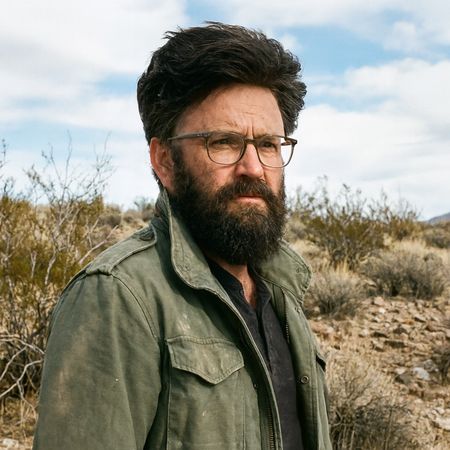

GPT Image 1
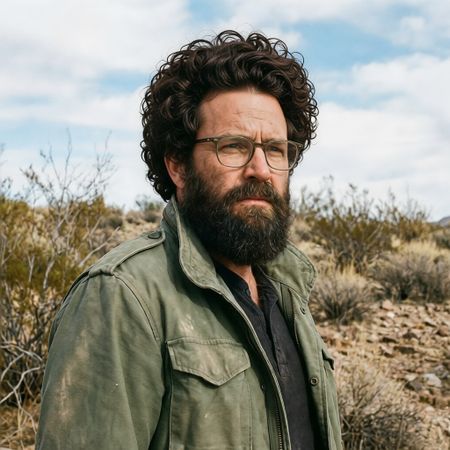
P-Image Edit
AI Judge Analysis
GPT Image 1
- + Excellent preservation of the original facial features and lighting.
- + The hair texture looks realistic and matches the existing beard well.
- − The hairline is a bit low and looks slightly unnatural at the forehead.
- − The hair volume is very large, bordering on looking like a wig.
P-Image Edit
- + Very creative interpretation with a curly texture.
- + Preserves the background and clothing perfectly.
- − The hair appears 'pasted on' with a visible halo where the new hair meets the original head shape.
- − Changes the subject's face shape significantly compared to the original.
- − The hair texture looks repetitive and somewhat artificial.
Verdict: GPT Image 1 succeeded better at integrating the new hair into the existing image, maintaining the lighting and skin texture of the original subject. P-Image Edit struggled with the transition between the scalp and the new hair, creating a visible seam and altering the face shape too much. GPT Image 1 is preferred because the edit feels like a cohesive part of the person rather than an overlay.
Over-the-top cartoon caricature
EditingEdit instruction
“Create a caricature of me and my job. Make it exaggerated and humorous, incorporating my profession as a tv show anchor and my love for dogs and hockey.”
Source
GPT Image 1
P-Image Edit
AI Judge Analysis
GPT Image 1
- + Excellent caricature style with exaggerated facial features that maintain a recognizable likeness.
- + Cleverly integrates all requested elements including news desk, hockey gear, and a dog.
- + High-quality watercolor aesthetic provides a classic caricature feel.
- − The 'TV 13' graphic is slightly simplistic compared to the rest of the illustration.
P-Image Edit
- + Successfully incorporates a complex background scene featuring a hockey arena and TV screens.
- + Maintains the subject's outfit and facial colors well.
- + Clean digital illustration style with clear 'TV Show' branding.
- − The dog element is very small and has a strange red object growing out of its head.
- − Contains significant text artifacts and gibberish on the background banners.
- − The caricature is less 'exaggerated' and more of a standard cartoon portrait.
Verdict: GPT Image 1 (Model A) is the clear winner as it delivers a true caricature with humorous exaggeration while perfectly balancing the requested themes of hockey, dogs, and news broadcasting in a cohesive watercolor style. P-Image Edit (Model B) creates a more generic cartoon portrait and suffers from AI artifacts, particularly the nonsensical text in the background and the bizarrely rendered dog accessory.
Studio Ghibli Anime Style
EditingEdit instruction
“Transform this photo into a Studio Ghibli–inspired illustration. Use soft pastel colors, hand-painted textures, gentle lighting, dreamy backgrounds, and a warm, nostalgic mood”
Source
GPT Image 1
P-Image Edit
AI Judge Analysis
GPT Image 1
- + Successfully captures the painterly, soft aesthetic of Studio Ghibli art.
- + Preserves the composition and poses of the original meme perfectly.
- + Excellent color palette that evokes a nostalgic watercolor feel.
- − The facial expressions are slightly simplified compared to the source's intensity.
P-Image Edit
- + Maintains a high level of detail in the faces and clothing patterns.
- + Preserves the exact expressions of the original subjects very well.
- − The style feels more like a standard webcomic than a 'hand-painted' Ghibli illustration.
- − The background trees and clouds look generic and digital rather than artistic.
- − Fails to capture the soft, dreamy lighting requested in the prompt.
Verdict: GPT Image 1 is the clear winner for its artistic interpretation of the prompt, truly transforming the photo into a hand-painted Studio Ghibli style with soft textures and nostalgic colors. P-Image Edit preserved the source details better, but the resulting style is too sharp and digital, missing the target aesthetic of the request.
Golden Hour Stroll
Image EditingEdit instruction
“Add dynamic motion to this photo: make hair blow in the wind, add leaves flying, energetic and lively feel.”
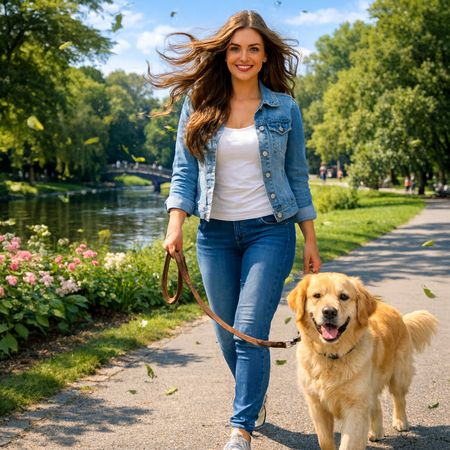

GPT Image 1
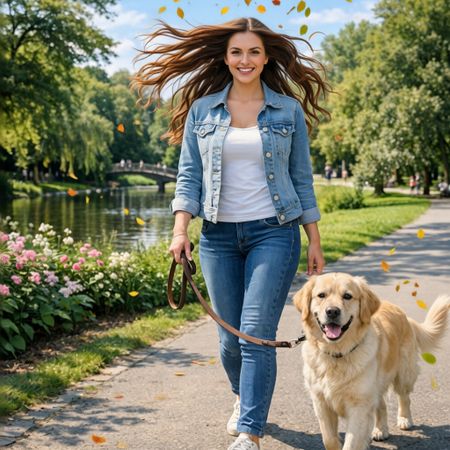
P-Image Edit
AI Judge Analysis
GPT Image 1
- + Excellent preservation of the subject's face and original features.
- + Highly realistic motion blur applied to the flying leaves.
- + Natural-looking hair movement that integrates well with the original lighting.
- − The leash and hand area slightly lost definition during the edit.
P-Image Edit
- + Successfully added leaves and dramatic hair motion as requested.
- + Good preservation of the dog and background environment.
- − The hair looks somewhat stylized and 'stringy' compared to the source.
- − Flying leaves look like static stickers rather than having dynamic motion or blur.
- − The subject's face was slightly altered, losing some of the specific likeness of the original.
Verdict: GPT Image 1 is the clear winner as it successfully adds the requested dynamic elements while maintaining the realistic quality of the original photo. P-Image Edit provides a more artistic but less realistic interpretation, with leaves that lack motion blur and hair that appears more digitally reconstructed. GPT Image 1's use of motion blur on the leaves better captures the 'energetic and lively feel' requested in the prompt.
Next steps
Explore each model
PrunaAI's sub-1-second multi-image editing model supporting up to 5 reference images with state-of-the-art quality