Distilled version of Black Forest Labs' FLUX.2 [dev] outperforming it at a cheaper price. Developed by fal.ai.
Settled by community votes across 7 shared challenges, with an AI judge weighing in on each.
FLUX.2 [dev] Turbo
26.6
arena score
#7 of 62 in Text-to-Image
Skill signature
· Text-to-Image
P-Image Edit
14.9
arena score
#30 of 37 in Image Editing
Vote tally
Where the votes landed
FLUX.2 [dev] Turbo
0%
win rate
Ties
0%
P-Image Edit
0%
win rate
Shared challenges
7
Challenge by challenge
The strongest take from each model on every shared challenge, with the AI judge's read.
Man and Car in California
EditingEdit instruction
“Make a photo of the man driving the car down the California coastline”
Source
FLUX.2 [dev] Turbo
P-Image Edit
AI Judge Analysis
FLUX.2 [dev] Turbo
- + Excellent character preservation of the man's face, hair, and clothing.
- + Dynamic perspective from inside the car that emphasizes the driving action.
- + High-quality rendering of the Rolls-Royce interior details.
- − Changes the exterior color of the car to a light silver/gold rather than the source's pure white.
- − Changes the camera angle entirely, moving from a side exterior shot to an over-the-shoulder interior shot.
P-Image Edit
- + Successfully keeps the original car's exterior perspective and white paint color.
- + Accurately represents the California coastline scenery.
- + Good sense of motion blur on the road.
- − The man's features and hair are significantly simplified and lack the detail from the source image.
- − The man's scale and positioning inside the car look slightly unnatural.
Verdict: FLUX.2 [dev] Turbo excels at preserving the subject's identity and detailed clothing, though it significantly alters the camera perspective and car color. P-Image Edit preserves the original car's white color and perspective better but fails to maintain the man's likeness, resulting in a generic figure. FLUX.2 [dev] Turbo is the winner for its superior visual quality and character consistency.
Pose & Character Mashup
EditingEdit instruction
“Use Image 1 as the exact pose reference and Image 2 as the character reference. Recreate the person/character from Image 2 in the exact dynamic pose and body position from Image 1. Keep the exact face, hair, clothing style/details, and expression from Image 2. Match the lighting and environment of Image 1. The final image must show the character from Image 2 performing the precise action/pose from Image 1 with perfect anatomy and natural integration.”
Source
FLUX.2 [dev] Turbo
P-Image Edit
AI Judge Analysis
FLUX.2 [dev] Turbo
- + Successfully transferred the majority of the clothing (scarf, sunglasses, black sweatshirt) from Image 2.
- + Maintains the yellow background and red stool from Image 1.
- − Extreme anatomical failure, showing two heads (one from each image) in a horrific merger.
- − Failed to match the specific pose from Image 1, settling for a generic jumping action.
P-Image Edit
- + Perfectly replicates the complex 'pretzel' pose and body position from Image 1.
- + Accurately combines elements from both images, such as the character's face, sunglasses, and scarf with the pose's red sleeve.
- − Anatomical issues with the hands, including an extra finger and unnatural palm placement on the stool.
- − Long hair from Image 1 was kept instead of the short hair from the character in Image 2.
Verdict: FLUX.2 [dev] Turbo failed the core task by producing a disturbing image with two heads and a completely different pose. P-Image Edit successfully followed the instructions to replicate the exact pose of Image 1 while applying the character features of Image 2, despite some minor issues with hand anatomy and hair length.
Outfit Transfer Challenge
EditingEdit instruction
“Use Image 1 as the base person. Dress them in the exact elaborate outfit from Image 2 (including all layers, accessories, jewelry, and shoes). Carefully adapt the clothing to the body shape and pose in Image 1 while maintaining realistic fabric behavior, correct proportions, and perfect lighting/shadow matching. Keep the person’s exact face, hair, and background completely unchanged.”
Source
FLUX.2 [dev] Turbo
P-Image Edit
AI Judge Analysis
FLUX.2 [dev] Turbo
- + Successfully replicates the specific scarf and coat details from Image 2.
- + High-quality jewelry and accessories added with realistic lighting.
- − Completely failed the identity preservation requirement by replacing the person in Image 1 with the person from Image 2.
- − Failed to keep the original person's face and hair as requested.
P-Image Edit
- + Excellent source preservation, keeping the exact person/face from Image 1.
- + Correctly adapts the clothing from Image 2 to the body and pose of the person in Image 1.
- + Good background preservation.
- − The shoes included are not from either source image.
- − The gold jewelry is simplified compared to the complex jewelry in the source and Image A.
Verdict: FLUX.2 [dev] Turbo failed the core logic of the image editing task by replacing the subject of Image 1 with the subject of Image 2, essentially just recreation the second image in the first's setting. P-Image Edit successfully followed the complex instruction to transfer clothing onto the specific person from Image 1 while maintaining their identity and skin details. P-Image Edit is the clear winner for respecting all constraints of the edit.
Bald man challenge
Image EditingEdit instruction
“Give the person a full, thick head of natural hair with realistic texture, density, and a natural hairline. Preserve facial features and lighting.”
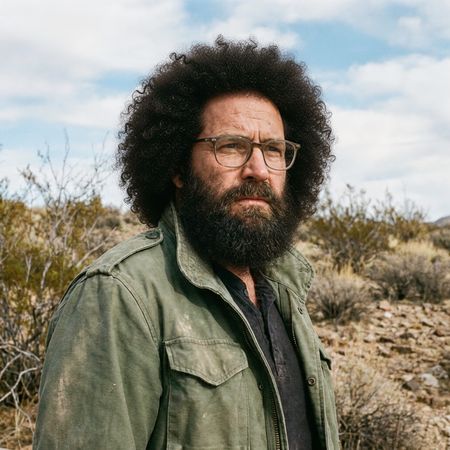

FLUX.2 [dev] Turbo

P-Image Edit
AI Judge Analysis
FLUX.2 [dev] Turbo
- + Excellent preservation of the original facial features and expression
- + Highly realistic hair texture that blends naturally with the lighting and environment
- + Perfectly seamless integration at the temples and hairline
- − Very minor loss of sharpness in the skin texture compared to the original
P-Image Edit
- + Successfully adds a full head of hair as requested
- + Preserves the background and clothing accurately
- − The hair curls appear repetitive and slightly artificial/digital
- − The hairline integration at the forehead looks less natural than the other model
- − The lighting on the top of the hair is a bit flat compared to the scene's light source
Verdict: FLUX.2 [dev] Turbo provides a significantly more realistic result with hair that looks like it belongs to the subject, featuring convincing texture and a seamless hairline. P-Image Edit also succeeds in adding hair while preserving the identity, but the hair itself has a repetitive, 'stamped-on' quality that lacks the natural variation seen in the FLUX output.
Over-the-top cartoon caricature
EditingEdit instruction
“Create a caricature of me and my job. Make it exaggerated and humorous, incorporating my profession as a tv show anchor and my love for dogs and hockey.”
Source
FLUX.2 [dev] Turbo
P-Image Edit
AI Judge Analysis
FLUX.2 [dev] Turbo
- + Excellent integration of all three themes (news anchor, dogs, hockey) in a coherent scene.
- + Captures the subject's likness very well while applying a distinct caricature art style.
- + Creative detail in adding dogs as both co-anchors and hockey players in the background.
- − The text on the desk is nonsensical gibberish.
P-Image Edit
- + Preserved the subject's denim attire from the source image better than Model A.
- + Successfully identifies the hockey and TV anchor themes.
- + Caricature style is clean and vibrant.
- − The dog element is very small and contains bizarre anatomical/visual artifacts.
- − The hand holding the microphone has an extra finger that looks distorted.
- − Composition feels slightly more cluttered with fragmented text elements.
Verdict: FLUX.2 [dev] Turbo is the clear winner as it successfully and humorously integrated all requested elements into a high-quality caricature. While P-Image Edit preserved the original clothing and caricature style, it failed to meaningfully incorporate the 'dogs' requirement beyond a small, distorted figure and had significant anatomical issues with the subject's hand.
Studio Ghibli Anime Style
EditingEdit instruction
“Transform this photo into a Studio Ghibli–inspired illustration. Use soft pastel colors, hand-painted textures, gentle lighting, dreamy backgrounds, and a warm, nostalgic mood”
Source
FLUX.2 [dev] Turbo
P-Image Edit
AI Judge Analysis
FLUX.2 [dev] Turbo
- + Excellent adherence to the Studio Ghibli art style with watercolor-like textures and soft line art.
- + Perfectly captures the requested soft pastel color palette and nostalgic mood.
- + High level of preservation for the original composition and character poses.
- − The character in the red dress has a slightly altered facial structure compared to the source.
P-Image Edit
- + Strong preservation of the characters' facial features, keeping them recognizable.
- + Successfully translates the scene into a stylized illustration with clean lines.
- − The art style feels more like a generic modern digital illustration rather than the specific Ghibli aesthetic requested.
- − Colors are more saturated than the requested 'soft pastels'.
- − Lacks the hand-painted, textured feel specified in the prompt.
Verdict: FLUX.2 [dev] Turbo is the clear winner as it successfully captured the specific nuances of the Studio Ghibli style, including the watercolor textures and dreamy atmosphere. P-Image Edit preserved the faces more accurately but failed to deliver on the requested artistic style, resulting in a more generic digital drawing without the requested nostalgic mood.
Golden Hour Stroll
Image EditingEdit instruction
“Add dynamic motion to this photo: make hair blow in the wind, add leaves flying, energetic and lively feel.”
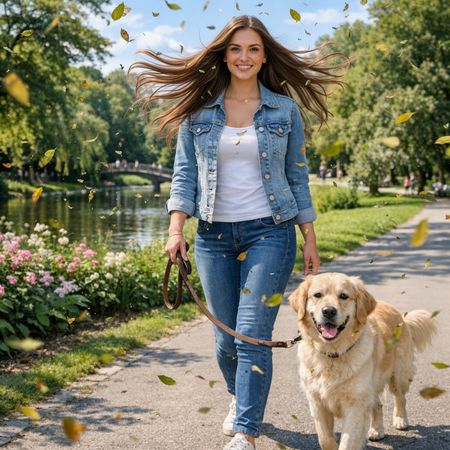

FLUX.2 [dev] Turbo
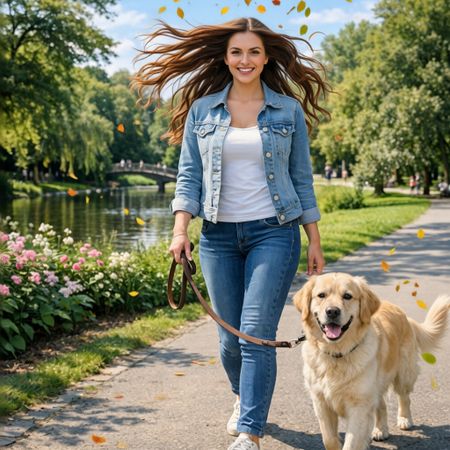
P-Image Edit
AI Judge Analysis
FLUX.2 [dev] Turbo
- + Excellent adherence to the 'flying leaves' instruction with a high density of foliage.
- + Maintains the original facial features and clothing details of the subject perfectly.
- + Leaves are integrated realistically with depth-of-field effects.
- − The hair edit is slightly less fluid and wavy compared to model B.
- − Some leaves have slight motion blur that looks a bit like noise in the background.
P-Image Edit
- + Successfully renders dynamic blowing hair that looks natural and energetic.
- + Perfectly preserves the source image except for the requested hair and leaves.
- + Leaves appear bright and colorful, adding to the lively feel.
- − Fewer leaves than Model A, making the environment feel a bit less 'dynamic'.
- − Some leaves overlap the subject in a way that looks slightly flat.
Verdict: Both models performed excellent edits while maintaining perfect source preservation, which is rare. Model B (P-Image Edit) is the winner because the hair physics are much more natural and truly reflect 'blowing in the wind', whereas FLUX.2 [dev] Turbo's hair edit looks somewhat stiff. However, FLUX.2 did a slightly better job at populating the scene with leaves.
Next steps
Explore each model
PrunaAI's sub-1-second multi-image editing model supporting up to 5 reference images with state-of-the-art quality