

Black Forest Labs' premium multimodal flow transformer with greatly improved prompt adherence and typography generation for in-context image generation and editing without compromise on speed
Settled by community votes across 17 shared challenges, with an AI judge weighing in on each.
FLUX.1 Kontext [max]
24.0
arena score
#24 of 62 in Text-to-Image
Skill signature
· Text-to-Image
Grok Imagine Image Pro
24.7
arena score
#20 of 62 in Text-to-Image
Vote tally
Where the votes landed
FLUX.1 Kontext [max]
0%
win rate
Ties
0%
Grok Imagine Image Pro
0%
win rate
Shared challenges
17
Challenge by challenge
The strongest take from each model on every shared challenge, with the AI judge's read.
Geometric Composition
Text-to-Image“A glass cube on a wooden table. Inside the cube is a small blue sphere. On top of the cube sits a red book. A green plant is behind the cube, partially visible through the glass. Soft window light from the left.”
FLUX.1 Kontext [max]
Grok Imagine Image Pro
AI Judge Analysis
FLUX.1 Kontext [max]
- + Excellent depiction of window lighting and dramatic shadows.
- + High-quality texture on the wooden table and red book cover.
- + Clean, modern glass cube rendering.
- − The text on the book spine is nonsensical.
- − The plant pot is partially visible but the leaves are somewhat blurry and indistinct.
Grok Imagine Image Pro
- + Perfectly legible and clever text on the book spine ('Reflections in Glass').
- + Very clear visibility of the plant through the glass, matching the prompt's structural requirement.
- + More naturalistic, rustic wooden table texture.
- − The sphere is slightly large, bordering on 'medium' rather than 'small'.
- − Lighting is a bit flatter compared to the dramatic lighting in the first image.
Verdict: Both models adhered perfectly to the complex spatial relationship requirements of the prompt. Grok Imagine Image Pro is the winner due to its superior rendering of the plant through the glass and its impressive ability to generate relevant, legible text on the book's spine, whereas FLUX.1 Kontext [max] struggled with the text and provided a more obscured view of the plant.
Candid Street Photography
Text-to-Image“A candid street photo of an elderly Japanese man repairing a red bicycle in light rain, reflections on wet pavement, shallow depth of field, 50mm lens, natural skin texture, imperfect framing, motion blur from passing cars, cinematic but realistic, no stylization.”
FLUX.1 Kontext [max]
Grok Imagine Image Pro
AI Judge Analysis
FLUX.1 Kontext [max]
- + Excellent depiction of heavy rain and wet surface reflections.
- + Highly cinematic composition with a strong use of light and color.
- + Accurate and realistic bicycle mechanical details (chain and cassette).
- − The rain effect looks a bit like a digital overlay in some areas.
- − Missing the specific motion blur from passing cars requested in the prompt.
Grok Imagine Image Pro
- + Successfully incorporates the requested motion blur from passing cars.
- + Features an 'imperfect' wider framing that feels more like a candid street shot.
- + Subtle, realistic skin texture and age details on the subject.
- − The rain is barely visible compared to the light rain requested.
- − Anatomical/logical error with how the wrench is being held relative to the bicycle frame.
Verdict: FLUX.1 Kontext [max] creates a more visually stunning and atmospheric image with superior mechanical detail on the bicycle, though it missed the car motion blur. Grok Imagine Image Pro followed the composition instructions more literally, including the motion blur and a wider candid framing, but it suffers from minor logic errors in the man's interaction with the tool. FLUX.1 Kontext [max] is the preferred choice for its higher realism and cinematic quality.
Fantasy Warrior
Text-to-Image“Close portrait of a battle-worn paladin in ornate engraved plate armor, hair braided with small beads, faint scars and dirt on the skin, warm torchlight reflecting off metal, shallow depth of field, bokeh sparks, lifelike eyes, highly detailed texture on leather straps and cloth underlayer.”
FLUX.1 Kontext [max]
Grok Imagine Image Pro
AI Judge Analysis
FLUX.1 Kontext [max]
- + Excellent depiction of warm torchlight reflecting off the curved metal surfaces.
- + Highly realistic skin texture including sweat and pores.
- + Superior rendering of tangled, realistic hair and beard textures.
- − Missed the request for small beads in the braided hair.
- − Crop is a bit tight, losing some of the peripheral detail of the armor.
Grok Imagine Image Pro
- + Excellent adherence to all prompt details including beads in hair and the leather/cloth underlayers.
- + Impressive text rendering on the armor collar.
- + Well-balanced composition that shows more of the ornate plate armor.
- − The scars look a bit like digital paint strokes rather than healed flesh.
- − Skin texture is slightly more 'perfect' and less grittily realistic than Model A.
Verdict: Both models performed exceptionally well on this complex prompt. FLUX.1 Kontext [max] has a slight edge in photorealistic lighting and skin textures, but Grok Imagine Image Pro followed the specific instructions more closely, notably including the beads in the hair and the specific layering of the outfit. Grok's inclusion of Latin text on the armor also added a layer of creative detail that made the paladin character more convincing.
Modern Clean Menu
Text-to-Image“Modern minimalist restaurant menu design, white background with colorful food photos in grid, sections for appetizers/pizza/mains, bold sans-serif fonts, vibrant accents, clean professional layout for casual dining.”
FLUX.1 Kontext [max]
Grok Imagine Image Pro
AI Judge Analysis
FLUX.1 Kontext [max]
- + Elegant white-bordered layout resembling a high-end restaurant
- + Consistent food photography style
- + Clean professional typography for the main title
- − Nonsense filler text and illegible handwriting fonts for category headers
- − Poor category organization as almost all images are pizza excluding one plate of fries
Grok Imagine Image Pro
- + Excellent adherence to the requested sections (Appetizers, Pizza, Mains)
- + Clear, legible sans-serif fonts for descriptions and pricing
- + Stronger logical coherence with food photos matching their descriptions
- − The text description under 'Avocado Toast' erroneously references prosciutto and thin crust
- − Slightly less realistic, more 'stock photo' aesthetic compared to model A
Verdict: Grok Imagine Image Pro is the winner because it followed the structural instructions of the prompt, creating distinct and labeled sections for appetizers, pizza, and mains with logical food items for each. While FLUX.1 Kontext [max] has a more premium aesthetic, it failed the multi-section requirement by filling the menu almost entirely with pizza and using illegible placeholder text for the headers.
Magic Burger Explosion: Fiery Photorealism Challenge
Text-to-Image“Ad for 'Magic Burger'. Dynamic, exploded burger with all components (bun, patty, cheese, lettuce, tomato, sauce) suspended in mid-air. Emphasize photorealistic detail and a sense of motion. Dark, fiery background with glowing embers. Integrate text: 'MAGIC BURGER' as a prominent title, 'LIMITED TIME ONLY' as a secondary message, and '€6.99' in a starburst, all rendered with a fiery, glowing effect.”
FLUX.1 Kontext [max]
Grok Imagine Image Pro
AI Judge Analysis
FLUX.1 Kontext [max]
- + Clean and highly legible typography with a consistent glowing light-bulb effect
- + Excellent photorealistic texture on the main burger patty and lettuce
- + Effective use of embers and fire in the background to create atmospheric depth
- − Failed to render the price in a starburst as requested
- − The 'exploded' effect is less dynamic, with the main burger appearing mostly intact
- − The floating bun halves on the sides look slightly unnatural and disconnected
Grok Imagine Image Pro
- + Strong adherence to the 'exploded' request with dynamic suspension and stretching cheese
- + Successfully integrated the starburst element for the price tag
- + Text rendering is stylized and fits the fiery theme perfectly
- − The price text is somewhat crowded within the starburst
- − The sauce droplets look a bit more digital and less photorealistic than Image A
Verdict: Grok Imagine Image Pro is the winner because it adhered more closely to the complex compositional requirements, specifically the 'exploded' view of the ingredients and the starburst element for the price. While FLUX.1 Kontext [max] produced very clean text and a high-quality main burger, it failed to incorporate the starburst and the exploded effects felt static in comparison.
Chalkboard Menu
Text-to-Image“Handwritten-style chalkboard menu in a cozy café, all text rendered in the exact same realistic chalk handwriting style with natural variations in letter size, slight slant, and chalk texture — no printed or digital fonts anywhere on the board. Title at the top in elegant cursive chalk handwriting: ‘TODAY’S SPECIALS – APRIL 30, 2026’. Below it, three menu items also in the same handwritten chalk style: ‘Truffle Mushroom Risotto – $24’, ‘Grilled Octopus with Lemon & Herbs – $28’, ‘Brown Butter Chocolate Chip Cookies – $9’. At the very bottom, smaller text in the identical handwritten chalk style (slightly smaller but still clearly legible with the same handwriting characteristics): ‘All items made fresh daily • Ask about our gluten-free options’. Warm ambient café lighting, visible chalk dust and smudges, realistic handwriting imperfections, no clean printed text anywhere.”
FLUX.1 Kontext [max]
Grok Imagine Image Pro
AI Judge Analysis
FLUX.1 Kontext [max]
- + Excellent text legibility and accuracy
- + Features realistic chalk smudges and texture on the board surface
- + Correctly interpreted the incomplete 'Brown But...' prompt to conclude with 'Brown Butter Chocolate Chip Cookies'
- − The title font is very blocky and lacks the requested 'elegant cursive' style
- − The handwriting looks somewhat digital and uniform compared to a natural human hand
Grok Imagine Image Pro
- + The handwriting style is much more realistic with varying pressure and authentic chalk texture
- + Successfully incorporated cursive elements as requested in the title
- + Captured a better 'cozy café' atmosphere with lighting and brickwork
- − Minor spelling error in 'Aprıl' (dot over the capital I)
- − The chalk texture is so realistic that it slightly degrades the legibility of finer strokes
Verdict: Both models followed the complex prompt exceptionally well, including the specific date and pricing. FLUX.1 Kontext [max] produced the cleanest and most accurate text, but Grok Imagine Image Pro felt much more authentic to the 'handwritten' and 'cursive' requirements of the prompt, capturing the soul of a chalkboard much better than the slightly clinical look of FLUX.1 Kontext [max].
The Reversed Rodeo
Text-to-Image“Horse riding astronaut in space — horse on top, not vice versa. Surreal, highly detailed, cinematic.”
FLUX.1 Kontext [max]
Grok Imagine Image Pro
AI Judge Analysis
FLUX.1 Kontext [max]
- + High visual realism and cinematic lighting
- + Excellent texture detail on the spacesuit and horse fur
- − Failed to follow the core spatial instruction of the horse being on top
- − Produced a standard, cliché interpretation of the prompt
Grok Imagine Image Pro
- + Followed the specific spatial instruction with the horse positioned on top of the astronaut
- + Vibrant colors and a more surreal, dreamlike atmosphere
- + Successfully interpreted the 'horse riding astronaut' wordplay
- − Anatomical issues where the horse's back leg blends into the astronaut's backpack
- − Lower realism compared to the other model
Verdict: FLUX.1 Kontext [max] produced a high-quality but generic image that completely ignored the negative constraint/spatial instruction of the horse being on top. Grok Imagine Image Pro correctly interpreted the surreal nature of the request, placing the horse on top of the astronaut, making it the clear winner for prompt adherence despite minor anatomical clipping.
The Capybara Taxi Driver
Text-to-Image“Photorealistic scene inside a yellow New York taxi at night. A capybara is driving, wearing a yellow taxi driver cap and a dark jacket. It has a calm, professional expression and both front paws on the steering wheel. In the back seat sits a human businesswoman in a coat, looking at her phone with a completely normal, bored expression (as if this is just another normal ride). Through the windows you can see the streets of Manhattan at night with blurred lights. Realistic taxi interior, photorealistic, detailed fur and fabric, 35mm lens, night lighting with reflections, shallow depth of field.”
FLUX.1 Kontext [max]
Grok Imagine Image Pro
AI Judge Analysis
FLUX.1 Kontext [max]
- + Excellent photographic texture on the capybara's fur and the taxi interior.
- + Effective use of shallow depth of field for the background city lights.
- + Accurately represents the request for a yellow taxi driver cap.
- − The passenger is holding a phone to her ear like a call, rather than looking at it as requested.
- − The capybara's paws are not clearly placed on the steering wheel in a professional manner.
Grok Imagine Image Pro
- + Follows the composition prompt perfectly, showing both characters clearly inside the taxi.
- + Highly specific text rendering on the taxi cap ('NYC TLC Medallion').
- + Accurately depicts the businesswoman looking at her phone with a bored expression.
- − The capybara's paws look slightly claw-like and unnatural on the steering wheel.
- − The passenger is sitting in the middle/front seat area due to the odd car geometry choice.
Verdict: Grok Imagine Image Pro is the winner as it accurately captures the entire scene layout and the specific actions of both characters, particularly the businesswoman looking down at her phone. While FLUX.1 Kontext [max] has slightly better fur textures, it fails the composition by placing the woman on a phone call and obscuring the 'inside the car' perspective requested.
The Halloween Invitation
Text-to-Image“Vintage gothic Halloween party invitation. Dark parchment poster, spooky border with webs and thorns, central glowing jack-o-lantern, bats, twisted trees, moody night sky. Add elegant gothic title text saying "Halloween Party Invitation", a small scroll banner saying "You are invited to a night of frights", and event details at the bottom: Date: 30.10.2026 Time: 7pm Location: The Arches, NYC Spooky but polished, cinematic lighting, square format.”
FLUX.1 Kontext [max]
Grok Imagine Image Pro
AI Judge Analysis
FLUX.1 Kontext [max]
- + Excellent typography rendering with crisp, clear letters.
- + Highly thematic gothic border with intricate web details.
- + Effective cinematic lighting on the central jack-o-lantern.
- − Redundant text at the bottom repeating the location.
- − Composition feels a bit cramped due to the text size.
- − The scroll banner is less stylized than Model B.
Grok Imagine Image Pro
- + Beautiful parchment paper texture with frayed edges and wax seal.
- + Better overall balance and composition for a poster/invitation.
- + More atmospheric background including a misty moon and distinct twisted trees.
- − Slightly less 'gothic' typography, leaning more towards classic calligraphy.
- − Webbing in the corners is a bit repetitive/symmetrical.
Verdict: While both models followed the prompt exceptionally well, Grok Imagine Image Pro wins on composition and vintage aesthetic, utilizing a convincing parchment texture and a better-designed scroll banner. FLUX.1 Kontext [max] has very sharp text rendering, but the accidental repetition of the location at the bottom detracts from the professional layout.
Bald man challenge
Image EditingEdit instruction
“Give the person a full, thick head of natural hair with realistic texture, density, and a natural hairline. Preserve facial features and lighting.”
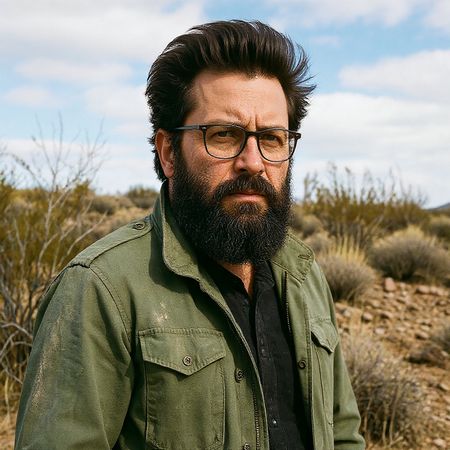

FLUX.1 Kontext [max]
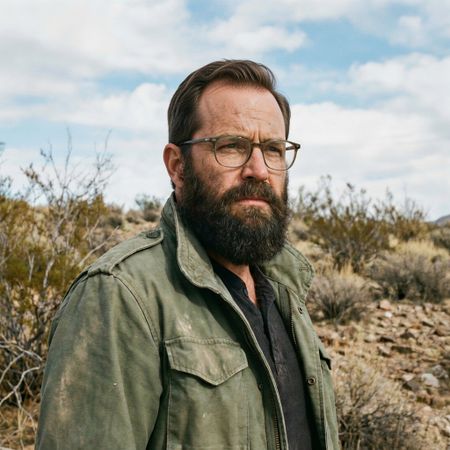
Grok Imagine Image Pro
AI Judge Analysis
FLUX.1 Kontext [max]
- + Excellent addition of thick, voluminous hair
- + Good texture on the individual hair strands
- − Substantially altered the shape of the person's face and changed the glasses
- − Lower quality preservation of original facial skin texture and expression
- − The hairline looks slightly artificial compared to the forehead
Grok Imagine Image Pro
- + Perfectly preserved the original facial features, glasses, and expression
- + Highly realistic and natural-looking hairline
- + Maintains consistent lighting and image quality with the original
- − The hair is somewhat less 'full' than Model A, though still fits the prompt
Verdict: Grok Imagine Image Pro is the clear winner as it successfully added natural-looking hair while perfectly preserving the identity of the person in the source image. FLUX.1 Kontext [max] produced a high-quality head of hair but failed the image editing task by significantly altering the subject's face and accessories.
Isometric Miniature Diorama Scenes
Text-to-Image“Create a clear, 45° top-down isometric miniature 3D cartoon scene of Japan's signature dish: sushi, with soft refined textures, realistic PBR materials, gentle lighting, on a small raised diorama base with minimal garnish and plate. Solid light blue background. At top-center: 'JAPAN' in large bold text, 'SUSHI' below it, small flag icon. Perfectly centered, ultra-clean, high-clarity, square format.”
FLUX.1 Kontext [max]
Grok Imagine Image Pro
AI Judge Analysis
FLUX.1 Kontext [max]
- + Excellent 3D miniature styling with realistic soft textures and PBR materials.
- + Clean rendering of the isometric diorama base.
- + Text is perfectly centered and bold as requested.
- − Missing the flag icon requested in the prompt.
- − The text color and font are somewhat plain compared to the high-quality 3D models below it.
Grok Imagine Image Pro
- + Includes the requested Japan flag icon next to the text.
- + Good variety of sushi types within the miniature style.
- + Clean white typography that integrates well with the background.
- − The diorama base is a simple round board rather than the requested raised miniature base.
- − Text rendering on 'JAPAN' has slight artifacts/inconsistency in the letters.
Verdict: Both models followed the prompt well, providing clean 3D isometric scenes on blue backgrounds. FLUX.1 Kontext [max] delivered superior material rendering and a much better diorama base, though it missed the flag icon; Grok Imagine Image Pro included all prompt elements but the overall composition and base were less interesting.
Over-the-top cartoon caricature
EditingEdit instruction
“Create a caricature of me and my job. Make it exaggerated and humorous, incorporating my profession as a tv show anchor and my love for dogs and hockey.”
Source
FLUX.1 Kontext [max]
Grok Imagine Image Pro
AI Judge Analysis
FLUX.1 Kontext [max]
- + Captures the user's likeness accurately even in caricature form
- + Retains the denim shirt from the source image provided
- + Clean, comic-style illustration with high visual clarity
- − The hockey element is cut off at the top and barely visible
- − Simplified background lacks the professional TV studio feel
- − Caricature style is a bit safe and lacks extreme exaggeration
Grok Imagine Image Pro
- + Excellent integration of all requested elements including hockey trophy, stick, and news desk
- + Highly creative layout with funny 'Pups & Pucks' news graphics
- + Clear, legible text that complements the humorous theme
- − Likeness is generic and does not resemble the source woman as closely as Model A
- − The image is very busy with quite a few visual distractions
Verdict: While FLUX.1 Kontext [max] does a much better job of preserving the woman's actual facial features and clothing from the source image, Grok Imagine Image Pro is the superior thematic edit. Grok expertly combined the profession, the dogs, and the hockey elements into a cohesive and genuinely humorous 'news' scene, whereas FLUX.1 almost missed the hockey requirement entirely.
Adorable Baby Animals in Sunny Meadow
Text-to-Image“Hyper-photorealistic scene of fluffy baby animals—a golden retriever puppy, tabby kitten, baby bunny, and red fox kit—with big expressive eyes and ultra-detailed soft fur, playfully chasing butterflies and tumbling together in a lush wildflower meadow, warm golden sunrise light with god rays and dew sparkles, joyful wholesome vibe, 8K masterpiece.”
FLUX.1 Kontext [max]
Grok Imagine Image Pro
AI Judge Analysis
FLUX.1 Kontext [max]
- + Excellent soft lighting and atmospheric god rays
- + Coherent group interaction with all animals looking in similar directions
- + Consistent 'fluffy' texture across all subjects
- − The animals are largely static rather than 'tumbling and chasing' as requested
- − Butterflies are a bit stylized and glowy rather than realistic
Grok Imagine Image Pro
- + Successfully captures the dynamic 'tumbling' and active play requested
- + Butterflies are more realistically rendered in terms of wing patterns
- + Clearly visible dew sparkles on the flowers in the foreground
- − Included two kittens instead of one, missing the specific count requested
- − Some anatomy issues with the fox's paws and the puppy's floating mid-air pose
- − The lighting on the animals is a bit flat compared to the strong sunset background
Verdict: FLUX.1 Kontext [max] produced a more aesthetically pleasing, painterly image with superior lighting, though it missed the dynamic movement requested. Grok Imagine Image Pro followed the action-oriented parts of the prompt much better, showing the animals actually tumbling and leaping, but it failed on count accuracy (two kittens) and had less convincing animal anatomy. FLUX.1 is preferred for its high-quality rendering and artistic composition.
Studio Ghibli Anime Style
EditingEdit instruction
“Transform this photo into a Studio Ghibli–inspired illustration. Use soft pastel colors, hand-painted textures, gentle lighting, dreamy backgrounds, and a warm, nostalgic mood”
Source
FLUX.1 Kontext [max]
Grok Imagine Image Pro
AI Judge Analysis
FLUX.1 Kontext [max]
- + Captures the Studio Ghibli cel-shaded aesthetic perfectly with clean line work.
- + Preserves the original composition and pose details accurately while stylizing them.
- + The soft pastel colors and hand-painted watercolor textures in the background are spot-on.
- − The eyes on the woman in the foreground are slightly generic compared to true Ghibli character designs.
Grok Imagine Image Pro
- + Successfully applies a beautiful watercolor 'hand-painted' texture across the entire image.
- + Excellent light and shadow play that contributes to a warm, nostalgic mood.
- − The character faces, particularly the man's, feel a bit more like generic web-comic art than specific Ghibli style.
- − The man's hand/thumb area near his pocket is slightly more distorted than in Model A.
Verdict: Both models did an excellent job of preserving the source image's composition and iconic poses while applying the requested style. FLUX.1 Kontext [max] is the winner because its character linework and eye styles more closely resemble the actual animation style of Studio Ghibli, whereas Grok Imagine Image Pro leans a bit more toward a generic watercolor illustration style.
Golden Hour Stroll
Image EditingEdit instruction
“Add dynamic motion to this photo: make hair blow in the wind, add leaves flying, energetic and lively feel.”
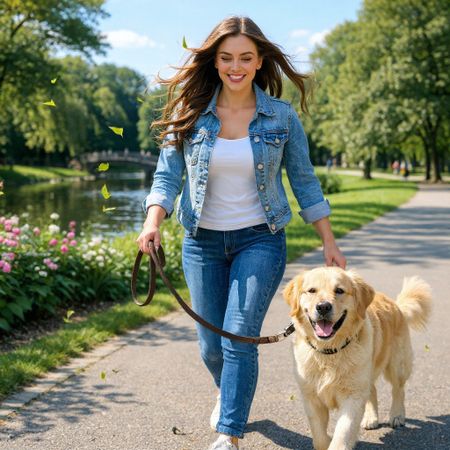

FLUX.1 Kontext [max]
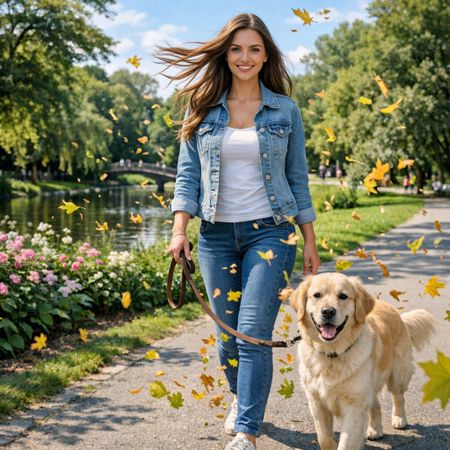
Grok Imagine Image Pro
AI Judge Analysis
FLUX.1 Kontext [max]
- + Natural and subtle hair physics consistent with wind
- + Maintains excellent preservation of the original face and clothing
- + Captures an 'energetic' feel by slightly adjusting the walking pose and stride
- − Very few leaves added, making that part of the prompt almost unnoticeable
- − The left hand on the dog becomes slightly anatomically confused
Grok Imagine Image Pro
- + Strong adherence to the 'flying leaves' instruction with various sizes and depths
- + Clear 'hair blowing in the wind' effect that is more pronounced than the original
- + High level of preservation for the subject's face and the dog
- − Leaves look static and lack motion blur, feeling a bit like stickers
- − No change to the subjects' poses, making the 'motion' feel purely like an overlay
Verdict: Both models do a good job of preserving the source image. Grok Imagine Image Pro followed the prompt more literally by adding a significant amount of blowing leaves, though they lack the dynamic motion blur requested. FLUX.1 Kontext [max] creates a more realistic wind effect in the hair and a more energetic walking pose (changing the stride), but failed to add a meaningful amount of leaves.
Vintage Cafe Logo
Text-to-Image“Vintage minimalist restaurant logo for "Caffè Florian", retro cloche dome with steam and "Est. 1720" banner, classic typography, warm brown and cream tones, subtle texture on light background, vector emblem style.”
FLUX.1 Kontext [max]
Grok Imagine Image Pro
AI Judge Analysis
FLUX.1 Kontext [max]
- + Excellent typography with a hand-drawn, vintage feel
- + Subtle paper texture adds to the retro aesthetic
- + Strong alignment and balance between the cloche, text, and banner
- − The steam icon is a bit simple compared to the texture of the other elements
- − The circumflex accent on the 'Ê' is slightly oversized
Grok Imagine Image Pro
- + Clean, modern vector appearance
- + Includes a circular emblem frame as implied by 'emblem style'
- + Accurate placement of the accent on the 'è'
- − Typography looks generic and lacks the 'vintage' character of model A
- − Steam effect is somewhat swirly and inconsistent with the minimalist cloche style
- − Overall appearance feels more like a modern template than a vintage logo
Verdict: FLUX.1 Kontext [max] delivered a superior vintage aesthetic with excellent font choice and a texture that feels authentic to the 1720 era requested. Grok Imagine Pro produced a competent vector logo, but it lacked the specific character and 'classic typography' requested in the prompt, feeling more like a modern digital recreation.
Apollo 11: Journey to Tranquility
Text-to-Image“Create a clean, modern vector infographic poster about the Apollo 11 mission. NASA-inspired palette (navy, white, muted red, light gray). Flat-vector style, crisp lines, consistent iconography, subtle gradients only. Steps (stop at landing): 1. Launch (Saturn Vicon) 2. Earth Orbit (Earth + orbit ring icon) 3. Translunar (trajectory arc icon) 4. Lunar Orbit (Moon + orbit ring icon) 5. Descent (lunar module descending icon) 6. Landing (lunar module on the surface icon) Small supporting elements (minimal text): • Crew strip: three silhouette icons with only last names: Armstrong, Aldrin, Collins. • Landing site marker: Moon pin labeled "Tranquility" only. Layout constraints: generous margins, large readable labels, clean background with subtle stars. Vector-only, print-poster look, high resolution.”
FLUX.1 Kontext [max]
Grok Imagine Image Pro
AI Judge Analysis
FLUX.1 Kontext [max]
- + Strong typography and large, readable headings.
- + Creative inclusion of the crew silhouettes with correct name labeling.
- + High-quality rendering of the Lunar Module character.
- − Failed to follow the requested 6-step chronological sequence.
- − The central diagram is confusing and doesn't clearly map out the mission stages.
- − The rocket icon looks like a generic cartoon rocket rather than a Saturn V.
Grok Imagine Image Pro
- + Perfectly followed the 6-step instructional sequence with correct icons for each stage.
- + Excellent adherence to the 'NASA-inspired' color palette and flat-vector style.
- + Logical vertical layout that works effectively as an infographic.
- − Text for the crew names is slightly small and less legible than the main headings.
- − The 'Translunar' arc icon is a bit simple compared to the other more detailed icons.
Verdict: Grok Imagine Image Pro followed the complex multi-step instructions perfectly, creating a logical 6-stage vertical timeline that aligns with the prompt's structural requirements. FLUX.1 Kontext [max] produced a more stylish illustration with better character detail, but it failed to include all the requested mission steps and the layout is less effective for an infographic.
Next steps
Explore each model
xAI's premium image generation model offering higher fidelity output and stronger performance on single-image editing benchmarks compared to the standard Grok Imagine model