“Modern minimalist restaurant menu design, white background with colorful food photos in grid, sections for appetizers/pizza/mains, bold sans-serif fonts, vibrant accents, clean professional layout for casual dining.”
Tongyi-MAI's 6-billion parameter distilled text-to-image model optimized for speed, achieving high-quality generation in 8 steps or fewer with support for bilingual text rendering
Details
z-image-turbo
Starting from
Prices shown are in USD · Some prices estimated from per-megapixel or per-token pricing
See all providersProvider Performance
Fastest generation through alibaba at 5,863ms median latency with 73.1% success rate.
Aggregated from real API requests over the last 30 days.
Generation Time
Success Rate
Time to First Byte
Provider Rankings
| # | Provider | p50 Gen Time | p95 Gen Time | Success Rate | TTFB (p50) |
|---|---|---|---|---|---|
| 1 | alibaba | 5,863ms | 11,912ms | 73.1% | 5,500ms |
Providers & Pricing (4)
Z-Image Turbo is available from 4 providers, with per-image pricing starting at $0.005 through fal.ai.
All modes
fal/z-image-turbo
fal/z-image-turbo-edit
replicate/z-image-turbo
Output
Pricing Notes (2)
- • PrunaAI optimized version of Tongyi-MAI Z-Image-Turbo
- • Sub-second generation with 8 steps
alibaba/z-image-turbo
Output
Z-Image Turbo API OpenAI-compatible
Integrate Z-Image Turbo through Lumenfall’s OpenAI-compatible API to generate images or execute edits using its 6-billion parameter distilled architecture optimized for 8-step inference.
https://api.lumenfall.ai/openai/v1
z-image-turbo
Code Examples
Text to Image
/v1/images/generationscurl -X POST \
https://api.lumenfall.ai/openai/v1/images/generations \
-H "Authorization: Bearer $LUMENFALL_API_KEY" \
-H "Content-Type: application/json" \
-d '{
"model": "z-image-turbo",
"prompt": "",
"size": "1024x1024"
}'
# Response:
# { "created": 1234567890, "data": [{ "url": "https://...", "revised_prompt": "..." }] }
import OpenAI from 'openai';
const client = new OpenAI({
apiKey: 'YOUR_API_KEY',
baseURL: 'https://api.lumenfall.ai/openai/v1'
});
const response = await client.images.generate({
model: 'z-image-turbo',
prompt: '',
size: '1024x1024'
});
// { created: 1234567890, data: [{ url: "https://...", revised_prompt: "..." }] }
console.log(response.data[0].url);
from openai import OpenAI
client = OpenAI(
api_key="YOUR_API_KEY",
base_url="https://api.lumenfall.ai/openai/v1"
)
response = client.images.generate(
model="z-image-turbo",
prompt="",
size="1024x1024"
)
# { created: 1234567890, data: [{ url: "https://...", revised_prompt: "..." }] }
print(response.data[0].url)
Image Edit
/v1/images/editsParameter Reference
Core Parameters
| Parameter | Type | Description | Modes |
|---|---|---|---|
prompt
|
string | Required. Text prompt for image generation |
T2I
Edit
|
seed
|
integer | Random seed for reproducibility |
T2I
Edit
|
Size & Layout
| Parameter | Type | Description | Modes |
|---|---|---|---|
size
|
string |
Image dimensions as WxH pixels (e.g. "1024x1024") or aspect ratio (e.g. "16:9")
WxH determines both shape and scale (aspect_ratio and resolution are ignored when size is provided). W:H format is equivalent to aspect_ratio.
|
T2I
Edit
|
aspect_ratio
|
string |
Aspect ratio of the output image (e.g. "16:9", "1:1")
Controls shape independently of scale. Use with resolution to control both. If size is also provided, size takes precedence. Any ratio is accepted and mapped to the nearest supported value.
|
T2I
Edit
|
resolution
|
string |
Output resolution tier (e.g. "1K", "4K")
Controls scale independently of shape. Higher tiers produce larger images and cost more. If size is also provided, size takes precedence for scale. Any tier is accepted and mapped to the nearest supported value.
|
T2I
Edit
|
size
Exact pixel dimensions
"1920x1080"
aspect_ratio
Shape only, default scale
"16:9"
resolution
Scale tier, preserves shape
"1K"
Priority when combined
size is most specific and always wins. aspect_ratio and resolution control shape and scale independently.
How matching works
7:1 on a model with
4:1 and 8:1,
you get 8:1.
0.5K 1K 2K 4K)
or megapixel tiers (0.25 1).
If the exact tier isn't available, you get the nearest one.
Media Inputs
| Parameter | Type | Description | Modes |
|---|---|---|---|
image
|
file |
Required.
Input image(s) to edit
Supports PNG, JPEG, WebP.
|
T2I
Edit
|
Output & Format
| Parameter | Type | Description | Modes |
|---|---|---|---|
response_format
|
string |
How to return the image
url
b64_json
Default:
"url" |
T2I
Edit
|
output_format
|
string |
Output image format
png
jpeg
gif
webp
avif
Gateway converts to requested format if provider doesn't support it natively.
|
T2I
Edit
|
output_compression
|
integer | Compression level for lossy formats (JPEG, WebP, AVIF) |
T2I
Edit
|
n
|
integer |
Number of images to generate
Default:
1Gateway generates multiple images in parallel even if provider only supports 1.
|
T2I
Edit
|
Additional Parameters
Provider-specific passthrough fields, available only when the request is routed to the listed provider.
| Parameter | Type | Description | Modes |
|---|---|---|---|
|
Universal
|
|||
cfg_scale
|
number | Classifier-free guidance scale — higher values stick more closely to the prompt |
T2I
Edit
|
strength
|
number | How much to transform the input image: 0 keeps it unchanged, 1 fully regenerates from the prompt |
T2I
Edit
|
num_inference_steps
|
integer | Number of inference steps. |
T2I
Edit
|
|
fal
|
|||
acceleration
|
string |
The acceleration level to use.
high
none
regular
|
T2I
Edit
|
enable_prompt_expansion
|
boolean | Whether to enable prompt expansion. Note: this will increase the price by 0.0025 credits per request. |
T2I
Edit
|
enable_safety_checker
|
boolean | If set to true, the safety checker will be enabled. |
T2I
Edit
|
sync_mode
|
boolean | If `True`, the media will be returned as a data URI and the output data won't be available in the request history. |
T2I
Edit
|
|
replicate
|
|||
go_fast
|
boolean | Apply additional optimizations for faster generation |
T2I
Edit
|
height
|
integer | Height of the generated image |
T2I
Edit
|
output_quality
|
integer | Quality when saving the output images, from 0 to 100. 100 is best quality, 0 is lowest quality. Not relevant for .png outputs |
T2I
Edit
|
width
|
integer | Width of the generated image |
T2I
Edit
|
Parameter Normalization
How we handle parameters across different providers
Not every provider speaks the same language. When you send a parameter, we handle it in one of four ways depending on what the model supports:
| Behavior | What happens | Example |
|---|---|---|
passthrough |
Sent as-is to the provider | style, quality |
renamed |
Same value, mapped to the field name the provider expects | prompt |
converted |
Transformed to the provider's native format | size |
emulated |
Works even if the provider has no concept of it | n, response_format |
Parameters we don't recognize pass straight through to the upstream API, so provider-specific options still work.
Z-Image Turbo Benchmarks
Alibaba's Z-Image Turbo holds a top 10 position in global text-to-image rankings with a 1253 Elo rating. It remains competitive in high-speed workflows, maintaining a rank of 16 for complex image editing tasks with an Elo of 1021.
Text-to-Image Landscape
Elo vs Cost
Elo vs Speed
Image Editing Landscape
Elo vs Cost
Elo vs Speed
Competition Results
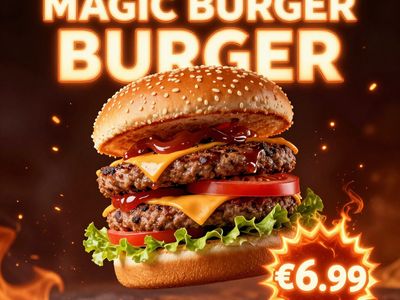
“Ad for 'Magic Burger'. Dynamic, exploded burger with all components (bun, patty, cheese, lettuce, tomato, sauce) suspended in mid-air. Emphasize photorealistic detail and a sense of motion. Dark, fiery background with glowing embers. Integrate text: 'MAGIC BURGER' as a prominent title, 'LIMITED TIME ONLY' as a secondary message, and '€6.99' in a starburst, all rendered with a fiery, glowing effect.”
“Vintage minimalist restaurant logo for "Caffè Florian", retro cloche dome with steam and "Est. 1720" banner, classic typography, warm brown and cream tones, subtle texture on light background, vector emblem style.”
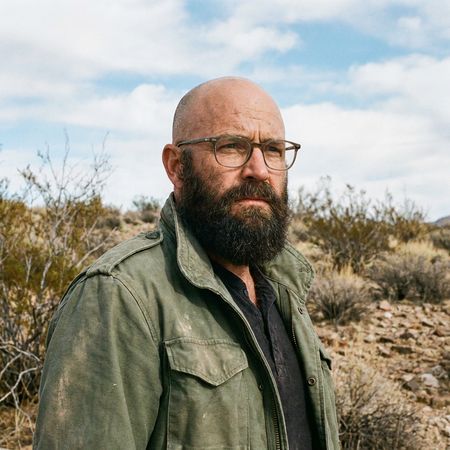
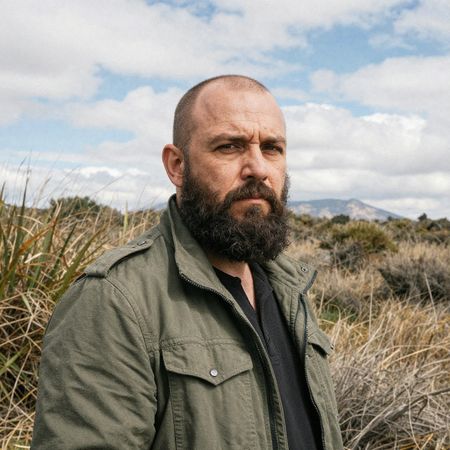
“Give the person a full, thick head of natural hair with realistic texture, density, and a natural hairline. Preserve facial features and lighting.”
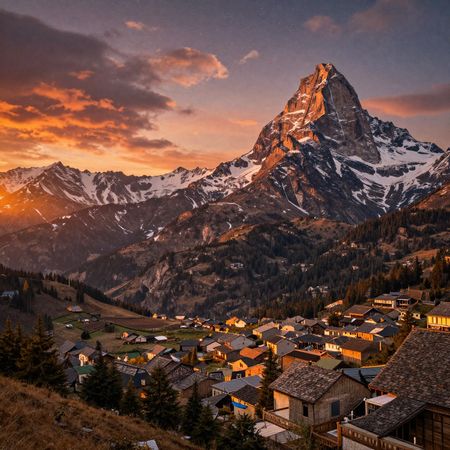
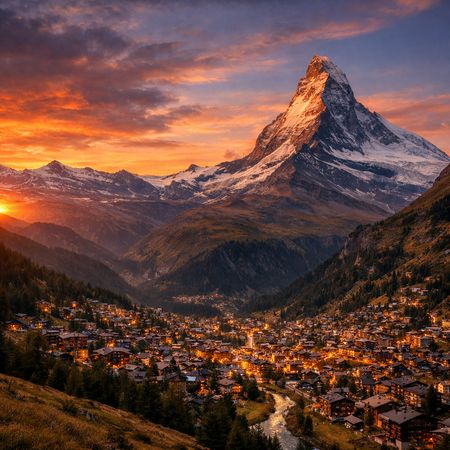
“Change the scene to night: a deep, dark sky with subtle, glistening stars visible behind the mountain.”
“Give the person a full, thick head of natural hair with realistic texture, density, and a natural hairline. Preserve facial features and lighting.”
“Ad for 'Magic Burger'. Dynamic, exploded burger with all components (bun, patty, cheese, lettuce, tomato, sauce) suspended in mid-air. Emphasize photorealistic detail and a sense of motion. Dark, fiery background with glowing embers. Integrate text: 'MAGIC BURGER' as a prominent title, 'LIMITED TIME ONLY' as a secondary message, and '€6.99' in a starburst, all rendered with a fiery, glowing effect.”
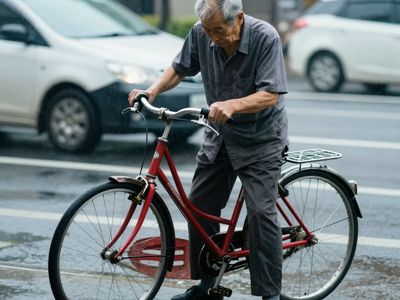
“A candid street photo of an elderly Japanese man repairing a red bicycle in light rain, reflections on wet pavement, shallow depth of field, 50mm lens, natural skin texture, imperfect framing, motion blur from passing cars, cinematic but realistic, no stylization.”
“Ad for 'Magic Burger'. Dynamic, exploded burger with all components (bun, patty, cheese, lettuce, tomato, sauce) suspended in mid-air. Emphasize photorealistic detail and a sense of motion. Dark, fiery background with glowing embers. Integrate text: 'MAGIC BURGER' as a prominent title, 'LIMITED TIME ONLY' as a secondary message, and '€6.99' in a starburst, all rendered with a fiery, glowing effect.”
“Vintage minimalist restaurant logo for "Caffè Florian", retro cloche dome with steam and "Est. 1720" banner, classic typography, warm brown and cream tones, subtle texture on light background, vector emblem style.”
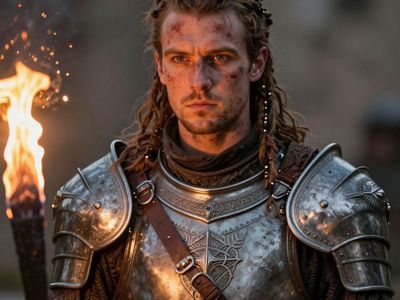
“Close portrait of a battle-worn paladin in ornate engraved plate armor, hair braided with small beads, faint scars and dirt on the skin, warm torchlight reflecting off metal, shallow depth of field, bokeh sparks, lifelike eyes, highly detailed texture on leather straps and cloth underlayer.”
Uncategorized
“Hyper-photorealistic scene of fluffy baby animals—a golden retriever puppy, tabby kitten, baby bunny, and red fox kit—with big expressive eyes and ultra-detailed soft fur, playfully chasing butterflies and tumbling together in a lush wildflower meadow, warm golden sunrise light with god rays and dew sparkles, joyful wholesome vibe, 8K masterpiece.”
“A glass cube on a wooden table. Inside the cube is a small blue sphere. On top of the cube sits a red book. A green plant is behind the cube, partially visible through the glass. Soft window light from the left.”
“Create a clear, 45° top-down isometric miniature 3D cartoon scene of Japan's signature dish: sushi, with soft refined textures, realistic PBR materials, gentle lighting, on a small raised diorama base with minimal garnish and plate. Solid light blue background. At top-center: 'JAPAN' in large bold text, 'SUSHI' below it, small flag icon. Perfectly centered, ultra-clean, high-clarity, square format.”
“Hyper-photorealistic interior of a lush Victorian glass greenhouse filled with exotic tropical plants, vibrant blooming orchids, tall ferns, colorful butterflies in flight, sunlight filtering through ornate glass roof creating realistic caustics and dew on leaves, intricate iron framework visible, misty atmosphere, 8K masterpiece.”
“Hyper-photorealistic full-body portrait of a female superhero standing triumphantly on a New York skyscraper rooftop at golden sunset, wearing a classic modest superhero costume with flowing cape, chest emblem, gloves, and boots in red and blue colors, practical design, short hair, strong determined heroic expression looking into the distance, powerful confident stance with hands on hips and cape billowing dramatically in the wind, detailed urban cityscape background, warm natural sunlight with sharp shadows and fabric highlights, ultra-sharp textures on suit, hair, and concrete, 8K masterpiece, empowering family-friendly style.”
“Close portrait of a battle-worn paladin in ornate engraved plate armor, hair braided with small beads, faint scars and dirt on the skin, warm torchlight reflecting off metal, shallow depth of field, bokeh sparks, lifelike eyes, highly detailed texture on leather straps and cloth underlayer.”
Top Matchups
See how Z-Image Turbo performs head-to-head against other AI models, ranked by community votes in blind comparisons.
vs Grok Imagine Image
Challenge: Modern Clean Menu
38% W · 50% L · 13% T
vs Nano Banana
Challenge: Bald man challenge
0% W · 75% L · 25% T
vs GPT Image 1.5
Challenge: Vintage Cafe Logo
0% W · 100% L
vs Seedream 4.5
Challenge: Isometric Miniature Diorama Scenes
0% W · 100% L
vs GPT Image 2
Challenge: Magic Burger Explosion: Fiery Photorealism Challenge
50% W · 50% L
Z-Image Turbo is best for
See all Use CasesZ-Image Turbo excels in commercial applications, ranking 5th in product and branding with a 55.6% win rate and 7th in portrait generation with a 62.5% win rate. It demonstrates moderate performance in bilingual text rendering but faces significant challenges in specialized photorealism and portrait-specific arena categories.
Gallery
View all 17 imagesZ-Image Turbo FAQ
How much does Z-Image Turbo cost?
Z-Image Turbo starts at $0.005 per image through Lumenfall. Pricing varies by provider. Lumenfall does not add any markup to provider pricing.
How do I use Z-Image Turbo via API?
You can use Z-Image Turbo through Lumenfall's OpenAI-compatible API. Send requests to the unified endpoint with model ID "z-image-turbo". Code examples are available in Python, JavaScript, and cURL.
Which providers offer Z-Image Turbo?
Z-Image Turbo is available through Replicate, Alibaba Cloud, and fal.ai on Lumenfall. Lumenfall automatically routes requests to the best available provider.
What is the maximum resolution for Z-Image Turbo?
Z-Image Turbo supports images up to 2048x2048 resolution.
Overview
Z-Image Turbo is a 6-billion parameter text-to-image model developed by Alibaba’s Tongyi-MAI team. It distinguishes itself by utilizing distillation techniques to enable high-quality image synthesis in eight steps or fewer, making it significantly faster than standard diffusion models. The model is specifically optimized for bilingual text rendering, supporting both Chinese and English characters within generated imagery.
Strengths
- Inference Latency: By reducing the required sampling steps to a range of 1 to 8, the model provides near-instantaneous image generation suitable for real-time applications.
- Bilingual Text Rendering: The model excels at accurately rendering complex Chinese characters and English text, a task where many Western-centric models often fail or produce “gibberish.”
- Visual Fidelity at Low Step Counts: Despite the aggressive distillation for speed, the model maintains high structural integrity and aesthetic consistency that typically requires 25-50 steps in non-distilled models.
- Multimodal Input Support: It can process both text prompts and image-based references (image-to-image) to guide the generation process, offering flexibility beyond simple text descriptors.
Limitations
- Fine Detail Saturation: While excellent for rapid generation, the model may lack the extreme micro-detail or complex texture depth found in larger, 12B+ parameter models that utilize longer sampling chains.
- Step Count Sensitivity: Moving beyond the 8-step threshold does not necessarily improve quality and can sometimes lead to visual artifacts, as the model is strictly tuned for low-step schedules.
- Stylistic Range: Compared to broader foundation models, the output may lean toward a specific “polished” aesthetic favored by its distillation process, which might require more aggressive prompting to deviate from.
Technical Background
Z-Image Turbo is part of the Z-Image model family and utilizes a distilled architecture derived from a larger latent diffusion framework. To achieve its speed, the developers employed a consistency-based distillation approach that maps the probability flow of the original model into a single or few-step inference trajectory. The integration of a specialized text encoder allows the model to handle bilingual tokens more effectively than models trained solely on English datasets.
Best For
This model is ideal for interactive applications such as live drawing assistants, rapid prototyping for UI/UX design, and social media content creation where speed is prioritized over granular control. It is also a leading choice for projects requiring accurate Chinese typography within images. Z-Image Turbo is available for integration and testing through Lumenfall’s unified API and interactive playground.
Try Z-Image Turbo in Playground
Generate images with custom prompts — no API key needed.