“Create a clean, modern vector infographic poster about the Apollo 11 mission. NASA-inspired palette (navy, white, muted red, light gray). Flat-vector style, crisp lines, consistent iconography, subtle gradients only. Steps (stop at landing): 1. Launch (Saturn Vicon) 2. Earth Orbit (Earth + orbit ring icon) 3. Translunar (trajectory arc icon) 4. Lunar Orbit (Moon + orbit ring icon) 5. Descent (lunar module descending icon) 6. Landing (lunar module on the surface icon) Small supporting elements (minimal text): • Crew strip: three silhouette icons with only last names: Armstrong, Aldrin, Collins. • Landing site marker: Moon pin labeled "Tranquility" only. Layout constraints: generous margins, large readable labels, clean background with subtle stars. Vector-only, print-poster look, high resolution.”
FLUX.2 [max]
AI Image Editing Model
Black Forest Labs' flagship image generation model delivering state-of-the-art quality with exceptional realism, precision, and consistency for both text-to-image and advanced image editing
![FLUX.2 [max] generated image of A hyper-realistic close-up of a weathered leather traveler’s journal laying o...](https://assets.lumenfall.ai/f9OGgQG7fX-JzJ47JIKwP8nzfvfYfn47bD5ZZlkCqsM/rs:fill:400:400:1/plain/gs://lumenfall-prod-assets/zg9ux9i0h5dya1wmidq0n4pzeffd@jpeg)
![FLUX.2 [max] generated image of A hyper-realistic, high-angle shot of a minimalist wooden workbench. In the c...](https://assets.lumenfall.ai/1qHnO77Z8WIInEi_UwTiJsjwGFC201R-ETF-2yTruig/rs:fill:400:400:1/plain/gs://lumenfall-prod-assets/711brgbd4pc7xxdu9zbrusvj4k3o@jpeg)
Details
flux.2-max
Starting from
Prices shown are in USD · Some prices estimated from per-megapixel or per-token pricing
See all providersProvider Performance
Fastest generation through replicate at 25,963ms median latency with 95.4% success rate.
Aggregated from real API requests over the last 30 days.
Generation Time
Success Rate
Time to First Byte
Provider Rankings
| # | Provider | p50 Gen Time | p95 Gen Time | Success Rate | TTFB (p50) |
|---|---|---|---|---|---|
| 1 | replicate | 25,963ms | 46,670ms | 95.4% | 25,182ms |
| 2 | fal | 29,217ms | 53,232ms | 96.8% | 29,083ms |
Providers & Pricing (2)
FLUX.2 [max] is available from 2 providers, with per-image pricing starting at $0.03 through fal.ai.
fal/flux.2-max
replicate/flux.2-max
Input
Output
Pricing Notes (4)
- • Resolution is rounded up to the next megapixel, separately for each reference image and the generated image
- • 1 megapixel = 1024x1024 pixels
- • Each reference image is counted separately (minimum 1 MP each)
- • Images exceeding 4 megapixels are resized to 4 megapixels
flux-2-max API OpenAI-compatible
Integrate FLUX.2 [max] into your applications using Lumenfall’s OpenAI-compatible API to generate high-fidelity images and perform advanced image editing.
https://api.lumenfall.ai/openai/v1
flux.2-max
Code Examples
Text to Image
/v1/images/generationscurl -X POST \ https://api.lumenfall.ai/openai/v1/images/generations \ -H "Authorization: Bearer $LUMENFALL_API_KEY" \ -H "Content-Type: application/json" \ -d '{ "model": "flux.2-max", "prompt": "", "size": "1024x1024" }'# Response:# { "created": 1234567890, "data": [{ "url": "https://...", "revised_prompt": "..." }] }import OpenAI from 'openai';const client = new OpenAI({ apiKey: 'YOUR_API_KEY', baseURL: 'https://api.lumenfall.ai/openai/v1'});const response = await client.images.generate({ model: 'flux.2-max', prompt: '', size: '1024x1024'});// { created: 1234567890, data: [{ url: "https://...", revised_prompt: "..." }] }console.log(response.data[0].url);from openai import OpenAIclient = OpenAI( api_key="YOUR_API_KEY", base_url="https://api.lumenfall.ai/openai/v1")response = client.images.generate( model="flux.2-max", prompt="", size="1024x1024")# { created: 1234567890, data: [{ url: "https://...", revised_prompt: "..." }] }print(response.data[0].url)Parameter Reference
Core Parameters
| Parameter | Type | Description | Modes |
|---|---|---|---|
prompt
|
string | Required. Text prompt for image generation |
T2I
Edit
|
seed
|
integer | Random seed for reproducibility |
T2I
Edit
|
Size & Layout
| Parameter | Type | Description | Modes |
|---|---|---|---|
size
|
string |
Image dimensions as WxH pixels (e.g. "1024x1024") or aspect ratio (e.g. "16:9")
WxH determines both shape and scale (aspect_ratio and resolution are ignored when size is provided). W:H format is equivalent to aspect_ratio.
|
T2I
Edit
|
aspect_ratio
|
string |
Aspect ratio of the output image (e.g. "16:9", "1:1")
Controls shape independently of scale. Use with resolution to control both. If size is also provided, size takes precedence. Any ratio is accepted and mapped to the nearest supported value.
|
T2I
Edit
|
resolution
|
string |
Output resolution tier (e.g. "1K", "4K")
auto
1K
Controls scale independently of shape. Higher tiers produce larger images and cost more. If size is also provided, size takes precedence for scale. Any tier is accepted and mapped to the nearest supported value.
|
T2I
Edit
|
| Output |
size
|
aspect_ratio
+
resolution
|
|
|---|---|---|---|
| Flexible | |||
| Auto | "auto" |
— | Model chooses optimal dimensions |
|
Custom
1–14142px per side
|
"WxH" |
— | Any pixel dimensions within model constraints |
1K 9 sizes
| Output |
size
|
aspect_ratio
+
resolution
|
|
|---|---|---|---|
| 1183 × 887 | "1183x887" |
or |
"4:3"
+
"1K"
|
| 916 × 1145 | "916x1145" |
or |
"4:5"
+
"1K"
|
| 1145 × 916 | "1145x916" |
or |
"5:4"
+
"1K"
|
| 1024 × 1024 | "1024x1024" |
or |
"1:1"
+
"1K"
|
| 887 × 1182 | "887x1182" |
or |
"3:4"
+
"1K"
|
| 836 × 1254 | "836x1254" |
or |
"2:3"
+
"1K"
|
| 1254 × 836 | "1254x836" |
or |
"3:2"
+
"1K"
|
| 768 × 1365 | "768x1365" |
or |
"9:16"
+
"1K"
|
| 1365 × 768 | "1365x768" |
or |
"16:9"
+
"1K"
|
How these parameters work
size
Exact pixel dimensions
"1920x1080"
aspect_ratio
Shape only, default scale
"16:9"
resolution
Scale tier, preserves shape
"1K"
Priority when combined
size is most specific and always wins. aspect_ratio and resolution control shape and scale independently.
How matching works
7:1 on a model with
4:1 and 8:1,
you get 8:1.
0.5K 1K 2K 4K)
or megapixel tiers (0.25 1).
If the exact tier isn't available, you get the nearest one.
Media Inputs
| Parameter | Type | Description | Modes |
|---|
Output & Format
| Parameter | Type | Description | Modes |
|---|---|---|---|
response_format
|
string |
How to return the image
url
b64_json
Default:
"url" |
T2I
Edit
|
output_format
|
string |
Output image format
png
jpeg
gif
webp
avif
Gateway converts to requested format if provider doesn't support it natively.
|
T2I
Edit
|
output_compression
|
integer | Compression level for lossy formats (JPEG, WebP, AVIF) |
T2I
Edit
|
n
|
integer |
Number of images to generate
Default:
1Gateway generates multiple images in parallel even if provider only supports 1.
|
T2I
Edit
|
Additional Parameters
Provider-specific passthrough fields, available only when the request is routed to the listed provider.
| Parameter | Type | Description | Modes |
|---|---|---|---|
|
Universal
|
|||
safety_tolerance
|
integer |
Safety tolerance, 1 is most strict and 5 is most permissive
1
2
3
4
5
|
T2I
Edit
|
|
fal
|
|||
enable_safety_checker
|
boolean | Whether to enable the safety checker. |
T2I
Edit
|
sync_mode
|
boolean | If `True`, the media will be returned as a data URI and the output data won't be available in the request history. |
T2I
Edit
|
|
replicate
|
|||
height
|
integer | Height of the generated image. Only used when aspect_ratio=custom. Must be a multiple of 16 (if it's not, it will be rounded to nearest multiple of 16). |
T2I
Edit
|
output_quality
|
integer | Quality when saving the output images, from 0 to 100. 100 is best quality, 0 is lowest quality. Not relevant for .png outputs |
T2I
Edit
|
width
|
integer | Width of the generated image. Only used when aspect_ratio=custom. Must be a multiple of 16 (if it's not, it will be rounded to nearest multiple of 16). |
T2I
Edit
|
Parameter Normalization
How we handle parameters across different providers
Not every provider speaks the same language. When you send a parameter, we handle it in one of four ways depending on what the model supports:
| Behavior | What happens | Example |
|---|---|---|
passthrough |
Sent as-is to the provider | style, quality |
renamed |
Same value, mapped to the field name the provider expects | prompt |
converted |
Transformed to the provider's native format | size |
emulated |
Works even if the provider has no concept of it | n, response_format |
Parameters we don't recognize pass straight through to the upstream API, so provider-specific options still work.
FLUX.2 [max] Benchmarks
FLUX.2 [max] maintains a competitive standing in visual synthesis, securing Rank #6 in Text-to-Image generation with an Elo score of 1265. The model also ranks #12 for complex image editing tasks with an Elo of 1195.
Text-to-Image Landscape
Elo vs Cost
1 model without pricing omitted.
Elo vs Speed
26 models waiting for enough speed data.
Competition Results
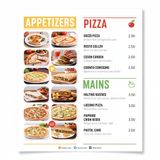
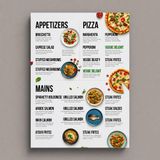
“Modern minimalist restaurant menu design, white background with colorful food photos in grid, sections for appetizers/pizza/mains, bold sans-serif fonts, vibrant accents, clean professional layout for casual dining.”
“Vintage minimalist restaurant logo for "Caffè Florian", retro cloche dome with steam and "Est. 1720" banner, classic typography, warm brown and cream tones, subtle texture on light background, vector emblem style.”
“Ad for 'Magic Burger'. Dynamic, exploded burger with all components (bun, patty, cheese, lettuce, tomato, sauce) suspended in mid-air. Emphasize photorealistic detail and a sense of motion. Dark, fiery background with glowing embers. Integrate text: 'MAGIC BURGER' as a prominent title, 'LIMITED TIME ONLY' as a secondary message, and '€6.99' in a starburst, all rendered with a fiery, glowing effect.”
“A candid street photo of an elderly Japanese man repairing a red bicycle in light rain, reflections on wet pavement, shallow depth of field, 50mm lens, natural skin texture, imperfect framing, motion blur from passing cars, cinematic but realistic, no stylization.”
“Ad for 'Magic Burger'. Dynamic, exploded burger with all components (bun, patty, cheese, lettuce, tomato, sauce) suspended in mid-air. Emphasize photorealistic detail and a sense of motion. Dark, fiery background with glowing embers. Integrate text: 'MAGIC BURGER' as a prominent title, 'LIMITED TIME ONLY' as a secondary message, and '€6.99' in a starburst, all rendered with a fiery, glowing effect.”
“Photorealistic scene inside a yellow New York taxi at night. A capybara is driving, wearing a yellow taxi driver cap and a dark jacket. It has a calm, professional expression and both front paws on the steering wheel. In the back seat sits a human businesswoman in a coat, looking at her phone with a completely normal, bored expression (as if this is just another normal ride). Through the windows you can see the streets of Manhattan at night with blurred lights. Realistic taxi interior, photorealistic, detailed fur and fabric, 35mm lens, night lighting with reflections, shallow depth of field.”
“Vintage minimalist restaurant logo for "Caffè Florian", retro cloche dome with steam and "Est. 1720" banner, classic typography, warm brown and cream tones, subtle texture on light background, vector emblem style.”
“Ad for 'Magic Burger'. Dynamic, exploded burger with all components (bun, patty, cheese, lettuce, tomato, sauce) suspended in mid-air. Emphasize photorealistic detail and a sense of motion. Dark, fiery background with glowing embers. Integrate text: 'MAGIC BURGER' as a prominent title, 'LIMITED TIME ONLY' as a secondary message, and '€6.99' in a starburst, all rendered with a fiery, glowing effect.”
Uncategorized
“Create a clear, 45° top-down isometric miniature 3D cartoon scene of Japan's signature dish: sushi, with soft refined textures, realistic PBR materials, gentle lighting, on a small raised diorama base with minimal garnish and plate. Solid light blue background. At top-center: 'JAPAN' in large bold text, 'SUSHI' below it, small flag icon. Perfectly centered, ultra-clean, high-clarity, square format.”
“A glass cube on a wooden table. Inside the cube is a small blue sphere. On top of the cube sits a red book. A green plant is behind the cube, partially visible through the glass. Soft window light from the left.”
“Hyper-photorealistic scene of fluffy baby animals—a golden retriever puppy, tabby kitten, baby bunny, and red fox kit—with big expressive eyes and ultra-detailed soft fur, playfully chasing butterflies and tumbling together in a lush wildflower meadow, warm golden sunrise light with god rays and dew sparkles, joyful wholesome vibe, 8K masterpiece.”
“Perfectly symmetrical mandala made entirely of real flowers, petals, leaves, fruits, and seeds in vibrant natural colors, intricate layered patterns with radial symmetry, top-down view on a soft neutral background, hyper-detailed organic textures and subtle shadows, photorealistic, 8K masterpiece.”
“Hyper-photorealistic interior of a lush Victorian glass greenhouse filled with exotic tropical plants, vibrant blooming orchids, tall ferns, colorful butterflies in flight, sunlight filtering through ornate glass roof creating realistic caustics and dew on leaves, intricate iron framework visible, misty atmosphere, 8K masterpiece.”
“Hyper-photorealistic full-body portrait of a female superhero standing triumphantly on a New York skyscraper rooftop at golden sunset, wearing a classic modest superhero costume with flowing cape, chest emblem, gloves, and boots in red and blue colors, practical design, short hair, strong determined heroic expression looking into the distance, powerful confident stance with hands on hips and cape billowing dramatically in the wind, detailed urban cityscape background, warm natural sunlight with sharp shadows and fabric highlights, ultra-sharp textures on suit, hair, and concrete, 8K masterpiece, empowering family-friendly style.”
Top Matchups
See how FLUX.2 [max] performs head-to-head against other AI models, ranked by community votes in blind comparisons.





FLUX.2 [max] is best for
See all Use CasesBlack Forest Labs' flagship model excels in Photorealism and Portrait categories, ranking #3 in both with win rates of 81.0% and 38.3% respectively. Performance is comparatively lower in commercial and branding applications, where it holds Rank #17 out of 19 models.
![FLUX.2 [max] — Text Rendering](https://assets.lumenfall.ai/EKGVcPwWwQfOHP1-m2MWYUR6rq0YVI4eZ7GnklhBgt4/rs:fill:400:300:1/plain/gs://lumenfall-prod-assets/22xeri3447j8zhvfef6x0w5n32r2@jpeg)
![FLUX.2 [max] — Photorealism](https://assets.lumenfall.ai/W_yDLhV4xVCALq0VlTkzwUaB_2Usd0RbNlpa_efzBlE/rs:fill:400:300:1/plain/gs://lumenfall-prod-assets/2y8znaa2ye0m1fc6tt16iqsqkzu3@jpeg)
Gallery
View all 12 imagesFLUX.2 [max] FAQ
How much does FLUX.2 [max] cost?
FLUX.2 [max] starts at $0.03 per image through Lumenfall. Pricing varies by provider. Lumenfall does not add any markup to provider pricing.
How do I use FLUX.2 [max] via API?
You can use FLUX.2 [max] through Lumenfall's OpenAI-compatible API. Send requests to the unified endpoint with model ID "flux.2-max". Code examples are available in Python, JavaScript, and cURL.
Which providers offer FLUX.2 [max]?
FLUX.2 [max] is available through Replicate and fal.ai on Lumenfall. Lumenfall automatically routes requests to the best available provider.
What is the maximum resolution for FLUX.2 [max]?
FLUX.2 [max] supports images up to 2048x2048 resolution.
Overview
FLUX.2 [max] is the flagship image generation model from Black Forest Labs, designed to push the boundaries of photorealism and compositional accuracy. As the most a capable entry in the FLUX.2 family, it functions as a multimodal tool capable of both high-fidelity text-to-image synthesis and sophisticated image-to-image editing. It is distinguished by its ability to follow complex prompts with high spatial precision while maintaining structural consistency across various aspect ratios.
Strengths
- Anatomical and Textual Precision: The model excels at rendering fine anatomical details—such as hands, eyes, and skin textures—and exhibits high accuracy when placing legible, coherent text within generated images.
- Prompt Adherence: It handles multi-subject prompts and complex spatial relationships (e.g., “a blue sphere balanced on a rough wooden cube behind a glass prism”) with significantly fewer hallucinations than previous iterations.
- Photorealistic Texture: The model produces outputs with improved dynamic range and lighting, effectively simulating professional photography across various lenses and lighting conditions.
- Versatile Modality: It supports both text and image inputs, making it highly effective for refined image editing, style transfer, and consistent character variations.
Limitations
- Computational Latency: Due to its high parameter count and focus on maximum quality, inference times are generally higher than the “pro” or “schnell” variants of the same family.
- Hardware Requirements: The model’s complexity makes it less suitable for real-time applications or low-latency environments compared to distilled or smaller models.
- Knowledge Cutoffs: Like all large-scale generative models, it may struggle with highly niche or very recent cultural events and specific technical diagrams that were not well-represented in its training data.
Technical Background
FLUX.2 [max] is built on a large-scale transformer-based architecture optimized for flow-based image generation. It utilizes a sophisticated latent diffusion process that integrates high-resolution visual tokens with rich text embeddings. Black Forest Labs employed advanced training techniques to improve the model’s understanding of physics and light, resulting in a more predictable output during the denoising process.
Best For
This model is best suited for professional creative workflows, advertising imagery, and high-end concept art where visual fidelity is more critical than generation speed. It is an ideal choice for tasks requiring precise text rendering or consistent architectural details. FLUX.2 [max] is available for testing and integration through Lumenfall’s unified API and playground, allowing developers to compare its output against other models in the FLUX family.
Try FLUX.2 [max] in Playground
Generate images with custom prompts — no API key needed.