

Alibaba's Qwen image editing model for instruction-based image modifications and transformations
Settled by community votes across 4 shared challenges, with an AI judge weighing in on each.
Qwen Image Edit 2511
19.9
arena score
#15 of 23 in Image Editing
Skill signature
Not enough comparable category data
The chart appears once both models have ratings across at least three shared arena categories.
Seedream 4.0
24.6
arena score
#16 of 44 in Text-to-Image
Vote tally
Where the votes landed
Qwen Image Edit 2511
88.6%
win rate
Ties
0.0%
Seedream 4.0
11.4%
win rate
88.6%
0.0% ties
11.4%
Shared challenges
4
Challenge by challenge
The strongest take from each model on every shared challenge, with the AI judge's read.
Man and Car in California
EditingEdit instruction
“Make a photo of the man driving the car down the California coastline”
Source
Qwen Image Edit 2511
Seedream 4.0
98% wins
0% ties
2% wins
AI Judge Analysis
Qwen Image Edit 2511
- + Excellent preservation of the subject's face and hair details
- + Perfectly recreates the specific plaid pattern of the coat
- + High visual quality with realistic lighting and interior details
- − Changes the car model internally (dashboard/steering wheel no longer match a Rolls-Royce)
Seedream 4.0
- + Strongly preserves the exterior model of the original car (Rolls-Royce Phantom Drophead Coupe)
- + Excellent composition capturing the movement of the car on the coastline
- + Good integration of the driver into the scene
- − Loss of fine detail in the subject's face and hair
- − The plaid pattern of the coat is significantly simplified and altered
Verdict: This is a close competition between two different approaches. Qwen Image Edit 2511 focuses on preserving the man's identity and clothing with incredible accuracy, although it sacrifices the specific car model's interior details. Seedream 4.0 does a better job of preserving the car's exterior identity and the sense of motion, but lose the likeness of the man and the detail of his outfit. Qwen Image Edit 2511 is the winner for its superior rendering of the subject's face and textures.
Bald man challenge
Image EditingEdit instruction
“Give the person a full, thick head of natural hair with realistic texture, density, and a natural hairline. Preserve facial features and lighting.”
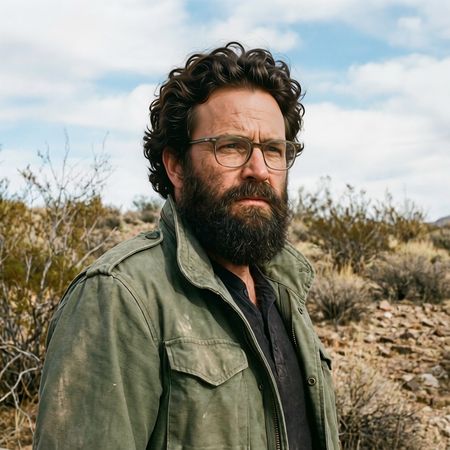
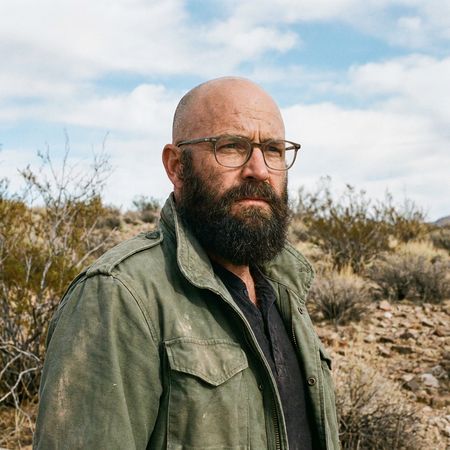
Qwen Image Edit 2511
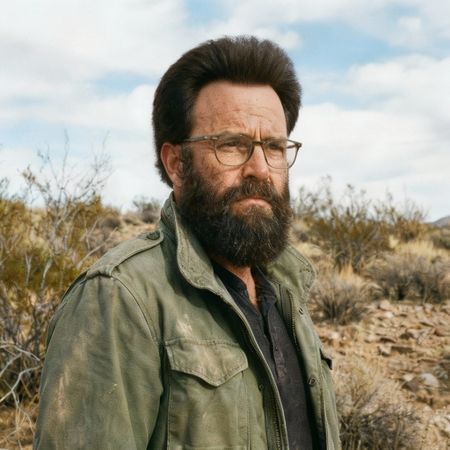
Seedream 4.0
83% wins
0% ties
17% wins
AI Judge Analysis
Qwen Image Edit 2511
- + Excellent texture and realistic hair volume
- + Very natural integrated hairline
- + Perfectly preserved the background and lighting
- − Subtle change to the eye/brow region makes the face look slightly different from the source
Seedream 4.0
- + Successfully added a full head of hair
- + Maintained the face shape and character well
- − Hair texture looks slightly fuzzy or synthetic compared to the sharp beard
- − The hairline is very straight and lacks a natural recession or transition
- − Lower technical resolution on the hair fibers
Verdict: Qwen Image Edit 2511 produced a much more realistic result with convincing hair texture and a believable hairline, though it slightly softened some facial details. Seedream 4.0 successfully followed the prompt but the hair appears somewhat like a wig due to its uniform texture and lack of a natural transition at the forehead.
Studio Ghibli Anime Style
EditingEdit instruction
“Transform this photo into a Studio Ghibli–inspired illustration. Use soft pastel colors, hand-painted textures, gentle lighting, dreamy backgrounds, and a warm, nostalgic mood”
Source
Qwen Image Edit 2511
Seedream 4.0
40% wins
0% ties
60% wins
AI Judge Analysis
Qwen Image Edit 2511
- + Excellent preservation of the original subjects' facial features and expressions
- + Accurate reproduction of the clothing patterns, specifically the plaid shirt
- + Maintains the depth and complexity of the urban background
- − The art style leans more towards generic digital manhwa/anime rather than the specific Studio Ghibli aesthetic
- − The addition of sparkles feels a bit distracting and not characteristic of the requested style
Seedream 4.0
- + Perfectly captures the Studio Ghibli 'watercolor' and hand-painted texture look
- + Uses the soft pastel palette and dreamy lighting requested in the prompt
- + Excellent translation of the characters into the simplified anime character designs associated with the studio
- − Sacrifices the specific facial identities of the people in the original image for generic character faces
- − The background detail is almost entirely lost in favor of a watercolor wash
Verdict: Seedream 4.0 followed the stylistic instructions much more accurately, producing a result that truly feels like a Studio Ghibli watercolor illustration, despite losing the likeness of the original subjects. Qwen Image Edit 2511 preserved the original image details and identities much better but failed to fully capture the distinctive Ghibli art style, resulting in a more generic digital illustration.
Golden Hour Stroll
Image EditingEdit instruction
“Add dynamic motion to this photo: make hair blow in the wind, add leaves flying, energetic and lively feel.”
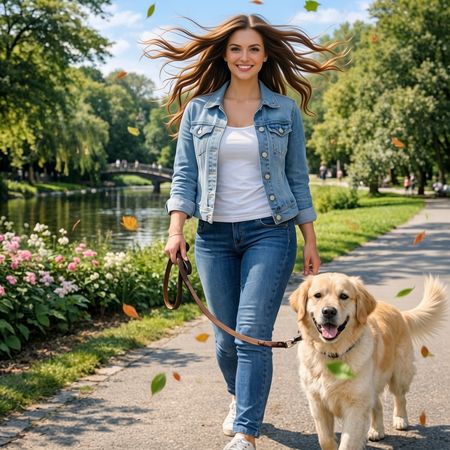
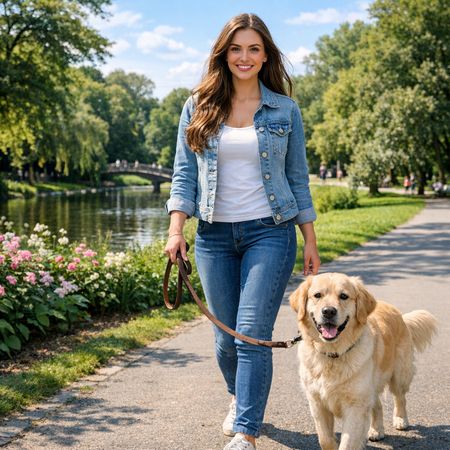
Qwen Image Edit 2511

Seedream 4.0
56% wins
0% ties
44% wins
AI Judge Analysis
Qwen Image Edit 2511
- + Excellent adherence to the 'hair blowing in the wind' instruction
- + Bright and colorful leaves add high energy to the scene
- + Perfectly preserves the woman's face and original clothing
- − Hair strands look a bit stiff and vectorized rather than natural
- − The dog's tail has a slightly awkward jagged edge after the edit
Seedream 4.0
- + The hair motion looks more realistic and natural
- + Good overall preservation of the source image colors and lighting
- − The woman's facial features were altered, losing the likeness of the original
- − The flying leaves are subtle and less energetic compared to the other model
Verdict: Qwen Image Edit 2511 followed all instructions perfectly, creating a high-energy scene while maintaining the exact likeness of the original subject. Seedream 4.0 provided more natural-looking hair movement, but it failed to preserve the woman's face correctly and the overall impact of the added motion was less dynamic.
Next steps
Explore each model
ByteDance's image generation model with integrated text-to-image and image editing capabilities in a unified architecture, supporting up to 4K resolution