
Alibaba's Qwen image editing model for instruction-based image modifications and transformations
Settled by community votes across 7 shared challenges, with an AI judge weighing in on each.
Qwen Image Edit 2511
20.2
arena score
#16 of 32 in Image Editing
Skill signature
· Image Editing
Wan 2.7 Pro
20.7
arena score
#38 of 62 in Text-to-Image
Vote tally
Where the votes landed
Qwen Image Edit 2511
0%
win rate
Ties
0%
Wan 2.7 Pro
0%
win rate
Shared challenges
7
Challenge by challenge
The strongest take from each model on every shared challenge, with the AI judge's read.
Man and Car in California
EditingEdit instruction
“Make a photo of the man driving the car down the California coastline”
Source
Qwen Image Edit 2511
Wan 2.7 Pro
AI Judge Analysis
Qwen Image Edit 2511
- + Excellent preservation of the man's identity, clothing, and hairstyle.
- + Strong composition that places the viewer inside the car with the subject.
- + Seamlessly blends the car's interior with the new coastal environment.
- − The steering wheel is positioned on the wrong side for a standard US road (California coastline context).
Wan 2.7 Pro
- + Successfully places the car from the source image on a coastal road.
- + Good lighting and shadows that match the sunset environment.
- − Completely failed to use the man from the source image, replacing him with a different person.
- − The scale of the driver is too small and poorly integrated into the seat.
Verdict: Qwen Image Edit 2511 followed the instructions perfectly, meticulously preserving the specific person's appearance and clothing while placing him in the car. Wan 2.7 Pro successfully edited the car into the environment but failed the core requirement of using the provided person, replacing him with a generic figure.
Pose & Character Mashup
EditingEdit instruction
“Use Image 1 as the exact pose reference and Image 2 as the character reference. Recreate the person/character from Image 2 in the exact dynamic pose and body position from Image 1. Keep the exact face, hair, clothing style/details, and expression from Image 2. Match the lighting and environment of Image 1. The final image must show the character from Image 2 performing the precise action/pose from Image 1 with perfect anatomy and natural integration.”
Source
Qwen Image Edit 2511
Wan 2.7 Pro
AI Judge Analysis
Qwen Image Edit 2511
- + Successfully integrated elements of the background from Image 2.
- + Followed the character reference by including the man from Image 2.
- − Failed to replace the person in the pose; instead, it layered both subjects in a chaotic composition.
- − Poor edge blending and lighting mismatches between the two characters.
- − Anatomically incorrect legs and floating feet on the red box.
Wan 2.7 Pro
- + Retained the high resolution and framing of the pose reference.
- − Completely ignored the instruction to change the character to the subject of Image 2.
- − Failed to perform any significant editing requested by the prompt.
- − No elements of Image 2 (face, clothing, or character) are present.
Verdict: Both models failed the complex image editing task. Qwen Image Edit 2511 attempted to combine both images but resulted in a visual mess that didn't apply the pose to the correct character, while Wan 2.7 Pro simply returned the original pose reference with no changes. Qwen is slightly preferred only because it attempted to use both source images, even though the execution was technically poor.
Outfit Transfer Challenge
EditingEdit instruction
“Use Image 1 as the base person. Dress them in the exact elaborate outfit from Image 2 (including all layers, accessories, jewelry, and shoes). Carefully adapt the clothing to the body shape and pose in Image 1 while maintaining realistic fabric behavior, correct proportions, and perfect lighting/shadow matching. Keep the person’s exact face, hair, and background completely unchanged.”
Source
Qwen Image Edit 2511
Wan 2.7 Pro
AI Judge Analysis
Qwen Image Edit 2511
- + Successfully replicates the specific outfit from Image 2 including the blue coat, scarf, and jeans.
- + Matches the hand-in-pocket pose from Image 2 onto the new background character.
- − Completely failed to preserve the face and skin of the person in Image 1, replacing him with the man from Image 2.
- − Changed the character's pose from Image 1 significantly.
Wan 2.7 Pro
- + Perfectly preserves the exact face, skin condition, and hair of the person in Image 1.
- + Retains the background and general body orientation of Image 1.
- − Failed to use the requested outfit from Image 2, instead generating a generic gold-patterned jacket.
- − The clothing does not match the layers or accessories shown in the reference image.
Verdict: Both models struggled with the complexity of this task but in opposite ways. Qwen Image Edit 2511 correctly identified the clothing from Image 2 but failed to preserve the base person as requested, essentially copy-pasting the person from the second image into the first. Wan 2.7 Pro correctly preserved the person's identity and skin patterns but completely ignored the style and details of the required outfit, making it a failed edit for a specific clothing transfer.
Bald man challenge
Image EditingEdit instruction
“Give the person a full, thick head of natural hair with realistic texture, density, and a natural hairline. Preserve facial features and lighting.”
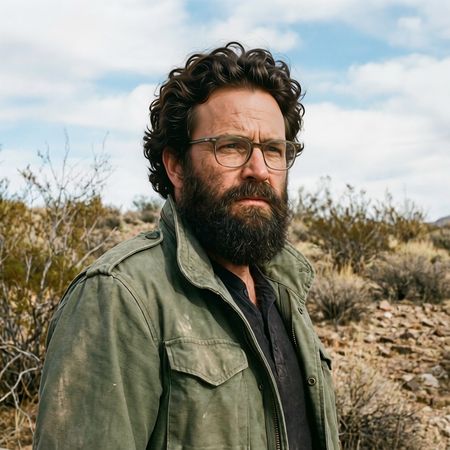

Qwen Image Edit 2511
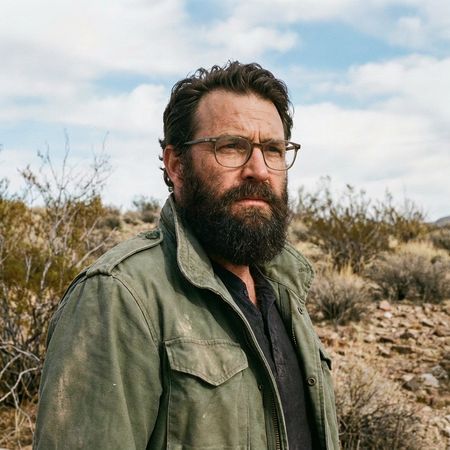
Wan 2.7 Pro
AI Judge Analysis
Qwen Image Edit 2511
- + Excellent texture and volume of the added hair
- + Perfect preservation of facial features and lighting
- + Seamless blending at the temples and sideburns
- − The hairline on the forehead is a bit high/uniform
Wan 2.7 Pro
- + Natural and realistic hairline shape
- + Strong preservation of the source image's identity
- + Texture matches the existing beard well
- − The hair on top is slightly sparse and patchy in terms of density
- − Less 'thick' than requested compared to the other model
Verdict: Both models performed excellently in terms of preserving the original image's facial details and background. Qwen Image Edit 2511 provided a much thicker and more voluminous head of hair as requested, while Wan 2.7 Pro offered a more conservative and slightly thinner result that, while realistic, didn't match the 'thick' instruction as well as its competitor.
Over-the-top cartoon caricature
EditingEdit instruction
“Create a caricature of me and my job. Make it exaggerated and humorous, incorporating my profession as a tv show anchor and my love for dogs and hockey.”
Source
Qwen Image Edit 2511
Wan 2.7 Pro
AI Judge Analysis
Qwen Image Edit 2511
- + Excellent caricature style with classic 'large head' exaggeration.
- + Strong 'TV anchor' vibe with a detailed news desk, microphone, and studio background.
- + Good facial likeness preservation from the source image within the cartoon format.
- − Completely missed the hockey element requested in the prompt.
- − Contains gibberish text in the speech bubble.
- − Strange artifacts like a candle on the desk that feels out of place.
Wan 2.7 Pro
- + Included all three prompt elements: TV anchor (suit/mic), dogs, and hockey (jerseys and stick).
- + Legible English text in the speech bubbles.
- + Clean vector-like illustration style with vibrant colors.
- − The caricature exaggeration is slightly less 'humanoid' than Model A, feeling a bit more generic.
- − The 'hockey stick' held by the anchor is strangely fused with a microphone head.
- − The composition is a bit clustered at the bottom with three dogs.
Verdict: Wan 2.7 Pro is the clear winner because it successfully incorporated every element of the prompt, including the 'hockey' requirement which Qwen Image Edit 2511 missed entirely. While Qwen produced a more traditional caricature head-to-body ratio, Wan 2.7 Pro's use of hockey jerseys on the dogs and legible speech bubbles makes it a much more effective interpretation of the user's request.
Studio Ghibli Anime Style
EditingEdit instruction
“Transform this photo into a Studio Ghibli–inspired illustration. Use soft pastel colors, hand-painted textures, gentle lighting, dreamy backgrounds, and a warm, nostalgic mood”
Source
Qwen Image Edit 2511
Wan 2.7 Pro
AI Judge Analysis
Qwen Image Edit 2511
- + Excellent preservation of the original pose and facial expressions
- + Successful application of soft, warm lighting and pastel colors
- + High clarity and clean line work
- − The style leans more towards modern anime/webtoon than the specific hand-painted Ghibli texture
- − Added unnecessary glitter/sparkle artifacts on the clothing
Wan 2.7 Pro
- + Perfectly captures the requested hand-painted texture with a watercolor aesthetic
- + Strong adherence to the Studio Ghibli 'retro' illustration style
- + Excellent color palette that feels nostalgic and warm
- − Loses some of the sharpness in facial features compared to the source
- − Slight distortion in the background line work
Verdict: Both models did an exceptional job of preserving the composition and characters of the 'distracted boyfriend' meme. Qwen Image Edit 2511 produces a cleaner, more modern anime look, but Wan 2.7 Pro better captures the specific 'hand-painted' and 'nostalgic' requirements of a Studio Ghibli-inspired piece through its beautiful watercolor textures.
Golden Hour Stroll
Image EditingEdit instruction
“Add dynamic motion to this photo: make hair blow in the wind, add leaves flying, energetic and lively feel.”
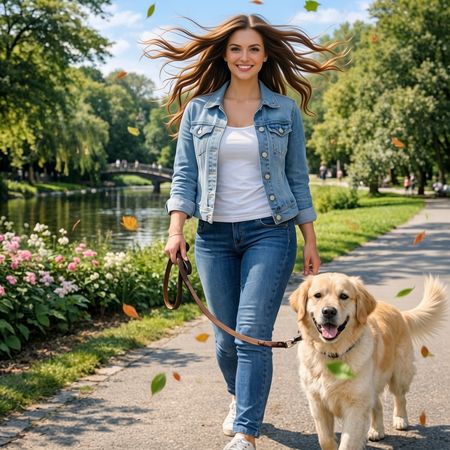

Qwen Image Edit 2511
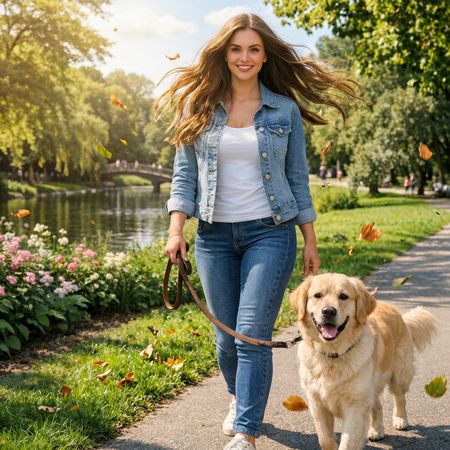
Wan 2.7 Pro
AI Judge Analysis
Qwen Image Edit 2511
- + Excellent preservation of the source image's identity and background details.
- + Accurately renders hair blowing outward symmetrically to simulate motion.
- + Includes colorful flying leaves as requested.
- − The hair strands appear somewhat stiff and digitally rendered rather than photographic.
- − The leaves have a flat, illustrative quality that doesn't perfectly match the scene's lighting.
Wan 2.7 Pro
- + The hair motion looks very natural and follows a more realistic physics-based flow.
- + The lighting on the falling leaves blends better with the sunlit environment.
- + Successfully conveys a more 'energetic' feel through the varied leaf positions and lighting.
- − Subtle changes to the background foliage, specifically an added tree/branch on the top right.
Verdict: Both models followed the instructions well, but Wan 2.7 Pro is the superior output because the hair motion and leaf integration look much more photographic and natural. Qwen Image Edit 2511's edits feel slightly more like 'stickers' placed over the image, whereas Wan 2.7 Pro feels like a dynamic snap from a real camera.
Next steps
Explore each model
Alibaba's Wan 2.7 Pro image generation and editing model with higher-quality outputs and support for 4K image generation