
Alibaba's Qwen image editing model for instruction-based image modifications and transformations
Settled by community votes across 6 shared challenges, with an AI judge weighing in on each.
Qwen Image Edit 2511
20.4
arena score
#15 of 37 in Image Editing
Skill signature
· Image Editing
Wan 2.5 (Preview)
25.4
arena score
#11 of 62 in Text-to-Image
Vote tally
Where the votes landed
Qwen Image Edit 2511
0%
win rate
Ties
0%
Wan 2.5 (Preview)
0%
win rate
Shared challenges
6
Challenge by challenge
The strongest take from each model on every shared challenge, with the AI judge's read.
Man and Car in California
EditingEdit instruction
“Make a photo of the man driving the car down the California coastline”
Source
Qwen Image Edit 2511
Wan 2.5 (Preview)
AI Judge Analysis
Qwen Image Edit 2511
- + Excellent preservation of the man's facial features and specific clothing items
- + Strong lighting integration between the subject and the coastline environment
- + High resolution and clear details on the car interior and textures
- − The car interior changed from a white/cream luxury dashboard to a wood-grain style which differs from the source
- − The steering wheel is positioned on the right side for a US coastline drive
Wan 2.5 (Preview)
- + Successfully preserved the exact exterior model and color of the Rolls Royce from the source image
- + Accurately depicts the car being driven on the coastline road from an external perspective
- + Correctly places the driver on the left side of the vehicle
- − The man's scale and appearance are significantly less detailed compared to the source image
- − Motion blur on the wheels is slightly inconsistent with the static background
Verdict: Qwen Image Edit 2511 excels at maintaining the identity and clothing of the subject, although it changes several interior details of the car. Wan 2.5 (Preview) does a much better job of preserving the specific car from the source image and creating a realistic driving scene, but the subject becomes a small, less-defined part of the composition. Qwen Image Edit 2511 is the winner for its impressive ability to transport a specific person into a new setting without losing their likeness.
Outfit Transfer Challenge
EditingEdit instruction
“Use Image 1 as the base person. Dress them in the exact elaborate outfit from Image 2 (including all layers, accessories, jewelry, and shoes). Carefully adapt the clothing to the body shape and pose in Image 1 while maintaining realistic fabric behavior, correct proportions, and perfect lighting/shadow matching. Keep the person’s exact face, hair, and background completely unchanged.”
Source
Qwen Image Edit 2511
Wan 2.5 (Preview)
AI Judge Analysis
Qwen Image Edit 2511
- + Successfully rendered some aspects of the outfit like the scarf and jeans.
- + Attempts a full-body composition that fits the beach scene.
- − Completely failed to preserve the base person's face, hair, and unique skin features.
- − Changed the person's identity to match the person in Image 2 instead of Image 1.
- − Poor lens/lighting match with noticeable blurring on the legs.
Wan 2.5 (Preview)
- + Accurately captured the outfit details including the scarf, coat, and accessories like the watch.
- + Maintained the framing and background of the original image well.
- − Completely failed to preserve the person from Image 1, replacing their face and features with the person from Image 2.
- − Ignored the instruction to keep hair and vitiligo skin patterns unchanged.
- − The head looks awkwardly pasted onto the neck.
Verdict: Both models failed the primary instruction of the edit, which was to keep the person from Image 1 (identifiable by his face and vitiligo) and simply dress him in the clothes from Image 2. Instead, both Qwen Image Edit 2511 and Wan 2.5 (Preview) simply generated the person from Image 2 inside the environment of Image 1. Wan 2.5 is slightly better in terms of garment texture and detail, but since both failed the fundamental preservation task, it is an overall failure for an editing prompt.
Bald man challenge
Image EditingEdit instruction
“Give the person a full, thick head of natural hair with realistic texture, density, and a natural hairline. Preserve facial features and lighting.”
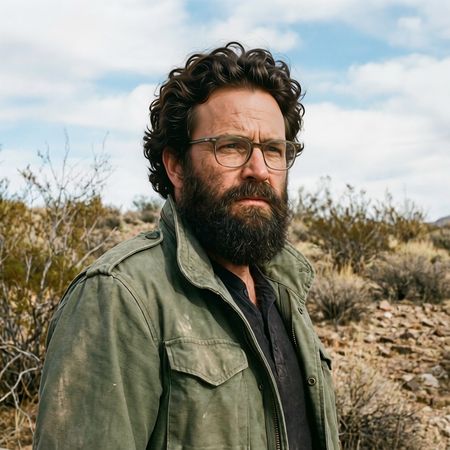

Qwen Image Edit 2511
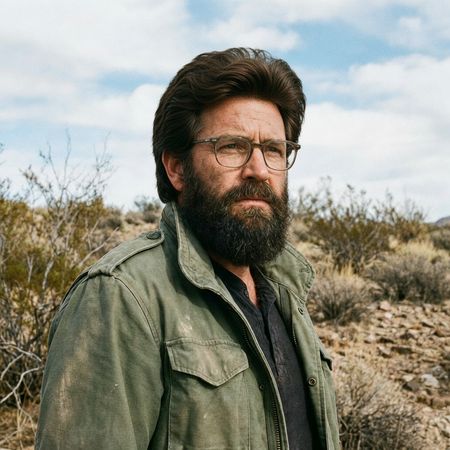
Wan 2.5 (Preview)
AI Judge Analysis
Qwen Image Edit 2511
- + Excellent preservation of the original face and beard.
- + The curly hair texture matches the beard's texture well.
- + Maintains original lighting and image sharpness.
- − The hairline transition is slightly visible/sharp near the forehead.
- − The hair volume is a bit extreme, sitting very high on the head.
Wan 2.5 (Preview)
- + Natural, classic hairstyle that matches the character's age.
- + Seamless blending at the hairline and temples.
- + Excellent preservation of the original image elements.
- − Slight softening of facial details compared to the original.
- − Small smudge-like artifact on the forehead below the hairline.
Verdict: Both models performed excellently, perfectly maintaining the background, clothing, and overall composition. Wan 2.5 (Preview) provided a more realistic and grounded hairstyle that blends naturally with the subject's face, whereas Qwen Image Edit 2511 followed the 'thick' instruction very literally with a extremely high-volume curly look. Wan 2.5 is the winner for a more convincing and aesthetically pleasing integration.
Over-the-top cartoon caricature
EditingEdit instruction
“Create a caricature of me and my job. Make it exaggerated and humorous, incorporating my profession as a tv show anchor and my love for dogs and hockey.”
Source
Qwen Image Edit 2511
Wan 2.5 (Preview)
AI Judge Analysis
Qwen Image Edit 2511
- + Excellent caricature style with exaggerated facial features
- + Successfully captures the TV anchor profession with a news desk and microphone
- − Completely missed the hockey element of the prompt
- − Includes gibberish text in a speech bubble
Wan 2.5 (Preview)
- + Successfully incorporates all three elements: TV anchor, dogs, and hockey
- + Maintains strong reference to the source image's clothing (denim shirt and black undershirt)
- + Playful composition with hockey stick and a dog in a jersey
- − The transition from the caricature area to the white background is a bit abrupt
- − The hockey scene on the monitor looks more like field hockey or a hybrid rather than standard ice hockey
Verdict: Wan 2.5 (Preview) provided a far more comprehensive response by including all elements of the prompt (profession, dogs, and hockey), whereas Qwen Image Edit 2511 completely ignored the hockey requirement. Additionally, Wan 2.5 (Preview) preserved the character's original attire from the source image, making the caricature more recognizable as the subject.
Studio Ghibli Anime Style
EditingEdit instruction
“Transform this photo into a Studio Ghibli–inspired illustration. Use soft pastel colors, hand-painted textures, gentle lighting, dreamy backgrounds, and a warm, nostalgic mood”
Source
Qwen Image Edit 2511
Wan 2.5 (Preview)
AI Judge Analysis
Qwen Image Edit 2511
- + Excellent preservation of the original subjects' facial features and expressions
- + Maintains the specific patterns and textures of the clothing perfectly
- + Accurately replicates the composition while adding a soft, illustrative glow
- − The art style leans more towards a generic digital semi-realism than the specific Studio Ghibli aesthetic
- − The addition of sparkles feels a bit superficial compared to a hand-painted texture
Wan 2.5 (Preview)
- + Stronger adherence to the Studio Ghibli art style with flatter shading and character design
- + Captures the 'hand-painted' look in the background and hair
- + Good use of thematic elements like falling leaves and soft lighting to enhance the mood
- − Loss of original likeness, particularly for the man whose face and hair were significantly altered
- − Simplification of the plaid pattern on the shirt loses some of the source detail
- − The girl on the left looks significantly different from the original photo
Verdict: Qwen Image Edit 2511 is a superior image editor in terms of technical preservation, keeping the exact facial expressions and clothing details of the original meme high-fidelity while applying a soft filter. However, Wan 2.5 (Preview) much more successfully captures the requested Ghibli art style, transforming the subjects into hand-drawn anime characters. While Wan 2.5 sacrifices subject likeness for stylistic accuracy, it fulfills the 'Studio Ghibli-inspired' prompt much more effectively.
Golden Hour Stroll
Image EditingEdit instruction
“Add dynamic motion to this photo: make hair blow in the wind, add leaves flying, energetic and lively feel.”
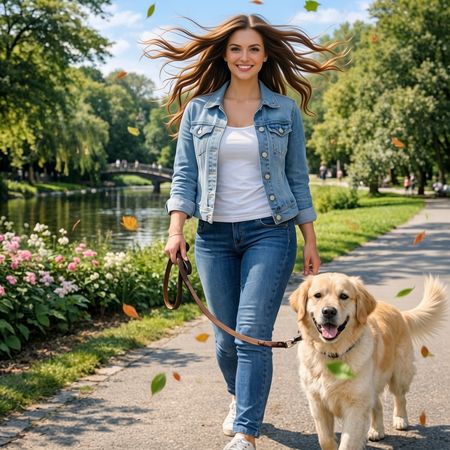

Qwen Image Edit 2511
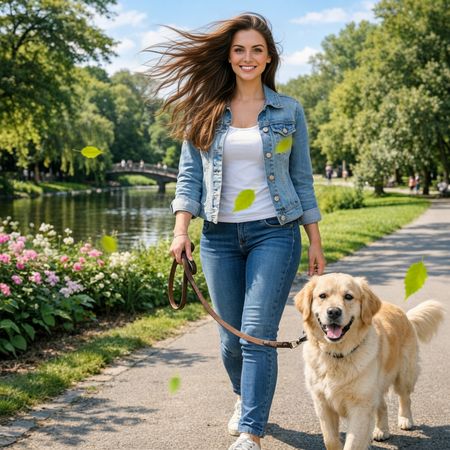
Wan 2.5 (Preview)
AI Judge Analysis
Qwen Image Edit 2511
- + Strong prompt adherence with many leaves added.
- + Successful hair motion effect.
- + Maintains character identity and environment perfectly.
- − Hair motion looks a bit symmetrical and unnatural.
- − Some leaves lack motion blur.
Wan 2.5 (Preview)
- + More natural, directional hair motion.
- + Subtle and tasteful integration of falling leaves.
- + Excellent preservation of the original image details.
- − Fewer leaves than Model A, resulting in slightly less 'energy'.
- − Leaf color is very uniform and saturated green compared to the environment.
Verdict: Both models performed excellent edits with near-perfect source preservation. Qwen Image Edit 2511 created a more 'energetic' feel with a higher quantity of leaves and more dramatic hair movement, whereas Wan 2.5 (Preview) produced a more realistic and aesthetically pleasing hair simulation that feels more like a real breeze.
Next steps
Explore each model
Alibaba's text-to-image and image-to-image generation model from the Wan AI suite, offering high-quality visual generation capabilities