
Alibaba's Qwen image editing model for instruction-based image modifications and transformations
Settled by community votes across 7 shared challenges, with an AI judge weighing in on each.
Qwen Image Edit 2509
19.0
arena score
#19 of 37 in Image Editing
Skill signature
· Image Editing
Qwen Image Edit 2511
20.4
arena score
#15 of 37 in Image Editing
Vote tally
Where the votes landed
Qwen Image Edit 2509
0%
win rate
Ties
0%
Qwen Image Edit 2511
0%
win rate
Shared challenges
7
Challenge by challenge
The strongest take from each model on every shared challenge, with the AI judge's read.
Man and Car in California
EditingEdit instruction
“Make a photo of the man driving the car down the California coastline”
Source
Qwen Image Edit 2509
Qwen Image Edit 2511
AI Judge Analysis
Qwen Image Edit 2509
- + Excellent preservation of the original car's exterior design.
- + Realistic motion blur and lighting for a high-speed driving shot.
- + Accurate coastline background.
- − The man appears only as a small, indistinct figure in the distance.
- − Loss of detail on the person's face and clothing from the source image.
Qwen Image Edit 2511
- + Near-perfect preservation of the man's face, hair, and specific clothing (coat and scarf).
- + Cleverly combines the interior of a luxury vehicle with the coastal background.
- + Maintains subject focus while following the driving prompt.
- − The car interior does not perfectly match the specific Rolls Royce model from the source (steering wheel and dash changes).
Verdict: Qwen Image Edit 2511 is the clear winner because it successfully merges both source images, carefully preserving the man's unique appearance, hairstyle, and clothing while placing him in a driving context. While Qwen Image Edit 2509 does a great job maintaining the car's exterior, the man becomes a tiny, barely recognizable detail, whereas 2511 maintains the identity of the person provided.
Pose & Character Mashup
EditingEdit instruction
“Use Image 1 as the exact pose reference and Image 2 as the character reference. Recreate the person/character from Image 2 in the exact dynamic pose and body position from Image 1. Keep the exact face, hair, clothing style/details, and expression from Image 2. Match the lighting and environment of Image 1. The final image must show the character from Image 2 performing the precise action/pose from Image 1 with perfect anatomy and natural integration.”
Source
Qwen Image Edit 2509
Qwen Image Edit 2511
AI Judge Analysis
Qwen Image Edit 2509
- + Successfully preserved the pose from Image 1.
- + Maintained the yellow background and environment of Image 1.
- − Failed the primary instruction to use the character from Image 2.
- − Basically returned Image 1 with slight color filtering.
Qwen Image Edit 2511
- + Included the character from Image 2 in the frame.
- + Applied the background from Image 2 to the new scene.
- − Failed to actually place the character from Image 2 in the pose from Image 1.
- − Produced a chaotic collage with two people instead of one integrated character.
- − The anatomy where the character and person overlap is incoherent.
Verdict: Both models failed the complex instruction of character re-posing. Qwen Image Edit 2509 essentially ignored the character reference and returned the pose reference, while Qwen Image Edit 2511 attempted to combine them but resulted in a messy, non-integrated composition with two different people. Because Qwen Image Edit 2511 at least attempted to incorporate elements of Image 2, it is slightly better than the near-duplicate of Image 1 provided by Qwen Image Edit 2509, though both failed the core task.
Outfit Transfer Challenge
EditingEdit instruction
“Use Image 1 as the base person. Dress them in the exact elaborate outfit from Image 2 (including all layers, accessories, jewelry, and shoes). Carefully adapt the clothing to the body shape and pose in Image 1 while maintaining realistic fabric behavior, correct proportions, and perfect lighting/shadow matching. Keep the person’s exact face, hair, and background completely unchanged.”
Source
Qwen Image Edit 2509
Qwen Image Edit 2511
AI Judge Analysis
Qwen Image Edit 2509
- + Maintains the subject's unique skin patterns (vitiligo) from Image 1.
- + Includes the sunglasses as requested.
- + Successfully places the full outfit on the subject in the correct environment.
- − Significant distortion of the facial structure and head shape.
- − Lower resolution and presence of artifacts around the edges of the person.
Qwen Image Edit 2511
- + Higher overall image quality and cleaner composite.
- + Correctly adapts the full outfit and pose to the beach background.
- + Natural-looking lighting and shadow integration.
- − Completely failed to preserve the person from Image 1, replacing them with the face/features of the person from Image 2.
- − Ignored the instruction to keep the person's exact face and hair unchanged.
Verdict: Both models struggled with the complex task of merging identity and clothing perfectly. Qwen Image Edit 2509 is the closer adherence to the prompt because it attempted to maintain the first person's identity and skin patterns, whereas Qwen Image Edit 2511 simply replaced the original person with the subject from Image 2. However, Qwen Image Edit 2509 suffered from severe distortion of the facial features.
Bald man challenge
Image EditingEdit instruction
“Give the person a full, thick head of natural hair with realistic texture, density, and a natural hairline. Preserve facial features and lighting.”
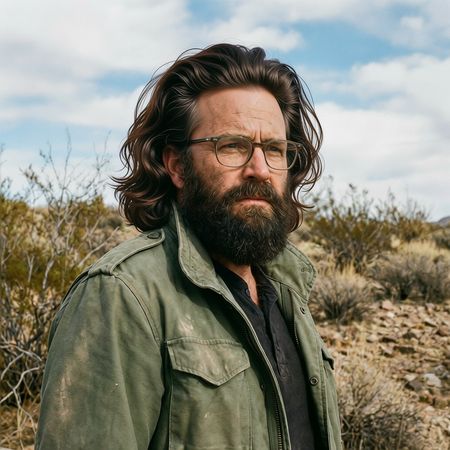

Qwen Image Edit 2509
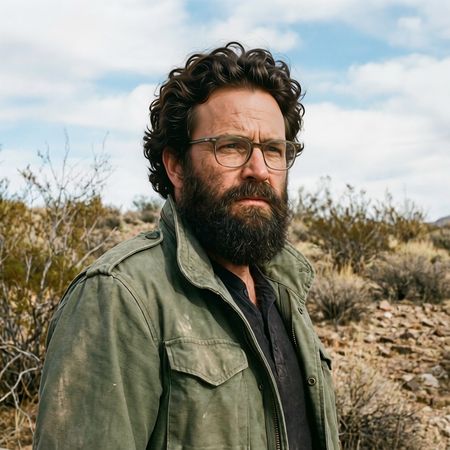
Qwen Image Edit 2511
AI Judge Analysis
Qwen Image Edit 2509
- + Excellent preservation of the original face, clothes, and background.
- + The hair texture matches the realism and lighting of the scene.
- + The hairline follows a very natural path across the forehead without distortion.
- − The hair volume is quite high, giving it a slightly 'styled' look rather than a flat natural look.
Qwen Image Edit 2511
- + Successfully adds a full head of hair with realistic curls.
- + Maintains the identity and lighting of the source image perfectly.
- + The curly texture adds a nice layer of detail that fits the character's rugged look.
- − The hair around the temples looks slightly detached from the skin upon close inspection.
Verdict: Both Qwen Image Edit 2509 and Qwen Image Edit 2511 performed exceptionally well, showing almost perfect preservation of the original image's facial details, clothing, and environment. 2511 is slightly preferred as its curly hair texture feels more grounded and 'natural' for the rugged character, whereas 2509's more voluminous, swept-back style feels a bit more intentional or styled.
Over-the-top cartoon caricature
EditingEdit instruction
“Create a caricature of me and my job. Make it exaggerated and humorous, incorporating my profession as a tv show anchor and my love for dogs and hockey.”
Source
Qwen Image Edit 2509
Qwen Image Edit 2511
AI Judge Analysis
Qwen Image Edit 2509
- + Successfully incorporates all elements: tv anchor desk, hockey rink background, and a dog.
- + Maintains the outfit (denim shirt) from the source image to help with identity recognition.
- + Creative composition with the hockey player in the background and anchor set in the foreground.
- − The dog is very small and lacks detail compared to the rest of the image.
- − The text in the speech bubble is nonsensical gibberish.
Qwen Image Edit 2511
- + High quality caricature style with clean lines and expressive facial features.
- + Includes a larger, more detailed dog that fits the cartoon style well.
- + Clearer 'tv show anchor' profession through the use of a professional suit and microphone.
- − Misses the 'hockey' requirement entirely; there are no hockey-related elements visible.
- − Replaced the user's denim shirt with a suit, reducing source preservation.
Verdict: Qwen Image Edit 2509 is the winner because it successfully incorporated every element of the prompt, including the specific request for hockey themes by placing the desk on a rink. While Qwen Image Edit 2511 produced a high-quality caricature and a great dog, it completely ignored the 'hockey' instruction and changed the subject's clothing more than necessary.
Studio Ghibli Anime Style
EditingEdit instruction
“Transform this photo into a Studio Ghibli–inspired illustration. Use soft pastel colors, hand-painted textures, gentle lighting, dreamy backgrounds, and a warm, nostalgic mood”
Source
Qwen Image Edit 2509
Qwen Image Edit 2511
AI Judge Analysis
Qwen Image Edit 2509
- + Successfully captures the stylistic essence of Studio Ghibli through simple line work and facial features.
- + Maintains excellent composition and structure while transforming the style.
- + Uses vibrant yet soft pastel-friendly colors consistent with the prompt.
- − The character in the foreground loses her distinct original facial likeness in the transition to the anime style.
Qwen Image Edit 2511
- + Retains a higher degree of the original subjects' facial features and likeness.
- + Good application of soft, dreamy lighting and background textures.
- − The art style is more of a generic 'painterly' filter than a true Studio Ghibli illustration.
- − The faces look slightly uncanny as they are hybrid between photo-realism and illustration.
Verdict: Qwen Image Edit 2509 is the clear winner as it fully commits to the Studio Ghibli aesthetic, redesigning the characters' features to fit the iconic anime style while perfectly preserving the composition and context of the 'distracted boyfriend' meme. Qwen Image Edit 2511 feels more like a stylized digital painting of the photo, failing to capture the specific Ghibli charm requested in the prompt.
Golden Hour Stroll
Image EditingEdit instruction
“Add dynamic motion to this photo: make hair blow in the wind, add leaves flying, energetic and lively feel.”
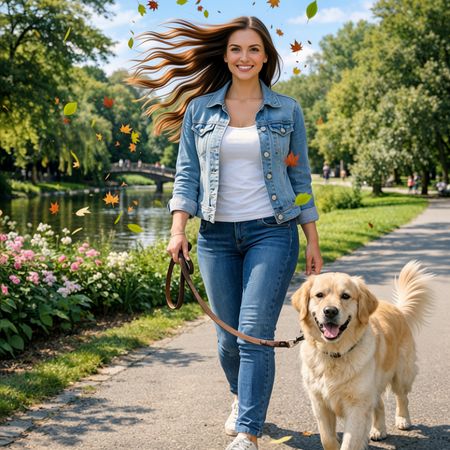

Qwen Image Edit 2509
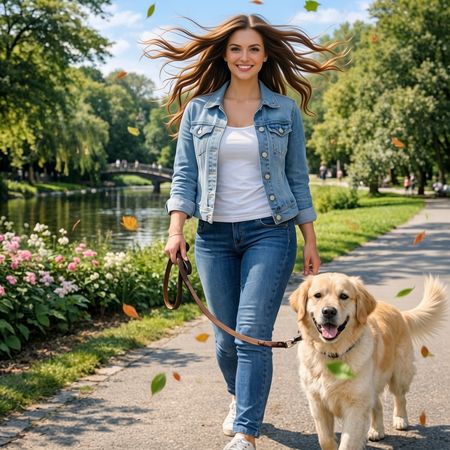
Qwen Image Edit 2511
AI Judge Analysis
Qwen Image Edit 2509
- + Excellent addition of high-contrast, multi-colored autumn leaves.
- + Successfully manipulated the hair to flow strongly in one direction.
- + Maintains excellent preservation of the subject's face and original background.
- − The wind direction for the hair and the leaves appears slightly inconsistent.
- − Some leaves have a flat, sticker-like appearance.
Qwen Image Edit 2511
- + Natural-looking hair motion that spreads out convincingly.
- + Better integration of leaves with motion blur, creating a sense of depth.
- + Higher consistency in the 'energetic' feel requested by the prompt.
- − The dog's tail looks slightly more detached and synthetic compared to the source.
Verdict: Both models performed exceptionally well at preserving the source image while adding the requested elements. Qwen Image Edit 2511 is the preferred winner because its application of motion blur to the leaves and the more natural, multi-directional flow of the hair creates a much more convincing sense of dynamic movement compared to the relatively static-looking leaves in Qwen Image Edit 2509.
Next steps
Explore each model
Alibaba's Qwen image editing model for instruction-based image modifications and transformations