
PrunaAI's sub-1-second multi-image editing model supporting up to 5 reference images with state-of-the-art quality
Settled by community votes across 6 shared challenges, with an AI judge weighing in on each.
P-Image Edit
14.9
arena score
#30 of 37 in Image Editing
Skill signature
· Image Editing
Wan 2.5 (Preview)
25.4
arena score
#11 of 62 in Text-to-Image
Vote tally
Where the votes landed
P-Image Edit
0%
win rate
Ties
0%
Wan 2.5 (Preview)
0%
win rate
Shared challenges
6
Challenge by challenge
The strongest take from each model on every shared challenge, with the AI judge's read.
Man and Car in California
EditingEdit instruction
“Make a photo of the man driving the car down the California coastline”
Source
P-Image Edit
Wan 2.5 (Preview)
AI Judge Analysis
P-Image Edit
- + Excellent preservation of the car's exact design and proportions from the source image.
- + Captures the person's unique hairstyle and features with high fidelity.
- + Superior motion blur on the road and wheels creates a realistic sense of speed.
- − The transition between the car body and the background scenery is slightly sharp.
Wan 2.5 (Preview)
- + Good integration of the car into the environment with realistic lighting.
- + Accurately represents the California coastline scenery including palm trees and cliffs.
- − Noticeable distortion of the car's front grille and headlight area compared to the source.
- − The driver's appearance is less distinct and less faithful to the source subject's features.
- − The motion blur on the wheels appears slightly artificial compared to the road.
Verdict: P-Image Edit is the clear winner as it perfectly preserves the structural integrity of both source subjects: the specific Rolls Royce model and the man's physical appearance. While Wan 2.5 (Preview) creates a more vibrant environment, it fails the core editing task by distorting the front of the car and losing the likeness of the man in the driver's seat.
Outfit Transfer Challenge
EditingEdit instruction
“Use Image 1 as the base person. Dress them in the exact elaborate outfit from Image 2 (including all layers, accessories, jewelry, and shoes). Carefully adapt the clothing to the body shape and pose in Image 1 while maintaining realistic fabric behavior, correct proportions, and perfect lighting/shadow matching. Keep the person’s exact face, hair, and background completely unchanged.”
Source
P-Image Edit
Wan 2.5 (Preview)
AI Judge Analysis
P-Image Edit
- + Successfully preserved the unique facial features, vitiligo pattern, and hair of the person in Image 1.
- + Accurately transferred the coat, scarf, and jeans from Image 2 to the target person.
- + Maintained the correct background and overall composition of the original scene.
- − Added a gold chain and bright yellow sneakers that were not present in the source outfit.
- − The lighting on the coat is a bit too bright compared to the beach environment.
Wan 2.5 (Preview)
- + Excellent fabric texture rendering and high visual quality.
- + The lighting and integration of the clothing into the scene is very realistic.
- − Completely failed to preserve the person from Image 1, replacing him with the man from Image 2.
- − Ignored the instruction to keep the person's face and hair completely unchanged.
- − Changed the camera framing to a much tighter shot.
Verdict: P-Image Edit followed the complex instructions much better by maintaining the identity, hair, and specific skin patterns of the original person while applying the requested clothing. Wan 2.5 (Preview) produced a high-quality image but failed the fundamental task of source preservation, essentially replacing the subject with the person from the reference outfit image.
Bald man challenge
Image EditingEdit instruction
“Give the person a full, thick head of natural hair with realistic texture, density, and a natural hairline. Preserve facial features and lighting.”
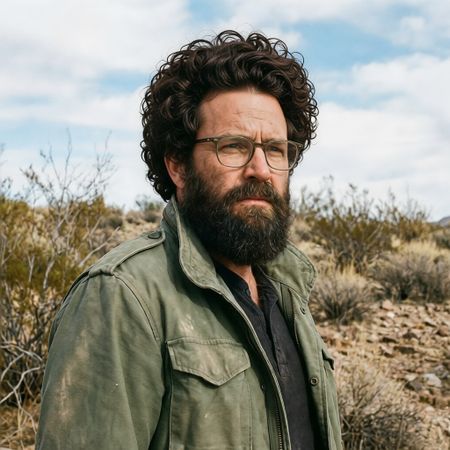

P-Image Edit
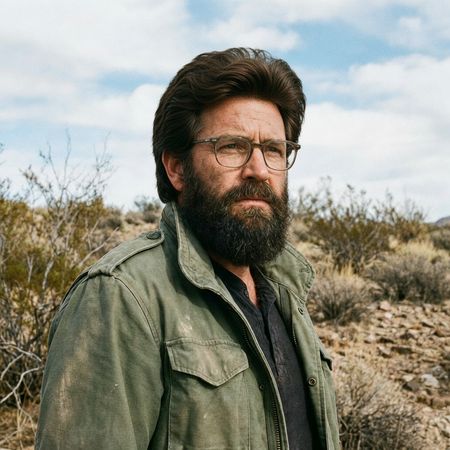
Wan 2.5 (Preview)
AI Judge Analysis
P-Image Edit
- + Excellent preservation of the original face, clothing, and background
- + Realistic curly texture that blends well with the existing beard
- − The hairline is a bit sharp/abrupt against the forehead
- − The volume and styling of the hair are somewhat exaggerated
Wan 2.5 (Preview)
- + More natural and believable hairstyle choice for the subject
- + Very realistic integration of the hairline and temples
- + Excellent preservation of lighting and image quality
- − Slightly altered the shape of the eyebrows compared to the original
Verdict: Both models successfully added hair while perfectly preserving the original background and clothing. Wan 2.5 (Preview) produced a much more realistic and age-appropriate hairstyle with a natural-looking hairline, whereas P-Image Edit chose a very large curly style that, while technically well-rendered, looks less integrated with the subject's features.
Over-the-top cartoon caricature
EditingEdit instruction
“Create a caricature of me and my job. Make it exaggerated and humorous, incorporating my profession as a tv show anchor and my love for dogs and hockey.”
Source
P-Image Edit
Wan 2.5 (Preview)
AI Judge Analysis
P-Image Edit
- + Excellent caricature style that maintains a strong resemblance to the source subject.
- + Creatively integrates the hockey setting as the background of the news desk.
- + High level of detail in the background, including spectators and electronic displays.
- − The dog element is small and features a strange, nonsensical red structure on its back.
- − The text on the screens is gibberish.
- − The microphone and hand interaction is a bit messy.
Wan 2.5 (Preview)
- + Features clear, prominent dog characters, including one wearing a hockey jersey.
- + Uses a classic big-head caricature style that emphasizes the 'exaggerated' instruction.
- + Clean composition with a white background focusing on the prompt elements.
- − The facial resemblance to the source image is weaker than the competitor.
- − The hockey content in the TV screen shows a player on a green field instead of ice.
- − The transition between the desk and the character's torso is awkwardly rendered.
Verdict: P-Image Edit is the preferred model because it successfully maintained the likeness of the woman while creatively blending the news anchor and hockey elements into a single scene. While Wan 2.5 (Preview) produced a higher contrast caricature and better dogs, it failed on the fine details, such as showing a hockey player on a grass field and losing the specific facial features of the source woman.
Studio Ghibli Anime Style
EditingEdit instruction
“Transform this photo into a Studio Ghibli–inspired illustration. Use soft pastel colors, hand-painted textures, gentle lighting, dreamy backgrounds, and a warm, nostalgic mood”
Source
P-Image Edit
Wan 2.5 (Preview)
AI Judge Analysis
P-Image Edit
- + Excellent preservation of the original subjects' faces and expressions.
- + Strong adherence to the 'soft pastel colors' and 'dreamy background' requirements.
- − The art style leans more towards modern digital manhwa/webtoon rather than the specific Studio Ghibli aesthetic.
- − Replaces the urban setting with generic park foliage, losing some of the source's context.
Wan 2.5 (Preview)
- + Captures the Studio Ghibli art style perfectly, especially in the facial features and line work.
- + Preserves the original street background while successfully translating it into a hand-painted anime look.
- + Includes thematic Ghibli elements like floating leaves and glowing dust motes.
- − The faces look slightly less like the original people compared to Model A, though they still capture the expressions well.
Verdict: While P-Image Edit does a great job of keeping the likenesses of the people in the original meme, it fails to capture the specific 'Studio Ghibli' style, looking more like a generic modern illustration. Wan 2.5 (Preview) successfully transforms the image into a authentic-looking anime still that perfectly matches the requested aesthetic while maintaining the composition and context of the source image.
Golden Hour Stroll
Image EditingEdit instruction
“Add dynamic motion to this photo: make hair blow in the wind, add leaves flying, energetic and lively feel.”
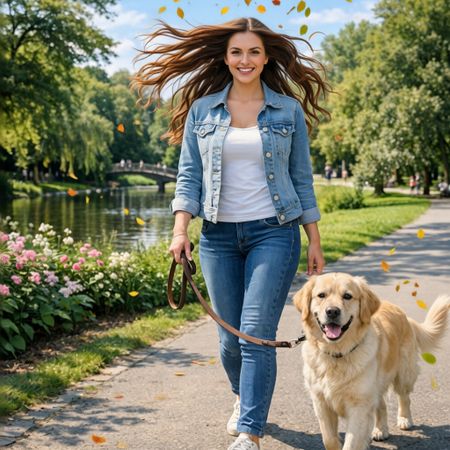

P-Image Edit
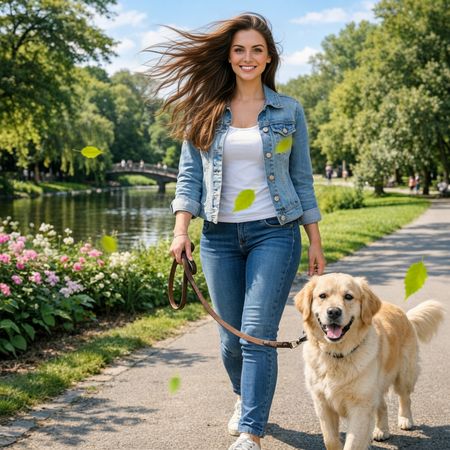
Wan 2.5 (Preview)
AI Judge Analysis
P-Image Edit
- + Excellent subject preservation, maintaining the original facial features and clothing accurately.
- + Highly dynamic hair motion that flows symmetrically and creates a sense of energy.
- + Well-distributed leaves that look like they belong in the autumn-toned palette of the scene.
- − The hair edit appears slightly more 'painted on' compared to the photographic texture of the original.
Wan 2.5 (Preview)
- + Naturalistic hair movement that follows a consistent wind direction.
- + Maintains very high image fidelity and lighting consistency across the entire frame.
- + Realistic integration of flying leaves with motion blur.
- − The green of the leaves is overly saturated and does not match the foliage in the background.
- − Slightly less dynamic hair volume compared to the other model.
Verdict: Both models successfully interpreted the request for dynamic motion. P-Image Edit provides a more dramatic and energetic hair transformation while perfectly preserving the person's face. however, Wan 2.5 (Preview) offers a more realistic, directional wind effect that feels more physically plausible, despite the oddly bright green color of the added leaves.
Next steps
Explore each model
Alibaba's text-to-image and image-to-image generation model from the Wan AI suite, offering high-quality visual generation capabilities