
PrunaAI's sub-1-second multi-image editing model supporting up to 5 reference images with state-of-the-art quality
Settled by community votes across 7 shared challenges, with an AI judge weighing in on each.
P-Image Edit
14.9
arena score
#30 of 37 in Image Editing
Skill signature
· Image Editing
Qwen Image Edit 2509
19.0
arena score
#19 of 37 in Image Editing
Vote tally
Where the votes landed
P-Image Edit
0.0%
win rate
Ties
0.0%
Qwen Image Edit 2509
100.0%
win rate
0.0%
0.0% ties
100.0%
Shared challenges
7
Challenge by challenge
The strongest take from each model on every shared challenge, with the AI judge's read.
Man and Car in California
EditingEdit instruction
“Make a photo of the man driving the car down the California coastline”
Source
P-Image Edit
Qwen Image Edit 2509
AI Judge Analysis
P-Image Edit
- + Excellent preservation of the car's original design and proportions
- + Highly realistic motion blur on the road and wheels
- + Correct identification of the subject's hairstyle from the second source image
- − The driver is positioned a bit low in the seat, making him hard to see
- − Slightly less vibrant color palette compared to model B
Qwen Image Edit 2509
- + Creative use of hair movement to imply wind while driving
- + Vibrant and cinematic lighting and color grading
- + Dynamic composition with a strong sense of speed
- − Minor distortion of the car's body length and rear proportions
- − Artifacts on the road surface lines and a less realistic motion blur
Verdict: P-Image Edit (Model A) is the winner as it perfectly preserves the source image of the car while accurately integrating the individual from the second source image into a realistic California coastline setting. While Qwen Image Edit 2509 (Model B) offers more cinematic lighting and fun hair physics, it slightly distorts the car's actual model and has less clean motion rendering.
Pose & Character Mashup
EditingEdit instruction
“Use Image 1 as the exact pose reference and Image 2 as the character reference. Recreate the person/character from Image 2 in the exact dynamic pose and body position from Image 1. Keep the exact face, hair, clothing style/details, and expression from Image 2. Match the lighting and environment of Image 1. The final image must show the character from Image 2 performing the precise action/pose from Image 1 with perfect anatomy and natural integration.”
Source
P-Image Edit
Qwen Image Edit 2509
AI Judge Analysis
P-Image Edit
- + Successfully integrated character features like face, sunglasses, and scarf.
- + Maintained the dynamic pose from Image 1.
- + Correctly swapped the clothing style to match Image 2's black outfit.
- − Significant anatomy errors, including a foot emerging from the head area and distorted limbs.
- − Added long feminine hair that contradicts the character from Image 2.
- − Poor blending between different photographic elements resulting in a 'cut-and-paste' look.
Qwen Image Edit 2509
- + Perfect preservation of the original Image 1 background and lighting.
- − Failed the core task of replacing the character from Image 1 with the one from Image 2.
- − Produced an almost identical copy of Image 1 with zero character editing.
- − Did not incorporate the scarf, sunglasses, or clothing from Image 2.
Verdict: P-Image Edit attempted the complex task of merging character details from Image 2 onto the pose of Image 1, though it suffered from severe anatomical distortions and odd hair choices. Qwen Image Edit 2509 failed the instruction entirely, providing what is essentially a copy of the source pose image. P-Image Edit is the preferred choice solely because it made a visible effort to fulfill the edit requested.
Outfit Transfer Challenge
EditingEdit instruction
“Use Image 1 as the base person. Dress them in the exact elaborate outfit from Image 2 (including all layers, accessories, jewelry, and shoes). Carefully adapt the clothing to the body shape and pose in Image 1 while maintaining realistic fabric behavior, correct proportions, and perfect lighting/shadow matching. Keep the person’s exact face, hair, and background completely unchanged.”
Source
P-Image Edit
Qwen Image Edit 2509
AI Judge Analysis
P-Image Edit
- + Successfully extracted and applied the coat and scarf layers while maintaining the subject's face.
- + Accurately identifies the need for jewelry, adding a chunky gold necklace.
- + Good preservation of the background and wooden structure.
- − Included bright yellow/blue shoes that were not present in either source image.
- − The subject's facial features and vitiligo patterns changed significantly compared to Image 1.
- − The scarf pattern is simplified compared to the source.
Qwen Image Edit 2509
- + Successfully applied the sunglasses from Image 2 to the subject's face.
- + Maintains the pose and slouching lean from Image 2 more effectively than Model A.
- + Higher fidelity reproduction of the plaid scarf pattern.
- − The person's face was completely altered to look like a fusion of both men rather than keeping the base person.
- − The shoes are generic black boots not found in the source image.
- − Overall image suffers from high contrast and loss of detail in shadow areas.
Verdict: P-Image Edit did a better job of attempting to keep the base person's face and original vitiligo patterns, though it failed to include the sunglasses and added hallucinated shoes. Qwen Image Edit 2509 captured the plaid scarf and sunglasses better but failed the primary instruction to keep the person's face 'completely unchanged,' resulting in a composite person. P-Image Edit is the preferred winner for better preservation of the source person and background.
Bald man challenge
Image EditingEdit instruction
“Give the person a full, thick head of natural hair with realistic texture, density, and a natural hairline. Preserve facial features and lighting.”
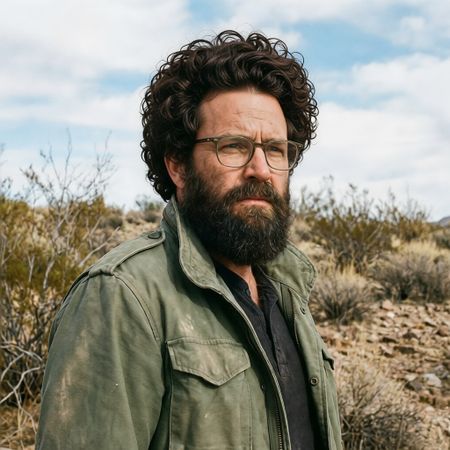

P-Image Edit
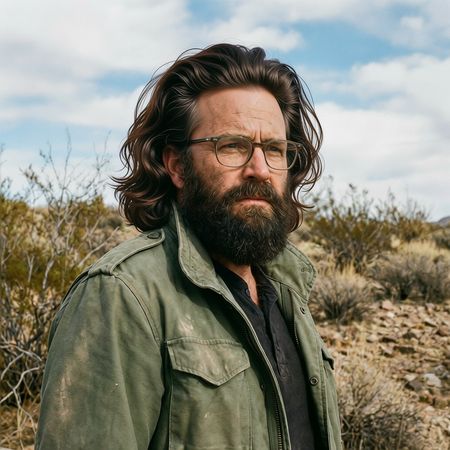
Qwen Image Edit 2509
0% wins
0% ties
100% wins
AI Judge Analysis
P-Image Edit
- + Excellent preservation of the original facial features and environment
- + Naturally rendered curly hair texture
- + Perfect lighting match with the source image
- − The hairline on the forehead looks slightly superimposed rather than integrated
Qwen Image Edit 2509
- + Natural integration of the hairline and sideburns
- + Dynamic hair volume that fits the character's style
- + Accurately preserved the jacket and background
- − Subtle smoothing effect on the skin of the forehead compared to the original
- − Slightly glossy/synthetic look to some hair strands
Verdict: Both models performed exceptionally well, perfectly preserving the subject's face, clothing, and background. P-Image Edit provided a very believable curly texture, while Qwen Image Edit 2509 better integrated the hair with the existing sideburns for a more cohesive look. Qwen is the winner for the superior blend at the temples and forehead, making the hair look truly grown-in.
Over-the-top cartoon caricature
EditingEdit instruction
“Create a caricature of me and my job. Make it exaggerated and humorous, incorporating my profession as a tv show anchor and my love for dogs and hockey.”
Source
P-Image Edit
Qwen Image Edit 2509
AI Judge Analysis
P-Image Edit
- + Excellent caricature translation that feels professional and polished.
- + Cleverly integrates all three requirements: TV news desk, hockey rink backdrop, and dog accessories.
- + Maintains a high level of facial resemblance to the source image within the artistic style.
- − The dog element is a bit small and cluttered with an odd red object on its back.
- − The hand holding the microphone has perspective issues with the fingers.
Qwen Image Edit 2509
- + Successfully captures the 'exaggerated and humorous' aspect of a caricature with bold expressions.
- + Preserves the selfie-style framing and the specific clothing from the source image better than Model A.
- + Includes all elements: hockey, TV environment, and a dog.
- − The facial exaggeration borders on grotesque rather than charming.
- − The text in the speech bubble is nonsensical gibberish.
- − The dog is very small and lacks detail compared to the rest of the scene.
Verdict: P-Image Edit produced a more professional-looking caricature that successfully balanced the requested hobbies into a cohesive scene with a high-quality finish. Qwen Image Edit 2509 did a better job of preserving the source image's 'selfie' composition and clothing, but the facial distortion was less appealing and the text rendering was poor. P-Image Edit is the winner for its superior artistic execution and clear integration of the hockey and TV anchor elements.
Studio Ghibli Anime Style
EditingEdit instruction
“Transform this photo into a Studio Ghibli–inspired illustration. Use soft pastel colors, hand-painted textures, gentle lighting, dreamy backgrounds, and a warm, nostalgic mood”
Source
P-Image Edit
Qwen Image Edit 2509
AI Judge Analysis
P-Image Edit
- + Excellent preservation of the original subjects' facial structures and expressions.
- + Strong adherence to the requested 'dreamy background' with soft, painterly clouds.
- + Keeps the specific plaid pattern of the man's shirt very close to the source.
- − Art style leans more toward generic modern webtoon/manhwa than specific Ghibli aesthetics.
- − The background changes the urban setting of the original into a park, which was not explicitly requested.
Qwen Image Edit 2509
- + Expertly captures the Ghibli character design style, including eye shapes and soft shading.
- + Preserves the original urban background elements (street, bus) while applying the requested style.
- + Perfectly captures the 'warm, nostalgic' lighting and pastel color palette requested.
- − Faces are generalized into the anime style, losing some of the specific likeness of the source individuals.
- − Minor line work jitter on the plaid shirt pattern.
Verdict: P-Image Edit focuses on preserving the source image's realism and facial likeness but fails to truly capture the soul of the Ghibli art style. Qwen Image Edit 2509 successfully transforms the image into a genuine-looking anime still by modifying facial features and background textures to match the iconic Studio Ghibli aesthetic, while still maintaining the original composition.
Golden Hour Stroll
Image EditingEdit instruction
“Add dynamic motion to this photo: make hair blow in the wind, add leaves flying, energetic and lively feel.”
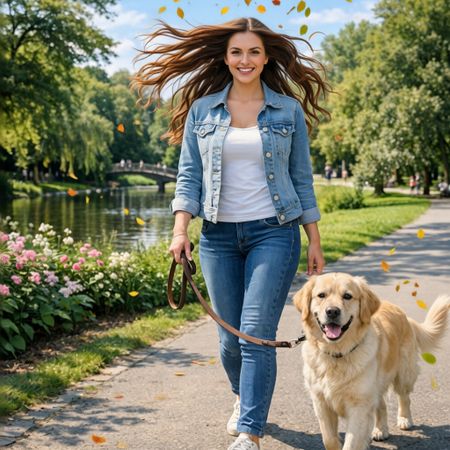

P-Image Edit
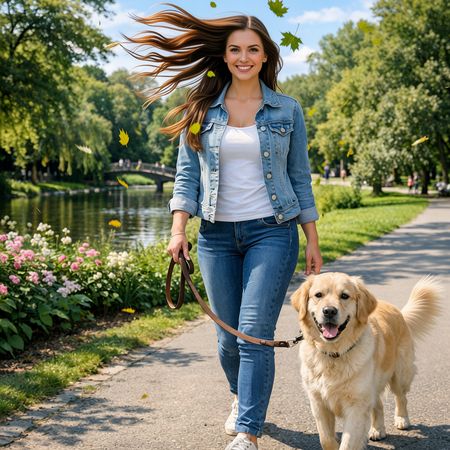
Qwen Image Edit 2509
AI Judge Analysis
P-Image Edit
- + Excellent preservation of the subject's face and original features.
- + Highly realistic integration of flowing hair that maintains the texture of the original hair.
- − The 'flying leaves' appear as small, indistinct orange and yellow specks rather than detailed leaves.
- − Lower count of leaves compared to the other model results in slightly less 'energetic' feel.
Qwen Image Edit 2509
- + Successfully added detailed, recognizable autumn leaves as requested.
- + Good hair motion that effectively follows the implied wind direction.
- − Noticeable over-smoothing and slight alteration of the subject's facial features, making her look different from the source image.
- − The hair rendering is a bit more illustrative and less realistic in texture compared to the source.
Verdict: Both models followed the instructions well, but P-Image Edit is the winner due to its superior preservation of the source person's identity and more realistic hair texture. While Qwen Image Edit 2509 added better-looking leaves, it modified the woman's face and eyes enough that she no longer looks like the same person from the source image.
Next steps
Explore each model
Alibaba's Qwen image editing model for instruction-based image modifications and transformations