

xAI's premium image generation model offering higher fidelity output and stronger performance on single-image editing benchmarks compared to the standard Grok Imagine model
Settled by community votes across 7 shared challenges, with an AI judge weighing in on each.
Grok Imagine Image Pro
24.7
arena score
#20 of 62 in Text-to-Image
Skill signature
· Text-to-Image
Qwen Image Edit 2509
19.0
arena score
#19 of 37 in Image Editing
Vote tally
Where the votes landed
Grok Imagine Image Pro
100.0%
win rate
Ties
0.0%
Qwen Image Edit 2509
0.0%
win rate
100.0%
0.0% ties
0.0%
Shared challenges
7
Challenge by challenge
The strongest take from each model on every shared challenge, with the AI judge's read.
Man and Car in California
EditingEdit instruction
“Make a photo of the man driving the car down the California coastline”
Source
Grok Imagine Image Pro
Qwen Image Edit 2509
AI Judge Analysis
Grok Imagine Image Pro
- + Excellent preservation of the original car's geometry and details
- + Realistic integration of the car into a winding coastal road
- + High visual quality with natural lighting and shadows
- − Completely loses the identity of the man from the source image, replacing him with a different person
Qwen Image Edit 2509
- + Successfully preserves the identity of the man, including his distinctive hairstyle
- + Dynamic composition with a strong sense of motion
- + Good interpretation of the California coastline theme
- − Noticeable warping of the car's front grille and side proportions
- − The man is positioned oddly high and offset from the driver's seat
- − Motion blur on the wheels is slightly inconsistent with the car's body
Verdict: Grok Imagine Image Pro creates a much more photorealistic and technically sound image of the car, but it fails the specific editing task of including the man from the source image. Qwen Image Edit 2509 successfully merges both subjects but suffers from significant anatomical and mechanical distortion. Qwen is the likely winner for better adhering to the multi-subject edit instruction, despite lower technical fidelity.
Pose & Character Mashup
EditingEdit instruction
“Use Image 1 as the exact pose reference and Image 2 as the character reference. Recreate the person/character from Image 2 in the exact dynamic pose and body position from Image 1. Keep the exact face, hair, clothing style/details, and expression from Image 2. Match the lighting and environment of Image 1. The final image must show the character from Image 2 performing the precise action/pose from Image 1 with perfect anatomy and natural integration.”
Source
Grok Imagine Image Pro
Qwen Image Edit 2509
AI Judge Analysis
Grok Imagine Image Pro
- + Excellent source preservation of the background and pose.
- + Maintains the high resolution and texture of the original Image 1.
- − Completely failed to use the character from Image 2, essentially returning the source Image 1 with minor face smoothing.
- − Failed to incorporate any clothing, hair, or facial features of the man in Image 2.
Qwen Image Edit 2509
- + Preserved the geometry and layout of Image 1 reasonably well.
- + Attempted a slight modification to the face shape, although still unsuccessful in capturing the character reference.
- − Completely failed to use the character from Image 2.
- − Significant degradation in image quality, introducing posterization, crushed blacks, and loss of fine hair detail.
- − The color grade is overly saturated and lacks the professional lighting of the source.
Verdict: Both Grok Imagine Image Pro and Qwen Image Edit 2509 failed the core task of character replacement, as neither model successfully integrated the man from Image 2 into the pose of Image 1. Grok Imagine Image Pro is slightly preferred only because it maintained the original image quality and resolution of the source, whereas Qwen Image Edit 2509 returned a low-quality, heavily compressed version of the original image without fulfilling the edit request.
Outfit Transfer Challenge
EditingEdit instruction
“Use Image 1 as the base person. Dress them in the exact elaborate outfit from Image 2 (including all layers, accessories, jewelry, and shoes). Carefully adapt the clothing to the body shape and pose in Image 1 while maintaining realistic fabric behavior, correct proportions, and perfect lighting/shadow matching. Keep the person’s exact face, hair, and background completely unchanged.”
Source
Grok Imagine Image Pro
Qwen Image Edit 2509
AI Judge Analysis
Grok Imagine Image Pro
- + Successfully preserved the exact face and hair of the subject from Image 1.
- + Maintained high image resolution and background consistency.
- + Followed the instruction to adapt clothing to the exact pose of the source person.
- − Completely failed to use the outfit from Image 2, generating an unrelated royal costume instead.
- − The hands are poorly rendered with multiple extra fingers.
Qwen Image Edit 2509
- + Correctly identified and applied the specific outfit from Image 2, including the coat, scarf, glasses, and jeans.
- + Successfully adapted the pose of the subject to match the lean and leg position of the person in Image 2.
- − Significantly altered the facial features and head shape of the base person, failing the preservation requirement.
- − The skin texture on the face is muddy and loses the detail of the vitiligo/sand from Image 1.
- − Lower overall image quality with visible sharpening artifacts.
Verdict: This comparison represents a trade-off between prompt following and identity preservation. Grok Imagine Image Pro perfectly preserved the subject's identity but completely ignored the content of Image 2, whereas Qwen Image Edit 2509 correctly transferred the requested attire but failed to keep the subject's face recognizable. Qwen is the better editor for this specific task as it attempted the clothing transfer, while Grok simply generated a new outfit.
Bald man challenge
Image EditingEdit instruction
“Give the person a full, thick head of natural hair with realistic texture, density, and a natural hairline. Preserve facial features and lighting.”
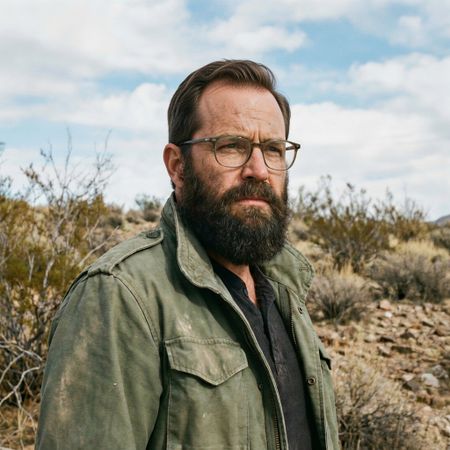

Grok Imagine Image Pro
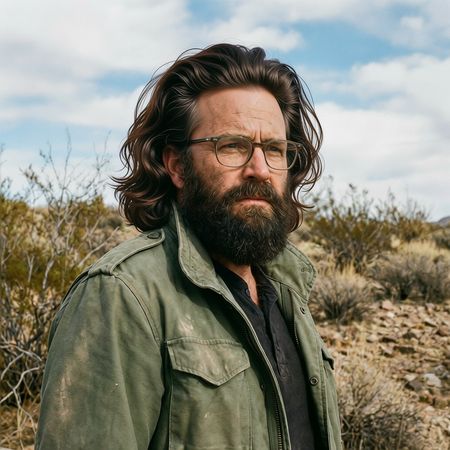
Qwen Image Edit 2509
100% wins
0% ties
0% wins
AI Judge Analysis
Grok Imagine Image Pro
- + Perfectly preserves facial features and glasses position
- + Highly realistic hairline and hair texture
- + Matches the lighting and grain of the original image seamlessly
- − The hair choice is quite conservative compared to the 'thick head of hair' request
Qwen Image Edit 2509
- + Successfully added a very thick head of hair
- + Maintains original facial features and environment accurately
- − The hair texture looks slightly stylized or wavy in a way that feels less natural
- − The integration between the forehead and the hair feels less polished than Model A
Verdict: Both models did an excellent job of preserving the original character and environment. Grok Imagine Image Pro is the winner because its integration of the hair is nearly indistinguishable from a real photograph, whereas Qwen Image Edit 2509 has a slightly more artificial appearance to the hair strands despite more literally following the 'full, thick' instruction.
Over-the-top cartoon caricature
EditingEdit instruction
“Create a caricature of me and my job. Make it exaggerated and humorous, incorporating my profession as a tv show anchor and my love for dogs and hockey.”
Source
Grok Imagine Image Pro
Qwen Image Edit 2509
AI Judge Analysis
Grok Imagine Image Pro
- + Excellent adherence to all prompt elements including technical profession details, hockey equipment, and many dogs.
- + High-quality rendering with readable, clever text like 'Pups & Pucks'.
- + Strong caricature style that maintains a recognizable likeness to the source subject.
- − Slightly cluttered composition with many overlapping elements.
Qwen Image Edit 2509
- + Preserved the blue denim jacket and the selfie-arm pose from the source image accurately.
- + Good capture of the exaggerated caricature facial features.
- + Includes the hockey and news elements in a cohesive studio/rink setting.
- − The dog element is very small and poorly integrated compared to the other requests.
- − Text in the speech bubbles and backgrounds is garbled and nonsensical.
- − The overall image quality and detail are lower than the competitor.
Verdict: Grok Imagine Image Pro is the clear winner as it fully embraced the 'exaggerated and humorous' request with high-quality illustrations of dogs, hockey gear, and news studio elements. While Qwen Image Edit 2509 did a better job preserving the specific clothing and pose from the source image, it failed to deliver a polished final result, with nonsensical text and a very minimal inclusion of the 'love for dogs' requirement.
Studio Ghibli Anime Style
EditingEdit instruction
“Transform this photo into a Studio Ghibli–inspired illustration. Use soft pastel colors, hand-painted textures, gentle lighting, dreamy backgrounds, and a warm, nostalgic mood”
Source
Grok Imagine Image Pro
Qwen Image Edit 2509
AI Judge Analysis
Grok Imagine Image Pro
- + Excellent preservation of the source image's composition and character poses.
- + Authentic watercolor texture that perfectly captures the Studio Ghibli 'hand-painted' aesthetic.
- + Maintains the specific facial expressions from the original meme while translating them into anime style.
- − The woman's dress color is slightly less vibrant than the original red, though it fits the soft theme.
Qwen Image Edit 2509
- + Successful transition to a clean anime art style.
- + Adheres well to the request for soft pastel colors, especially in the pinker dress.
- − The halftone/dotted digital texture looks more like a modern manga or comic than a hand-painted Ghibli film.
- − The man's facial expression is less accurate to the original 'distracted' look compared to Model A.
Verdict: Grok Imagine Image Pro is the clear winner as it perfectly captures the specific 'hand-painted' painterly texture associated with Studio Ghibli, whereas Qwen Image Edit 2509 uses a more generic digital halftone effect. Grok also does a superior job of preserving the iconic facial expressions of the 'Distracted Boyfriend' meme within the new art style.
Golden Hour Stroll
Image EditingEdit instruction
“Add dynamic motion to this photo: make hair blow in the wind, add leaves flying, energetic and lively feel.”
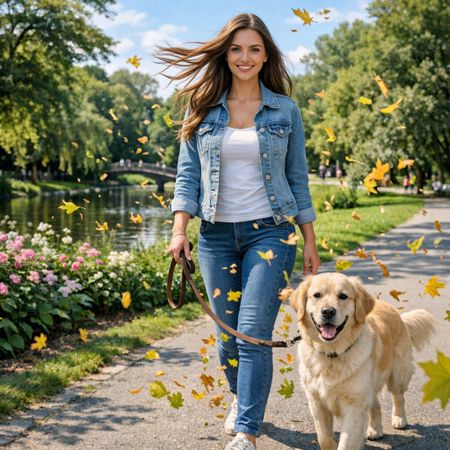

Grok Imagine Image Pro
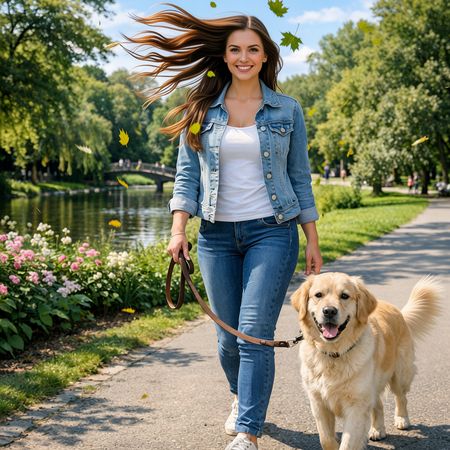
Qwen Image Edit 2509
AI Judge Analysis
Grok Imagine Image Pro
- + Excellent source preservation for the person, dog, and background.
- + The flying leaves feel more integrated with the scene's lighting and atmosphere.
- + Subtle and natural hair movement that matches the breeze direction.
Qwen Image Edit 2509
- + Highly dynamic hair motion that feels more wind-swept.
- + The dog's tail is edited to show motion, adding to the 'energetic' feel.
- + Leaves have a nice variety of shapes and colors.
- − The hair rendering is slightly more 'painted' and stylized compared to the original photorealistic texture.
- − Floating leaves are sparse and less naturally integrated into the foreground.
Verdict: Both models followed the instructions well, but Grok Imagine Image Pro is the preferred choice for its superior source preservation and more realistic integration of the flying leaves. While Qwen Image Edit 2509 added impressive motion to the hair and the dog's tail, the hair texture became slightly less realistic in the process.
Next steps
Explore each model
Alibaba's Qwen image editing model for instruction-based image modifications and transformations