
OpenAI's state-of-the-art image generation model with better instruction following and adherence to prompts
Settled by community votes across 7 shared challenges, with an AI judge weighing in on each.
GPT Image 1.5
27.0
arena score
#4 of 62 in Text-to-Image
Skill signature
· Text-to-Image
P-Image Edit
14.9
arena score
#30 of 37 in Image Editing
Vote tally
Where the votes landed
GPT Image 1.5
100.0%
win rate
Ties
0.0%
P-Image Edit
0.0%
win rate
100.0%
0.0% ties
0.0%
Shared challenges
7
Challenge by challenge
The strongest take from each model on every shared challenge, with the AI judge's read.
Man and Car in California
EditingEdit instruction
“Make a photo of the man driving the car down the California coastline”
Source
GPT Image 1.5
P-Image Edit
AI Judge Analysis
GPT Image 1.5
- + Excellent preservation of the subject's face and distinctive hairstyle
- + Compelling coastal background with realistic lighting
- + High level of detail on the interior and steering wheel
- − The character is placed on the passenger side for a left-hand drive car
- − Some perspective issues with the car relative to the road
P-Image Edit
- + Highly accurate preservation of the source car's model and angles
- + Strong sense of motion with the blurred road
- + Correct placement of the driver in the seat
- − The driver's face is somewhat obscured and lacks the detail of the source
- − The scale of the driver seems slightly small compared to the car interior
Verdict: GPT Image 1.5 does a superior job of preserving the identity and specific appearance of the man from the source image, though it mistakenly places him in the passenger seat (or creates a right-hand drive layout where the wheel is centered/on the right). P-Image Edit preserves the car much better and captures the sense of motion perfectly, but loses the character's facial detail. Overall, GPT Image 1.5 is preferred for the quality of the subject integration.
Pose & Character Mashup
EditingEdit instruction
“Use Image 1 as the exact pose reference and Image 2 as the character reference. Recreate the person/character from Image 2 in the exact dynamic pose and body position from Image 1. Keep the exact face, hair, clothing style/details, and expression from Image 2. Match the lighting and environment of Image 1. The final image must show the character from Image 2 performing the precise action/pose from Image 1 with perfect anatomy and natural integration.”
Source
GPT Image 1.5
P-Image Edit
AI Judge Analysis
GPT Image 1.5
- + Excellent preservation of the character's facial identity and accessories.
- + Captures the yellow background and red ottoman from the source image accurately.
- + Maintains the specific clothing style (black sweatshirt and scarf) from Image 2.
- − The pose is slightly relaxed compared to the extreme dynamic tilt of Image 1.
- − The right foot placement on the ottoman is anatomically awkward.
P-Image Edit
- + Successfully keeps the long hair element from the background character in Image 1 while using the face from Image 2.
- + Matches the specific angle of the head tilt from Image 1.
- − Severe anatomical issues with a third leg appearing behind the character.
- − Messy blending of clothing where the red sleeve from Image 1 and black sleeve from Image 2 collide.
- − The scarf details are distorted and low-quality.
Verdict: GPT Image 1.5 is the clear winner as it maintains the character's identity and clothing from Image 2 with high visual quality and logical anatomy. P-Image Edit fails the task by creating a third leg and failing to cleanly integrate the different clothing styles, resulting in a chaotic and anatomically incorrect image.
Outfit Transfer Challenge
EditingEdit instruction
“Use Image 1 as the base person. Dress them in the exact elaborate outfit from Image 2 (including all layers, accessories, jewelry, and shoes). Carefully adapt the clothing to the body shape and pose in Image 1 while maintaining realistic fabric behavior, correct proportions, and perfect lighting/shadow matching. Keep the person’s exact face, hair, and background completely unchanged.”
Source
GPT Image 1.5
P-Image Edit
100% wins
0% ties
0% wins
AI Judge Analysis
GPT Image 1.5
- + Excellent fabric texture and realistic clothing weight
- + Very high fidelity to the original scarf and coat patterns
- + Natural lighting and seamless integration with the wood pillar
- − Cropped the person's head, failing to show the exact face and hair as requested
- − Loss of the original image's high-contrast beach lighting
P-Image Edit
- + Successfully kept the full person including head and unique vitiligo features
- + Preserved the background and framing of Image 1 much better than Model A
- + Incorporated accessories like the watch and jewelry
- − Lower visual quality with visible artifacts around the skin and hair
- − The shoes and gold chain feel like digital stickers rather than integrated objects
- − Proportions of the legs appear slightly warped compared to the original torso
Verdict: GPT Image 1.5 achieved a much more realistic clothing transfer with superior textures and lighting, but it failed the fundamental requirement of keeping the person's face and hair by cropping them out. P-Image Edit followed the composition instructions much better, keeping the subject's identifying features intact, though the technical quality of the 'photoshop' is significantly lower and contains noticeable artifacts. P-Image Edit is the winner for actually completing the task, whereas Model A produced a high-quality image that ignored the subject preservation requirement.
Bald man challenge
Image EditingEdit instruction
“Give the person a full, thick head of natural hair with realistic texture, density, and a natural hairline. Preserve facial features and lighting.”
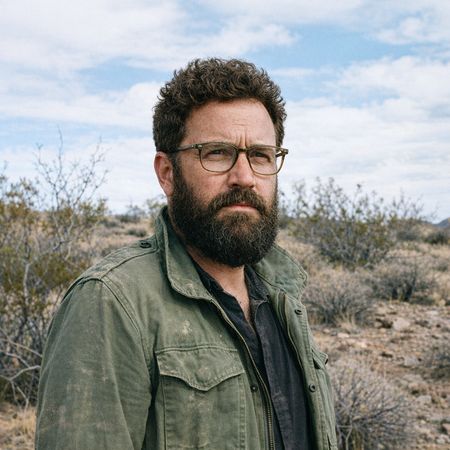

GPT Image 1.5
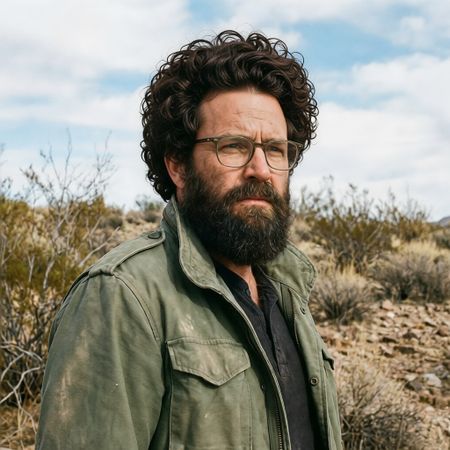
P-Image Edit
AI Judge Analysis
GPT Image 1.5
- + Excellent integration of the hairline with the forehead skin following natural lighting
- + Perfectly preserves original facial features and glasses
- + The hair texture mimics a natural, realistic growth pattern that matches the beard thickness
- − None notable; follows all instructions perfectly
P-Image Edit
- + Increases hair volume significantly as requested
- − The hair texture appears overly uniform and lacks realistic variation
- − The hairline is unnaturally abrupt and does not integrate well with the skin
- − The hair strands overlapping the background look slightly painterly and less photographic
Verdict: GPT Image 1.5 is the clear winner as it produces a seamless, photographic result with a convincing hairline and texture that matches the existing beard. P-Image Edit provides the requested volume, but the hair looks like a wig with an artificial, poorly blended hairline and repetitive curl patterns.
Over-the-top cartoon caricature
EditingEdit instruction
“Create a caricature of me and my job. Make it exaggerated and humorous, incorporating my profession as a tv show anchor and my love for dogs and hockey.”
Source
GPT Image 1.5
P-Image Edit
AI Judge Analysis
GPT Image 1.5
- + Successfully captures all three requested themes (anchor, dogs, hockey) in a coherent scene.
- + Maintains a strong physical resemblance to the source subject while applying caricature stylization.
- + High-quality rendering with good lighting and professional news broadcast aesthetics.
- − The small dog in the helmet has some minor artifacting around its mouth and the hockey stick.
P-Image Edit
- + Preserves the subject's denim outfit from the source image better than the other model.
- + Integrates the hockey theme more significantly into the background setting.
- + Cleverly includes small dog-themed items on the desk.
- − The dog in the bottom right has a strange anatomical deformity or odd red accessory.
- − The text on the screens and tickers is gibberish.
- − The caricature style is a bit flatter and less dynamic than Image A.
Verdict: GPT Image 1.5 is the winner because it creates a much more polished and humorous caricature that clearly incorporates all three prompt elements with high-quality rendering. While P-Image Edit does a better job of preserving the subject's original clothing, it fails on technical details like legible text and coherent anatomy for the dog in the foreground.
Studio Ghibli Anime Style
EditingEdit instruction
“Transform this photo into a Studio Ghibli–inspired illustration. Use soft pastel colors, hand-painted textures, gentle lighting, dreamy backgrounds, and a warm, nostalgic mood”
Source
GPT Image 1.5
P-Image Edit
AI Judge Analysis
GPT Image 1.5
- + Perfectly captures the Ghibli anime style through character features and expression.
- + Excellent watercolor hand-painted texture throughout the scene.
- + Exceptional use of golden hour lighting and soft pastel hues as requested.
- − The woman in the foreground is significantly blurred, which while true to the original photo, feels a bit heavy for an illustration.
P-Image Edit
- + Preserves the original facial structures and likenesses of the subjects very well.
- + Good use of cel-shading and clean line art.
- + Dreamy background with colorful clouds and foliage.
- − The style leans more toward a generic modern manhwa or webtoon rather than Ghibli.
- − Lighting feels flat compared to the requested dreamy, warm mood.
Verdict: GPT Image 1.5 successfully interpreted the 'Studio Ghibli' instruction by transforming the subjects into authentic anime characters with beautiful, warm, hand-painted textures. While P-Image Edit preserved the original faces more accurately, it failed to capture the specific Ghibli aesthetic, resulting in a more generic digital illustration style.
Golden Hour Stroll
Image EditingEdit instruction
“Add dynamic motion to this photo: make hair blow in the wind, add leaves flying, energetic and lively feel.”
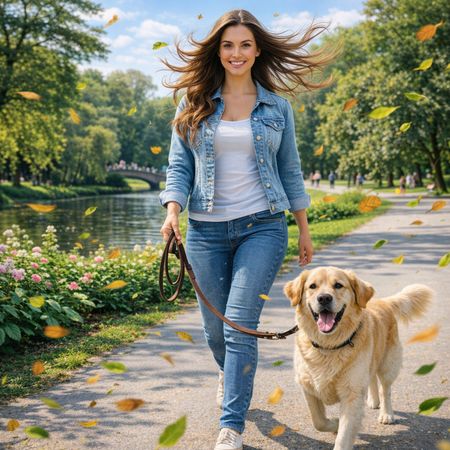

GPT Image 1.5
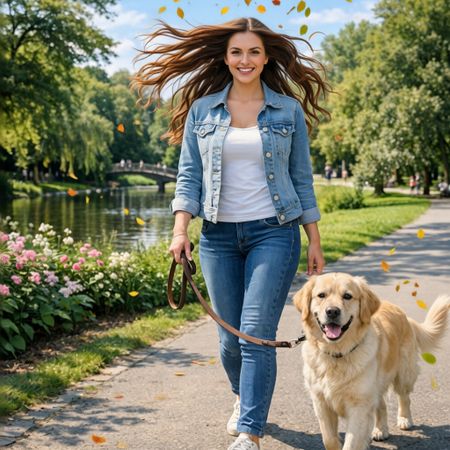
P-Image Edit
AI Judge Analysis
GPT Image 1.5
- + Excellent adherence to the 'flying leaves' request with varied leaf sizes and motion blur.
- + Maintains the subject's identity and original environment perfectly.
- + The hair motion feels natural and flows organically from the scalp.
- − The leaf depth of field is a bit inconsistent, with some sharp leaves appearing very close to the camera unnecessarily.
P-Image Edit
- + Successfully adds a dramatic wind effect to the hair.
- + Preserves the main subject, dog, and background accurately.
- − The leaves are very small and sparsely distributed, failing to create the 'energetic' feel requested.
- − The wind direction on the hair (blowing outward in both directions) feels a bit symmetrical and artificial compared to the environment.
Verdict: GPT Image 1.5 is the winner as it much better captured the 'energetic and lively' feel requested through the dense, motion-blurred flying leaves. While both models handled the hair and source preservation well, P-Image Edit's addition of leaves was too subtle and failed to create a significant sense of motion throughout the frame.
Next steps
Explore each model
PrunaAI's sub-1-second multi-image editing model supporting up to 5 reference images with state-of-the-art quality