

Black Forest Labs' state-of-the-art image generation model with maximum quality and speed, supporting text-to-image and multi-reference image editing with up to 4MP output
Settled by community votes across 6 shared challenges, with an AI judge weighing in on each.
FLUX.2 [pro]
26.6
arena score
#6 of 62 in Text-to-Image
Skill signature
· Text-to-Image
Qwen Image Edit 2511
20.4
arena score
#15 of 37 in Image Editing
Vote tally
Where the votes landed
FLUX.2 [pro]
39.0%
win rate
Ties
3.7%
Qwen Image Edit 2511
57.3%
win rate
39.0%
3.7% ties
57.3%
Shared challenges
6
Challenge by challenge
The strongest take from each model on every shared challenge, with the AI judge's read.
Man and Car in California
EditingEdit instruction
“Make a photo of the man driving the car down the California coastline”
Source
FLUX.2 [pro]
Qwen Image Edit 2511
38% wins
4% ties
58% wins
AI Judge Analysis
FLUX.2 [pro]
- + Excellent preservation of the source car's specific model and details
- + Realistic motion blur on the wheels and road
- + Good integration of the man's face and distinctive hairstyle into the driver's seat
- − The man's clothing is simplified and doesn't fully match the plaid coat from the source
- − The man appears slightly small relative to the car
Qwen Image Edit 2511
- + Strong preservation of the man's specific outfit, including the plaid coat and scarf
- + Dynamic and clear view of the California coastline
- + Clean facial features and hair accuracy
- − The car interior and steering wheel do not match the Rolls-Royce from the source image
- − The perspective change completely removes the car's exterior, failing the preservation of the car source image
Verdict: FLUX.2 [pro] followed the instructions while successfully merging both source images, keeping the exact car model and the person's identity. Qwen Image Edit 2511 did a better job preserving the man's complex outfit, but it completely changed the car's interior design, failing to maintain the consistency of the provided vehicle.
Pose & Character Mashup
EditingEdit instruction
“Use Image 1 as the exact pose reference and Image 2 as the character reference. Recreate the person/character from Image 2 in the exact dynamic pose and body position from Image 1. Keep the exact face, hair, clothing style/details, and expression from Image 2. Match the lighting and environment of Image 1. The final image must show the character from Image 2 performing the precise action/pose from Image 1 with perfect anatomy and natural integration.”
Source
FLUX.2 [pro]
Qwen Image Edit 2511
AI Judge Analysis
FLUX.2 [pro]
- + Successfully recreates the character's face, sunglasses, and outfit with high fidelity.
- + Accurately matches the lighting and environment (yellow background, red box) of Image 1.
- + Shows Good integration of the character into a physically plausible crouched/dynamic pose.
- − The pose is not an 'exact' match of Image 1, as the character is crouching rather than performing the specific limb extension.
- − The left arm and right hand show some anatomical awkwardness.
Qwen Image Edit 2511
- + Retains both the original woman's pose and the male character in the background.
- + Maintains high resolution on both subjects.
- − Completely fails the core instruction to recreate the male character *in* the pose of the woman.
- − Simply composites the two images together poorly rather than performing a character/pose swap.
- − Fails to match the environment of Image 1, choosing the background of Image 2 instead.
Verdict: FLUX.2 [pro] followed the complex instructions much better than Qwen Image Edit 2511, successfully putting the character from the second image into the environment and general pose of the first. While FLUX.2 [pro] modified the pose slightly to be more grounded, it correctly transferred the outfit and features. Qwen Image Edit 2511 failed the task entirely by simply placing one person in front of the other.
Bald man challenge
Image EditingEdit instruction
“Give the person a full, thick head of natural hair with realistic texture, density, and a natural hairline. Preserve facial features and lighting.”
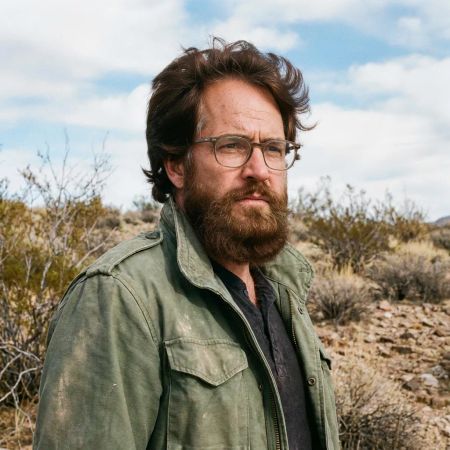

FLUX.2 [pro]
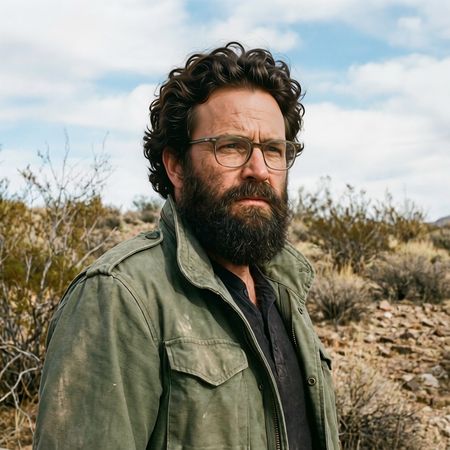
Qwen Image Edit 2511
43% wins
0% ties
57% wins
AI Judge Analysis
FLUX.2 [pro]
- + Successfully added a thick head of hair while preserving most facial details.
- + The lighting on the top of the hair matches the sky light source well.
- − The hair is somewhat blurry and lacks the sharp, realistic texture found in the original beard.
- − The skin tone on the forehead was altered significantly, appearing lighter and smoother than the rest of the face.
Qwen Image Edit 2511
- + Excellent texture and density in the hair with sharp, realistic strands.
- + Near-perfect source preservation of the forehead texture, wrinkles, and original facial lighting.
- − The hairline transition on the left side (near the temple) is slightly abrupt.
- − The hair has a very specific curly style that may look slightly 'styled' rather than purely 'natural'.
Verdict: Qwen Image Edit 2511 is the clear winner as it successfully added highly detailed, realistic hair while perfectly preserving the original skin texture and forehead lighting. FLUX.2 [pro] struggled with source preservation, smoothing out the forehead and changing the skin tone in the process of adding the hair.
Over-the-top cartoon caricature
EditingEdit instruction
“Create a caricature of me and my job. Make it exaggerated and humorous, incorporating my profession as a tv show anchor and my love for dogs and hockey.”
Source
FLUX.2 [pro]
Qwen Image Edit 2511
AI Judge Analysis
FLUX.2 [pro]
- + Successfully incorporates all elements: tv anchor, dogs, and hockey in a cohesive scene.
- + Captures the subject's likeness well in a clean, professional vector caricature style.
- + Creative composition with the hockey rink desk and dogs in the background/foreground.
- − The style is more of a generic cartoon vector than a hand-drawn caricature.
Qwen Image Edit 2511
- + Features a more 'exaggerated' and 'humorous' caricature style as requested.
- + Preserves the subject's hair and facial features accurately while distorting for comedic effect.
- − Completely missed the 'hockey' requirement of the prompt.
- − Contains nonsensical AI-generated text in the speech bubble.
- − Includes strange artifacts like a candle on a desk.
Verdict: FLUX.2 [pro] is the clear winner as it successfully incorporated every element of the prompt, including the tv anchor setting, the dogs, and the hockey theme, all while maintaining a consistent art style. Qwen Image Edit 2511 failed to include any hockey elements and added gibberish text and a strange candle, though it did a good job of exaggerating the facial features in a traditional caricature style.
Studio Ghibli Anime Style
EditingEdit instruction
“Transform this photo into a Studio Ghibli–inspired illustration. Use soft pastel colors, hand-painted textures, gentle lighting, dreamy backgrounds, and a warm, nostalgic mood”
Source
FLUX.2 [pro]
Qwen Image Edit 2511
67% wins
0% ties
33% wins
AI Judge Analysis
FLUX.2 [pro]
- + Excellent capture of the Studio Ghibli art style, including line work and watercolor textures.
- + Perfectly translates the expressions into a recognizable anime aesthetic.
- + Maintains the composition and iconic poses from the original meme accurately.
- − The color palette is slightly more washed out than a typical Ghibli frame.
Qwen Image Edit 2511
- + Successfully preserves the likeness and structure of the original image.
- + Clean, polished illustration style.
- − Does not capture the specific 'Ghibli' aesthetic, looking more like a generic modern digital illustration.
- − The lighting and textures lack the requested 'hand-painted' feel.
Verdict: FLUX.2 [pro] followed the artistic instructions much more effectively, delivering an image that genuinely looks like a frame from a Studio Ghibli film with authentic line work and textures. Qwen Image Edit 2511 provided a high-quality illustration, but it lacks the specific stylistic hallmarks requested in the prompt, appearing too modern and lacking 'dreamy' hand-painted elements.
Golden Hour Stroll
Image EditingEdit instruction
“Add dynamic motion to this photo: make hair blow in the wind, add leaves flying, energetic and lively feel.”
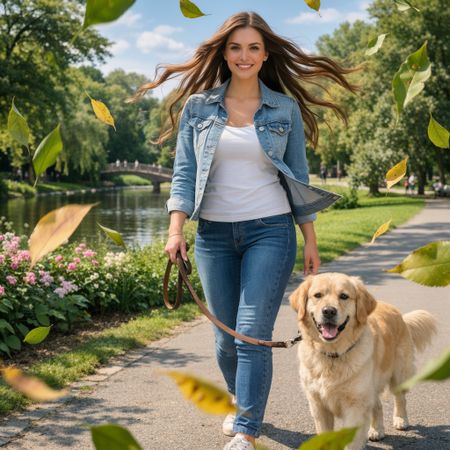

FLUX.2 [pro]
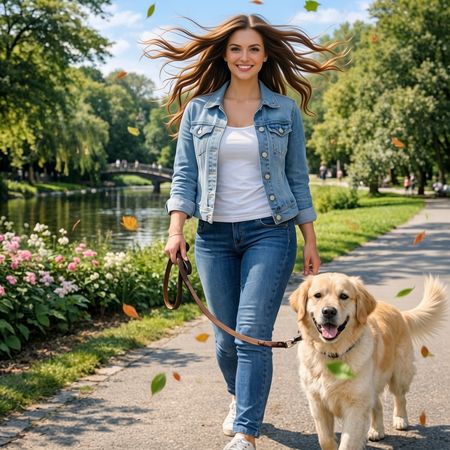
Qwen Image Edit 2511
33% wins
0% ties
67% wins
AI Judge Analysis
FLUX.2 [pro]
- + Excellent preservation of the woman's face and original features.
- + Highly realistic integration of falling leaves with naturalistic textures.
- + Subtle and effective wind effect on the hair.
- − Some leaves appear to be stuck in the dog's mouth and chest rather than flying in the air.
- − The jacket lapels lost some structure during the edit.
Qwen Image Edit 2511
- + Stronger, more dramatic wind effect on the hair that suggests more movement.
- + Better distribution of flying leaves throughout the scene without obscuring the subjects.
- + Maintains the dog's appearance perfectly while adding a motion-blurred tail.
- − The woman's face underwent slight changes, particularly around the jawline and smile, compared to the source.
- − A small artifact/floating leaf bit appeared near the woman's left hand.
Verdict: Both models followed the instructions effectively, but Qwen Image Edit 2511 captured a more 'dynamic' and 'energetic' feel by using motion blur on the leaves and a more dramatic wind effect on the hair. FLUX.2 [pro] excelled at preserving the original facial features of the woman, but the leaves felt more static and some were awkwardly placed on the dog's fur.
Next steps
Explore each model
Alibaba's Qwen image editing model for instruction-based image modifications and transformations