
Black Forest Labs' state-of-the-art image generation model with maximum quality and speed, supporting text-to-image and multi-reference image editing with up to 4MP output
Settled by community votes across 6 shared challenges, with an AI judge weighing in on each.
FLUX.2 [pro]
26.6
arena score
#6 of 62 in Text-to-Image
Skill signature
· Text-to-Image
P-Image Edit
14.9
arena score
#30 of 37 in Image Editing
Vote tally
Where the votes landed
FLUX.2 [pro]
0%
win rate
Ties
0%
P-Image Edit
0%
win rate
Shared challenges
6
Challenge by challenge
The strongest take from each model on every shared challenge, with the AI judge's read.
Man and Car in California
EditingEdit instruction
“Make a photo of the man driving the car down the California coastline”
Source
FLUX.2 [pro]
P-Image Edit
AI Judge Analysis
FLUX.2 [pro]
- + Excellent preservation of the specific car model and details from the source image.
- + Captures the man's likeness and hair style perfectly.
- + The low-angle composition on the highway is very realistic.
- − The man's scale relative to the car is slightly too small.
- − The car's shadow on the road is somewhat soft given the direct sunlight.
P-Image Edit
- + Great scenic composition capturing a classic California coastline feel.
- + Good motion blur on the road and wheels enhancing the sense of speed.
- + Accurate car preservation from the source.
- − The man's facial features are obscured and do not look like the source image.
- − The lighting on the man inside the car is too dark compared to the bright surroundings.
Verdict: Both models did an excellent job of extracting the Rolls Royce and placing it in a new environment. FLUX.2 [pro] is the clear winner because it successfully maintained the man's likeness and characteristic hairstyle from the second source image, whereas P-Image Edit lost almost all of his facial detail and resemblance.
Pose & Character Mashup
EditingEdit instruction
“Use Image 1 as the exact pose reference and Image 2 as the character reference. Recreate the person/character from Image 2 in the exact dynamic pose and body position from Image 1. Keep the exact face, hair, clothing style/details, and expression from Image 2. Match the lighting and environment of Image 1. The final image must show the character from Image 2 performing the precise action/pose from Image 1 with perfect anatomy and natural integration.”
Source
FLUX.2 [pro]
P-Image Edit
AI Judge Analysis
FLUX.2 [pro]
- + Excellent character preservation, including facial features, glasses, hair, and clothing details from Image 2.
- + High image quality with realistic skin textures and lighting integration.
- + Successful adaptation to the yellow studio environment with natural shadows.
- − Failed to match the exact leg and torso pose from Image 1, settling for a crouch instead of the cross-legged lean.
- − The character is squatting on the box rather than maintaining the specific balance point from the reference.
P-Image Edit
- + Better adherence to the complex cross-legged body position and overall silhouette from Image 1.
- + Attempts to merge elements like the scarf and glasses while keeping the dynamic tilt.
- − Anatomical failure where the character's head is attached to a long, unnatural neck/torsion.
- − Poor character preservation, giving the male character long flowing hair from Image 1 and inconsistent clothing colors (red sleeve).
- − The hand and arm reaching down are distorted and do not match the reference pose properly.
Verdict: FLUX.2 [pro] is the preferred model because it successfully transfers the character's identity, clothing, and accessories with high visual fidelity, even though it slightly simplified the complex pose. P-Image Edit followed the pose more closely but suffered from severe anatomical distortions and failed to maintain the character's gender/hair style, resulting in a confusing hybrid of the two images.
Bald man challenge
Image EditingEdit instruction
“Give the person a full, thick head of natural hair with realistic texture, density, and a natural hairline. Preserve facial features and lighting.”
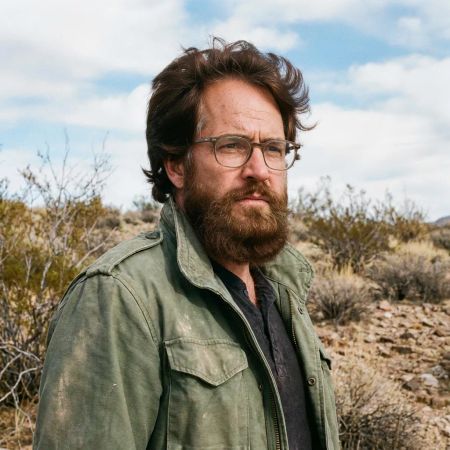

FLUX.2 [pro]

P-Image Edit
AI Judge Analysis
FLUX.2 [pro]
- + Natural and realistic hair texture
- + Excellent preservation of lighting and atmosphere
- + Maintains original identity while blending the new hair seamlessly
- − Subtle facial morphing in the eye and forehead area
- − Hairline transition on the right side is slightly soft
P-Image Edit
- + Perfect preservation of original facial features and glasses
- + Exact matching of the source background and clothes
- − Hair looks like a wig overlaid on top of the head
- − Hair texture and lighting do not match the environment
- − Hairline and curls appear artificial and lack depth
Verdict: FLUX.2 [pro] produces a much more believable and integrated result, successfully creating a natural hair texture that matches the rugged lighting of the original scene, though it slightly alters the face. P-Image Edit perfectly preserves the original face but fails the core task by producing an unrealistic, wig-like effect that doesn't respect the lighting or physics of the source image. FLUX.2 [pro] is preferred for its significantly higher realism and better execution of the prompt.
Over-the-top cartoon caricature
EditingEdit instruction
“Create a caricature of me and my job. Make it exaggerated and humorous, incorporating my profession as a tv show anchor and my love for dogs and hockey.”
Source
FLUX.2 [pro]
P-Image Edit
AI Judge Analysis
FLUX.2 [pro]
- + Successfully incorporates all prompt elements: tv anchor, dogs, and hockey in a cohesive studio setting.
- + Captures the subject's likeness effectively in a stylized, exaggerated caricature format.
- + Highly clean and polished vector-style illustration with no significant artifacts.
- − The dogs look more like generic cartoon characters than specific pets.
- − The hockey elements are slightly less dynamic, mostly confined to the desk and background screens.
P-Image Edit
- + Excellent character likeness that preserves the specific facial structure and smile of the source image.
- + More dynamic hockey interaction with players and rink depicted in the background.
- + Includes clever details like the television microphone and sports-themed desk accessories.
- − The 'love for dogs' is represented by a strange, anatomically confusing heart-shaped backpack on the dog.
- − The text in the background is garbled and nonsensical.
- − The hand holding the pen has anatomical issues with finger placement.
Verdict: Both models did an excellent job of translating the source image into a caricature style. FLUX.2 [pro] produced a more polished and professional-looking illustration that felt more like a complete 'TV show' scene, while P-Image Edit achieved a slightly better caricature likeness of the original woman's face but struggled with garbled text and a bizarrely designed dog accessory. Overall, FLUX.2 [pro] is preferred for its cleaner composition and better integration of all requested themes.
Studio Ghibli Anime Style
EditingEdit instruction
“Transform this photo into a Studio Ghibli–inspired illustration. Use soft pastel colors, hand-painted textures, gentle lighting, dreamy backgrounds, and a warm, nostalgic mood”
Source
FLUX.2 [pro]
P-Image Edit
AI Judge Analysis
FLUX.2 [pro]
- + Perfectly captures the Studio Ghibli art style with line work and facial features.
- + Excellent texture that mimics a hand-painted watercolor background.
- + Highly accurate preservation of the original pose while translating it into the new style.
- − The colors are slightly more muted than a typical vibrant Ghibli landscape.
P-Image Edit
- + Maintains a strong resemblance to the original human faces while stylizing them.
- + Successfully incorporates dreamy, colorful cloud textures requested in the prompt.
- − The art style leans more toward generic modern webtoon or digital illustration than Ghibli.
- − The facial expressions are a bit stiff and don't quite capture the Ghibli 'soul'.
Verdict: FLUX.2 [pro] is the clear winner as it successfully translates the source image into a specific, recognizable Studio Ghibli aesthetic with appropriate line art and painterly backgrounds. P-Image Edit creates a pleasing digital illustration but fails to capture the iconic hand-drawn feel and specific character design language of the requested studio style.
Golden Hour Stroll
Image EditingEdit instruction
“Add dynamic motion to this photo: make hair blow in the wind, add leaves flying, energetic and lively feel.”
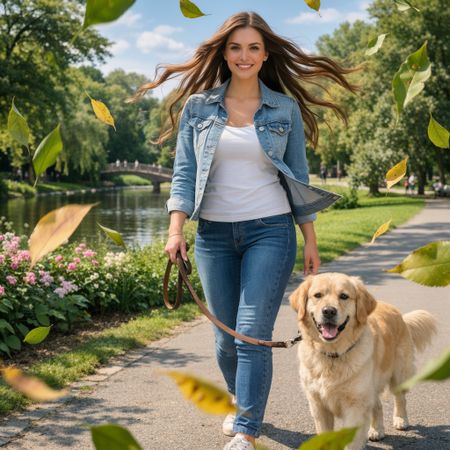

FLUX.2 [pro]
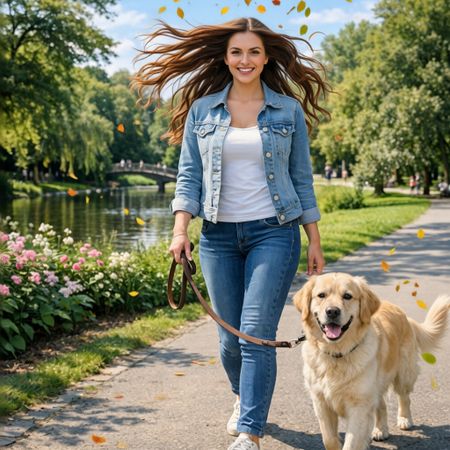
P-Image Edit
AI Judge Analysis
FLUX.2 [pro]
- + Excellent integration of flying leaves with varied sizes and realistic motion blur
- + Seamless hair edit that looks natural while capturing significant movement
- + Perfect preservation of the original person, dog, and background lighting
- − The leaf in the bottom right corner is slightly too blurred and distracts from the subject
P-Image Edit
- + Good dynamic hair flow that feels symmetrical and energetic
- + Leaves are small and don't obscure the main subjects
- + Effective preservation of the original image's identity
- − The leaves are very small and uniform, making them look like confetti rather than natural foliage
- − The hair edit has some slight artifacts where it meets the background trees
Verdict: FLUX.2 [pro] followed the instructions more realistically, using varied leaf sizes and motion blur to create a genuine sense of depth and movement. While P-Image Edit also achieved dynamic hair, its leaves felt less integrated into the environment and lacked the professional photography look of the competing model.
Next steps
Explore each model
PrunaAI's sub-1-second multi-image editing model supporting up to 5 reference images with state-of-the-art quality