
Black Forest Labs' precision image generation model with maximum control, reliable text rendering, and complete creative control supporting up to 4MP output
Settled by community votes across 6 shared challenges, with an AI judge weighing in on each.
FLUX.2 [flex]
25.1
arena score
#16 of 62 in Text-to-Image
Skill signature
· Text-to-Image
P-Image Edit
14.9
arena score
#30 of 37 in Image Editing
Vote tally
Where the votes landed
FLUX.2 [flex]
0%
win rate
Ties
0%
P-Image Edit
0%
win rate
Shared challenges
6
Challenge by challenge
The strongest take from each model on every shared challenge, with the AI judge's read.
Man and Car in California
EditingEdit instruction
“Make a photo of the man driving the car down the California coastline”
Source
FLUX.2 [flex]
P-Image Edit
AI Judge Analysis
FLUX.2 [flex]
- + Excellent preservation of the car's design and model features
- + Accurately places the specific man from the source image behind the wheel
- + Dynamic motion blur on the road and wheels creates a realistic sense of driving
- − The man's scale relative to the car is slightly too small
P-Image Edit
- + Beautifully rendered California coastline background with good atmospheric depth
- + Good motion blur on the wheels and road surface
- − The man is very small and lacks detail
- − The car's proportions feel slightly elongated compared to the source
- − The steering wheel placement looks awkward relative to the driver
Verdict: FLUX.2 [flex] is the clear winner as it successfully integrated both source images by placing the specific man from the second photo into the vehicle from the first. P-Image Edit captured the environment well, but the driver is far less detailed and recognizable. FLUX.2 [flex] also maintained the integrity of the Rolls Royce's design with higher fidelity.
Pose & Character Mashup
EditingEdit instruction
“Use Image 1 as the exact pose reference and Image 2 as the character reference. Recreate the person/character from Image 2 in the exact dynamic pose and body position from Image 1. Keep the exact face, hair, clothing style/details, and expression from Image 2. Match the lighting and environment of Image 1. The final image must show the character from Image 2 performing the precise action/pose from Image 1 with perfect anatomy and natural integration.”
Source
FLUX.2 [flex]
P-Image Edit
AI Judge Analysis
FLUX.2 [flex]
- + Excellent character facial likeness and clothing preservation.
- + High visual quality and resolution.
- + Accurate lighting and environment match.
- − Completely fails to replicate the pose from Image 1, creating a generic crouching pose instead.
- − Anatomical issues with the right hand (too many fingers) and right foot.
P-Image Edit
- + Successfully replicates the complex, dynamic pose from Image 1.
- + Good character recognition including sunglasses and scarf.
- + Correctly integrates long hair from the reference pose with the new character's head.
- − Inconsistent clothing, mixing the red sweater from Image 1 with the black shirt from Image 2.
- − Significant anatomical distortions, particularly with the leg and foot positions on the ottoman.
- − Mismatched skin tones between the face and legs.
Verdict: FLUX.2 [flex] produces a much cleaner image with better facial likeness but fails the primary task of adopting the specific pose from Image 1. P-Image Edit manages to replicate the exact pose and body position requested, though it suffers from severe anatomical glitches and inconsistent clothing. P-Image Edit is the winner for following the complex structural instructions, even though the visual polish is lower.
Bald man challenge
Image EditingEdit instruction
“Give the person a full, thick head of natural hair with realistic texture, density, and a natural hairline. Preserve facial features and lighting.”
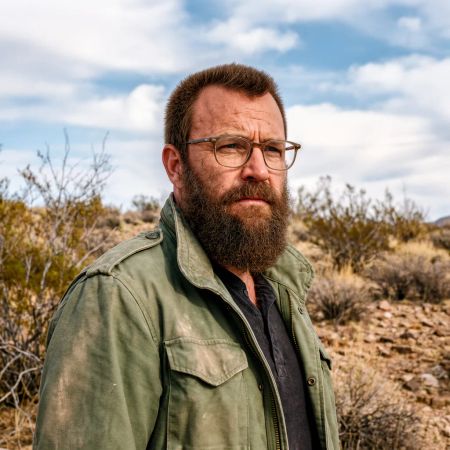

FLUX.2 [flex]
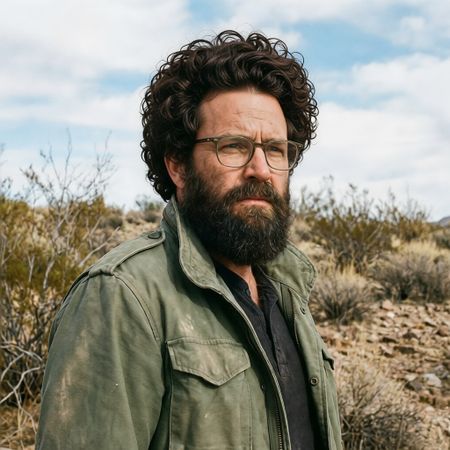
P-Image Edit
AI Judge Analysis
FLUX.2 [flex]
- + Perfect preservation of facial features and environment
- + Realistic texture and density
- + Natural-looking hairline integration
- − The hair length is a bit short compared to a 'full head' of hair
P-Image Edit
- + Achieves a very 'full' head of hair as requested
- + Matches the existing hair color well
- − Alters the facial shape and lighting slightly
- − The texture of the curls looks a bit repetitive and artificial
- − Poor blending at the temples and sideburns
Verdict: FLUX.2 [flex] provides a much more convincing and seamless edit, perfectly preserving the original person's features while adding a realistic hairline. P-Image Edit follows the prompt of a 'full' head of hair more literally with an afro-style cut, but the texture looks less natural and it does a poorer job of integrating the new hair with the existing sideburns and facial structure.
Over-the-top cartoon caricature
EditingEdit instruction
“Create a caricature of me and my job. Make it exaggerated and humorous, incorporating my profession as a tv show anchor and my love for dogs and hockey.”
Source
FLUX.2 [flex]
P-Image Edit
AI Judge Analysis
FLUX.2 [flex]
- + Successfully incorporates all elements: tv anchor, dogs, and hockey (via jerseys and stick).
- + Maintains the subject's denim outfit from the source image.
- + High visual quality with a consistent illustrative style.
- − The text on the news desk is garbled.
- − The dogs' jerseys are a bit repetitive and generic.
P-Image Edit
- + Excellent integration of the hockey theme by placing the anchor in a rink setting.
- + The caricature face bears a strong resemblance to the source image's features.
- − The 'love for dogs' element is poorly represented by a single small dog with a strange red object on its back.
- − The hockey players in the background have distorted, somewhat creepy faces.
- − Includes nonsensical objects on the desk that distract from the theme.
Verdict: FLUX.2 [flex] provides a more balanced and professionally executed caricature that clearly includes all three requested thematic elements (television, dogs, and hockey). While P-Image Edit creates a clever background setting and a better facial likeness, it misses the mark on the dog theme and includes several visual artifacts and nonsensical details on the desk.
Studio Ghibli Anime Style
EditingEdit instruction
“Transform this photo into a Studio Ghibli–inspired illustration. Use soft pastel colors, hand-painted textures, gentle lighting, dreamy backgrounds, and a warm, nostalgic mood”
Source
FLUX.2 [flex]
P-Image Edit
AI Judge Analysis
FLUX.2 [flex]
- + Captures the Studio Ghibli art style with high fidelity, including character facial features and watercolor textures.
- + Maintains the specific urban background context and character silhouettes from the original meme.
- + Uses a soft, muted pastel color palette that perfectly fits the 'nostalgic' mood.
- − Reduces the emotional intensity of the girlfriend's facial expression, making her look happy instead of annoyed.
P-Image Edit
- + Maintains the correct facial expressions and emotional storytelling from the original image.
- + Preserves the composition and character poses very accurately.
- + Good application of illustrative textures.
- − The art style leans more toward generic modern web-toon or digital illustration than specifically 'Studio Ghibli'.
- − Replaces the urban street background with a generic park/cloud setting, losing the original scene's context.
Verdict: FLUX.2 [flex] successfully transforms the image into a genuine Studio Ghibli aesthetic with its soft lines and watercolor-like textures, though it fails to preserve the girlfriend's angry expression. P-Image Edit preserves the original emotional context and poses better but delivers a more generic digital art style that doesn't quite hit the Ghibli-specific request. FLUX.2 [flex] is the winner for its superior stylistic adherence to the specific prompt.
Golden Hour Stroll
Image EditingEdit instruction
“Add dynamic motion to this photo: make hair blow in the wind, add leaves flying, energetic and lively feel.”
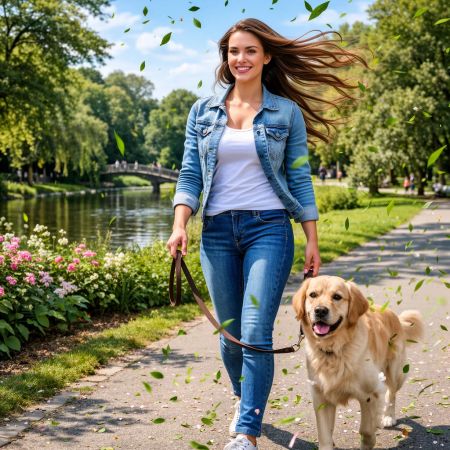

FLUX.2 [flex]
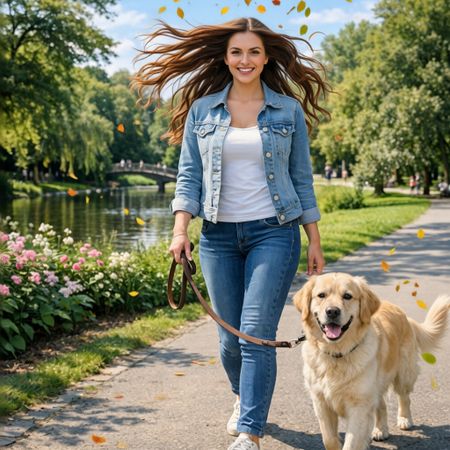
P-Image Edit
AI Judge Analysis
FLUX.2 [flex]
- + Natural-looking hair movement that flows logically from the head
- + Good integration of flying green leaves that match the environment's foliage
- + High preservation of the original facial features and background elements
- − The leaf motion is concentrated mostly in the foreground lower half, appearing a bit repetitive
P-Image Edit
- + Excellent sense of motion in the hair, creating a very dynamic 'wind-blown' look
- + Leaves covering more of the frame adds to the requested lively feel
- + Includes autumnal leaf colors which provide a nice visual contrast
- − Some hair strands appear to originate from the air rather than the scalp
- − The dog's tail has been slightly altered/extended in a way that looks less natural than the original
Verdict: Both models followed the instructions well, but P-Image Edit achieved a more energetic and lively feel as requested by significantly expanding the hair and scattering leaves more broadly across the composition. FLUX.2 [flex] produced a cleaner edit with better anatomical accuracy for the hair, but it felt slightly more static in comparison.
Next steps
Explore each model
PrunaAI's sub-1-second multi-image editing model supporting up to 5 reference images with state-of-the-art quality