

Black Forest Labs' precision image generation model with maximum control, reliable text rendering, and complete creative control supporting up to 4MP output
Settled by community votes across 19 shared challenges, with an AI judge weighing in on each.
FLUX.2 [flex]
25.1
arena score
#16 of 62 in Text-to-Image
Skill signature
· Text-to-Image
Grok Imagine Image Pro
24.7
arena score
#20 of 62 in Text-to-Image
Vote tally
Where the votes landed
FLUX.2 [flex]
20.0%
win rate
Ties
0.0%
Grok Imagine Image Pro
80.0%
win rate
20.0%
0.0% ties
80.0%
Shared challenges
19
Challenge by challenge
The strongest take from each model on every shared challenge, with the AI judge's read.
Geometric Composition
Text-to-Image“A glass cube on a wooden table. Inside the cube is a small blue sphere. On top of the cube sits a red book. A green plant is behind the cube, partially visible through the glass. Soft window light from the left.”
FLUX.2 [flex]
Grok Imagine Image Pro
0% wins
0% ties
100% wins
AI Judge Analysis
FLUX.2 [flex]
- + Perfectly sharp, clean glass cube geometry.
- + Excellent adherence to the 'small' sphere requirement, keeping it proportional.
- + Very high visual clarity and clean rendering of materials.
- − The plant is less visible through the glass compared to Model B.
- − The lighting feels a bit more synthetic/generic.
Grok Imagine Image Pro
- + More realistic texture on the wooden table and red book cover.
- + Better interaction of light and distortion through the thick glass walls.
- + Natural, convincing indoor lighting and atmosphere.
- − The blue sphere has a strange duplicate/reflection artifact on the right side that looks like a second object.
- − The sphere is relatively large compared to the 'small' description in the prompt.
Verdict: Both models followed the complex spatial instructions perfectly. FLUX.2 [flex] produced a cleaner, more precise image with better object proportions, while Grok Imagine Image Pro achieved a higher level of photographic realism and texture at the cost of some optical artifacts inside the glass. FLUX.2 [flex] is the winner for its superior clarity and lack of distracting reflections.
Man and Car in California
EditingEdit instruction
“Make a photo of the man driving the car down the California coastline”
Source
FLUX.2 [flex]
Grok Imagine Image Pro
AI Judge Analysis
FLUX.2 [flex]
- + Excellent preservation of the car's design and model features.
- + Successfully captures the specific facial features and hairstyle of the man from the source image.
- + Captures a realistic motion blur on the wheels and road.
- − The man is placed in the passenger seat instead of the driver's seat (steering wheel is on the left in the source/Image B).
Grok Imagine Image Pro
- + Accurately places the man in the driver's seat.
- + Beautiful composition that emphasizes the winding California coastline.
- + Good preservation of the car's general appearance.
- − Completely fails to preserve the identity of the man, replacing him with a different person with curly hair.
- − The car's proportions feel slightly elongated compared to the original.
Verdict: Both models successfully changed the environment from an indoor showroom to a coastal road. FLUX.2 [flex] is significantly better at actor preservation, capturing the man's likeness perfectly, but it failed the logic of the prompt by placing him in the passenger seat. Grok Imagine Image Pro correctly placed the figure in the driver's seat but failed to maintain the subject's identity, resulting in a generic replacement.
Candid Street Photography
Text-to-Image“A candid street photo of an elderly Japanese man repairing a red bicycle in light rain, reflections on wet pavement, shallow depth of field, 50mm lens, natural skin texture, imperfect framing, motion blur from passing cars, cinematic but realistic, no stylization.”
FLUX.2 [flex]
Grok Imagine Image Pro
AI Judge Analysis
FLUX.2 [flex]
- + Excellent shallow depth of field with realistic bokeh.
- + Superior skin textures and fine details on the man's hands and face.
- + Stronger sense of cinematic atmosphere and 'imperfect' candid framing.
- − The structural integrity of the bicycle's frame is physically impossible.
- − A foreground post on the left is slightly distracting.
Grok Imagine Image Pro
- + More realistic bicycle anatomy and tool usage.
- + Excellent reflections on the wet pavement.
- + Good adherence to the motion blur and light rain request.
- − The man's skin looks slightly smoothed compared to Model A.
- − The background cars look somewhat generic and less integrated into the lighting.
Verdict: FLUX.2 [flex] wins on pure photographic realism and texture, capturing beautiful skin details and a more convincing 50mm cinematic look, though it fails significantly on the bicycle's mechanical structure. Grok Imagine Image Pro provides a more logical scene with a functional-looking bike and tool, and better pavement reflections, but it lacks the fine textural detail and atmosphere of its competitor.
Fantasy Warrior
Text-to-Image“Close portrait of a battle-worn paladin in ornate engraved plate armor, hair braided with small beads, faint scars and dirt on the skin, warm torchlight reflecting off metal, shallow depth of field, bokeh sparks, lifelike eyes, highly detailed texture on leather straps and cloth underlayer.”
FLUX.2 [flex]
Grok Imagine Image Pro
AI Judge Analysis
FLUX.2 [flex]
- + Excellent high-contrast lighting with realistic warm torchlight reflections on the metal plate.
- + Superior rendering of cloth and knitted sweater textures under the armor.
- + Clear, lifelike eyes with realistic catchlights.
- − The scars appear more like fresh, bloody cuts than battle-worn, faint scars.
- − The armor engraving is slightly simpler compared to Model B.
Grok Imagine Image Pro
- + Includes impressive engraved Latin text on the collar piece which adds to the 'paladin' theme.
- + Exceptional armor detail with intricate filigree and visible weathering/rust.
- + Perfect adherence to the 'beads in hair' prompt with multiple visible types.
- − The lighting feels a bit flatter and more digital compared to the warmth in Model A.
- − The bokeh sparks are more generic and streaky than realistic embers.
Verdict: Both models performed exceptionally well on this prompt, but Grok Imagine Image Pro wins slightly due to the incredible level of detail in the armor engravings and the thematic inclusion of Latin text. While FLUX.2 [flex] has more naturalistic lighting and skin textures, Grok better captured the 'battle-worn' aesthetic with subtle rust and more complex hair braiding.
Modern Clean Menu
Text-to-Image“Modern minimalist restaurant menu design, white background with colorful food photos in grid, sections for appetizers/pizza/mains, bold sans-serif fonts, vibrant accents, clean professional layout for casual dining.”
FLUX.2 [flex]
Grok Imagine Image Pro
AI Judge Analysis
FLUX.2 [flex]
- + Includes realistic pricing and menu item names.
- + Effective use of color-coded headers (red, yellow, green) for different sections.
- + Good simulation of a physical printed menu layout with columns.
- − Text is mostly illegible gibberish.
- − The grid does not align photos with their respective categories (e.g., steaks and burgers are under 'Appetizers').
Grok Imagine Image Pro
- + Excellent logical organization where food photos match the 'Appetizers', 'Pizza', and 'Mains' headers.
- + Very high-quality, clear food photography for every item.
- + Perfectly legible bold sans-serif header text.
- − Lacks item descriptions and pricing, making it look more like a category board than a full menu.
- − A bit repetitive in composition across the photos.
Verdict: Grok Imagine Image Pro produced a much more logical and aesthetically pleasing layout, accurately placing specific food items under their correct categories as requested. While FLUX.2 [flex] attempted a more complex layout with pricing and descriptions, it suffered from nonsensical text and a messy grid where photos did not correspond to their headers.
Magic Burger Explosion: Fiery Photorealism Challenge
Text-to-Image“Ad for 'Magic Burger'. Dynamic, exploded burger with all components (bun, patty, cheese, lettuce, tomato, sauce) suspended in mid-air. Emphasize photorealistic detail and a sense of motion. Dark, fiery background with glowing embers. Integrate text: 'MAGIC BURGER' as a prominent title, 'LIMITED TIME ONLY' as a secondary message, and '€6.99' in a starburst, all rendered with a fiery, glowing effect.”
FLUX.2 [flex]
Grok Imagine Image Pro
AI Judge Analysis
FLUX.2 [flex]
- + Excellent typography with a cohesive fire effect on the text
- + High photorealistic detail in the burger patty and lettuce texture
- + Great atmospheric lighting and embers
- − The 'exploded' effect is slightly more vertical and static than Model B
- − Lower bun has slightly messy sauce physics
Grok Imagine Image Pro
- + Superior dynamic motion with sauces and ingredients flying outwards
- + Effective use of melted cheese strings to add to the 'exploded' feel
- + Clean rendering of all requested text elements
- − The pricing starburst looks a bit like a flat clip-art sticker compared to the background
- − The main title text has some slight clipping at the top
Verdict: Both models followed the prompt exceptionally well, producing professional-grade advertisement layouts. FLUX.2 [flex] has slightly better photorealistic textures and more cohesive text effects, while Grok Imagine Image Pro captured a much better sense of motion and 'exploded' dynamics with the flying ingredients and sauce splashes.
Chalkboard Menu
Text-to-Image“Handwritten-style chalkboard menu in a cozy café, all text rendered in the exact same realistic chalk handwriting style with natural variations in letter size, slight slant, and chalk texture — no printed or digital fonts anywhere on the board. Title at the top in elegant cursive chalk handwriting: ‘TODAY’S SPECIALS – APRIL 30, 2026’. Below it, three menu items also in the same handwritten chalk style: ‘Truffle Mushroom Risotto – $24’, ‘Grilled Octopus with Lemon & Herbs – $28’, ‘Brown Butter Chocolate Chip Cookies – $9’. At the very bottom, smaller text in the identical handwritten chalk style (slightly smaller but still clearly legible with the same handwriting characteristics): ‘All items made fresh daily • Ask about our gluten-free options’. Warm ambient café lighting, visible chalk dust and smudges, realistic handwriting imperfections, no clean printed text anywhere.”
FLUX.2 [flex]
Grok Imagine Image Pro
AI Judge Analysis
FLUX.2 [flex]
- + Excellent text rendering with no spelling errors.
- + The handwriting has a very natural, inconsistent baseline that feels authentically human.
- + Dynamic lighting and chalk smudges add to the cozy café atmosphere.
- − The 'cursive' title is more of a stylized print than true elegant cursive.
- − The handwriting style changes significantly between the main items and the bottom footer.
Grok Imagine Image Pro
- + Perfectly rendered text that includes the full prompt requirement.
- + Captures the 'chalk texture' very well with grainy strokes in the lettering.
- + Better adherence to the 'elegant cursive' request for the title line.
- − The alignment is a bit too uniform, lacking the natural slant and variation requested.
- − The lighting is less atmospheric compared to the competitor.
Verdict: Both models performed exceptionally well at rendering complex text on a chalkboard. FLUX.2 [flex] feels more like a real, slightly messy café board due to the lighting and spacing, but Grok Imagine Image Pro followed the prompt instructions more closely, particularly regarding the specific 'cursive' style of the header.
Pose & Character Mashup
EditingEdit instruction
“Use Image 1 as the exact pose reference and Image 2 as the character reference. Recreate the person/character from Image 2 in the exact dynamic pose and body position from Image 1. Keep the exact face, hair, clothing style/details, and expression from Image 2. Match the lighting and environment of Image 1. The final image must show the character from Image 2 performing the precise action/pose from Image 1 with perfect anatomy and natural integration.”
Source
FLUX.2 [flex]
Grok Imagine Image Pro
AI Judge Analysis
FLUX.2 [flex]
- + Successfully captures the character's facial features, sunglasses, and clothing from Image 2.
- + Matches the yellow background and red ottoman from Image 1.
- + Incorporates the scarf and jewelry details from the character reference.
- − Fails to match the exact pose from Image 1, resulting in a squat rather than the dynamic leaning pose.
- − Anatomy of the feet and legs is distorted and unrealistic.
Grok Imagine Image Pro
- + No pros found as the model completely failed the edit task.
- − Returned the original Image 1 without any changes.
- − Completely ignored the prompt to merge Image 2's character with Image 1's pose.
Verdict: FLUX.2 [flex] attempted the edit by merging the character from Image 2 into the setting of Image 1, although it failed to replicate the specific pose perfectly and suffered from anatomical artifacts. Grok Imagine Image Pro failed the task entirely by simply re-submitting a lower-resolution version of the source Image 1.
The Reversed Rodeo
Text-to-Image“Horse riding astronaut in space — horse on top, not vice versa. Surreal, highly detailed, cinematic.”
FLUX.2 [flex]
Grok Imagine Image Pro
AI Judge Analysis
FLUX.2 [flex]
- + Excellent adherence to the 'horse on top' spatial prompt
- + Cinematic detail on the spacesuit and horse's anatomy
- + Coherent interaction where the horse is physically gripping the astronaut
- − The horse's mane and tail look a bit like smoke, which might affect realism
Grok Imagine Image Pro
- + Vibrant and colorful space background with nebula and planets
- + Sharp rendering of the horse and astronaut
- − The horse appears to be floating above rather than 'riding' the astronaut
- − Lack of physical connection between the two subjects
- − Composition feels a bit more disjointed compared to Model A
Verdict: FLUX.2 [flex] successfully followed the complex instruction of a horse riding an astronaut by creating a clear physical interaction where the horse is holding onto the astronaut. Grok Imagine Image Pro produced a beautiful cosmic scene, but the horse is simply floating above the astronaut without a sense of 'riding', making FLUX.2 [flex] the winner for prompt adherence.
The Capybara Taxi Driver
Text-to-Image“Photorealistic scene inside a yellow New York taxi at night. A capybara is driving, wearing a yellow taxi driver cap and a dark jacket. It has a calm, professional expression and both front paws on the steering wheel. In the back seat sits a human businesswoman in a coat, looking at her phone with a completely normal, bored expression (as if this is just another normal ride). Through the windows you can see the streets of Manhattan at night with blurred lights. Realistic taxi interior, photorealistic, detailed fur and fabric, 35mm lens, night lighting with reflections, shallow depth of field.”
FLUX.2 [flex]
Grok Imagine Image Pro
AI Judge Analysis
FLUX.2 [flex]
- + Excellent fur texture and lighting on the capybara.
- + Logical perspective for an outdoor/indoor shot through the taxi door.
- + High detail on the jacket and uniform cap patches.
- − The passenger is seated too close to the driver, almost appearing to be in the front passenger seat.
- − The capybara's hands look more like human hands with hair than capybara paws.
Grok Imagine Image Pro
- + Perfectly captures the 'bored' expression of the businesswoman as requested.
- + Realistic text rendering on the driver's cap (NYC TLC Medallion).
- + Composition clearly separates the front and back seat, enhancing the taxi feel.
- − The capybara's paws look slightly claw-like and less natural around the steering wheel.
- − The lighting on the capybara is a bit flat compared to the background.
Verdict: Both models followed the complex prompt well, but Grok Imagine Image Pro captured the specific 'bored' emotion of the businesswoman more accurately. FLUX.2 [flex] produced a more vibrant image with better fur texture, but the spatial arrangement of the passenger made the interior feel less like a standard taxi compared to the clear backseat placement in Grok's version.
The Halloween Invitation
Text-to-Image“Vintage gothic Halloween party invitation. Dark parchment poster, spooky border with webs and thorns, central glowing jack-o-lantern, bats, twisted trees, moody night sky. Add elegant gothic title text saying "Halloween Party Invitation", a small scroll banner saying "You are invited to a night of frights", and event details at the bottom: Date: 30.10.2026 Time: 7pm Location: The Arches, NYC Spooky but polished, cinematic lighting, square format.”
FLUX.2 [flex]
Grok Imagine Image Pro
AI Judge Analysis
FLUX.2 [flex]
- + Excellent typography rendering with zero errors in the text
- + Clean, professional layout that matches the 'vintage parchment' aesthetic well
- + Subtle use of gothic elements like the skull and web border
- − The lighting is a bit flat compared to the cinematic request
- − The border is a bit repetitive
Grok Imagine Image Pro
- + Atmospheric, cinematic lighting with a moody sky and glowing colors
- + Rich details including a wax seal on the scroll and smoke from the pumpkin
- + Strong gothic font choice and complex thorny border
- − The text has slight rendering issues, particularly in 'Invitation'
- − The date and time are cramped together on one line
Verdict: FLUX.2 [flex] produced a very clean and legible invitation with perfect text alignment and spelling, making it highly functional. Grok Imagine Image Pro captured the 'cinematic' and 'moody' atmosphere better with more artistic flourishes like the wax seal and dramatic sky, but its text rendering was slightly less polished. FLUX.2 is preferred for its technical precision in a typography-heavy prompt.
Bald man challenge
Image EditingEdit instruction
“Give the person a full, thick head of natural hair with realistic texture, density, and a natural hairline. Preserve facial features and lighting.”


FLUX.2 [flex]
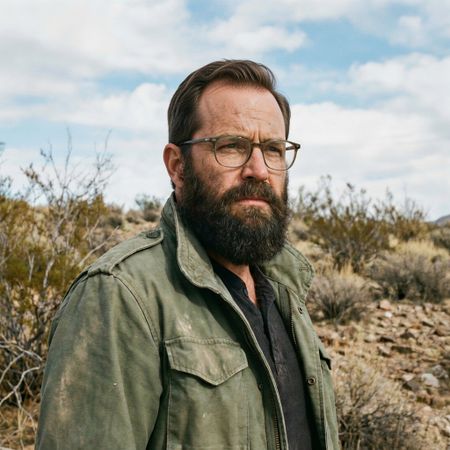
Grok Imagine Image Pro
AI Judge Analysis
FLUX.2 [flex]
- + Excellent preservation of the source background and clothing
- + The hair texture looks gritty and matches the subjects beard perfectly
- + Highly realistic hairline integration with the forehead
- − The hair is quite short and feels more like a buzz cut than a 'full, thick head' of hair
Grok Imagine Image Pro
- + Provides a fuller and thicker hairstyle as requested
- + Matches the color and texture of the beard well
- + Maintains facial features and background perfectly
- − The hair appears a bit too styled and neat for the rugged setting
- − Slightly less realistic blending at the crown compared to the source lighting
Verdict: Both models did an exceptional job of preserving the source image's identity, background, and lighting. FLUX.2 [flex] produced a very realistic short hair texture that blends seamlessly with the subject's skin, while Grok Imagine Image Pro better fulfilled the 'full, thick' part of the prompt by providing a longer, more complete hairstyle.
Isometric Miniature Diorama Scenes
Text-to-Image“Create a clear, 45° top-down isometric miniature 3D cartoon scene of Japan's signature dish: sushi, with soft refined textures, realistic PBR materials, gentle lighting, on a small raised diorama base with minimal garnish and plate. Solid light blue background. At top-center: 'JAPAN' in large bold text, 'SUSHI' below it, small flag icon. Perfectly centered, ultra-clean, high-clarity, square format.”
FLUX.2 [flex]
Grok Imagine Image Pro
33% wins
0% ties
67% wins
AI Judge Analysis
FLUX.2 [flex]
- + Perfectly matches the 'small raised diorama base' request with a clean, blue geometric platform.
- + Text rendering is clean and bold as requested.
- + Superior stylized 'cartoon' aesthetic with smooth, clay-like textures.
- − The flag icon is quite large and separate, rather than small and integrated.
- − The 45-degree angle is slightly flatter than a traditional isometric projection.
Grok Imagine Image Pro
- + Excellent miniature detail in the sushi grains and fillings.
- + Follows the text and icon instructions accurately, placing the flag next to 'SUSHI'.
- + Great use of PBR materials, especially on the wooden base and glossy fish.
- − The wooden base feels more like a plate than the requested 'diorama base'.
- − Shadows on the background are slightly noisy compared to Model A.
Verdict: Both models followed the prompt exceptionally well. FLUX.2 [flex] produced a more cohesive 'diorama' look with its geometric base and clean, stylized textures, whereas Grok Imagine Image Pro excelled in fine details and material realism. FLUX.2 is slightly preferred for adhering better to the 'isometric cartoon scene' aesthetic.
Over-the-top cartoon caricature
EditingEdit instruction
“Create a caricature of me and my job. Make it exaggerated and humorous, incorporating my profession as a tv show anchor and my love for dogs and hockey.”
Source
FLUX.2 [flex]
Grok Imagine Image Pro
AI Judge Analysis
FLUX.2 [flex]
- + Excellent preservation of the subject's specific facial features and hair color in caricature form.
- + Clever integration of hockey jerseys on every dog to symbolize the 'love for hockey'.
- + Maintains the blue denim shirt from the source image to ground the caricature.
- − Text in the news graphic is slightly garbled and nonsensical.
- − The hockey element is a bit subtle, mostly appearing on the dogs' clothing.
Grok Imagine Image Pro
- + Clear and legible text that wittily combines the requested themes (Pups & Pucks).
- + Strong, overt representation of hockey through the stick, jersey, trophy, and puck.
- + Highly expressive and humorous caricature style.
- − The subject's facial resemblance to the source image is significantly weaker than the other model.
- − The background graphics are slightly cluttered with repetitive puppy images.
Verdict: FLUX.2 [flex] successfully captures the subject's likeness and original clothing, creating a caricature that actually looks like her, whereas Grok Imagine Image Pro provides a more generic caricature face. However, Grok Imagine Image Pro does a much better job of integrating all the requested themes—dogs, hockey, and news—into a cohesive and legible scene. Model A is preferred for portrait accuracy, while Model B is better for capturing the 'humorous and exaggerated' spirit of the full prompt.
Adorable Baby Animals in Sunny Meadow
Text-to-Image“Hyper-photorealistic scene of fluffy baby animals—a golden retriever puppy, tabby kitten, baby bunny, and red fox kit—with big expressive eyes and ultra-detailed soft fur, playfully chasing butterflies and tumbling together in a lush wildflower meadow, warm golden sunrise light with god rays and dew sparkles, joyful wholesome vibe, 8K masterpiece.”
FLUX.2 [flex]
Grok Imagine Image Pro
AI Judge Analysis
FLUX.2 [flex]
- + Perfect adherence to the requested animal count, featuring one of each.
- + Excellent 'god rays' lighting and atmospheric morning dew.
- + Dynamic sense of motion with the animals actually pouncing and running.
Grok Imagine Image Pro
- + Very charming 'tumbling' pose for the fox kit.
- + Vibrant and diverse flower meadow composition.
- + High quality fur texture and sharp focus on the animals.
- − Failed the negative constraint/counting by including two kittens instead of one.
- − Lighting feels a bit more artificial and overly saturated compared to Model A.
Verdict: FLUX.2 [flex] adhered perfectly to the prompt by including exactly one of each animal requested, while Grok Imagine Image Pro added an extra kitten. FLUX.2 [flex] also captured the 'god rays' and dew sparkles with more realism and better atmospheric depth, making it the superior masterpiece.
Studio Ghibli Anime Style
EditingEdit instruction
“Transform this photo into a Studio Ghibli–inspired illustration. Use soft pastel colors, hand-painted textures, gentle lighting, dreamy backgrounds, and a warm, nostalgic mood”
Source
FLUX.2 [flex]
Grok Imagine Image Pro
AI Judge Analysis
FLUX.2 [flex]
- + Captures the clean line art typical of Ghibli character designs.
- + Follows the soft pastel color palette request effectively.
- + Preserves the composition and background elements of the source perfectly.
- − Changes the facial expression of the girlfriend to a happy smile, losing the narrative of the original meme.
- − Character faces feel a bit generic compared to the source's distinct features.
Grok Imagine Image Pro
- + Excellent watercolor texture that feels very much like hand-painted background art.
- + Preserves the correct facial expressions (the girlfriend's annoyance) better than Model A.
- + Stronger Ghibli-style character likeness while maintaining the source identities.
- − The line work is slightly more feathered/less defined than classic Ghibli animation cells.
- − Slightly less 'pastel' than Image A, though still within requested parameters.
Verdict: Both models do an excellent job of translating the 'Distracted Boyfriend' meme into the requested style. FLUX.2 [flex] excels at the clean aesthetic of animation cells but fails to preserve the emotional context of the scene by making the girlfriend look happy. Grok Imagine Image Pro is the winner because it successfully applies a beautiful watercolor texture and captures the Ghibli essence while accurately retaining the distinct facial expressions that make the original image iconic.
Golden Hour Stroll
Image EditingEdit instruction
“Add dynamic motion to this photo: make hair blow in the wind, add leaves flying, energetic and lively feel.”
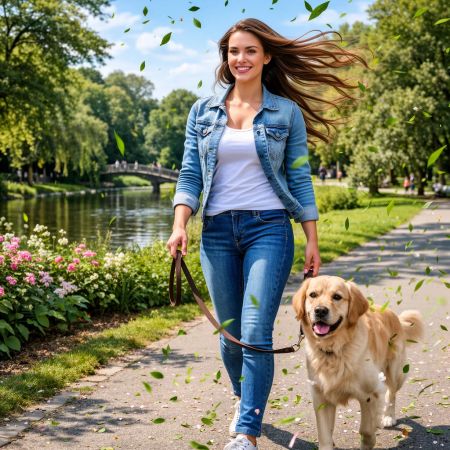

FLUX.2 [flex]
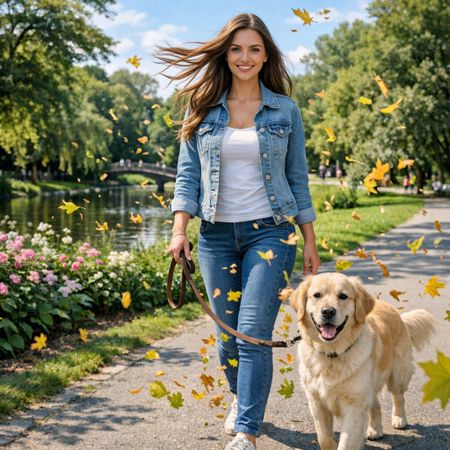
Grok Imagine Image Pro
AI Judge Analysis
FLUX.2 [flex]
- + Excellent addition of dynamic hair movement that looks very natural.
- + Adds subtle, green leaves that blend well with the existing lush green foliage.
- + Maintains original image facial features and background exceptionally well.
- − The wind direction on the hair seems a bit multidirectional/tangled rather than a single gust.
- − The dog's fur shows very little motion compared to the woman's hair.
Grok Imagine Image Pro
- + Strong 'energetic' feel with a high volume of flying leaves.
- + Good use of warm leaf colors to contrast with the cool denim of the sujetos.
- + Clear horizontal wind direction shown in the hair flow.
- − The sheer number of leaves feels slightly cluttered and overlaps with the subjects in a messy way.
- − Small artifacts around the edges of some leaves where they meet the background.
Verdict: Both models followed the instructions well, with FLUX.2 [flex] providing a more realistic and subtle edit that perfectly preserved the spirit of the original image. Grok Imagine Image Pro created a more stylized and busy 'energetic' scene with a large amount of flying leaves, which makes the motion more obvious but slightly less grounded in reality.
Vintage Cafe Logo
Text-to-Image“Vintage minimalist restaurant logo for "Caffè Florian", retro cloche dome with steam and "Est. 1720" banner, classic typography, warm brown and cream tones, subtle texture on light background, vector emblem style.”
FLUX.2 [flex]
Grok Imagine Image Pro
0% wins
0% ties
100% wins
AI Judge Analysis
FLUX.2 [flex]
- + Clean and professional vector emblem style with balanced line weights.
- + Excellent layout with the 'Est. 1720' naturally integrated into a classic banner.
- + Superior typography that feels elegant and authentic to the vintage prompt.
- − The steam effect is very subtle and slightly blends into the background.
Grok Imagine Image Pro
- + Includes all requested elements including the cloche and date.
- + Visible paper-like texture on the background as requested.
- + The circular frame creates a contained badge look.
- − The steam icon looks like a floating hook or 'S' and lacks elegance.
- − The cloche shading and heavy black outlines feel less like a professional logo and more like a simple illustration.
- − Typography is a bit generic and the bottom text 'EST. 1720' is not on a traditional banner.
Verdict: FLUX.2 [flex] produced a much more professional and aesthetically pleasing logo that feels like an actual restaurant brand identity. While Grok Imagine Image Pro followed the prompt instructions, its execution of the cloche and steam elements was clunky, whereas FLUX.2 [flex] achieved a sophisticated vintage look with superior typography.
Apollo 11: Journey to Tranquility
Text-to-Image“Create a clean, modern vector infographic poster about the Apollo 11 mission. NASA-inspired palette (navy, white, muted red, light gray). Flat-vector style, crisp lines, consistent iconography, subtle gradients only. Steps (stop at landing): 1. Launch (Saturn Vicon) 2. Earth Orbit (Earth + orbit ring icon) 3. Translunar (trajectory arc icon) 4. Lunar Orbit (Moon + orbit ring icon) 5. Descent (lunar module descending icon) 6. Landing (lunar module on the surface icon) Small supporting elements (minimal text): • Crew strip: three silhouette icons with only last names: Armstrong, Aldrin, Collins. • Landing site marker: Moon pin labeled "Tranquility" only. Layout constraints: generous margins, large readable labels, clean background with subtle stars. Vector-only, print-poster look, high resolution.”
FLUX.2 [flex]
Grok Imagine Image Pro
AI Judge Analysis
FLUX.2 [flex]
- + Excellent flat vector aesthetic with high-quality illustrations.
- + Follows the color palette closely using a deep navy background.
- + Clever use of trajectory arcs to represent space travel.
- − Failed to include stage 6 (Landing) entirely.
- − The layout becomes a bit messy in the center with overlapping arcs.
- − Step 5 (Descent) is labeled as 'in orbit' which is technically contradictory.
Grok Imagine Image Pro
- + Perfect adherence to the 6-step prompt requirements.
- + Very clean and consistent iconography within circular frames.
- + Excellent additional details like the crew portraits and landing site map.
- − The light gray background is less visually striking than the navy option.
- − Minimalist approach makes some icons (like Translunar) look a bit empty.
Verdict: While FLUX.2 [flex] has superior artistic flair and a more professional vector style, it failed the basic prompt instruction to illustrate all six specific steps. Grok Imagine Image Pro successfully captured every step of the mission profile, including the landing, and added thoughtful supporting details like the crew names, making it a much better infographic.
Next steps
Explore each model
xAI's premium image generation model offering higher fidelity output and stronger performance on single-image editing benchmarks compared to the standard Grok Imagine model