

Black Forest Labs' open-weights image generation model with frontier performance, available for non-commercial local deployment
Settled by community votes across 7 shared challenges, with an AI judge weighing in on each.
FLUX.2 [dev]
24.8
arena score
#19 of 62 in Text-to-Image
Skill signature
· Text-to-Image
Qwen Image Edit 2511
20.4
arena score
#15 of 37 in Image Editing
Vote tally
Where the votes landed
FLUX.2 [dev]
0.0%
win rate
Ties
0.0%
Qwen Image Edit 2511
100.0%
win rate
0.0%
0.0% ties
100.0%
Shared challenges
7
Challenge by challenge
The strongest take from each model on every shared challenge, with the AI judge's read.
Man and Car in California
EditingEdit instruction
“Make a photo of the man driving the car down the California coastline”
Source
FLUX.2 [dev]
Qwen Image Edit 2511
AI Judge Analysis
FLUX.2 [dev]
- + Successfully merges the car's interior aesthetic (white leather/wood trim) with the coastal environment.
- + Maintains the man's hairstyle and clothing textures with high fidelity.
- + Captures a cinematic lighting and motion blur effect on the road.
- − The man's face shape and features have changed significantly from the source image.
- − The hand on the steering wheel has anatomical issues with finger placement.
Qwen Image Edit 2511
- + Excellent preservation of the man's facial features and smiling expression from the source.
- + Perfectly captures the 'California coastline' vibe with palm trees and a winding coastal highway.
- + Strong rendering of hands on the steering wheel.
- − The car interior is less consistent with the source Rolls Royce, appearing slightly more generic.
- − The proportions of the man's head relative to the car seat seem slightly enlarged.
Verdict: Both models perform exceptionally well at this complex image-to-image merging task. FLUX.2 [dev] excels at the atmosphere and the technical details of the car, but it loses the likeness of the man in the process. Qwen Image Edit 2511 is the preferred winner because it maintains the subject's identity and facial expressions perfectly while creating a more iconic California backdrop.
Pose & Character Mashup
EditingEdit instruction
“Use Image 1 as the exact pose reference and Image 2 as the character reference. Recreate the person/character from Image 2 in the exact dynamic pose and body position from Image 1. Keep the exact face, hair, clothing style/details, and expression from Image 2. Match the lighting and environment of Image 1. The final image must show the character from Image 2 performing the precise action/pose from Image 1 with perfect anatomy and natural integration.”
Source
FLUX.2 [dev]
Qwen Image Edit 2511
AI Judge Analysis
FLUX.2 [dev]
- + Attempts to merge the character's clothing and appearance into a single figure.
- + Successfully replicates the yellow background and red ottoman from Image 1.
- + Captures the character's face, sunglasses, and scarf from Image 2.
- − Horrific anatomical failure with a second head and distorted limbs.
- − Does not mimic the pose from Image 1 accurately, creating a floating composite instead.
- − Severe artifacts and lack of structural coherence.
Qwen Image Edit 2511
- + Near-perfect preservation of the woman's pose and clothing from Image 1.
- + High resolution and clean edges on the subject.
- − Completely failed the core instruction to replace the person with the character from Image 2.
- − Just placed the character from Image 2 as a static background layer behind the original person.
- − Kept the background from Image 2 instead of Image 1.
Verdict: Both models failed the complex instruction of reposing a specific character. FLUX.2 [dev] attempted to create a hybrid creature that matched the yellow background but resulted in a nightmarish anatomical mess with two heads. Qwen Image Edit 2511 followed none of the reposing instructions, instead opting to simply composite the two images as separate layers, essentially ignoring the request to 'recreate the character in the exact pose.'
Outfit Transfer Challenge
EditingEdit instruction
“Use Image 1 as the base person. Dress them in the exact elaborate outfit from Image 2 (including all layers, accessories, jewelry, and shoes). Carefully adapt the clothing to the body shape and pose in Image 1 while maintaining realistic fabric behavior, correct proportions, and perfect lighting/shadow matching. Keep the person’s exact face, hair, and background completely unchanged.”
Source
FLUX.2 [dev]
Qwen Image Edit 2511
AI Judge Analysis
FLUX.2 [dev]
- + Successfully replicates the specific scarf pattern and pea coat style from Image 2.
- + Maintains the vitiligo pattern and unique blond hair patch from the person in Image 1.
- + Keeps the 'INNERSY' waistband detail from the original subject's underwear.
- − Blends the facial features of the person in Image 2 with the person in Image 1, failing the 'exact face' instruction.
- − The hand in the pocket has a blurry, distorted appearance.
Qwen Image Edit 2511
- + Accurately incorporates the shoes/boots as requested in the instructions.
- + Good full-body integration with the background environment.
- − Completely fails to preserve the identity of the person in Image 1, removing their vitiligo and facial structure.
- − Fails to keep the background completely unchanged, adding extra sand texture and modifying the post.
- − Changes the hairstyle significantly from the source image person.
Verdict: Both models failed the specific instruction to keep the person's exact face unchanged, as both models leaned heavily toward the facial features of the man in Image 2. However, FLUX.2 [dev] is superior because it preserved the unique vitiligo skin patterns and hair coloring of the person in Image 1, whereas Qwen Image Edit 2511 completely replaced the subject's identity.
Bald man challenge
Image EditingEdit instruction
“Give the person a full, thick head of natural hair with realistic texture, density, and a natural hairline. Preserve facial features and lighting.”


FLUX.2 [dev]
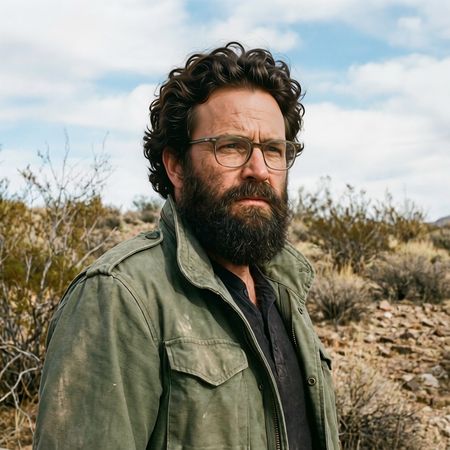
Qwen Image Edit 2511
0% wins
0% ties
100% wins
AI Judge Analysis
FLUX.2 [dev]
- + Excellent preservation of the original face, glasses, and background
- + Extremely realistic hair texture and fine strands
- − The 'afro' style chosen is a significant departure from the original subject's likely natural hair type
- − The hair obscures a portion of the original sky and background
Qwen Image Edit 2511
- + Natural-looking wavy hair that matches the existing beard texture well
- + Perfect preservation of the original face and surrounding environment
- − The lighting on top of the hair is slightly flatter than the high-contrast lighting of the original scene
Verdict: Both models performed exceptional edits with flawless preservation of the original subject's features and background. FLUX.2 [dev] opted for a very large, textured afro style, while Qwen Image Edit 2511 provided a more conservative, wavy hairstyle that better matched the existing beard; the latter feels like a more logical 'natural' extension of the original person.
Over-the-top cartoon caricature
EditingEdit instruction
“Create a caricature of me and my job. Make it exaggerated and humorous, incorporating my profession as a tv show anchor and my love for dogs and hockey.”
Source
FLUX.2 [dev]
Qwen Image Edit 2511
AI Judge Analysis
FLUX.2 [dev]
- + Strongly incorporates all prompt elements including dogs, a news desk, and a hockey rink background.
- + Maintains a recognizable likeness to the original subject while applying the caricature style.
- + High level of detail in the background, including a camera crew and multiple dogs in hockey jerseys.
- − Text on the desk is nonsensical gibberish.
- − The inclusion of the male caricature in the top left is slightly confusing in the context of the user's request.
Qwen Image Edit 2511
- + Successfully captures a high-energy, exaggerated facial expression appropriate for a caricature.
- + Clear and clean vector-like art style.
- − Completely fails to incorporate the requested hockey theme.
- − The text in the speech bubble is unintelligible.
- − The inclusion of a lit candle on the desk is a strange, unrelated artifact.
Verdict: FLUX.2 [dev] followed the complex instructions much better than Qwen Image Edit 2511, successfully integrating the news anchor desk, several dogs, and a hockey rink setting. While Qwen produced a clean caricature style, it completely missed the hockey requirement and included strange elements like a candle and gibberish speech. FLUX.2 [dev] is the clear winner for its creative and comprehensive interpretation of the prompt.
Studio Ghibli Anime Style
EditingEdit instruction
“Transform this photo into a Studio Ghibli–inspired illustration. Use soft pastel colors, hand-painted textures, gentle lighting, dreamy backgrounds, and a warm, nostalgic mood”
Source
FLUX.2 [dev]
Qwen Image Edit 2511
AI Judge Analysis
FLUX.2 [dev]
- + Captures the Studio Ghibli art style more authentically with hand-painted textures and soft line art.
- + Successfully implements a 'dreamy' background as requested in the prompt.
- + The color palette is very soft and nostalgic.
- − Replaces the background entirely, losing the urban street setting of the source image.
- − The foreground woman's red dress is faded to pink, deviating significantly from the source colors.
Qwen Image Edit 2511
- + Excellent source preservation, keeping the urban street, the bus, and background pedestrians intact.
- + Accurately translates the original facial expressions and likeness into an illustrated style.
- + The lighting effects align well with the warm, nostalgic atmosphere requested.
- − The art style is more generic 'manhwa/webtoon' than Studio Ghibli.
- − Some digital artifacts or 'sparkles' feel out of place for a hand-painted aesthetic.
Verdict: FLUX.2 [dev] delivers a much more convincing Studio Ghibli aesthetic but fails as an editor by completely changing the background and altering key colors. Qwen Image Edit 2511 functions better as an image editor by preserving the original scene's context and composition while applying the stylistic filter, even if the artistic interpretation is slightly less accurate to the specific Ghibli style.
Golden Hour Stroll
Image EditingEdit instruction
“Add dynamic motion to this photo: make hair blow in the wind, add leaves flying, energetic and lively feel.”
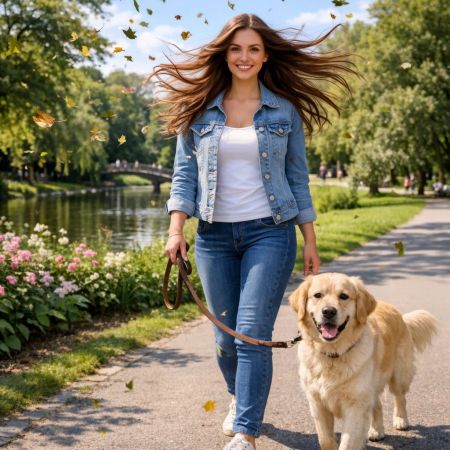

FLUX.2 [dev]
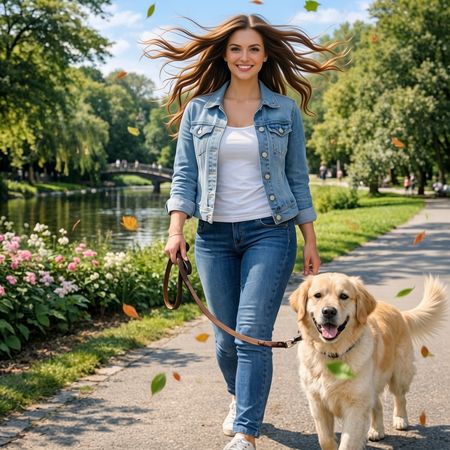
Qwen Image Edit 2511
AI Judge Analysis
FLUX.2 [dev]
- + Excellent addition of high-detail autumn leaves that fit the environment's color palette.
- + Successfully blew the hair outward in a natural-looking motion.
- + High source preservation including the woman's face and dog's features.
- − The hair edges look slightly fuzzy or disconnected in some areas.
Qwen Image Edit 2511
- + Successfully applied wind effect to both the woman's hair and the dog's fur.
- + Leaves are well-distributed throughout the frame to suggest a gust of wind.
- + Maintains the identity of the woman and the dog very well.
- − The added hair strands have a somewhat 'liquified' or smoothed look compared to the source texture.
- − A leaf appears to be growing out of the dog's back.
Verdict: Both models followed the instructions well, but FLUX.2 [dev] produced a more realistic integration of the flying leaves and better hair texture. Qwen Image Edit 2511 creatively added motion to the dog's fur as well, but it suffered from minor artifacts like a leaf merging with the dog's body.
Next steps
Explore each model
Alibaba's Qwen image editing model for instruction-based image modifications and transformations