
Black Forest Labs' open-weights image generation model with frontier performance, available for non-commercial local deployment
Settled by community votes across 7 shared challenges, with an AI judge weighing in on each.
FLUX.2 [dev]
24.8
arena score
#19 of 62 in Text-to-Image
Skill signature
· Text-to-Image
P-Image Edit
14.9
arena score
#30 of 37 in Image Editing
Vote tally
Where the votes landed
FLUX.2 [dev]
100.0%
win rate
Ties
0.0%
P-Image Edit
0.0%
win rate
100.0%
0.0% ties
0.0%
Shared challenges
7
Challenge by challenge
The strongest take from each model on every shared challenge, with the AI judge's read.
Man and Car in California
EditingEdit instruction
“Make a photo of the man driving the car down the California coastline”
Source
FLUX.2 [dev]
P-Image Edit
AI Judge Analysis
FLUX.2 [dev]
- + Excellent preservation of the man's clothing, hairstyle, and facial features from the source image.
- + Accurately recreates the interior details and leather seating of the Rolls Royce Phantom Drophead Coupe.
- − The perspective of the car's body in the foreground feels slightly disconnected from the interior view.
- − The lighting on the man's face is quite dark compared to the bright beach background.
P-Image Edit
- + Successfully translates the car from a showroom to a motion shot on a coastline road.
- + Preserves the overall exterior look and angle of the car from the source image very well.
- − The man is barely visible and lacks the specific details (plaid coat, scarf) from the source image.
- − The scale of the man inside the car looks slightly too small.
Verdict: FLUX.2 [dev] performed better as an image editing tool by accurately merging the two subjects, preserving the man's specific attire and hairstyle while placing him inside the car's interior. While P-Image Edit captured the 'driving' action and environment effectively, it failed to maintain the identity and details of the man from the source image, rendering him as a low-detail silhouette.
Pose & Character Mashup
EditingEdit instruction
“Use Image 1 as the exact pose reference and Image 2 as the character reference. Recreate the person/character from Image 2 in the exact dynamic pose and body position from Image 1. Keep the exact face, hair, clothing style/details, and expression from Image 2. Match the lighting and environment of Image 1. The final image must show the character from Image 2 performing the precise action/pose from Image 1 with perfect anatomy and natural integration.”
Source
FLUX.2 [dev]
P-Image Edit
AI Judge Analysis
FLUX.2 [dev]
- + Successfully incorporates the character's clothing, scarf, and sunglasses.
- + Maintains the central yellow background and red ottoman.
- − Extreme anatomical failure with a second head and distorted limbs.
- − Fails to replicate the dynamic pose, opting for a static upright torso superimposed on the scene.
- − Severe artifacting and blending issues between the character and the background elements.
P-Image Edit
- + Captures a much better approximation of the dynamic pose and body position from Image 1.
- + Successfully incorporates the specific character features like the sunglasses and scarf.
- + Integrated the character's face onto the tilted head position with logical orientation.
- − Anatomy is still flawed, particularly with the placement of legs and the extra foot in the air.
- − Confusion in clothing where black sleeves transition into red sleeves.
- − Hair style from Image 2 was not preserved, instead keeping the long hair from Image 1.
Verdict: FLUX.2 [dev] failed the task significantly by creating a nightmarish, multi-headed composite that ignored the requested pose geometry. P-Image Edit, while struggling with clothing consistency and leg anatomy, managed to approximate the dynamic pose and facial orientation of the source images much more effectively. P-Image Edit is preferred for its attempt at structural coherence despite the difficult nature of the pose reference.
Outfit Transfer Challenge
EditingEdit instruction
“Use Image 1 as the base person. Dress them in the exact elaborate outfit from Image 2 (including all layers, accessories, jewelry, and shoes). Carefully adapt the clothing to the body shape and pose in Image 1 while maintaining realistic fabric behavior, correct proportions, and perfect lighting/shadow matching. Keep the person’s exact face, hair, and background completely unchanged.”
Source
FLUX.2 [dev]
P-Image Edit
AI Judge Analysis
FLUX.2 [dev]
- + Successfully captures the texture and pattern of the scarf and pea coat from Image 2.
- + Maintains high resolution and realistic lighting that blends the figure with the beach background.
- − Fails significantly on source preservation by replacing the face and hair of the man in Image 1 with the man from Image 2.
- − Over-complicates the prompt by adding several large gold chains not present in either source image.
P-Image Edit
- + Excellent source preservation, keeping the exact face, unique hair pattern, and skin markings of the person in Image 1.
- + Generally follows the clothing transfer request while adapting the items to the full-body pose.
- − The color of the coat shifted from a dark navy/charcoal to a bright royal blue.
- − The gold chains and yellow-laced shoes are hallucinations not found in Image 2.
Verdict: The task was to keep the person from Image 1 and dress them in the clothes from Image 2. FLUX.2 [dev] failed the primary constraint by replacing the person's face entirely with the subject from the second image. P-Image Edit successfully preserved the original person's identity and background while applying the requested clothing, despite some minor color shifts and added details.
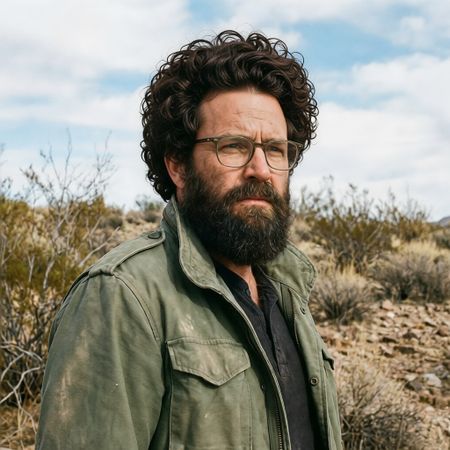
Bald man challenge
Image EditingEdit instruction
“Give the person a full, thick head of natural hair with realistic texture, density, and a natural hairline. Preserve facial features and lighting.”


FLUX.2 [dev]
P-Image Edit
AI Judge Analysis
FLUX.2 [dev]
- + Excellent preservation of the original face, lighting, and background.
- + Realistic hair texture and density that blends well with the existing beard.
- + Maintains the exact geometry of the eyeglasses.
- − The afro-style choice is a bit voluminous, though it fits the prompt's request for 'full and thick'.
P-Image Edit
- + Successfully adds a full head of hair.
- + Preserves the original facial features and environment accurately.
- − The hair texture has 'infinite loop' artifacts where curls repeat unnaturally.
- − The hairline integration at the forehead looks slightly less blending than the other model.
- − The hair rendering looks somewhat more synthetic/plastic compared to the beard.
Verdict: Both models did an excellent job of preserving the source image while adding the requested hair. FLUX.2 [dev] is the winner because the hair texture is more realistic and better integrated with the existing facial hair, whereas P-Image Edit's hair has repetitive digital artifacts in the curls that look less natural.
Over-the-top cartoon caricature
EditingEdit instruction
“Create a caricature of me and my job. Make it exaggerated and humorous, incorporating my profession as a tv show anchor and my love for dogs and hockey.”
Source
FLUX.2 [dev]
P-Image Edit
100% wins
0% ties
0% wins
AI Judge Analysis
FLUX.2 [dev]
- + Excellent caricature style with exaggerated proportions.
- + Effectively integrates all themes including profession (anchor desk), dogs, and hockey simultaneously.
- + Strong character likeness to the source image face.
- − Text on the desk is garbled and unreadable.
- − The hand holding the pen has anatomical issues with the fingers.
P-Image Edit
- + Successfully incorporates the 'tv show' and 'hockey' elements into a cohesive scene.
- + Maintains character likeness while translating the persona into a vibrant cartoon style.
- + Preserves the denim jacket style from the original source image.
- − The 'dogs' requirement is poorly executed, featuring strange, non-organic red shapes on the dog.
- − The overall composition feels a bit cluttered with nonsensical small objects on the desk.
- − Less of a 'caricature' and more of a standard comic illustration.
Verdict: FLUX.2 [dev] produces a much better 'caricature' in the traditional sense, featuring exaggerated heads and a clever integration of humorous elements like hockey-playing dogs. P-Image Edit follows the source material's clothing more closely but fails significantly on the rendering of the dogs, which was a core requirement of the prompt.
Studio Ghibli Anime Style
EditingEdit instruction
“Transform this photo into a Studio Ghibli–inspired illustration. Use soft pastel colors, hand-painted textures, gentle lighting, dreamy backgrounds, and a warm, nostalgic mood”
Source
FLUX.2 [dev]
P-Image Edit
AI Judge Analysis
FLUX.2 [dev]
- + Expertly captures the soft, matte, hand-painted texture typical of Studio Ghibli backgrounds.
- + Excellent application of pastel colors and dreamy, warm lighting that matches the prompt perfectly.
- + Maintains the composition and recognizable poses of the original meme flawlessly.
- − The characters' eyes are a bit simplified, leaning slightly more towards generic anime than a specific Ghibli face style.
P-Image Edit
- + Preserves the facial features and expressions of the source image with high accuracy.
- + Successfully translates the scene into a colorful, dreamy illustrated environment.
- − The art style feels more like a modern digital vector illustration than the requested 'hand-painted' Ghibli style.
- − The lighting is a bit harsher and less 'nostalgic' compared to the first model.
Verdict: Both models successfully interpreted the iconic 'distracted boyfriend' meme into an illustration. FLUX.2 [dev] is the clear winner for its superior adherence to the 'Studio Ghibli' aesthetic, providing the soft textures and hazy, warm atmosphere requested, whereas P-Image Edit produced a cleaner, more standard digital illustration that lacked the specific artistic soul of the prompt.
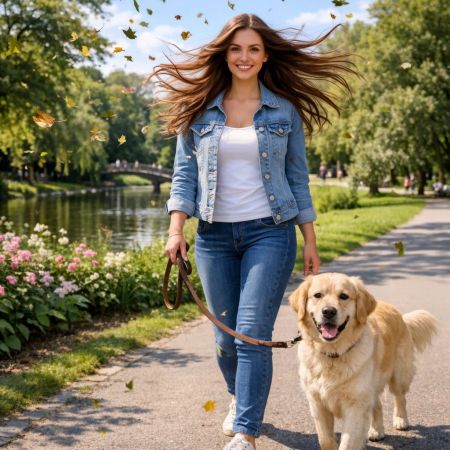
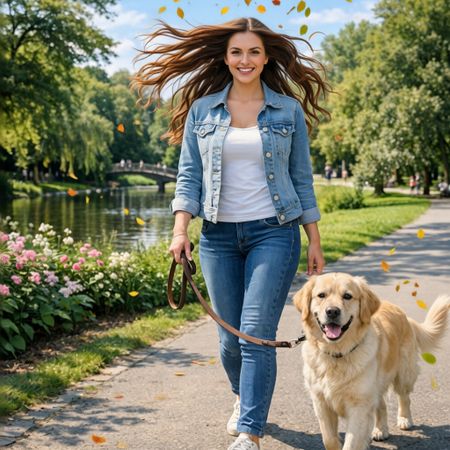
Golden Hour Stroll
Image EditingEdit instruction
“Add dynamic motion to this photo: make hair blow in the wind, add leaves flying, energetic and lively feel.”

FLUX.2 [dev]
P-Image Edit
AI Judge Analysis
FLUX.2 [dev]
- + Excellent preservation of the subject's face and original features.
- + Realistic, detailed autumn leaves added with natural lighting.
- + Effective wind effect on the hair that looks physically plausible.
- − The leaf placement looks slightly clustered on the left side of the frame.
P-Image Edit
- + Successfully applied the wind effect to the hair and added flying leaves.
- + Maintains high similarity to the original source image structure.
- − The hair edit creates some unnatural, thin 'stringy' artifacts on the right side.
- − Added leaves are very small and look more like simple yellow/orange dots than detailed foliage.
- − Noticeable softening or slight alteration of the facial features compared to the source.
Verdict: Both models followed the instructions well, but FLUX.2 [dev] produced a much higher quality result with more realistic leaf details and a cleaner hair transformation. P-Image Edit struggled with the hair texture and the leaves appeared less detailed, feeling more like graphical overlays than part of the scene.
Next steps
Explore each model
PrunaAI's sub-1-second multi-image editing model supporting up to 5 reference images with state-of-the-art quality