
Fast distilled version of Black Forest Labs' FLUX.2 [dev] optimized for speed and cost efficiency.
Settled by community votes across 20 shared challenges, with an AI judge weighing in on each.
FLUX.2 [dev] Flash
26.5
arena score
#8 of 62 in Text-to-Image
Skill signature
· Text-to-Image
Grok Imagine Image Pro
24.7
arena score
#20 of 62 in Text-to-Image
Vote tally
Where the votes landed
FLUX.2 [dev] Flash
85.7%
win rate
Ties
0.0%
Grok Imagine Image Pro
14.3%
win rate
85.7%
0.0% ties
14.3%
Shared challenges
20
Challenge by challenge
The strongest take from each model on every shared challenge, with the AI judge's read.
Geometric Composition
Text-to-Image“A glass cube on a wooden table. Inside the cube is a small blue sphere. On top of the cube sits a red book. A green plant is behind the cube, partially visible through the glass. Soft window light from the left.”
FLUX.2 [dev] Flash
Grok Imagine Image Pro
AI Judge Analysis
FLUX.2 [dev] Flash
- + Excellent photographic realism with natural dust and refraction on the glass.
- + Correctly places the plant behind the cube so it is visible through the glass.
- + The lighting is soft and directional as requested, creating a cohesive scene.
- − The sphere is slightly smaller than what might be expected for 'small', though still accurate.
Grok Imagine Image Pro
- + Strong colors and clean composition.
- + Good textural contrast between the wood, matte sphere, and glass.
- − Creates a strange hallucination where a second half-sphere appears on the right edge of the glass.
- − The plant is mostly to the side rather than 'behind' the cube as requested.
- − The glass appears unnaturally thick and distorted in a way that looks less realistic.
Verdict: FLUX.2 [dev] Flash followed the spatial instructions perfectly, placing the plant behind the glass cube and rendering the physics of light through glass very realistically. Grok Imagine Image Pro struggled with the internal contents of the cube, resulting in a redundant half-sphere artifact and failing to position the plant correctly according to the prompt.
Man and Car in California
EditingEdit instruction
“Make a photo of the man driving the car down the California coastline”
Source
FLUX.2 [dev] Flash
Grok Imagine Image Pro
AI Judge Analysis
FLUX.2 [dev] Flash
- + Excellent character preservation, maintaining the man's specific hairstyle and plaid coat.
- + High-quality rendering of the dashboard and leather interior.
- + Directly and accurately captures both subject and car in the new environment.
- − The steering wheel logo is slightly distorted.
- − The man's expression is very serious compared to the source image.
Grok Imagine Image Pro
- + Strong preservation of the car's exterior design and the 'Spirit of Ecstasy' hood ornament.
- + Beautiful landscape composition that perfectly evokes the California coastline.
- − Completely failed to preserve the man's identity, replacing him with a different person in a white shirt.
- − The driver's face is small and lacks detail.
Verdict: FLUX.2 [dev] Flash is the clear winner as it successfully integrated the specific man from the source image into the vehicle, preserving his unique hairstyle and clothing. Grok Imagine Image Pro produced a high-quality landscape but failed the primary edit task by replacing the man with a generic figure and removing his original attire.
Candid Street Photography
Text-to-Image“A candid street photo of an elderly Japanese man repairing a red bicycle in light rain, reflections on wet pavement, shallow depth of field, 50mm lens, natural skin texture, imperfect framing, motion blur from passing cars, cinematic but realistic, no stylization.”
FLUX.2 [dev] Flash
Grok Imagine Image Pro
100% wins
0% ties
0% wins
AI Judge Analysis
FLUX.2 [dev] Flash
- + Excellent depiction of motion blur with passing cars
- + High realism and skin texture detail
- + Successfully followed 'imperfect framing' with a slightly awkward, candid-style composition
- − Internal logic of the bike is messy (spokes and handlebars are jumbled)
- − The man's hands appear slightly merged with the bike's cables
Grok Imagine Image Pro
- + Natural-looking interaction with the bike using a wrench
- + Better background depth and lighting on the wet pavement
- + More coherent bike structure
- − Cars in the background lack the 'motion blur' requested
- − The framing feels too centered and professional, missing the 'imperfect framing' prompt
- − Face texture is slightly softer/less detailed than the competitor
Verdict: FLUX.2 [dev] Flash captured the specific photography technicalities of the prompt much better, including the motion blur and the requested 'imperfect' candid framing. Grok Imagine Image Pro produced a cleaner subject and more coherent bicycle, but failed to incorporate the motion blur and the spontaneous feel of a street photo.
Fantasy Warrior
Text-to-Image“Close portrait of a battle-worn paladin in ornate engraved plate armor, hair braided with small beads, faint scars and dirt on the skin, warm torchlight reflecting off metal, shallow depth of field, bokeh sparks, lifelike eyes, highly detailed texture on leather straps and cloth underlayer.”
FLUX.2 [dev] Flash
Grok Imagine Image Pro
100% wins
0% ties
0% wins
AI Judge Analysis
FLUX.2 [dev] Flash
- + Excellent skin texture with realistic blood and dirt
- + Highly detailed and intricate metal engravings
- + Very lifelike, clear eye rendering
- − The braids are a bit messy and merge into the background in spots
- − The color palette is slightly muted
Grok Imagine Image Pro
- + Stronger visual storytelling with the Latin inscription 'Lux in tenebris' on the gorget
- + Very distinctive and well-defined hair beads
- + Better lighting contrast with stronger warm reflections
- − The facial scars look a bit like digital paint strokes rather than skin damage
- − Some minor aliasing on the bokeh sparks
Verdict: Both models followed the prompt exceptionally well, but FLUX.2 [dev] Flash produces a more natural, lifelike face with superior skin texture. Grok Imagine Image Pro has slightly better composition and lighting contrast, and its addition of thematic text on the armor adds a nice touch, though the facial details feel slightly more 'rendered' than FLUX.
Modern Clean Menu
Text-to-Image“Modern minimalist restaurant menu design, white background with colorful food photos in grid, sections for appetizers/pizza/mains, bold sans-serif fonts, vibrant accents, clean professional layout for casual dining.”
FLUX.2 [dev] Flash
Grok Imagine Image Pro
AI Judge Analysis
FLUX.2 [dev] Flash
- + Strong use of vibrant accent colors in the layout
- + Excellent food photography realism
- + Clean grid-based visual presentation
- − Nonsensical text and significant spelling errors in the headers
- − Layout is confused with pizza photos categorized under 'Appetizers' and 'Pizza'
Grok Imagine Image Pro
- + Logically organized sections with appropriate food photos (Appetizers, Pizza, Mains)
- + Legible text with specific descriptions and prices
- + Very clean, professional minimalist design
- − Slightly less 'bold' use of color accents compared to Model A
- − Minor spelling errors in fine print like 'pepperani' and 'avucado'
Verdict: Model B (Grok Imagine Image Pro) produced a far more functional and logical menu design with text that is mostly readable and photos that correctly correspond to their section headers. Model A (FLUX.2 [dev] Flash) has higher artistic flair in its color usage and photo quality, but the text is garbled and the categorization is incorrect.
Magic Burger Explosion: Fiery Photorealism Challenge
Text-to-Image“Ad for 'Magic Burger'. Dynamic, exploded burger with all components (bun, patty, cheese, lettuce, tomato, sauce) suspended in mid-air. Emphasize photorealistic detail and a sense of motion. Dark, fiery background with glowing embers. Integrate text: 'MAGIC BURGER' as a prominent title, 'LIMITED TIME ONLY' as a secondary message, and '€6.99' in a starburst, all rendered with a fiery, glowing effect.”
FLUX.2 [dev] Flash
Grok Imagine Image Pro
AI Judge Analysis
FLUX.2 [dev] Flash
- + Excellent typography with a consistent fiery glow effect across all text elements
- + Very realistic textures on the patty and bun
- + Clean and professional composition suitable for a high-end ad
- − The 'exploded' effect is a bit static compared to Model B
Grok Imagine Image Pro
- + Highly dynamic sense of motion with liquid splashes and stretching cheese
- + Strong contrast and vibrant colors that make the product pop
- + Accurate inclusion of all requested text elements
- − Text styling is inconsistent, with 'Magic Burger' having a glossy gradient rather than a fiery glow
- − The price tag starburst looks like a flat graphic overlay rather than being integrated into the scene
Verdict: Both models followed the prompt closely, but FLUX.2 [dev] Flash produced a more cohesive advertisement by applying the requested 'fiery, glowing effect' consistently across all text elements, including the starburst. While Grok Imagine Image Pro offers more dynamic motion and exciting liquid physics, its text rendering feels more like a standard digital overlay rather than an integrated part of the 'magic' theme.
Chalkboard Menu
Text-to-Image“Handwritten-style chalkboard menu in a cozy café, all text rendered in the exact same realistic chalk handwriting style with natural variations in letter size, slight slant, and chalk texture — no printed or digital fonts anywhere on the board. Title at the top in elegant cursive chalk handwriting: ‘TODAY’S SPECIALS – APRIL 30, 2026’. Below it, three menu items also in the same handwritten chalk style: ‘Truffle Mushroom Risotto – $24’, ‘Grilled Octopus with Lemon & Herbs – $28’, ‘Brown Butter Chocolate Chip Cookies – $9’. At the very bottom, smaller text in the identical handwritten chalk style (slightly smaller but still clearly legible with the same handwriting characteristics): ‘All items made fresh daily • Ask about our gluten-free options’. Warm ambient café lighting, visible chalk dust and smudges, realistic handwriting imperfections, no clean printed text anywhere.”
FLUX.2 [dev] Flash
Grok Imagine Image Pro
AI Judge Analysis
FLUX.2 [dev] Flash
- + Excellent chalk texture with realistic smudging and dusting on the board.
- + Superior handwriting style that looks authentically human and elegant.
- + Very high-quality background and lighting within the café setting.
- − Slightly messy layout for the second menu item where 'Herbs' is oddly placed below a dash.
Grok Imagine Image Pro
- + Perfect text accuracy including the final menu item 'Cookies'.
- + Clean, legible layout with consistent spacing between items.
- + Adheres well to the cursive requirement for the title.
- − The chalk texture looks a bit too sharp and digital compared to Model A.
- − The handwriting looks slightly more uniform and less like natural chalk strokes.
Verdict: Both models followed the complex prompt with nearly 100% accuracy in text rendering. FLUX.2 [dev] Flash produces a more atmospheric and realistic image with authentic chalk dust and human-like variations in the script, while Grok Imagine Image Pro provides a cleaner, more readable board with slightly more precise letterforms. FLUX.2 [dev] Flash is the winner for its superior 'chalkboard' feel and artistic composition.
Pose & Character Mashup
EditingEdit instruction
“Use Image 1 as the exact pose reference and Image 2 as the character reference. Recreate the person/character from Image 2 in the exact dynamic pose and body position from Image 1. Keep the exact face, hair, clothing style/details, and expression from Image 2. Match the lighting and environment of Image 1. The final image must show the character from Image 2 performing the precise action/pose from Image 1 with perfect anatomy and natural integration.”
Source
FLUX.2 [dev] Flash
Grok Imagine Image Pro
100% wins
0% ties
0% wins
AI Judge Analysis
FLUX.2 [dev] Flash
- + Successfully transferred the character and clothing from Image 2 to the scene.
- + Correctly applied the lighting and color grade of the yellow background.
- + The character's face and accessories are recognizable from the reference.
- − Failed to match the 'exact' pose from Image 1, changing the torso and head orientation.
- − Serious anatomical errors including a floating head/disembodied hair behind the main character.
- − The feet positioning on the stool lacks the dynamism of the original photo.
Grok Imagine Image Pro
- + Perfectly preserved the background and stool from Image 1.
- − Failed the core task entirely by not changing the character to the subject of Image 2.
- − No edits were made to the person's face, clothing, or gender.
- − Completely ignored the character reference image.
Verdict: FLUX.2 [dev] Flash attempted the complex character and style transfer, resulting in a recognizable subject from Image 2 in the environment of Image 1, though it suffered from severe anatomical hallucinations and a modified pose. Grok Imagine Image Pro essentially returned Image 1 with no character changes, failing the prompt's primary instruction entirely. FLUX.2 is the winner for making a genuine attempt at the composite task despite the visual artifacts.
The Reversed Rodeo
Text-to-Image“Horse riding astronaut in space — horse on top, not vice versa. Surreal, highly detailed, cinematic.”
FLUX.2 [dev] Flash
Grok Imagine Image Pro
AI Judge Analysis
FLUX.2 [dev] Flash
- + High cinematic visual quality and realistic lighting
- + Detailed astronaut suit and horse anatomy
- + Excellent spatial depth with background planets
- − Completely failed the negative constraint/spatial instruction of horse on top
- − Interpretations is a standard 'astronaut riding horse' trope
Grok Imagine Image Pro
- + Followed the spatial instruction perfectly with the horse on top of the astronaut
- + Vibrant and colorful surrealist aesthetic
- + Creative interpretation of 'riding' where the astronaut acts as the mount
- − Slightly less realistic textures compared to Model A
- − Anatomical oddity with the horse's front legs merging slightly into the neck area
Verdict: FLUX.2 [dev] Flash produces a much higher quality, cinematic image but fails the core prompt instruction to have the horse on top. Grok Imagine Image Pro successfully follows the difficult spatial constraint of a horse riding an astronaut, delivering a truly surreal and unique image as requested.
Outfit Transfer Challenge
EditingEdit instruction
“Use Image 1 as the base person. Dress them in the exact elaborate outfit from Image 2 (including all layers, accessories, jewelry, and shoes). Carefully adapt the clothing to the body shape and pose in Image 1 while maintaining realistic fabric behavior, correct proportions, and perfect lighting/shadow matching. Keep the person’s exact face, hair, and background completely unchanged.”
Source
FLUX.2 [dev] Flash
Grok Imagine Image Pro
AI Judge Analysis
FLUX.2 [dev] Flash
- + Successfully incorporated the specific coat and scarf pattern from Image 2.
- − Horrific facial distortion and anatomical overlapping with a second ghostly head.
- − Failed to preserve the original person's face.
- − Excessive jewelry added that was not in Image 2.
Grok Imagine Image Pro
- + Perfect preservation of the subject's face, hair, and the background.
- + Clean, high-quality rendering of the clothing and accessories.
- − Failed the actual core instruction of using the outfit from Image 2, generating a generic royal outfit instead.
Verdict: Both models failed the specific complex instruction, but in different ways. FLUX.2 [dev] Flash attempted to copy the clothing from Image 2 but suffered a catastrophic failure in image coherence, resulting in a distorted double-head and ruining the subject's face. Grok Imagine Image Pro perfectly preserved the original person and background but completely ignored the style of the clothing in Image 2, substituting it for a random royal costume. Grok is the preferred outcome as it produced a usable, high-quality image, whereas Flux produced a nightmarish glitch.
The Capybara Taxi Driver
Text-to-Image“Photorealistic scene inside a yellow New York taxi at night. A capybara is driving, wearing a yellow taxi driver cap and a dark jacket. It has a calm, professional expression and both front paws on the steering wheel. In the back seat sits a human businesswoman in a coat, looking at her phone with a completely normal, bored expression (as if this is just another normal ride). Through the windows you can see the streets of Manhattan at night with blurred lights. Realistic taxi interior, photorealistic, detailed fur and fabric, 35mm lens, night lighting with reflections, shallow depth of field.”
FLUX.2 [dev] Flash
Grok Imagine Image Pro
AI Judge Analysis
FLUX.2 [dev] Flash
- + Excellent texture on the capybara fur and the jacket.
- + The capybara's head is sized more naturally for the space, filling the driver's area.
- + Good depth of field with the blurred Manhattan background.
- − The placement of the capybara's front paws on the steering wheel looks slightly distorted.
- − The passenger's face is a bit blurry and less detailed than the driver's.
Grok Imagine Image Pro
- + High level of detail in the dash instruments, including a realistic taxi meter showing a fare.
- + The passenger's expression and clothing are very high-quality and realistic.
- + Vibrant, recognizable Manhattan backdrop with neon lights and building textures.
- − The capybara appears a bit small in the driver's seat, making its arms look unnaturally long.
- − The hat is a simple baseball cap rather than a traditional taxi driver service cap.
Verdict: Both models followed the complex prompt exceptionally well, capturing the surreal scenario with high photorealism. Grok Imagine Image Pro stands out for its superior background detail and the addition of a functional-looking taxi meter, while FLUX.2 [dev] Flash provides a more convincing capybara appearance and a better interpretation of the requested chauffeur-style cap.
The Halloween Invitation
Text-to-Image“Vintage gothic Halloween party invitation. Dark parchment poster, spooky border with webs and thorns, central glowing jack-o-lantern, bats, twisted trees, moody night sky. Add elegant gothic title text saying "Halloween Party Invitation", a small scroll banner saying "You are invited to a night of frights", and event details at the bottom: Date: 30.10.2026 Time: 7pm Location: The Arches, NYC Spooky but polished, cinematic lighting, square format.”
FLUX.2 [dev] Flash
Grok Imagine Image Pro
AI Judge Analysis
FLUX.2 [dev] Flash
- + Excellent typography rendering with zero spelling errors in the main headers.
- + Highly intricate border design using thorns and webs that feels cohesive.
- + Cinematic lighting on the central jack-o-lantern.
- − Added an extra line of gibberish text ('Hurk: 03696') not requested in the prompt.
- − The 'parchment' effect is limited to the border rather than the whole background.
Grok Imagine Image Pro
- + Strong parchment texture used for the entire poster base.
- + Dynamic composition with more variety in bat shapes and a glowing moon.
- + Followed the text requirements perfectly without adding hallucinations.
- − Minor text artifacts on the word 'Invitation' (the 'i' is slightly fused).
- − The thorn border is somewhat repetitive and less detailed than Image A.
Verdict: Both models performed exceptionally well, capturing the gothic aesthetic and specific text requirements. FLUX.2 [dev] Flash has cleaner typography but includes a hallucinated line of text, whereas Grok Imagine Image Pro provides a better parchment effect and follows the prompt instructions exactly without additions.
Bald man challenge
Image EditingEdit instruction
“Give the person a full, thick head of natural hair with realistic texture, density, and a natural hairline. Preserve facial features and lighting.”
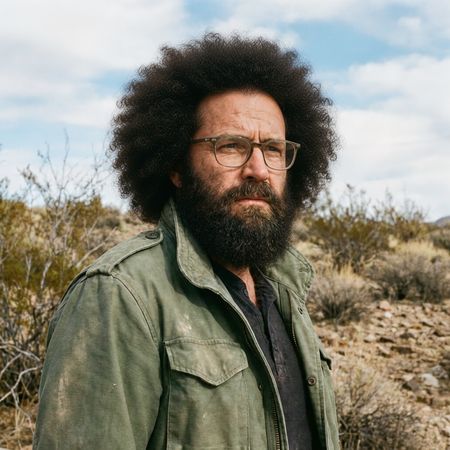

FLUX.2 [dev] Flash
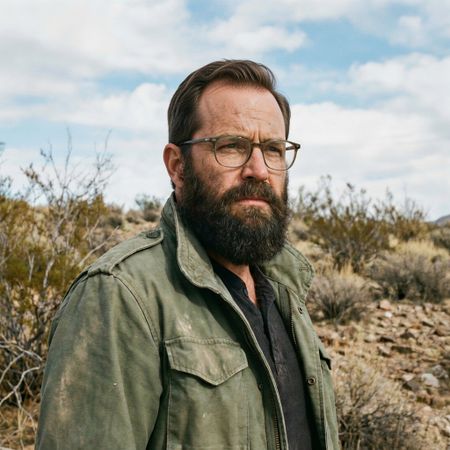
Grok Imagine Image Pro
AI Judge Analysis
FLUX.2 [dev] Flash
- + Successfully added a large volume of hair as requested.
- + Preserved the background and clothing perfectly.
- + Maintained the original facial features and lighting.
- − The hair texture (afro style) does not match the person's beard texture, making it look like a wig.
- − The hairline looks slightly artificial against the forehead.
Grok Imagine Image Pro
- + The hair texture and color perfectly match the existing beard and eyebrows.
- + The hairline and styling look highly realistic and natural for the subject's face.
- + Excellent preservation of the source image's lighting and facial structure.
- − None identified; the edit is seamless.
Verdict: FLUX.2 [dev] Flash and Grok Imagine Image Pro both successfully followed the instructions, but Grok Imagine Image Pro produced a much more convincing result. Grok added hair that naturally matches the man's existing texture and age, whereas FLUX.2 added hair that looks disjointed from the original's facial hair.
Isometric Miniature Diorama Scenes
Text-to-Image“Create a clear, 45° top-down isometric miniature 3D cartoon scene of Japan's signature dish: sushi, with soft refined textures, realistic PBR materials, gentle lighting, on a small raised diorama base with minimal garnish and plate. Solid light blue background. At top-center: 'JAPAN' in large bold text, 'SUSHI' below it, small flag icon. Perfectly centered, ultra-clean, high-clarity, square format.”
FLUX.2 [dev] Flash
Grok Imagine Image Pro
0% wins
0% ties
100% wins
AI Judge Analysis
FLUX.2 [dev] Flash
- + Perfect adherence to the isometric perspective and square diorama base.
- + High-quality text rendering and placement.
- + Excellent material textures, especially on the fish and wood grain.
- − The hybrid sushi roll/nigiri logic is a bit anatomically strange for sushi.
- − Slightly less variety in the dish compared to Model B.
Grok Imagine Image Pro
- + Great variety of sushi types including nigiri and maki rolls.
- + Excellent clay-like 'cartoon' aesthetic that feels very polished.
- + Clear and well-centered text with a nice shadow effect.
- − The circular plate on a circular base feels a bit redundant compared to a standard diorama aesthetic.
- − Materials are slightly more stylized/plastic than the requested PBR realism.
Verdict: Both models followed the complex prompt very well, including the specific text and flag requirements. FLUX.2 [dev] Flash delivered a more technically accurate isometric diorama with superior texture work on the wood and fish, while Grok Imagine Image Pro provided a more appealing variety of sushi and a charming 'cartoon' 3D style that feels more cohesive as a miniature scene.
Over-the-top cartoon caricature
EditingEdit instruction
“Create a caricature of me and my job. Make it exaggerated and humorous, incorporating my profession as a tv show anchor and my love for dogs and hockey.”
Source
FLUX.2 [dev] Flash
Grok Imagine Image Pro
100% wins
0% ties
0% wins
AI Judge Analysis
FLUX.2 [dev] Flash
- + Maintains a much stronger facial likeness to the original subject
- + Cleverly integrates the news desk directly onto a hockey rink
- + Includes multiple dog breeds which adds visual interest
- − The 'TV SHOW' text is a bit generic
- − The caricature style is relatively safe and less 'exaggerated' in the facial features
Grok Imagine Image Pro
- + Very creative graphic design with the 'Pups & Pucks' news header
- + Strong caricature energy with highly exaggerated eyes and expressions
- + Excellent integration of specific props like the Stanley Cup and hockey stick
- − The facial features lose the likeness of the original woman significantly
- − The repetitive use of the same puppy breed makes the background feel a bit cluttered/automated
Verdict: FLUX.2 [dev] Flash is the winner for its superior ability to maintain the subject's likeness while successfully integrating all requested elements (TV anchor, dogs, hockey) into a cohesive scene. While Grok Imagine Image Pro has more exaggerated caricature features and clever text overlays, it fails to preserve the recognizable face of the woman from the source image, which is central to a personal caricature request.
Adorable Baby Animals in Sunny Meadow
Text-to-Image“Hyper-photorealistic scene of fluffy baby animals—a golden retriever puppy, tabby kitten, baby bunny, and red fox kit—with big expressive eyes and ultra-detailed soft fur, playfully chasing butterflies and tumbling together in a lush wildflower meadow, warm golden sunrise light with god rays and dew sparkles, joyful wholesome vibe, 8K masterpiece.”
FLUX.2 [dev] Flash
Grok Imagine Image Pro
AI Judge Analysis
FLUX.2 [dev] Flash
- + Excellent fur texture and lighting integration on all animals.
- + Dynamic and playful composition with animals looking toward the butterflies.
- + Beautiful rendering of dew drops and god rays contributing to the '8K masterpiece' vibe.
- − The kitten/bunny hybrid in the bottom center is a significant anatomical error.
- − The fox's front right leg is missing or poorly placed behind the head.
Grok Imagine Image Pro
- + Perfectly captures the 'tumbling' motion with the fox kit on its back.
- + Clearer distinction between the specific animal types requested.
- + Strong adherence to the 'lush wildflower meadow' with a variety of flower types and colors.
- − The lighting on the animals feels slightly flat and 'cut-out' compared to the background.
- − The kitten has an oddly elongated neck and stiff pose.
- − Duplicated the kitten (two instead of one) which wasn't requested.
Verdict: FLUX.2 [dev] Flash produces a more aesthetically pleasing image with superior lighting and texture, but it suffers from a major anatomical failure by merging a kitten and a rabbit into one creature. Grok Imagine Image Pro follows the spirit of the prompt's action much better and avoids hybrid animals, though its lighting feels less photorealistic and it unnecessarily doubles the number of kittens. Grok is the preferred winner here simply for maintaining creature logic, which is essential for the prompt's requirements.
Studio Ghibli Anime Style
EditingEdit instruction
“Transform this photo into a Studio Ghibli–inspired illustration. Use soft pastel colors, hand-painted textures, gentle lighting, dreamy backgrounds, and a warm, nostalgic mood”
Source
FLUX.2 [dev] Flash
Grok Imagine Image Pro
AI Judge Analysis
FLUX.2 [dev] Flash
- + Excellent application of Ghibli-style line art and soft water-color textures.
- + Effective transformation of the background into a dreamy, nostalgic flower field with soft lighting.
- + Captures the character expressions well while translating them into the anime aesthetic.
- − Drastically changes the background environment from a city street to a field, which may exceed a simple 'style edit'.
Grok Imagine Image Pro
- + Successfully preserves the original composition and city background while applying a hand-painted aesthetic.
- + Accurately recreates the character's facial expressions in a classic Ghibli style.
- + Maintains high fidelity to the source image's specific details like the plaid pattern on the shirt.
- − The 'hand-painted' texture is slightly less refined than Model A, looking more like a digital filter in some areas.
Verdict: Both models performed exceptionally well at translating the 'distracted boyfriend' meme into the Studio Ghibli art style. Grok Imagine Image Pro is the winner because it successfully applied the requested style while preserving the original context of the city street background, whereas FLUX.2 [dev] Flash replaced the background with a generic flower field.
Golden Hour Stroll
Image EditingEdit instruction
“Add dynamic motion to this photo: make hair blow in the wind, add leaves flying, energetic and lively feel.”
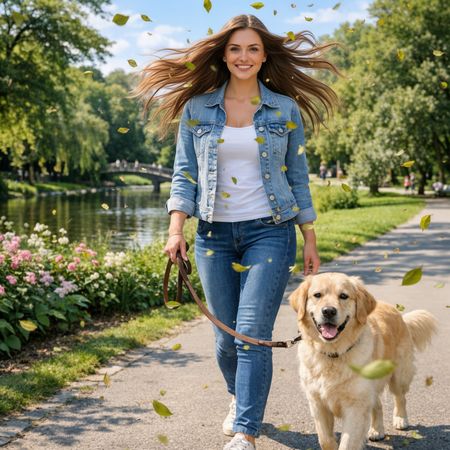

FLUX.2 [dev] Flash
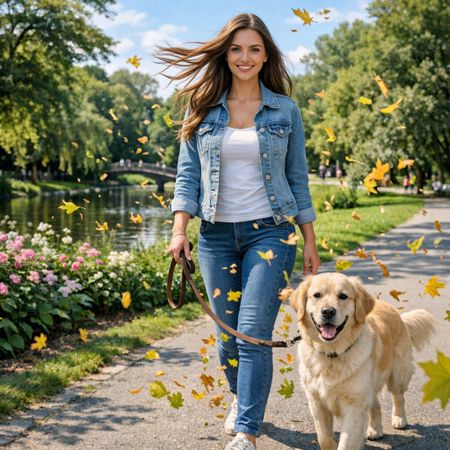
Grok Imagine Image Pro
AI Judge Analysis
FLUX.2 [dev] Flash
- + Successfully applied dramatic hair motion.
- + Added numerous flying leaves as requested.
- + Preserved the original subject's facial features and clothing well.
- − The hair expansion is a bit too symmetrical, looking less like natural wind.
- − Leaves are somewhat repetitive in color and texture.
Grok Imagine Image Pro
- + Excellent wind effect on hair that feels more directional and natural.
- + Included flying leaves with varied shapes and colors.
- + Maintained high source preservation for the background and character.
- − The leash handle has been slightly altered compared to the source.
Verdict: Both models followed the instructions well, adding the requested dynamic elements while preserving the original person and dog. Grok Imagine Image Pro (Model B) is the winner because the wind effect on the hair is far more realistic and directional, whereas FLUX.2 [dev] Flash (Model A) created a less natural, symmetrical 'poof' effect.
Vintage Cafe Logo
Text-to-Image“Vintage minimalist restaurant logo for "Caffè Florian", retro cloche dome with steam and "Est. 1720" banner, classic typography, warm brown and cream tones, subtle texture on light background, vector emblem style.”
FLUX.2 [dev] Flash
Grok Imagine Image Pro
AI Judge Analysis
FLUX.2 [dev] Flash
- + Excellent typography with a hand-drawn vintage feel
- + Artful implementation of subtle textures and grit for a retro look
- + Strong silhouette and balanced composition of the cloche and banner
- − The 'Est. 1720' text is placed outside the main banner element
Grok Imagine Image Pro
- + Clean vector aesthetic with perfect circular framing
- + Successfully placed 'Est. 1720' within the banner as requested
- + Legible and well-spaced text
- − The steam effect looks a bit like a generic swirl/hair strand rather than vapor
- − Minimal texture makes it look modern rather than vintage
Verdict: FLUX.2 [dev] Flash captures the 'vintage' and 'subtle texture' aspects of the prompt much more effectively with its gritty, classic illustration style. While Grok Imagine Image Pro followed the instruction to put the date in the banner more literally, its overall design feels like a modern imitation rather than a genuine retro logo.
Apollo 11: Journey to Tranquility
Text-to-Image“Create a clean, modern vector infographic poster about the Apollo 11 mission. NASA-inspired palette (navy, white, muted red, light gray). Flat-vector style, crisp lines, consistent iconography, subtle gradients only. Steps (stop at landing): 1. Launch (Saturn Vicon) 2. Earth Orbit (Earth + orbit ring icon) 3. Translunar (trajectory arc icon) 4. Lunar Orbit (Moon + orbit ring icon) 5. Descent (lunar module descending icon) 6. Landing (lunar module on the surface icon) Small supporting elements (minimal text): • Crew strip: three silhouette icons with only last names: Armstrong, Aldrin, Collins. • Landing site marker: Moon pin labeled "Tranquility" only. Layout constraints: generous margins, large readable labels, clean background with subtle stars. Vector-only, print-poster look, high resolution.”
FLUX.2 [dev] Flash
Grok Imagine Image Pro
100% wins
0% ties
0% wins
AI Judge Analysis
FLUX.2 [dev] Flash
- + Captures a more complex, illustrative 'poster' feel with a deep navy background.
- + Higher level of detail in the lunar module and planetary renders.
- + Includes creative extras like the crew silhouettes and a surface horizon.
- − Text is cluttered and contains significant spelling errors ('Sataurr' Iccòn', 'Tranquility' vs 'Tranquilty').
- − The layout is chaotic with overlapping labels and redundant icons (multiple landing/descent steps).
- − Fails the 'flat-vector' style requirement by include highly textured 3D-like elements.
Grok Imagine Image Pro
- + Perfectly adheres to the 'clean, flat-vector' style and requested NASA color palette.
- + Numbered steps are logical, organized, and follow the requested sequence exactly.
- + Text is legible and spelling is largely accurate with a clean, professional typeface.
- − The composition is a bit simple/vertical, leaving a lot of empty gray space on the sides.
- − The 'Translunar' icon is just a red arc without an integrated trajectory visual.
Verdict: Grok Imagine Image Pro is the clear winner as it strictly followed the stylistic 'vector' and 'flat' constraints of the prompt, resulting in a professional-looking infographic. While FLUX.2 [dev] Flash attempted a more ambitious illustration, it failed on typography, layout organization, and the specific 'flat' style requested, leading to a cluttered and messy final product.
Next steps
Explore each model
xAI's premium image generation model offering higher fidelity output and stronger performance on single-image editing benchmarks compared to the standard Grok Imagine model