
Alibaba's Qwen image editing model for instruction-based image modifications and transformations
Settled by community votes across 7 shared challenges, with an AI judge weighing in on each.
Qwen Image Edit 2509
7.8
arena score
#32 of 32 in Image Editing
Skill signature
· Image Editing
Wan 2.7 Pro
21.0
arena score
#37 of 62 in Text-to-Image
Vote tally
Where the votes landed
Qwen Image Edit 2509
0%
win rate
Ties
0%
Wan 2.7 Pro
0%
win rate
Shared challenges
7
Challenge by challenge
The strongest take from each model on every shared challenge, with the AI judge's read.
Man and Car in California
EditingEdit instruction
“Make a photo of the man driving the car down the California coastline”
Source
Qwen Image Edit 2509
Wan 2.7 Pro
AI Judge Analysis
Qwen Image Edit 2509
- + Excellent preservation of the car's identity and specific features
- + Good character consistency using the man's hair and features from the source
- + Natural sense of motion with wheel blur and background motion blur
- − Lighting on the car feels slightly disconnected from the sunset background
- − Minor distortion on the rear of the car's body line
Wan 2.7 Pro
- + Beautifully integrated lighting that matches the car to the environment perfectly
- + Highly realistic coastline geography
- − Completely failed to use the man from the source image, replacing him with a generic white male
- − Static wheels make the car look parked or poorly photoshopped into a motion scene
Verdict: Qwen Image Edit 2509 successfully combined both source images, correctly identifying the man and the car and placing them in a dynamic driving scene. Wan 2.7 Pro created a more photorealistic landscape, but it failed the fundamental instruction by replacing the subject in the second source image with a different person.
Pose & Character Mashup
EditingEdit instruction
“Use Image 1 as the exact pose reference and Image 2 as the character reference. Recreate the person/character from Image 2 in the exact dynamic pose and body position from Image 1. Keep the exact face, hair, clothing style/details, and expression from Image 2. Match the lighting and environment of Image 1. The final image must show the character from Image 2 performing the precise action/pose from Image 1 with perfect anatomy and natural integration.”
Source
Qwen Image Edit 2509
Wan 2.7 Pro
AI Judge Analysis
Qwen Image Edit 2509
- + Preserved the exact pose of the subject from Image 1.
- + Maintained the high-contrast yellow background and red stool.
- − Failed completely to incorporate the character from Image 2, including face, hair, and clothing.
- − The facial expression and features are still those of the woman from Image 1.
Wan 2.7 Pro
- + Perfectly preserved the pose and environment from Image 1.
- + Maintained the overall composition and lighting of the source image.
- − Failed entirely to transfer the identity (face, gender, hair, sunglasses, scarf) of the character from Image 2.
- − Produced an output that is a near-identical replica of Image 1 without the requested edits.
Verdict: Both Qwen Image Edit 2509 and Wan 2.7 Pro failed this complex identity-swap task, opting instead to replicate Image 1 almost exactly. Neither model attempted to integrate the male character, his clothing, or his accessories from Image 2 into the pose of Image 1. This results in a tie where both models were unable to follow the core instruction of the prompt.
Outfit Transfer Challenge
EditingEdit instruction
“Use Image 1 as the base person. Dress them in the exact elaborate outfit from Image 2 (including all layers, accessories, jewelry, and shoes). Carefully adapt the clothing to the body shape and pose in Image 1 while maintaining realistic fabric behavior, correct proportions, and perfect lighting/shadow matching. Keep the person’s exact face, hair, and background completely unchanged.”
Source
Qwen Image Edit 2509
Wan 2.7 Pro
AI Judge Analysis
Qwen Image Edit 2509
- + Successfully transferred the specific blue coat, plaid scarf, and jeans from Image 2.
- + Maintained the facial features and skin patterns of the person in Image 1 well.
- + Added appropriate boots that fit the aesthetic.
- − Significantly altered the original body pose and perspective of Image 1.
- − The image quality is lower with visible artifacts around the edges and background.
- − Changed the hair and added sunglasses not explicitly in the prompt.
Wan 2.7 Pro
- + Perfectly preserved the pose and original resolution of Image 1.
- + Maintained the exact face and background without unwanted changes.
- − Completely failed to use the specific outfit from Image 2, providing a gold-patterned jacket instead.
- − Failed to include the scarf or specific jeans requested.
Verdict: Qwen Image Edit 2509 followed the clothing transfer instructions by including the blue coat and plaid scarf, but it sacrificed the original image's pose, hair, and overall quality. Wan 2.7 Pro excelled at preservation and blending but failed the core task of transferring the specific outfit from Image 2, instead generating an entirely different suit. Qwen Image Edit 2509 is the preferred model as it attempted the specific complex edit, despite the loss in image fidelity.
Bald man challenge
Image EditingEdit instruction
“Give the person a full, thick head of natural hair with realistic texture, density, and a natural hairline. Preserve facial features and lighting.”
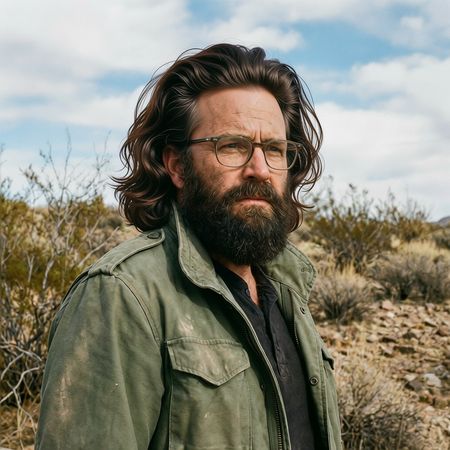

Qwen Image Edit 2509
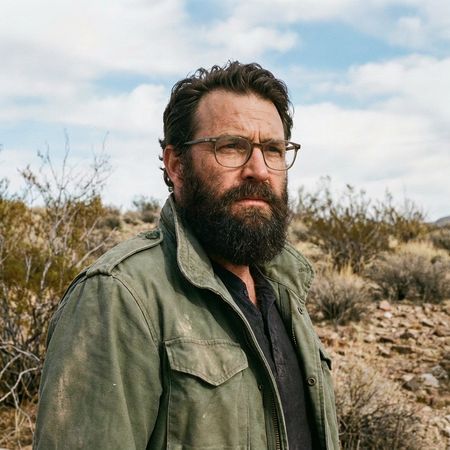
Wan 2.7 Pro
AI Judge Analysis
Qwen Image Edit 2509
- + Excellent preservation of all source image details including glasses and background
- + Matches the prompt for 'thick' hair perfectly
- + Good color matching between the new hair and existing beard
- − Hair volume is slightly exaggerated, feeling a bit like a wig
- − The lighting on the very top of the hair is slightly inconsistent with the sky light source
Wan 2.7 Pro
- + Natural and realistic hair volume and style that suits the subject
- + Seamless integration into the original image
- + Perfectly preserves facial features and the original background
- − The hair is somewhat thin at the temples
- − Slightly less 'thick' than requested compared to Model A
Verdict: Both models performed excellent edits with near-perfect preservation of the source image. Qwen Image Edit 2509 provided a very thick, stylized head of hair that certainly met the prompt requirements but looked slightly less natural in volume, whereas Wan 2.7 Pro created a more believable, grounded hairstyle that fit the character's aesthetic better while still fulfilling the request.
Over-the-top cartoon caricature
EditingEdit instruction
“Create a caricature of me and my job. Make it exaggerated and humorous, incorporating my profession as a tv show anchor and my love for dogs and hockey.”
Source
Qwen Image Edit 2509
Wan 2.7 Pro
AI Judge Analysis
Qwen Image Edit 2509
- + Excellent preservation of the original pose, including the selfie-arm perspective and denim shirt.
- + Great integration of the hockey theme by placing the news desk inside a hockey rink with players behind.
- + Clear caricature-style facial features that lean into the exaggerated requested theme.
- − Text in the speech bubble is gibberish.
- − The dog element is very small and relatively overlooked compared to the other themes.
Wan 2.7 Pro
- + Stronger emphasis on the dog theme with multiple dogs in hockey sweaters.
- + Creative integration of tools, combining a hockey stick with a microphone.
- + Readable text in the speech bubbles.
- − Fails to preserve the original pose and clothing (changed from a denim selfie to a formal suit).
- − The background layout is a bit generic and less immersive than a stadium setting.
- − The facial likeness to the original subject is slightly weaker due to more generic cartoon features.
Verdict: Qwen Image Edit 2509 is the winner because it successfully transforms the subject into a caricature while preserving key elements of the source image, such as her pose and her specific denim outfit. While Wan 2.7 Pro did a better job with the secondary theme of dogs, it failed as an edit by completely changing the character's clothing and posture to a generic anchor suit, ignoring the continuity of the source selfie.
Studio Ghibli Anime Style
EditingEdit instruction
“Transform this photo into a Studio Ghibli–inspired illustration. Use soft pastel colors, hand-painted textures, gentle lighting, dreamy backgrounds, and a warm, nostalgic mood”
Source
Qwen Image Edit 2509
Wan 2.7 Pro
AI Judge Analysis
Qwen Image Edit 2509
- + Successfully adopts a clean anime aesthetic with clear line work
- + Brightens the scene with soft pastel tones as requested
- + Preserves the spatial arrangement and recognizable poses of the memes original characters
- − The facial expressions are significantly flattened and lose the nuance of the original meme
- − The hand-painted texture is less apparent compared to Model B
- − Changes the red dress to pink, which slightly alters a key visual element of the original
Wan 2.7 Pro
- + Excellent hand-painted watercolor texture that perfectly aligns with the Ghibli request
- + Maintains the distinct facial expressions of all three characters from the original photo
- + Accurately preserves colors while applying the requested artistic filter
- − The background is slightly less detailed than Model A in the Ghibli style
- − The composition feels slightly more like a Photoshop filter than a from-scratch illustration in some areas
Verdict: Wan 2.7 Pro is the superior tool for this task because it preserves the essential comedic timing of the original meme's facial expressions while masterfully applying a hand-painted watercolor texture. Qwen Image Edit 2509 creates a nice anime-style illustration but loses much of the specific character detail and expression that makes the source image iconic.
Golden Hour Stroll
Image EditingEdit instruction
“Add dynamic motion to this photo: make hair blow in the wind, add leaves flying, energetic and lively feel.”
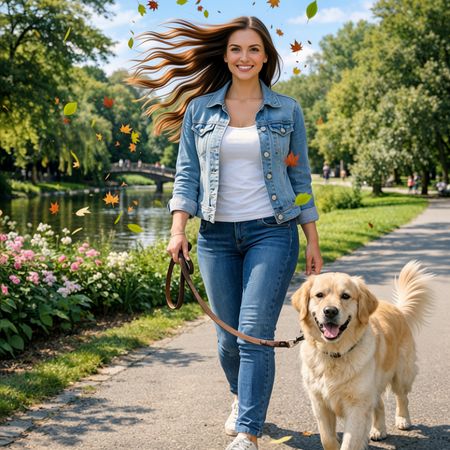

Qwen Image Edit 2509
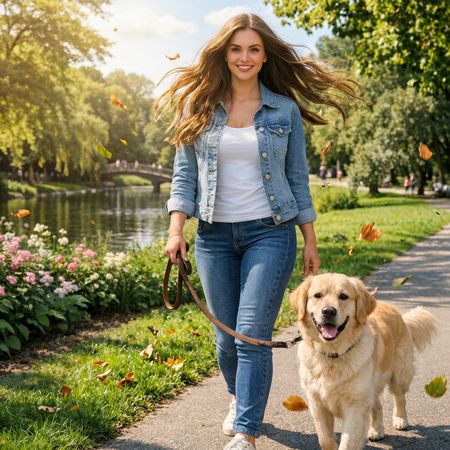
Wan 2.7 Pro
AI Judge Analysis
Qwen Image Edit 2509
- + Successfully added stylized blowing hair and flying leaves.
- + Preserved the original subject's face and clothing well.
- + Added motion to the dog's tail which enhances the lively feel.
- − The blowing hair looks very artificial and lacks realistic texture.
- − The flying leaves look like flat clip-art stickers pasted over the image.
- − Strong halo artifacts around the head and hair edges.
Wan 2.7 Pro
- + Rendered the wind-blown hair with much higher realism and natural lighting.
- + The flying leaves have motion blur and lighting that matches the scene.
- + Maintained excellent source preservation including the dog and background.
- − The dog's tail remains static compared to the movement in the rest of the image.
- − Slight softening of facial details compared to the original.
Verdict: Wan 2.7 Pro is the clear winner as it integrates the requested motion effects realistically into the scene; the hair and leaves feel part of the environment. Qwen Image Edit 2509 successfully added all components of the prompt, but the execution is very artificial, with hair that looks like thick plastic strands and leaves that lack depth or motion blur.
Next steps
Explore each model
Alibaba's Wan 2.7 Pro image generation and editing model with higher-quality outputs and support for 4K image generation