
Alibaba's Qwen image editing model for instruction-based image modifications and transformations
Settled by community votes across 6 shared challenges, with an AI judge weighing in on each.
Qwen Image Edit 2509
19.0
arena score
#19 of 37 in Image Editing
Skill signature
· Image Editing
Wan 2.5 (Preview)
25.4
arena score
#11 of 62 in Text-to-Image
Vote tally
Where the votes landed
Qwen Image Edit 2509
0%
win rate
Ties
0%
Wan 2.5 (Preview)
0%
win rate
Shared challenges
6
Challenge by challenge
The strongest take from each model on every shared challenge, with the AI judge's read.
Man and Car in California
EditingEdit instruction
“Make a photo of the man driving the car down the California coastline”
Source
Qwen Image Edit 2509
Wan 2.5 (Preview)
AI Judge Analysis
Qwen Image Edit 2509
- + Excellent preservation of the car's aesthetic and orientation.
- + Convincing motion blur on the wheels and road.
- + The subject's hair shows natural wind interaction with the environment.
- − The driver's face lacks detail and doesn't clearly resemble the source person.
- − Minor lighting inconsistencies on the car hood compared to the sunset.
Wan 2.5 (Preview)
- + Successfully identifies and integrates the specific person from the source image into the driver's seat.
- + The background environment feels very high-quality and geographically appropriate for California.
- + Great preservation of the car's design and reflections.
- − The man is wearing a scarf, which was in the source image but looks slightly unnatural for a sunny coastal drive.
- − The car's shadow on the road is a bit soft given the harsh daylight.
Verdict: Both models performed exceptionally well in this image editing task, preserving the white Rolls Royce and placing it in a dynamic coastal scene. Wan 2.5 (Preview) is the winner because it successfully brought the specific man's likeness and clothing from the second source image into the driver's seat, whereas Qwen Image Edit 2509 generated a generic person with dreadlocks that resembles the man but lacks his facial features.
Outfit Transfer Challenge
EditingEdit instruction
“Use Image 1 as the base person. Dress them in the exact elaborate outfit from Image 2 (including all layers, accessories, jewelry, and shoes). Carefully adapt the clothing to the body shape and pose in Image 1 while maintaining realistic fabric behavior, correct proportions, and perfect lighting/shadow matching. Keep the person’s exact face, hair, and background completely unchanged.”
Source
Qwen Image Edit 2509
Wan 2.5 (Preview)
AI Judge Analysis
Qwen Image Edit 2509
- + Successfully applied the full outfit, including pants and shoes, by adjusting the camera framing.
- + Preserved the unique vitiligo patterns on the forehead and face of the person in Image 1.
- + Incorporated requested accessories like the ring and watch from Image 2.
- − Significantly changed the person's face structure and facial hair towards the person in Image 2.
- − Poor quality and warped details around the hands and eyes.
- − Changed the person's pose entirely to match Image 2's pose.
Wan 2.5 (Preview)
- + Excellent visual quality and high-resolution rendering.
- + Seamlessly integrated the coat and scarf onto the person's torso while maintaining the background.
- + Correctly matched the watch accessory from Image 2.
- − Completely replaced the person's head and face with the man from Image 2, ignoring the instruction to keep Image 1's face unchanged.
- − Failed to include the bottom half of the outfit (jeans and shoes) by cropping the original composition.
- − The person's vitiligo is entirely removed.
Verdict: Both models struggled with identity preservation, which was a key part of the prompt. Qwen Image Edit 2509 attempted to retain the person's vitiligo and included the full outfit from top to bottom, but heavily distorted the person's face and changed their pose. Wan 2.5 (Preview) produced a much cleaner, more professional-looking image, but it failed the primary edit instructions by swapping the base person's face entirely for the face in Image 2.
Bald man challenge
Image EditingEdit instruction
“Give the person a full, thick head of natural hair with realistic texture, density, and a natural hairline. Preserve facial features and lighting.”
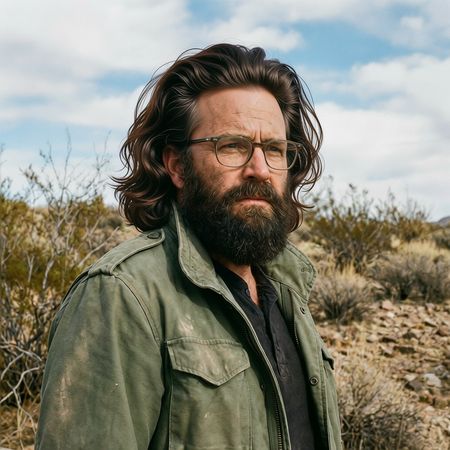

Qwen Image Edit 2509
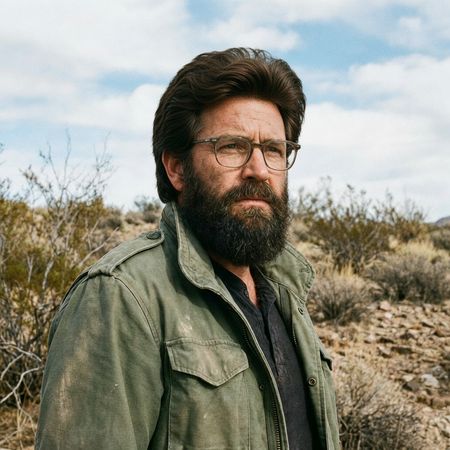
Wan 2.5 (Preview)
AI Judge Analysis
Qwen Image Edit 2509
- + Excellent preservation of the original facial features and lighting.
- + Hair texture is sharp and matches the lighting direction of the scene.
- + Seamless integration at the forehead and ears.
- − The hair volume is slightly exaggerated, giving a somewhat 'wig-like' silhouette.
Wan 2.5 (Preview)
- + Realistic hair density and natural flow.
- + Successfully preserves the background and clothing of the source image.
- − Subtly alters the person's face, specifically narrowing the eyes and changing the bridge of the nose.
- − The hairline integration on the forehead is a bit blurry compared to Model A.
Verdict: Qwen Image Edit 2509 is the winner because it perfectly preserved the subject's identity and facial features while adding the hair. Wan 2.5 (Preview) produced a very natural hair shape, but it significantly altered the structure of the man's face, failing the 'preserve facial features' instruction.
Over-the-top cartoon caricature
EditingEdit instruction
“Create a caricature of me and my job. Make it exaggerated and humorous, incorporating my profession as a tv show anchor and my love for dogs and hockey.”
Source
Qwen Image Edit 2509
Wan 2.5 (Preview)
AI Judge Analysis
Qwen Image Edit 2509
- + Excellent preservation of the original pose, clothing, and composition.
- + Strong caricature style with exaggerated facial features that still resemble the subject.
- + Cleverly blends the news anchor desk with a hockey rink background.
- − The dog is very small and lacks the detail/character of the rest of the image.
- − Nonsensical text in the speech bubble and on the monitors.
Wan 2.5 (Preview)
- + Successfully incorporates all elements: news desk, dogs in jerseys, hockey stick, and TV screen.
- + Clean, professional-looking illustration style.
- + The dogs are well-rendered and central to the theme.
- − Fails to preserve the original composition and pose of the source image.
- − The caricature face loses much of the likeness of the original woman.
Verdict: Qwen Image Edit 2509 is the clear winner for its ability to maintain the user's likeness and original composition (including the selfie arm pose) while applying the requested caricature style. Wan 2.5 (Preview) ignores the source image's layout entirely, creating a generic centered avatar that loses the personality of the original photo.
Studio Ghibli Anime Style
EditingEdit instruction
“Transform this photo into a Studio Ghibli–inspired illustration. Use soft pastel colors, hand-painted textures, gentle lighting, dreamy backgrounds, and a warm, nostalgic mood”
Source
Qwen Image Edit 2509
Wan 2.5 (Preview)
AI Judge Analysis
Qwen Image Edit 2509
- + Excellent adherence to the 'Studio Ghibli' art style with clean line work and vibrant, warm colors.
- + Faithfully preserves the character poses and clothing patterns from the source image.
- + Captures the facial expressions effectively in an anime style.
- − The color palette is slightly more saturated than the requested 'soft pastels'.
Wan 2.5 (Preview)
- + Successfully incorporates atmospheric Ghibli elements like floating leaves and soft, hazy lighting.
- + Preserves the composition and character identities exceptionally well.
- + Features a more muted, nostalgic color palette as requested.
- − The line work is a bit less defined compared to Model A.
- − The background is more washed out, losing some architectural detail from the source.
Verdict: Both models did an excellent job translating the 'Distracted Boyfriend' meme into the Studio Ghibli aesthetic while maintaining source preservation. Qwen Image Edit 2509 leans into a cleaner, modern anime look with better clarity, while Wan 2.5 (Preview) captures the 'dreamy' and 'pastoral' mood more effectively through atmosphere and lighting. Qwen Image Edit 2509 is slightly preferred for its character rendering and better preservation of the plaid pattern on the shirt.
Golden Hour Stroll
Image EditingEdit instruction
“Add dynamic motion to this photo: make hair blow in the wind, add leaves flying, energetic and lively feel.”
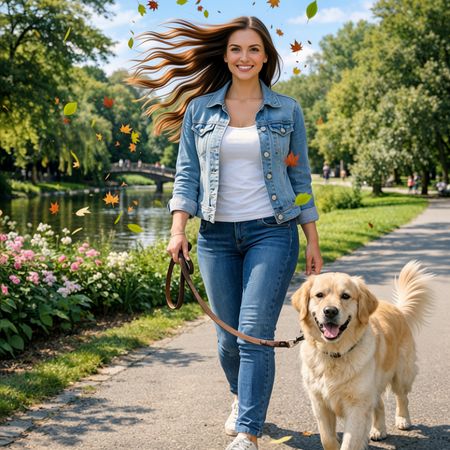

Qwen Image Edit 2509
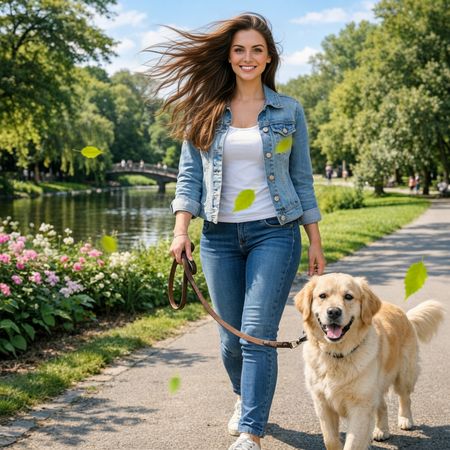
Wan 2.5 (Preview)
AI Judge Analysis
Qwen Image Edit 2509
- + Successfully added distinct flying leaves with variety in color and shape
- + Effectively altered the hair to show strong directional movement
- + Maintained the facial features and clothing details of the subject very well
- − The hair movement looks slightly artificial and stiff compared to the original flow
- − The addition of a fan-like tail on the dog is unnecessary and looks less realistic than the original
Wan 2.5 (Preview)
- + The hair blowing effect looks more natural and integrated with the subject's posture
- + Preserved the original dog's appearance more accurately than the competitor
- + Good preservation of the background and color palette
- − The leaves are very sparse and look like simple green dots rather than actual leaves
- − Less 'dynamic' overall as the movement in the scenery is quite subtle
Verdict: Qwen Image Edit 2509 followed the instructions for a 'dynamic and lively feel' more literally by adding numerous colorful autumn leaves and creating a dramatic hair-blowing effect, though it slightly altered the dog's tail. Wan 2.5 (Preview) produced a more subtle and realistic edit in the hair, but failed to provide the variety or quantity of flying leaves requested. Qwen is the winner for better instruction adherence regarding the specific elements requested.
Next steps
Explore each model
Alibaba's text-to-image and image-to-image generation model from the Wan AI suite, offering high-quality visual generation capabilities