

Black Forest Labs' state-of-the-art image generation model with maximum quality and speed, supporting text-to-image and multi-reference image editing with up to 4MP output
Settled by community votes across 6 shared challenges, with an AI judge weighing in on each.
FLUX.2 [pro]
26.6
arena score
#6 of 62 in Text-to-Image
Skill signature
· Text-to-Image
Qwen Image Edit 2509
19.0
arena score
#19 of 37 in Image Editing
Vote tally
Where the votes landed
FLUX.2 [pro]
50.0%
win rate
Ties
0.0%
Qwen Image Edit 2509
50.0%
win rate
50.0%
0.0% ties
50.0%
Shared challenges
6
Challenge by challenge
The strongest take from each model on every shared challenge, with the AI judge's read.
Man and Car in California
EditingEdit instruction
“Make a photo of the man driving the car down the California coastline”
Source
FLUX.2 [pro]
Qwen Image Edit 2509
AI Judge Analysis
FLUX.2 [pro]
- + Excellent preservation of the car's specific model and details
- + Accurately places the specific man from the source image into the driver's seat
- + Realistic lighting and motion blur on the wheels and road
- − The man's scale relative to the car is slightly off, making him look a bit small
Qwen Image Edit 2509
- + Beautiful cinematic lighting and environment
- + Good sense of speed with motion blur
- − Faces the man away from the camera, losing his likeness
- − Significantly alters the car's proportions and rear-end design
- − Visual artifacts such as the floating hair and messy steering wheel area
Verdict: FLUX.2 [pro] is the clear winner as it successfully merges the two source images while maintaining high fidelity to both the car and the person. Qwen Image Edit 2509 creates a more stylized, generic scene that fails to preserve the identity of the man and introduces several structural inaccuracies to the vehicle.
Pose & Character Mashup
EditingEdit instruction
“Use Image 1 as the exact pose reference and Image 2 as the character reference. Recreate the person/character from Image 2 in the exact dynamic pose and body position from Image 1. Keep the exact face, hair, clothing style/details, and expression from Image 2. Match the lighting and environment of Image 1. The final image must show the character from Image 2 performing the precise action/pose from Image 1 with perfect anatomy and natural integration.”
Source
FLUX.2 [pro]
Qwen Image Edit 2509
100% wins
0% ties
0% wins
AI Judge Analysis
FLUX.2 [pro]
- + Successfully integrated the man, his clothing, sunglasses, and scarf from Image 2.
- + Matches the yellow background and red stool lighting from Image 1.
- + High visual quality with realistic textures on the skin and clothing.
- − The pose is a crouch rather than the exact bent-over standing pose from Image 1.
- − Failed to replicate the specific crossed-leg standing position.
Qwen Image Edit 2509
- + Perfectly preserves the environment and composition of Image 1.
- − Completely failed to incorporate the character from Image 2.
- − The output is essentially just a higher-contrast version of the source Image 1.
- − Did not change the person, clothes, or features at all.
Verdict: FLUX.2 [pro] followed the complex instruction to merge two images, successfully placing the character from Image 2 into the environment and lighting of Image 1, though it simplified the difficult pose. Qwen Image Edit 2509 failed the task entirely, simply returning a filtered version of the first source image without making the requested character swap.
Bald man challenge
Image EditingEdit instruction
“Give the person a full, thick head of natural hair with realistic texture, density, and a natural hairline. Preserve facial features and lighting.”
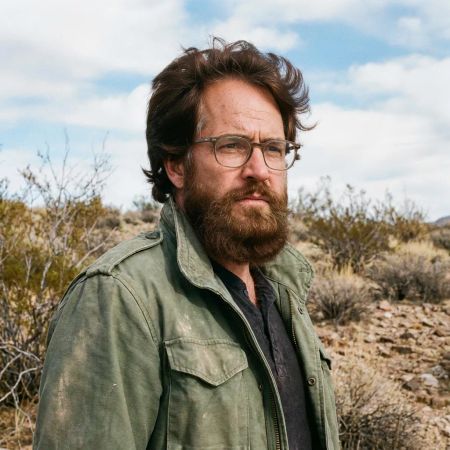

FLUX.2 [pro]
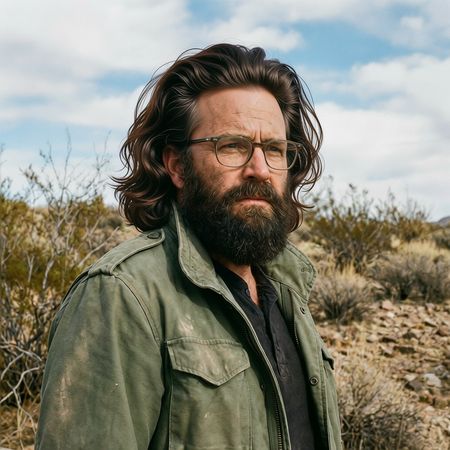
Qwen Image Edit 2509
AI Judge Analysis
FLUX.2 [pro]
- + Natural-looking hair texture and volume.
- + Excellent preservation of background, clothing, and facial lighting.
- + The hairstyle matches the rugged aesthetic of the original image.
- − Slightly altered the person's eye shape/expression compared to the original.
- − The very top of the hair looks a bit blurry/poorly masked.
Qwen Image Edit 2509
- + Very high detail in individual hair strands.
- + Maintains the original facial features and beard more accurately than Model A.
- + Great preservation of the background and jacket.
- − The hair looks somewhat 'plastic' or overly groomed/wig-like.
- − The hairstyle is a bit too stylized and flamboyant for the character's rugged look.
Verdict: Both models effectively added hair while preserving the identity and surroundings. FLUX.2 [pro] provided a more natural, realistic texture that fits the person's character, whereas Qwen Image Edit 2509 generated hair with a slightly artificial, synthetic sheen. Model A is the likely winner for better adhering to the 'natural texture' part of the prompt.
Over-the-top cartoon caricature
EditingEdit instruction
“Create a caricature of me and my job. Make it exaggerated and humorous, incorporating my profession as a tv show anchor and my love for dogs and hockey.”
Source
FLUX.2 [pro]
Qwen Image Edit 2509
AI Judge Analysis
FLUX.2 [pro]
- + Successfully incorporates all themes including the tv anchor desk, dogs, and hockey elements.
- + Presents a clean, professional vector illustration style with high visual appeal.
- + Maintains a recognizable likeness to the subject's facial structure and hair color.
- − The art style is more of a generic cartoon/clipart than a traditional 'exaggerated' caricature.
- − The subject's eyes were changed from brown to green, failing to preserve a key physical trait.
- − The hockey integration is a bit cluttered, with sticks just floating/leaning behind chairs.
Qwen Image Edit 2509
- + Captures a more traditional 'caricature' feel with exaggerated facial expressions and features.
- + Includes a clever integration of a hockey rink as the studio backdrop.
- + Preserves the 'selfie' arm pose from the source image, bridging the edit to the original.
- − Text in speech bubbles and on screens is nonsensical/gibberish.
- − The dogs are very small and feel like an afterthought compared to the other elements.
- − The rendering of hands and facial features is slightly messy compared to Model A.
Verdict: Both models followed the complex instructions, but in very different ways. FLUX.2 [pro] created a very polished, professional-looking illustration that neatly organized the studio, the dogs, and the hockey theme, though it missed the subject's eye color. Qwen Image Edit 2509 felt more like a true caricature by exaggerating the smile and maintaining the original selfie composition, but it suffered from messy details and unintelligible text. Overall, FLUX.2 [pro] is the winner for its superior visual quality and clear representation of all requested elements.
Studio Ghibli Anime Style
EditingEdit instruction
“Transform this photo into a Studio Ghibli–inspired illustration. Use soft pastel colors, hand-painted textures, gentle lighting, dreamy backgrounds, and a warm, nostalgic mood”
Source
FLUX.2 [pro]
Qwen Image Edit 2509
0% wins
0% ties
100% wins
AI Judge Analysis
FLUX.2 [pro]
- + Excellent adherence to the 'hand-painted textures' and 'watercolor' aesthetic requested.
- + Captures the soft, nostalgic lighting and color palette characteristic of Ghibli films.
- + Preserves the compositions and key visual elements of the meme while transforming the medium effectively.
Qwen Image Edit 2509
- + Successfully translates the characters into a clean anime style.
- + Maintains the identifiable colors from the original source image, such as the red dress.
- − The color palette is too bright and high-contrast, failing the 'soft pastel' and 'warm nostalgic' requirements.
- − The texture looks digital and commercial rather than the 'hand-painted' texture requested.
- − The man's facial features and hair are significantly modified compared to the source.
Verdict: FLUX.2 [pro] followed the artistic instructions much more closely, delivering a soft, painterly aesthetic that truly feels inspired by Studio Ghibli. Qwen Image Edit 2509 produced a generic, clean anime style that lacked the requested hand-painted texture and nostalgic atmosphere, and it also changed the lady's red dress to pink.
Golden Hour Stroll
Image EditingEdit instruction
“Add dynamic motion to this photo: make hair blow in the wind, add leaves flying, energetic and lively feel.”
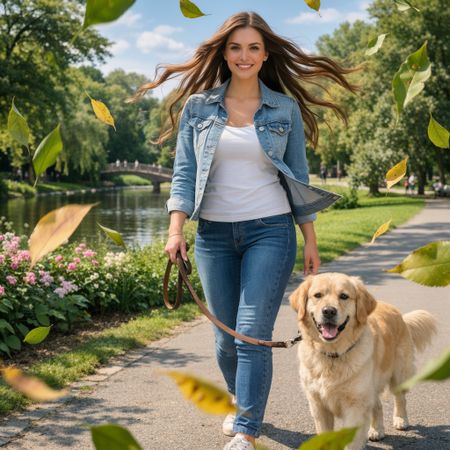

FLUX.2 [pro]
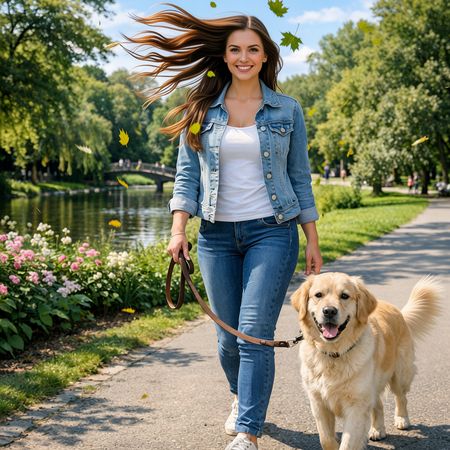
Qwen Image Edit 2509
AI Judge Analysis
FLUX.2 [pro]
- + Excellent integration of wind-blown hair that looks natural and energetic.
- + The added leaves have varying depths of field, creating a strong sense of foreground and background motion.
- + Accurately modifies the denim jacket to show movement.
- − The facial features are slightly altered compared to the source image.
Qwen Image Edit 2509
- + Successfully adds a large number of falling leaves to create a lively atmosphere.
- + Captures a distinct wind-blown effect in the hair.
- + Preserves the subject's face very closely to the original.
- − The hair strands appear somewhat repetitive and artificial in their curvature.
- − The leaves look like a 2D overlay rather than being integrated into the 3D space of the scene.
Verdict: FLUX.2 [pro] is the superior choice because it better integrates the requested motion into the scene, with the blowing jacket and depth-of-field effects on the leaves creating a true sense of dynamic energy. Qwen Image Edit 2509 successfully adds the elements but they feel more like static overlays, particularly the leaves which lack the realistic motion blur and spatial depth found in the other model.
Next steps
Explore each model
Alibaba's Qwen image editing model for instruction-based image modifications and transformations