P-Image Edit

AI Image Editing Model

Image $ · 1¢

PrunaAI's sub-1-second multi-image editing model supporting up to 5 reference images with state-of-the-art quality

P-Image Edit Benchmarks

P-Image Edit is ranked #31 in Image Editing with an Elo of 1135 on the Lumenfall Arena, where real users pick the better image in blind comparisons. These rankings are based on 3 blind-vote competitions.

Lumenfall Arena
#31
Image Editing
1135 Elo

Image Editing Landscape

Competition Results

Image Editing

Prompt Adherence

View leaderboard
Image Editing
Source
Edit instruction

“Use Image 1 as the base person. Dress them in the exact elaborate outfit from Image 2 (including all layers, accessories, jewelry, and shoes). Carefully adapt the clothing to the body shape and pose in Image 1 while maintaining realistic fabric behavior, correct proportions, and perfect lighting/shadow matching. Keep the person’s exact face, hair, and background completely unchanged.”
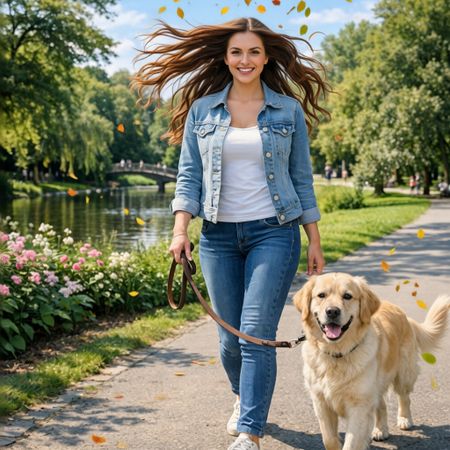

Image Editing

Aesthetics

View leaderboard
P-Image Edit edited result for Golden Hour Stroll
Original image before P-Image Edit editing
Before After
#31
Golden Hour Stroll
45 models
Image Editing
Edit instruction

“Add dynamic motion to this photo: make hair blow in the wind, add leaves flying, energetic and lively feel.”

Image Editing
Source
Edit instruction

“Make a photo of the man driving the car down the California coastline”

Image Editing

Photorealism

View leaderboard
P-Image Edit edited result for Golden Hour Stroll
Original image before P-Image Edit editing
Before After
#31
Golden Hour Stroll
45 models
Image Editing
Edit instruction

“Add dynamic motion to this photo: make hair blow in the wind, add leaves flying, energetic and lively feel.”

Image Editing
Source
Edit instruction

“Make a photo of the man driving the car down the California coastline”

Image Editing
Source
Edit instruction

“Use Image 1 as the base person. Dress them in the exact elaborate outfit from Image 2 (including all layers, accessories, jewelry, and shoes). Carefully adapt the clothing to the body shape and pose in Image 1 while maintaining realistic fabric behavior, correct proportions, and perfect lighting/shadow matching. Keep the person’s exact face, hair, and background completely unchanged.”

Image Editing

Preservation

View leaderboard
P-Image Edit edited result for Golden Hour Stroll
Original image before P-Image Edit editing
Before After
#31
Golden Hour Stroll
45 models
Image Editing
Edit instruction

“Add dynamic motion to this photo: make hair blow in the wind, add leaves flying, energetic and lively feel.”

Image Editing
Source
Edit instruction

“Make a photo of the man driving the car down the California coastline”

Image Editing
Source
Edit instruction

“Use Image 1 as the base person. Dress them in the exact elaborate outfit from Image 2 (including all layers, accessories, jewelry, and shoes). Carefully adapt the clothing to the body shape and pose in Image 1 while maintaining realistic fabric behavior, correct proportions, and perfect lighting/shadow matching. Keep the person’s exact face, hair, and background completely unchanged.”
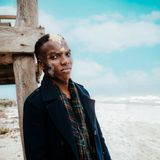
Image Editing

Adding & Editing Objects

View leaderboard
Image Editing
Source
Edit instruction

“Make a photo of the man driving the car down the California coastline”

Image Editing
Source
Edit instruction

“Use Image 1 as the base person. Dress them in the exact elaborate outfit from Image 2 (including all layers, accessories, jewelry, and shoes). Carefully adapt the clothing to the body shape and pose in Image 1 while maintaining realistic fabric behavior, correct proportions, and perfect lighting/shadow matching. Keep the person’s exact face, hair, and background completely unchanged.”
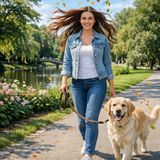
Image Editing

Backgrounds & Scenes

View leaderboard
Image Editing
Source
Edit instruction

“Make a photo of the man driving the car down the California coastline”

Image Editing

Lighting, Shadows & Materials

View leaderboard
P-Image Edit edited result for Golden Hour Stroll
Original image before P-Image Edit editing
Before After
#31
Golden Hour Stroll
45 models
Image Editing
Edit instruction

“Add dynamic motion to this photo: make hair blow in the wind, add leaves flying, energetic and lively feel.”

Image Editing
Source
Edit instruction

“Make a photo of the man driving the car down the California coastline”

Image Editing
Source
Edit instruction

“Use Image 1 as the base person. Dress them in the exact elaborate outfit from Image 2 (including all layers, accessories, jewelry, and shoes). Carefully adapt the clothing to the body shape and pose in Image 1 while maintaining realistic fabric behavior, correct proportions, and perfect lighting/shadow matching. Keep the person’s exact face, hair, and background completely unchanged.”

Image Editing

People & Poses

View leaderboard
P-Image Edit edited result for Golden Hour Stroll
Original image before P-Image Edit editing
Before After
#31
Golden Hour Stroll
45 models
Image Editing
Edit instruction

“Add dynamic motion to this photo: make hair blow in the wind, add leaves flying, energetic and lively feel.”

Top Matchups

See how P-Image Edit performs head-to-head against other AI models, ranked by community votes in blind comparisons.

Help rank P-Image Edit Pick the better image in blind matchups. Results update rankings in real time.
Start Voting