Text-to-Vector
Prompt
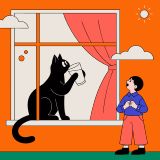
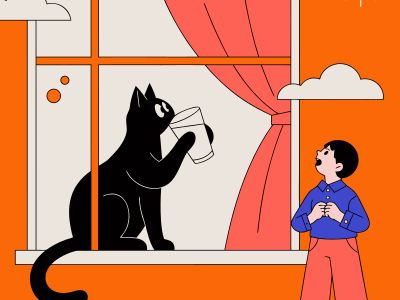
“A cat drinking milk by a morning window while a boy watches from outside, simple vector illustration”
Recraft V4.1 Pro text-to-vector model — generates large-format editable SVGs intended for poster art, complex brand assets, and detailed scene illustration

recraft-v4.1-pro-svg
Starting from
Prices shown are in USD
Full pricing detailsRecraft V4.1 Pro SVG is available exclusively through fal.ai, starting at $0.3/image.
fal/recraft-v4.1-pro-svg
https://api.lumenfall.ai/openai/v1
recraft-v4.1-pro-svg
| Parameter | Type | Description | Modes |
|---|---|---|---|
prompt
|
string | Required. Text prompt for SVG vector generation |
T2Vec
|
| Parameter | Type | Description | Modes |
|---|---|---|---|
size
|
string |
Image dimensions as WxH pixels (e.g. "1024x1024") or aspect ratio (e.g. "16:9")
WxH determines both shape and scale (aspect_ratio and resolution are ignored when size is provided). W:H format is equivalent to aspect_ratio.
|
T2Vec
|
aspect_ratio
|
string |
Aspect ratio of the output image (e.g. "16:9", "1:1")
Controls shape independently of scale. Use with resolution to control both. If size is also provided, size takes precedence. Any ratio is accepted and mapped to the nearest supported value.
|
T2Vec
|
resolution
|
string |
Output resolution tier (e.g. "1K", "4K")
Controls scale independently of shape. Higher tiers produce larger images and cost more. If size is also provided, size takes precedence for scale. Any tier is accepted and mapped to the nearest supported value.
|
T2Vec
|
size
Exact pixel dimensions
"1920x1080"
aspect_ratio
Shape only, default scale
"16:9"
resolution
Scale tier, preserves shape
"1K"
size is most specific and always wins. aspect_ratio and resolution control shape and scale independently.
7:1 on a model with
4:1 and 8:1,
you get 8:1.
0.5K 1K 2K 4K)
or megapixel tiers (0.25 1).
If the exact tier isn't available, you get the nearest one.
| Parameter | Type | Description | Modes |
|---|---|---|---|
response_format
|
string |
How to return the image
url
b64_json
Default:
"url" |
T2Vec
|
output_format
|
string |
Output image format
png
jpeg
gif
webp
avif
Gateway converts to requested format if provider doesn't support it natively.
|
T2Vec
|
output_compression
|
integer | Compression level for lossy formats (JPEG, WebP, AVIF) |
T2Vec
|
n
|
integer |
Number of images to generate
Default:
1Gateway generates multiple images in parallel even if provider only supports 1.
|
T2Vec
|
Provider-specific passthrough fields, available only when the request is routed to the listed provider.
| Parameter | Type | Description | Modes |
|---|---|---|---|
|
fal
|
|||
background_color
|
["object", "null"] | The preferable background color of the generated images, as an `{r, g, b}` object with channel values 0-255. |
T2Vec
|
colors
|
array | An array of preferable colors. Each entry is an `{r, g, b}` object with channel values 0-255. |
T2Vec
|
enable_safety_checker
|
boolean | If set to true, the safety checker will be enabled. |
T2Vec
|
How we handle parameters across different providers
Not every provider speaks the same language. When you send a parameter, we handle it in one of four ways depending on what the model supports:
| Behavior | What happens | Example |
|---|---|---|
passthrough |
Sent as-is to the provider | style, quality |
renamed |
Same value, mapped to the field name the provider expects | prompt |
converted |
Transformed to the provider's native format | size |
emulated |
Works even if the provider has no concept of it | n, response_format |
Parameters we don't recognize pass straight through to the upstream API, so provider-specific options still work.
Recraft V4.1 Pro SVG is ranked #3 in Text-to-Vector with an Elo of 1221 on the Lumenfall Arena, where real users pick the better image in blind comparisons. These rankings are based on 3 blind-vote competitions.
1 model without pricing omitted.
“A cat drinking milk by a morning window while a boy watches from outside, simple vector illustration”
“A Capybara steering an excavator”
“Elephant painting a lighthouse”
“A cat drinking milk by a morning window while a boy watches from outside, simple vector illustration”
“Elephant painting a lighthouse”
“A cat drinking milk by a morning window while a boy watches from outside, simple vector illustration”
“A Capybara steering an excavator”
“Elephant painting a lighthouse”
“A cat drinking milk by a morning window while a boy watches from outside, simple vector illustration”
“A Capybara steering an excavator”
“Elephant painting a lighthouse”
See how Recraft V4.1 Pro SVG performs head-to-head against other AI models, ranked by community votes in blind comparisons.
Recraft V4.1 Pro SVG starts at $0.3 per image through Lumenfall. Pricing varies by provider. Lumenfall does not add any markup to provider pricing.
You can use Recraft V4.1 Pro SVG through Lumenfall's OpenAI-compatible API. Send requests to the unified endpoint with model ID "recraft-v4.1-pro-svg". Code examples are available in Python, JavaScript, and cURL.
Recraft V4.1 Pro SVG is available through fal.ai on Lumenfall. Lumenfall automatically routes requests to the best available provider.
Generate images with custom prompts — no API key needed.