Image Editing
Edit instruction
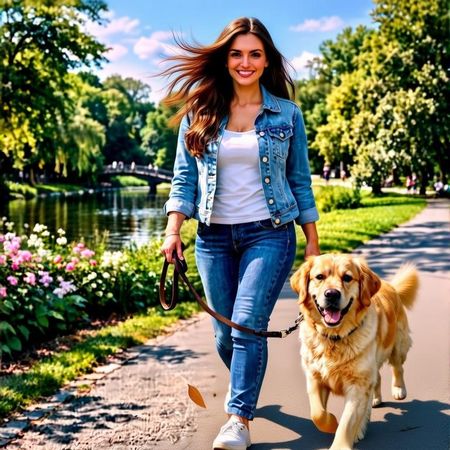
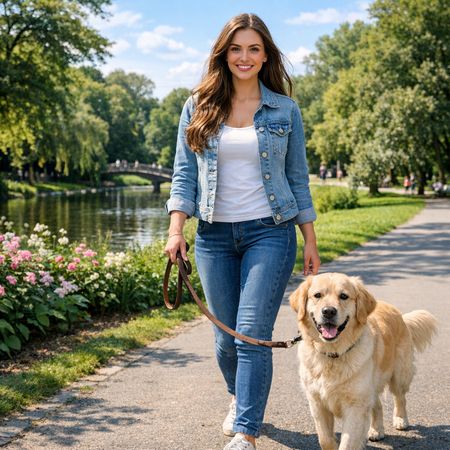
“Add dynamic motion to this photo: make hair blow in the wind, add leaves flying, energetic and lively feel.”
HiDream AI's image-to-image editing model for instruction-based image modifications and transformations
Example outputs coming soon
hidream-e1-1
Starting from
Prices shown are in USD
Full pricing detailsHiDream E1 is available exclusively through fal.ai, starting at $0.06/image.
fal/hidream-e1-1
Developers can integrate HiDream E1 via the Lumenfall OpenAI-compatible API to perform instruction-based image modifications and text-to-image generation.
https://api.lumenfall.ai/openai/v1
hidream-e1-1
curl -X POST \ https://api.lumenfall.ai/openai/v1/images/edits \ -H "Authorization: Bearer $LUMENFALL_API_KEY" \ -F "model=hidream-e1-1" \ -F "[email protected]" \ -F "prompt=Add a starry night sky to this image" \ -F "size=1024x1024"# Response:# { "created": 1234567890, "data": [{ "url": "https://...", "revised_prompt": "..." }] }import OpenAI from 'openai';import fs from 'fs';const client = new OpenAI({ apiKey: 'YOUR_API_KEY', baseURL: 'https://api.lumenfall.ai/openai/v1'});const response = await client.images.edit({ model: 'hidream-e1-1', image: fs.createReadStream('source.png'), prompt: 'Add a starry night sky to this image', size: '1024x1024'});// { created: 1234567890, data: [{ url: "https://...", revised_prompt: "..." }] }console.log(response.data[0].url);from openai import OpenAIclient = OpenAI( api_key="YOUR_API_KEY", base_url="https://api.lumenfall.ai/openai/v1")response = client.images.edit( model="hidream-e1-1", image=open("source.png", "rb"), prompt="Add a starry night sky to this image", size="1024x1024")# { created: 1234567890, data: [{ url: "https://...", revised_prompt: "..." }] }print(response.data[0].url)| Parameter | Type | Description | Modes |
|---|---|---|---|
prompt
|
string | Required. Edit instruction for the image |
Edit
|
negative_prompt
|
string | Negative prompt to guide generation away from undesired content |
Edit
|
seed
|
integer | Random seed for reproducibility |
Edit
|
| Parameter | Type | Description | Modes |
|---|---|---|---|
size
|
string |
Image dimensions as WxH pixels (e.g. "1024x1024") or aspect ratio (e.g. "16:9")
WxH determines both shape and scale (aspect_ratio and resolution are ignored when size is provided). W:H format is equivalent to aspect_ratio.
|
Edit
|
aspect_ratio
|
string |
Aspect ratio of the output image (e.g. "16:9", "1:1")
Controls shape independently of scale. Use with resolution to control both. If size is also provided, size takes precedence. Any ratio is accepted and mapped to the nearest supported value.
|
Edit
|
resolution
|
string |
Output resolution tier (e.g. "1K", "4K")
Controls scale independently of shape. Higher tiers produce larger images and cost more. If size is also provided, size takes precedence for scale. Any tier is accepted and mapped to the nearest supported value.
|
Edit
|
size
Exact pixel dimensions
"1920x1080"
aspect_ratio
Shape only, default scale
"16:9"
resolution
Scale tier, preserves shape
"1K"
size is most specific and always wins. aspect_ratio and resolution control shape and scale independently.
7:1 on a model with
4:1 and 8:1,
you get 8:1.
0.5K 1K 2K 4K)
or megapixel tiers (0.25 1).
If the exact tier isn't available, you get the nearest one.
| Parameter | Type | Description | Modes |
|---|---|---|---|
image
|
file |
Required.
Input image(s) to edit
Supports PNG, JPEG, WebP.
|
Edit
|
| Parameter | Type | Description | Modes |
|---|---|---|---|
response_format
|
string |
How to return the image
url
b64_json
Default:
"url" |
Edit
|
output_format
|
string |
Output image format
png
jpeg
gif
webp
avif
Gateway converts to requested format if provider doesn't support it natively.
|
Edit
|
output_compression
|
integer | Compression level for lossy formats (JPEG, WebP, AVIF) |
Edit
|
n
|
integer |
Number of images to generate
Default:
1Gateway generates multiple images in parallel even if provider only supports 1.
|
Edit
|
Provider-specific passthrough fields, available only when the request is routed to the listed provider.
| Parameter | Type | Description | Modes |
|---|---|---|---|
|
Universal
|
|||
cfg_scale
|
number | Classifier-free guidance scale — higher values stick more closely to the prompt |
Edit
|
|
fal
|
|||
enable_safety_checker
|
boolean | If set to true, the safety checker will be enabled. |
Edit
|
image_guidance_scale
|
number | The CFG (Classifier Free Guidance) scale is a measure of how close you want the model to stick to your initial image when looking for a related image to show you. |
Edit
|
num_inference_steps
|
integer | The number of inference steps to perform. |
Edit
|
sync_mode
|
boolean | If `True`, the media will be returned as a data URI and the output data won't be available in the request history. |
Edit
|
target_image_description
|
string | The description of the target image after your edits have been made. Leave this blank to allow the model to use its own imagination. |
Edit
|
How we handle parameters across different providers
Not every provider speaks the same language. When you send a parameter, we handle it in one of four ways depending on what the model supports:
| Behavior | What happens | Example |
|---|---|---|
passthrough |
Sent as-is to the provider | style, quality |
renamed |
Same value, mapped to the field name the provider expects | prompt |
converted |
Transformed to the provider's native format | size |
emulated |
Works even if the provider has no concept of it | n, response_format |
Parameters we don't recognize pass straight through to the upstream API, so provider-specific options still work.
HiDream E1 is ranked #38 in Image Editing with an Elo of 1047 on the Lumenfall Arena, where real users pick the better image in blind comparisons. These rankings are based on 1 blind-vote competition.
1 model without pricing omitted.
20 models waiting for enough speed data.
“Add dynamic motion to this photo: make hair blow in the wind, add leaves flying, energetic and lively feel.”
“Add dynamic motion to this photo: make hair blow in the wind, add leaves flying, energetic and lively feel.”
“Add dynamic motion to this photo: make hair blow in the wind, add leaves flying, energetic and lively feel.”
“Add dynamic motion to this photo: make hair blow in the wind, add leaves flying, energetic and lively feel.”
“Add dynamic motion to this photo: make hair blow in the wind, add leaves flying, energetic and lively feel.”
See how HiDream E1 performs head-to-head against other AI models, ranked by community votes in blind comparisons.
HiDream E1 starts at $0.06 per image through Lumenfall. Pricing varies by provider. Lumenfall does not add any markup to provider pricing.
You can use HiDream E1 through Lumenfall's OpenAI-compatible API. Send requests to the unified endpoint with model ID "hidream-e1-1". Code examples are available in Python, JavaScript, and cURL.
HiDream E1 is available through fal.ai on Lumenfall. Lumenfall automatically routes requests to the best available provider.
HiDream E1 is an instruction-based image-to-image editing model developed by HiDream AI. It is designed to perform precise modifications and transformations on existing images based on natural language prompts. Unlike standard text-to-image models that generate visuals from scratch, E1 specializes in altering specific elements of a source image while maintaining the original context and structure.
HiDream E1 is built on a diffusion-based architecture specifically tuned for image-to-image tasks. It utilizes a conditioning mechanism that balances the visual information from the input image with the semantic requirements of the text prompt. This approach allows the model to treat the original image as a structural guide rather than a mere suggestion, ensuring that edits feel integrated rather than overlaid.
HiDream E1 is ideal for professional design workflows, social media content creation, and e-commerce product visualization where users need to iterate on existing assets. It is particularly effective for background replacement, wardrobe adjustments, and applying global style transfers to specific photographs.
HiDream E1 is available through Lumenfall’s unified API and playground, allowing developers to integrate these advanced editing capabilities into their applications with a single standardized interface.
Generate images with custom prompts — no API key needed.