
Image Editing
Edit instruction
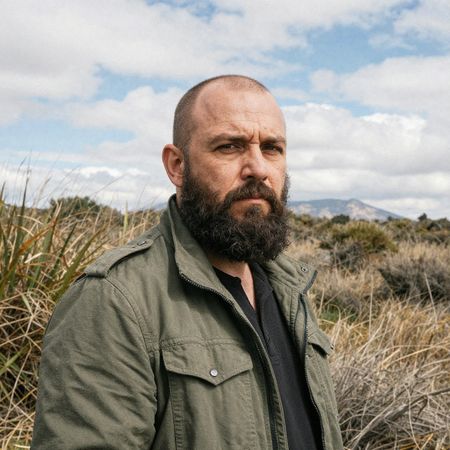
“Give the person a full, thick head of natural hair with realistic texture, density, and a natural hairline. Preserve facial features and lighting.”
Tongyi-MAI's 6-billion parameter distilled text-to-image model optimized for speed, achieving high-quality generation in 8 steps or fewer with support for bilingual text rendering


z-image-turbo
Starting from
Prices shown are in USD · Some prices estimated from per-megapixel or per-token pricing
Full pricing detailsZ-Image Turbo is available exclusively through fal.ai, starting at $0.005/image.
fal/z-image-turbo-edit
Integrate Z-Image Turbo through Lumenfall’s OpenAI-compatible API to generate images or execute edits using its 6-billion parameter distilled architecture optimized for 8-step inference.
https://api.lumenfall.ai/openai/v1
z-image-turbo
curl -X POST \ https://api.lumenfall.ai/openai/v1/images/edits \ -H "Authorization: Bearer $LUMENFALL_API_KEY" \ -F "model=z-image-turbo" \ -F "[email protected]" \ -F "prompt=Add a starry night sky to this image" \ -F "size=1024x1024"# Response:# { "created": 1234567890, "data": [{ "url": "https://...", "revised_prompt": "..." }] }import OpenAI from 'openai';import fs from 'fs';const client = new OpenAI({ apiKey: 'YOUR_API_KEY', baseURL: 'https://api.lumenfall.ai/openai/v1'});const response = await client.images.edit({ model: 'z-image-turbo', image: fs.createReadStream('source.png'), prompt: 'Add a starry night sky to this image', size: '1024x1024'});// { created: 1234567890, data: [{ url: "https://...", revised_prompt: "..." }] }console.log(response.data[0].url);from openai import OpenAIclient = OpenAI( api_key="YOUR_API_KEY", base_url="https://api.lumenfall.ai/openai/v1")response = client.images.edit( model="z-image-turbo", image=open("source.png", "rb"), prompt="Add a starry night sky to this image", size="1024x1024")# { created: 1234567890, data: [{ url: "https://...", revised_prompt: "..." }] }print(response.data[0].url)| Parameter | Type | Description | Modes |
|---|---|---|---|
prompt
|
string | Required. Text prompt for image generation |
T2I
Edit
|
seed
|
integer | Random seed for reproducibility |
T2I
Edit
|
| Parameter | Type | Description | Modes |
|---|---|---|---|
size
|
string |
Image dimensions as WxH pixels (e.g. "1024x1024") or aspect ratio (e.g. "16:9")
WxH determines both shape and scale (aspect_ratio and resolution are ignored when size is provided). W:H format is equivalent to aspect_ratio.
|
T2I
Edit
|
aspect_ratio
|
string |
Aspect ratio of the output image (e.g. "16:9", "1:1")
Controls shape independently of scale. Use with resolution to control both. If size is also provided, size takes precedence. Any ratio is accepted and mapped to the nearest supported value.
|
T2I
Edit
|
resolution
|
string |
Output resolution tier (e.g. "1K", "4K")
Controls scale independently of shape. Higher tiers produce larger images and cost more. If size is also provided, size takes precedence for scale. Any tier is accepted and mapped to the nearest supported value.
|
T2I
Edit
|
size
Exact pixel dimensions
"1920x1080"
aspect_ratio
Shape only, default scale
"16:9"
resolution
Scale tier, preserves shape
"1K"
size is most specific and always wins. aspect_ratio and resolution control shape and scale independently.
7:1 on a model with
4:1 and 8:1,
you get 8:1.
0.5K 1K 2K 4K)
or megapixel tiers (0.25 1).
If the exact tier isn't available, you get the nearest one.
| Parameter | Type | Description | Modes |
|---|---|---|---|
image
|
file |
Required.
Input image(s) to edit
Supports PNG, JPEG, WebP.
|
T2I
Edit
|
| Parameter | Type | Description | Modes |
|---|---|---|---|
response_format
|
string |
How to return the image
url
b64_json
Default:
"url" |
T2I
Edit
|
output_format
|
string |
Output image format
png
jpeg
gif
webp
avif
Gateway converts to requested format if provider doesn't support it natively.
|
T2I
Edit
|
output_compression
|
integer | Compression level for lossy formats (JPEG, WebP, AVIF) |
T2I
Edit
|
n
|
integer |
Number of images to generate
Default:
1Gateway generates multiple images in parallel even if provider only supports 1.
|
T2I
Edit
|
Provider-specific passthrough fields, available only when the request is routed to the listed provider.
| Parameter | Type | Description | Modes |
|---|---|---|---|
|
Universal
|
|||
cfg_scale
|
number | Classifier-free guidance scale — higher values stick more closely to the prompt |
T2I
Edit
|
prompt_enhancement
|
string |
Whether an LLM rewrites/expands the prompt before generation (off, on)
off
on
|
T2I
Edit
|
strength
|
number | How much to transform the input image: 0 keeps it unchanged, 1 fully regenerates from the prompt |
T2I
Edit
|
num_inference_steps
|
integer | The number of inference steps to perform. |
T2I
Edit
|
|
fal
|
|||
acceleration
|
string |
The acceleration level to use.
high
none
regular
|
T2I
Edit
|
enable_safety_checker
|
boolean | If set to true, the safety checker will be enabled. |
T2I
Edit
|
sync_mode
|
boolean | If `True`, the media will be returned as a data URI and the output data won't be available in the request history. |
T2I
Edit
|
How we handle parameters across different providers
Not every provider speaks the same language. When you send a parameter, we handle it in one of four ways depending on what the model supports:
| Behavior | What happens | Example |
|---|---|---|
passthrough |
Sent as-is to the provider | style, quality |
renamed |
Same value, mapped to the field name the provider expects | prompt |
converted |
Transformed to the provider's native format | size |
emulated |
Works even if the provider has no concept of it | n, response_format |
Parameters we don't recognize pass straight through to the upstream API, so provider-specific options still work.
Alibaba's Z-Image Turbo holds a top 10 position in global text-to-image rankings with a 1253 Elo rating. It remains competitive in high-speed workflows, maintaining a rank of 16 for complex image editing tasks with an Elo of 1021.
1 model without pricing omitted.
20 models waiting for enough speed data.
“Give the person a full, thick head of natural hair with realistic texture, density, and a natural hairline. Preserve facial features and lighting.”
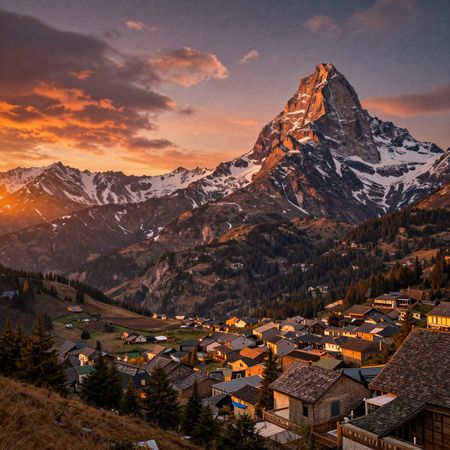
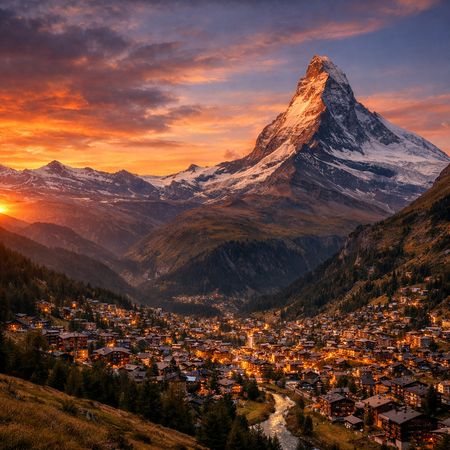
“Change the scene to night: a deep, dark sky with subtle, glistening stars visible behind the mountain.”
“Give the person a full, thick head of natural hair with realistic texture, density, and a natural hairline. Preserve facial features and lighting.”
“Change the scene to night: a deep, dark sky with subtle, glistening stars visible behind the mountain.”
“Give the person a full, thick head of natural hair with realistic texture, density, and a natural hairline. Preserve facial features and lighting.”
“Change the scene to night: a deep, dark sky with subtle, glistening stars visible behind the mountain.”
“Give the person a full, thick head of natural hair with realistic texture, density, and a natural hairline. Preserve facial features and lighting.”
See how Z-Image Turbo performs head-to-head against other AI models, ranked by community votes in blind comparisons.









Z-Image Turbo excels in commercial applications, ranking 5th in product and branding with a 55.6% win rate and 7th in portrait generation with a 62.5% win rate. It demonstrates moderate performance in bilingual text rendering but faces significant challenges in specialized photorealism and portrait-specific arena categories.
Z-Image Turbo starts at $0.005 per image through Lumenfall. Pricing varies by provider. Lumenfall does not add any markup to provider pricing.
You can use Z-Image Turbo through Lumenfall's OpenAI-compatible API. Send requests to the unified endpoint with model ID "z-image-turbo". Code examples are available in Python, JavaScript, and cURL.
Z-Image Turbo is available through fal.ai, Replicate, and Alibaba Cloud on Lumenfall. Lumenfall automatically routes requests to the best available provider.
Z-Image Turbo supports images up to 2048x2048 resolution.
Z-Image Turbo is a 6-billion parameter text-to-image model developed by Alibaba’s Tongyi-MAI team. It distinguishes itself by utilizing distillation techniques to enable high-quality image synthesis in eight steps or fewer, making it significantly faster than standard diffusion models. The model is specifically optimized for bilingual text rendering, supporting both Chinese and English characters within generated imagery.
Z-Image Turbo is part of the Z-Image model family and utilizes a distilled architecture derived from a larger latent diffusion framework. To achieve its speed, the developers employed a consistency-based distillation approach that maps the probability flow of the original model into a single or few-step inference trajectory. The integration of a specialized text encoder allows the model to handle bilingual tokens more effectively than models trained solely on English datasets.
This model is ideal for interactive applications such as live drawing assistants, rapid prototyping for UI/UX design, and social media content creation where speed is prioritized over granular control. It is also a leading choice for projects requiring accurate Chinese typography within images. Z-Image Turbo is available for integration and testing through Lumenfall’s unified API and interactive playground.
Generate images with custom prompts — no API key needed.