Qwen Image Edit 2511 vs Wan 2.6
Head-to-head across 6 challenges
Qwen Image Edit 2511
35.6%
win rate
Ties
2.2%
Wan 2.6
62.2%
win rate
Challenge Results
Man and Car in California
Editing“Make a photo of the man driving the car down the California coastline”
AI Judge Analysis
Qwen Image Edit 2511
- + Excellent preservation of the subject's face, hair, and clothing.
- + Interior details like the cream seats and wood trim closely match the source car.
- + Realistic integration of the subject into the driver's seat.
- − The car's exterior body lines are slightly warped near the top of the door.
Wan 2.6
- + Captured the California coastline aesthetic very well with motion blur.
- + Successfully combined the subject and the car into a cohesive scene.
- − The subject's facial features and hair texture are significantly altered from the source.
- − The car is positioned for left-hand drive but the steering wheel is on the right side of the cabin (RHD), which is inconsistent with California roads.
Verdict: Qwen Image Edit 2511 is the winner because it maintained incredibly high fidelity to the source images, perfectly preserving the man's face, hairstyle, and specific plaid coat. In contrast, Wan 2.6 lost much of the subject's likeness and introduced a logical error by placing a right-hand drive vehicle on a road meant for right-side driving.
Bald man challenge
Editing“Give the person a full, thick head of natural hair with realistic texture, density, and a natural hairline. Preserve facial features and lighting.”

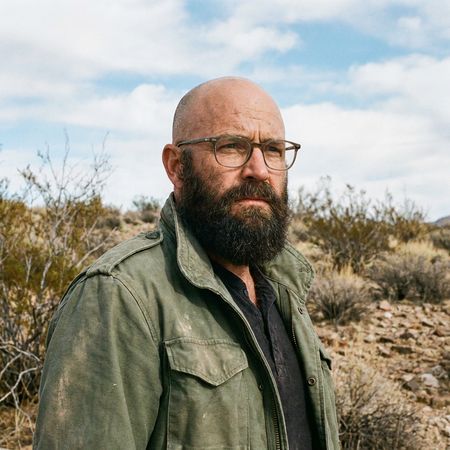
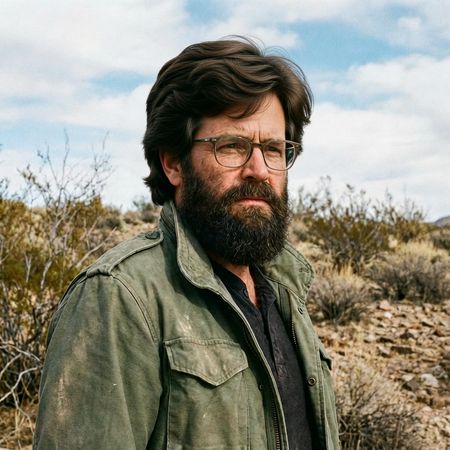
AI Judge Analysis
Qwen Image Edit 2511
- + Excellent preservation of the original facial features and glasses
- + Good integration of sideburns with the existing beard
- + Retained the original background and lighting perfectly
- − The hair texture looks slightly oily or plastic-like with unnatural swirls
- − The hairline is a bit high and harsh on the forehead
Wan 2.6
- + The hair texture is extremely realistic and voluminous
- + The hairline and hair integration feel very natural for the subject's age and style
- + Perfectly preserved the jacket and background elements
- − Slightly altered the shape of the glasses and the bridge of the nose
- − The eyes appear subtly different from the source image
Verdict: Both models performed excellent edits with high source preservation. Qwen Image Edit 2511 did a better job of keeping the facial features 100% identical, but the hair itself looks a bit synthetic. Wan 2.6 provided a much more believable and aesthetically pleasing head of hair, though it slightly softened the facial likeness in the process.
Night Sky Transformation
Editing“Change the scene to night: a deep, dark sky with subtle, glistening stars visible behind the mountain.”
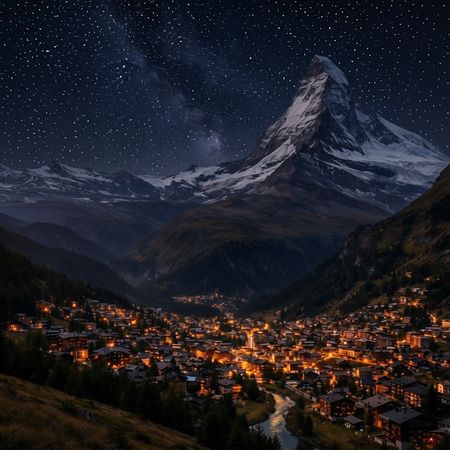
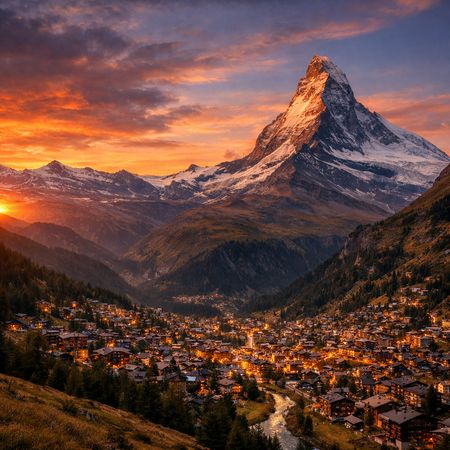
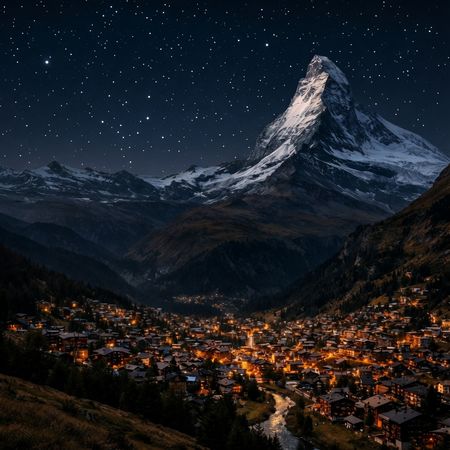
AI Judge Analysis
Qwen Image Edit 2511
- + Successfully darkened the scene and preserved the village layout
- + Maintains high structural consistency with the source image
- − The stars appear as a repetitive, grid-like pattern of dots rather than natural celestial bodies
- − The star pattern blatantly overlaps the mountain peaks in several areas
- − The lighting on the mountain remains somewhat bright for a night scene
Wan 2.6
- + The stars look natural, varied in size and brightness, and are correctly placed behind the mountain
- + Excellent lighting adjustment that makes the snow on the mountain look illuminated by moonlight
- + Perfect preservation of the foreground village while fully changing the atmosphere
- − None notable; very high quality edit
Verdict: Wan 2.6 provided a near-perfect edit, convincingly changing the lighting of the entire scene to night while placing realistic stars behind the mountain peaks. Qwen Image Edit 2511 failed on the 'subtle' and 'stars' aspect of the prompt, instead overlaying a synthetic, repetitive dot pattern that improperly masks the mountain foreground.
Studio Ghibli Anime Style
Editing“Transform this photo into a Studio Ghibli–inspired illustration. Use soft pastel colors, hand-painted textures, gentle lighting, dreamy backgrounds, and a warm, nostalgic mood”
AI Judge Analysis
Qwen Image Edit 2511
- + Excellent preservation of the original pose and character likeness.
- + Good balance between a painting style and the original structure.
- + High-quality linework that maintains the expressions of the source image.
- − The style feels more like a modern manhwa/digital illustration than specifically Studio Ghibli.
- − The lighting is a bit flat compared to the 'dreamy' request.
Wan 2.6
- + Successfully captures the hand-painted watercolor texture associated with Ghibli background art.
- + Uses soft pastel colors and atmospheric lighting to create a nostalgic mood.
- + Maintains the composition and character roles perfectly.
- − The white speckles/sparkles feel a bit overlayed and distracting.
- − The character features are slightly more homogenized than in model A.
Verdict: Both models did an exceptional job of preserving the structure of the original 'distracted boyfriend' meme. Qwen Image Edit 2511 provides a cleaner, more precise digital illustration, but Wan 2.6 better captures the specific requested 'Studio Ghibli' aesthetic through its use of soft watercolor textures and gentle, warm lighting.
Neutral Expression to Genuine Smile
Editing{
"action": "image_edit",
"reference": "uploaded neutral portrait",
"change": "Warm genuine Duchenne smile: lips curved up, slight natural teeth, soft eye crinkles, subtle cheek raise",
"details": "Realistic smiling skin (dimples if present, soft cheek shadows), slightly brighter eyes; keep exact eye shape/color/iris",
"preserve_exact": "Face identity/structure, eyes/nose/lips/eyebrows, hair, skin texture/pores/freckles, makeup, clothing, head pose, background, lighting, shadows, framing",
"no_changes": "No face shape change, no new features, no gaze shift, no hair/clothing/lighting/background edits",
"style": "Ultra-photorealistic 8K portrait, sharp face focus, natural soft lighting, realistic skin glow"
}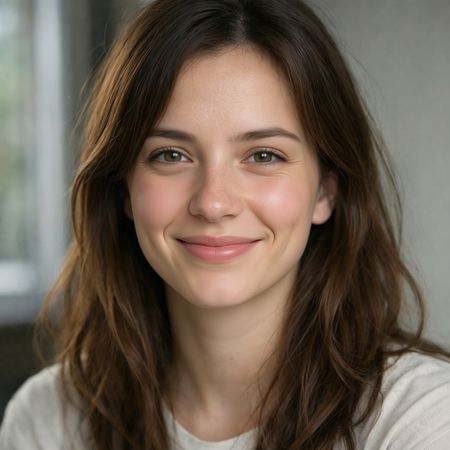
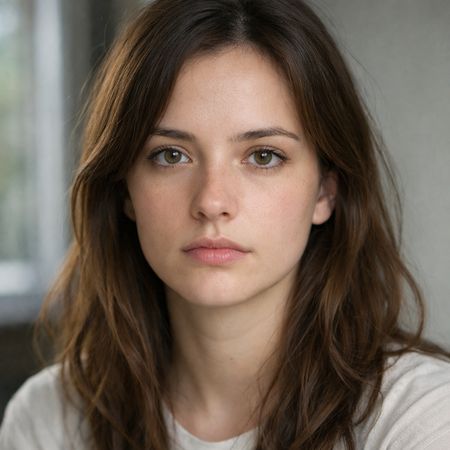
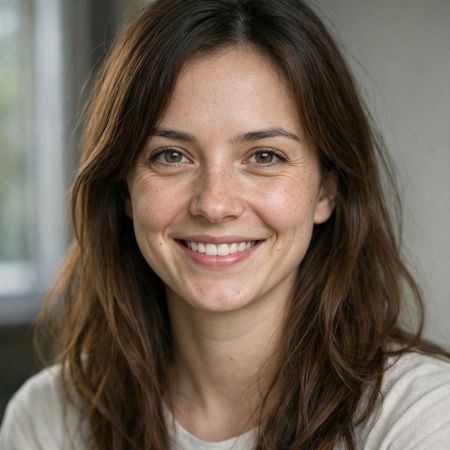
AI Judge Analysis
Qwen Image Edit 2511
- + Excellent preservation of the source image background and hair structure
- + Very clean, aesthetic smile that fits the facial structure well
- − Smoothed out skin texture and freckles significantly, failing the preservation requirement
- − Lower eye crinkle intensity compared to Model B
Wan 2.6
- + Outstanding preservation of skin texture, including freckles and pores from the original
- + Perfectly captures the 'Duchenne' aspect with realistic eye crinkles and muscle movement
- + Maintains the exact clothing and background details
- − None notable
Verdict: Wan 2.6 is the clear winner as it successfully applied the complex smile edit while strictly adhering to the preservation instructions, keeping the original skin texture and freckles intact. Qwen Image Edit 2511 produced a pleasant result but over-smoothed the subject's face, losing much of the realistic detail present in the source image.
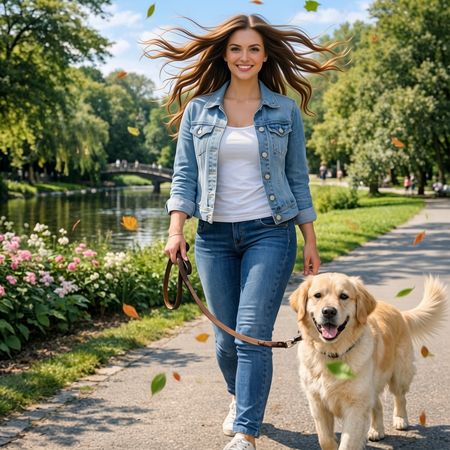
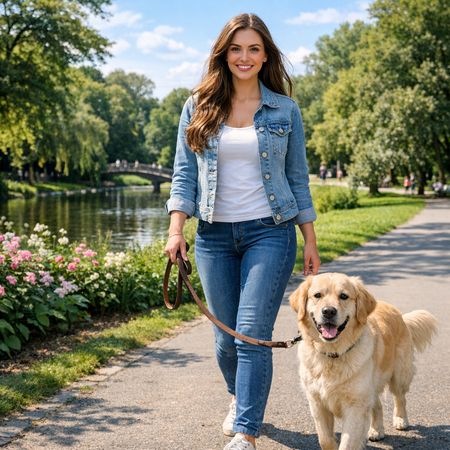
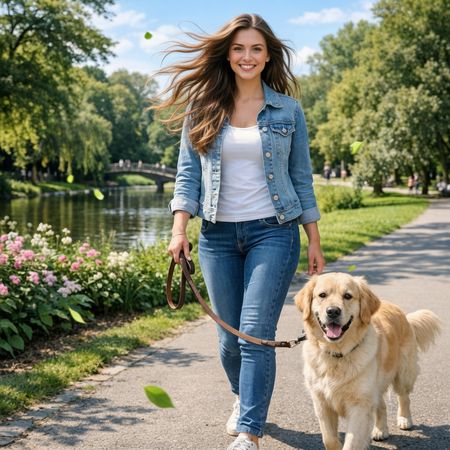
Golden Hour Stroll
Editing“Add dynamic motion to this photo: make hair blow in the wind, add leaves flying, energetic and lively feel.”
AI Judge Analysis
Qwen Image Edit 2511
- + Excellent adherence to the 'windy' hair request with strands fanned out symmetrically.
- + Includes a dense concentration of leaves in various colors (orange, yellow, green) for better visual energy.
- + Maintains high fidelity to the original person and dog faces.
- − The hair flow looks a bit artificial and stiffly posed compared to natural movement.
- − Some leaves appear disconnected or lack consistent motion blur.
Wan 2.6
- + Naturalistic hair movement that follows a consistent wind direction.
- + Motion blur on the leaves creates a more realistic sense of movement.
- + Excellent preservation of the original image's lighting and background elements.
- − Fewer leaves added compared to Model A, resulting in slightly less 'lively' energy.
- − The hair edit is more subtle and less transformative than Model A.
Verdict: Both models handled the editing task well, preserving the base image while adding the requested elements. Qwen Image Edit 2511 provided more visual 'pop' by adding a high number of colorful leaves and a very dramatic hair change, while Wan 2.6 opted for a more realistic, subtle approach with consistent wind direction and motion blur. Qwen is slightly preferred for better meeting the request for 'energetic and lively' feel through higher contrast and more numerous additions.
Qwen Image Edit 2511
Alibaba's Qwen image editing model for instruction-based image modifications and transformations
Wan 2.6
Alibaba's multimodal generation model from the Wan AI suite, supporting text-to-video, image-to-video, reference-to-video with audio, and text-to-image, in both Chinese and English