Qwen Image Edit 2511 vs Seedream 4.5
Head-to-head across 6 challenges
Qwen Image Edit 2511
58.4%
win rate
Ties
2.2%
Seedream 4.5
39.3%
win rate
Challenge Results
Man and Car in California
Editing“Make a photo of the man driving the car down the California coastline”
AI Judge Analysis
Qwen Image Edit 2511
- + Excellent preservation of the man's facial features and distinctive hairstyle.
- + The interior of the car perfectly matches the source Rolls-Royce aesthetic with cream leather and wood trim.
- + The lighting is vibrant and fits the California coastal theme perfectly.
- − The car is a right-hand drive model, which is atypical for a California-based photo.
- − The man's hands on the steering wheel have some slight anatomical blurring.
Seedream 4.5
- + Successfully incorporates the man's full outfit including the green cargo pants and boots from the source image.
- + Accurately depicts the car driving on the right side of the road with the driver on the left.
- + Strong ocean/cliffside background that clearly resembles the California coast.
- − The man's face and hair are significantly altered from the source image, losing the likeness.
- − Major anatomical error with three legs/feet visible in the footwell area.
- − The car door is open while the vehicle is supposedly in motion, creating a safety and logic error.
Verdict: Qwen Image Edit 2511 is the clear winner as it maintains the subject's identity and facial features with high fidelity, whereas Seedream 4.5 creates a generic face. Although Seedream 4.5 captures more of the subject's clothing, it suffers from severe anatomical glitches and a logical error where the car door is open during driving.
Bald man challenge
Editing“Give the person a full, thick head of natural hair with realistic texture, density, and a natural hairline. Preserve facial features and lighting.”
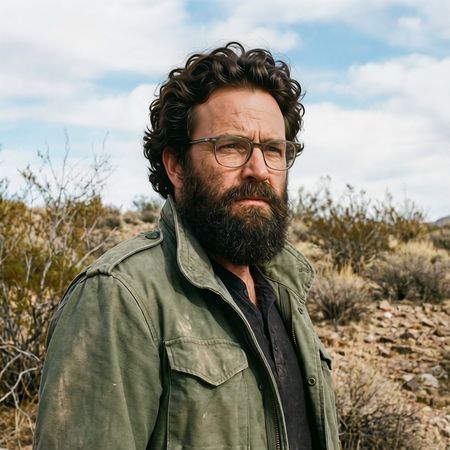
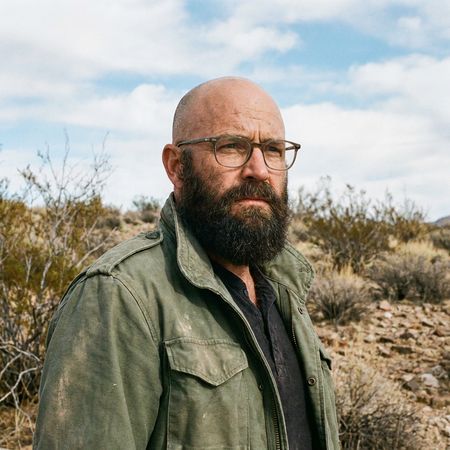
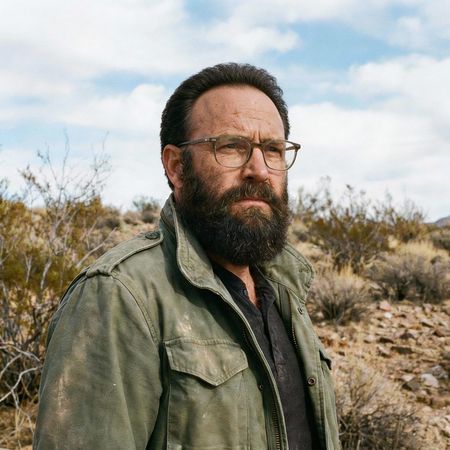
AI Judge Analysis
Qwen Image Edit 2511
- + Successfully provides a thick, full head of curly hair as requested.
- + Matches the hair lighting and texture to the existing beard.
- + Excellent source preservation of the background and clothing.
- − The hairline on the forehead looks slightly superimposed rather than growing naturally from the scalp.
Seedream 4.5
- + Maintains a very realistic, natural hairline that blends perfectly with the existing temple hair.
- + Preserves the original facial features and environmental lighting perfectly.
- − The hair is quite short and thin compared to the request for 'full, thick' hair.
- − The edit is very subtle, bordering on a buzz cut rather than a full head of hair.
Verdict: Qwen Image Edit 2511 followed the prompt much more effectively by providing a thick, curly head of hair that significantly changes the man's appearance as requested. Seedream 4.5 was very conservative, providing a realistic hairline but failing to deliver the 'thick' volume specified in the instructions.
Night Sky Transformation
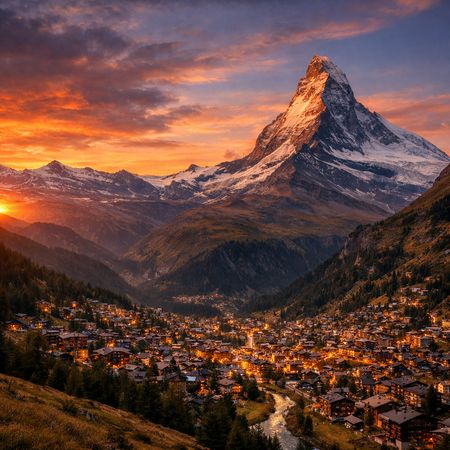
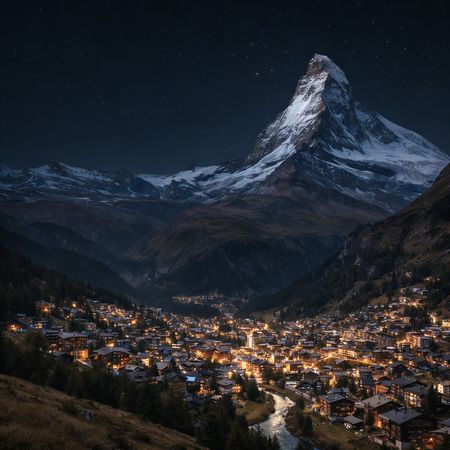
Editing“Change the scene to night: a deep, dark sky with subtle, glistening stars visible behind the mountain.”
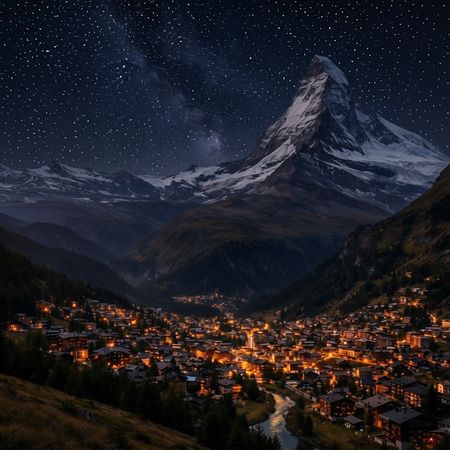
AI Judge Analysis
Qwen Image Edit 2511
- + Excellent preservation of the foreground village structure.
- + Effective darkening of the landscape to simulate night.
- − The stars appear as static, uniform white dots on a grid-like pattern.
- − Failed to remove the sunset glow on the mountain peak, causing lighting inconsistency.
Seedream 4.5
- + Natural and realistic star field that matches the prompt's request for 'subtle' and 'glistening'.
- + Greatly improved lighting consistency, making the mountain peak look moonlit rather than sunlit.
- + Keeps the original landscape almost perfectly intact while changing the time of day.
- − The sky is perhaps a bit too empty in the upper left compared to the rest of the image.
Verdict: Seedream 4.5 is the clear winner as it successfully translated the scene to night with realistic, high-quality stars and plausible lighting on the mountain peak. Qwen Image Edit 2511 suffered from poor star rendering, producing a 'polka-dot' effect that looks like a digital overlay rather than a natural sky.
Studio Ghibli Anime Style
Editing“Transform this photo into a Studio Ghibli–inspired illustration. Use soft pastel colors, hand-painted textures, gentle lighting, dreamy backgrounds, and a warm, nostalgic mood”
AI judge analysis unavailable for this challenge.
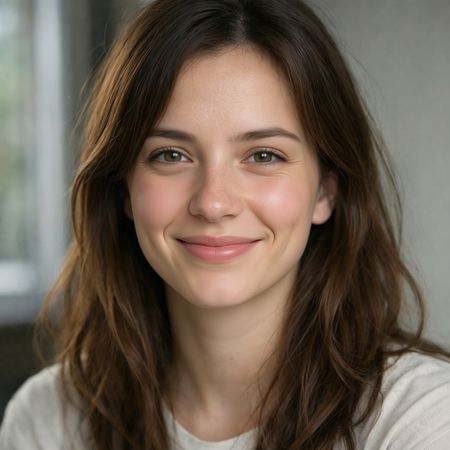
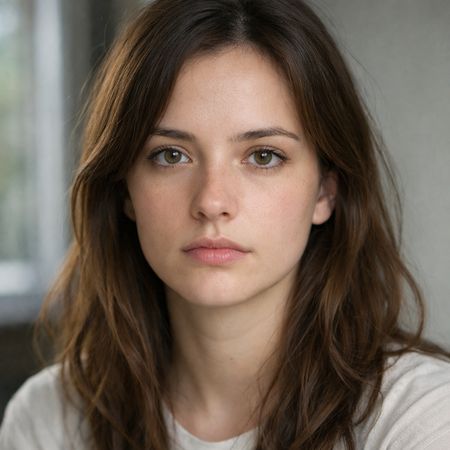
Neutral Expression to Genuine Smile
Editing{
"action": "image_edit",
"reference": "uploaded neutral portrait",
"change": "Warm genuine Duchenne smile: lips curved up, slight natural teeth, soft eye crinkles, subtle cheek raise",
"details": "Realistic smiling skin (dimples if present, soft cheek shadows), slightly brighter eyes; keep exact eye shape/color/iris",
"preserve_exact": "Face identity/structure, eyes/nose/lips/eyebrows, hair, skin texture/pores/freckles, makeup, clothing, head pose, background, lighting, shadows, framing",
"no_changes": "No face shape change, no new features, no gaze shift, no hair/clothing/lighting/background edits",
"style": "Ultra-photorealistic 8K portrait, sharp face focus, natural soft lighting, realistic skin glow"
}
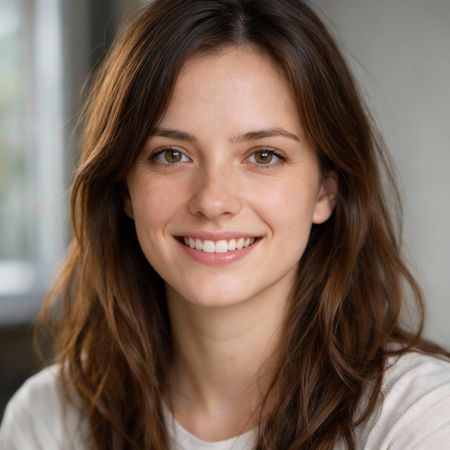
AI Judge Analysis
Qwen Image Edit 2511
- + Excellent preservation of the original skin texture and freckles.
- + Natural-looking eye crinkles and cheek elevation.
- + Matches the hair and background of the source image perfectly.
- − Failed to show the 'slight natural teeth' requested in the prompt.
Seedream 4.5
- + Followed the instruction to show 'slight natural teeth' very effectively.
- + Captures the 'warm genuine' expression well with realistic facial structure changes.
- + Maintains character identity and high-quality skin rendering.
- − Slightly overly smoothed skin texture compared to the original source's pores and freckles.
Verdict: Both models did an excellent job preserving the identity and composition of the source image. Qwen Image Edit 2511 better preserved the original skin texture and fine details like freckles, but it missed the requirement for a smile with visible teeth. Seedream 4.5 followed all instructions including the teeth and produced a more convincing Duchenne smile, making it the more successful edit.
Golden Hour Stroll
Editing“Add dynamic motion to this photo: make hair blow in the wind, add leaves flying, energetic and lively feel.”

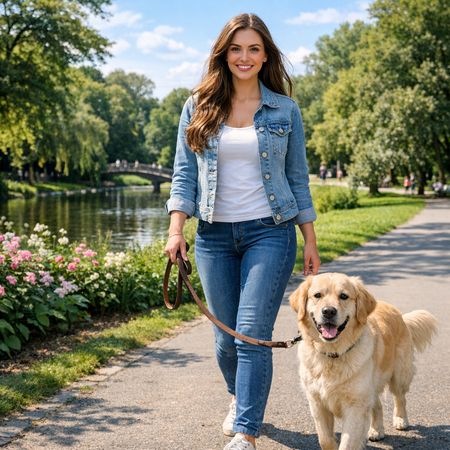

AI Judge Analysis
Qwen Image Edit 2511
- + Excellent preservation of the subject's face and original lighting
- + Successfully added a large volume of falling leaves and wind-blown hair
- + The dog's tail was appropriately modified to look fluffier and in motion
Seedream 4.5
- + Natural integration of wind-blown hair that flows to one side
- + Effective use of foreground and background blur on leaves to create depth and speed
- + Adjusted the woman's gait to look more like a jog, enhancing the energetic feel
- − The woman's face has been significantly altered from the source image
- − Background elements like the bridge and trees have changed substantially compared to the source
Verdict: Qwen Image Edit 2511 is the better editing tool as it maintains the identity of the woman and the original composition perfectly while adding the requested elements. Seedream 4.5 creates a more convincing sense of motion through gait changes and motion blur, but it fails as an edit by completely regenerating the subject's face and altering the background environment.
Qwen Image Edit 2511
Alibaba's Qwen image editing model for instruction-based image modifications and transformations
Seedream 4.5
ByteDance's latest image generation model unifying text-to-image and image editing in a single architecture, with improved text rendering and 30-40% faster generation than v4.0