Grok Imagine Image Pro vs Qwen Image Edit 2511
Head-to-head across 3 challenges
Grok Imagine Image Pro
60.0%
win rate
Ties
0.0%
Qwen Image Edit 2511
40.0%
win rate
Challenge Results
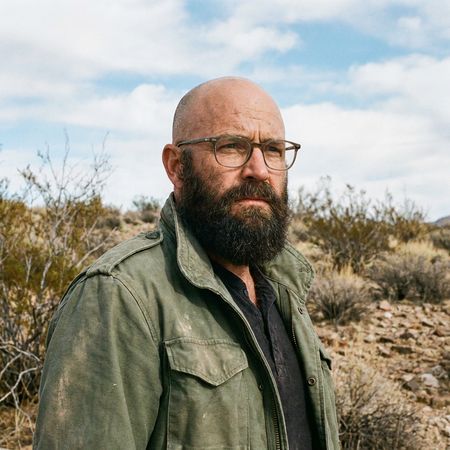
Bald man challenge
Image Editing“Give the person a full, thick head of natural hair with realistic texture, density, and a natural hairline. Preserve facial features and lighting.”


AI Judge Analysis
Grok Imagine Image Pro
- + Excellent source preservation of facial features and textures.
- + Highly realistic hairline and hair texture that integrates naturally with the existing ear and sideburns.
- + Perfectly matches the lighting and color of the original beard.
- − None notable.
Qwen Image Edit 2511
- + Successfully provides a full, thick head of hair.
- + Maintains the background and clothing accurately.
- − The hair appears too voluminous and 'placed on top', slightly distorting the shape of the head.
- − The texture of the hair is slightly less realistic than the source's beard texture.
- − The hairline integration on the forehead is less seamless than Model A.
Verdict: Grok Imagine Image Pro is the winner because it provides a modification that looks completely indistinguishable from a real photograph, seamlessly integrating the new hair with the original sideburns and lighting. Qwen Image Edit 2511 also performs well but the hair volume feels slightly artificial and the hairline is less convincingly merged with the skin.
Studio Ghibli Anime Style
Editing“Transform this photo into a Studio Ghibli–inspired illustration. Use soft pastel colors, hand-painted textures, gentle lighting, dreamy backgrounds, and a warm, nostalgic mood”
AI Judge Analysis
Grok Imagine Image Pro
- + Excellent adherence to the Ghibli art style including facial features and linework.
- + Strong watercolor texture consistent with hand-painted backgrounds.
- + Preserves the composition and character poses perfectly while translating to anime.
- − The facial expression of the central man is slightly more surprised than 'distracted longing'.
Qwen Image Edit 2511
- + Successfully maintains the character likeness of the original faces.
- + Good use of warm lighting and pastel colors.
- − The style feels like a generic digital filter rather than a hand-painted Studio Ghibli illustration.
- − The addition of white sparkling dots is distracting and not typical of the requested style.
- − Faces look more like 3D renders with lines over them than classic 2D Ghibli art.
Verdict: Grok Imagine Image Pro successfully transformed the source image into a convincing Studio Ghibli aesthetic, utilizing authentic hand-painted textures and facial proportions characteristic of the studio's films. Qwen Image Edit 2511 retained more facial detail from the original photo but failed to capture the specific artistic essence of the prompt, resulting in a more generic digital illustration.
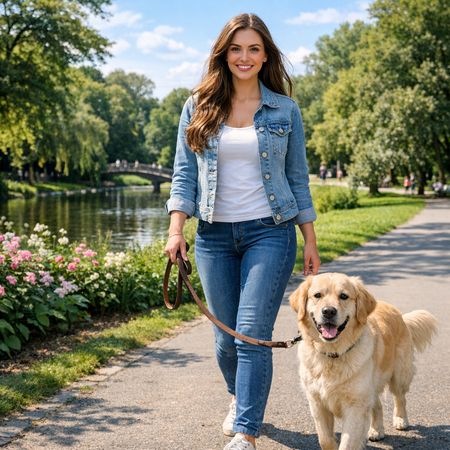
Golden Hour Stroll
Image Editing“Add dynamic motion to this photo: make hair blow in the wind, add leaves flying, energetic and lively feel.”


AI Judge Analysis
Grok Imagine Image Pro
- + Excellent preservation of the original woman's face and body features
- + Natural hair movement that flows consistently in one direction
- + Includes a large amount of flying leaves to create the requested 'lively' feel
Qwen Image Edit 2511
- + Successfully adds motion to both the woman's hair and the dog's tail
- + High-quality rendering of individual flying leaves
- + Good preservation of the background and original subjects
- − The hair appears too symmetrical and gravity-defying, looking slightly unnatural
- − Minor changes to facial features compared to the source image
Verdict: Grok Imagine Image Pro performed better at preserving the original woman's identity while adding believable hair movement that flows naturally with the wind. Qwen Image Edit 2511 correctly added motion to the dog's tail as well, but the woman's hair composition feels more like a static 'explosion' than a breeze, and her face was slightly altered from the source.
Grok Imagine Image Pro
xAI's premium image generation model offering higher fidelity output and stronger performance on single-image editing benchmarks compared to the standard Grok Imagine model
Qwen Image Edit 2511
Alibaba's Qwen image editing model for instruction-based image modifications and transformations