FLUX.2 [pro] vs Grok Imagine Image Pro
Head-to-head across 12 challenges
FLUX.2 [pro]
33.3%
win rate
Ties
0.0%
Grok Imagine Image Pro
66.7%
win rate
Challenge Results
Geometric Composition
Text-to-Image“A glass cube on a wooden table. Inside the cube is a small blue sphere. On top of the cube sits a red book. A green plant is behind the cube, partially visible through the glass. Soft window light from the left.”
AI Judge Analysis
FLUX.2 [pro]
- + Perfectly sharp, clean glass cube geometry.
- + Excellent light interaction and reflections on the glass and wooden surface.
- + Very realistic textures on the book cover and the wooden table.
- − The blue sphere is quite small compared to the scale of the cube.
- − The plant in the background is very blurred, making it hard to see through the glass as requested.
Grok Imagine Image Pro
- + The plant is clearly visible through the glass panels, adhering well to that part of the prompt.
- + The sphere is larger and more central to the composition.
- + Rich wooden texture on the table adds character.
- − The glass cube has distorted, wavy edges that make it look more like a vase or a molded container than a precise cube.
- − There is a strange double-reflection or ghosting of the blue sphere on the right side of the glass.
Verdict: FLUX.2 [pro] produced a much more photorealistic and physically accurate image with clean lines and superior lighting, though the background plant is heavily out of focus. Grok Imagine Image Pro followed the instruction to show the plant through the glass better, but failed on the basic geometry of the cube and created confusing visual artifacts with the sphere's reflection.
Candid Street Photography
Text-to-Image“A candid street photo of an elderly Japanese man repairing a red bicycle in light rain, reflections on wet pavement, shallow depth of field, 50mm lens, natural skin texture, imperfect framing, motion blur from passing cars, cinematic but realistic, no stylization.”
AI Judge Analysis
FLUX.2 [pro]
- + Excellent shallow depth of field and bokeh.
- + Highly realistic skin textures and fine details on the hands.
- + The 'imperfect framing' is captured well with the cropped bicycle wheel in the foreground.
Grok Imagine Image Pro
- + Good inclusion of a wrench to signify the 'repairing' action.
- + Better visibility of the light rain hitting the subject's jacket.
- + Effective use of the wet pavement for reflections.
- − The man's foot and the bicycle stand are merging awkwardly with the ground.
- − The bicycle's anatomy is slightly warped near the rear wheel/frame junction.
- − Background motion blur feels a bit more synthetic compared to Model A.
Verdict: FLUX.2 [pro] delivers a much higher level of photorealism, particularly in the rendering of the man's skin and the natural fall-off of the focus, which perfectly matches the 50mm lens request. While Grok Imagine Image Pro has a good composition and captures the 'repair' action clearly, it suffers from several anatomical and clipping artifacts where the objects meet the ground.
Fantasy Warrior
Text-to-Image“Close portrait of a battle-worn paladin in ornate engraved plate armor, hair braided with small beads, faint scars and dirt on the skin, warm torchlight reflecting off metal, shallow depth of field, bokeh sparks, lifelike eyes, highly detailed texture on leather straps and cloth underlayer.”
AI Judge Analysis
FLUX.2 [pro]
- + Excellent realism in skin texture and lighting.
- + The warm torchlight reflection on the plate armor is very convincing.
- + Features highly detailed texture on the leather straps and rough-spun neck cloth.
- − The bokeh sparks appear as solid, elongated streaks that look less natural.
- − The engraving on the armor is somewhat soft and lacks depth compared to Model B.
Grok Imagine Image Pro
- + Intricate and sharp engraving on the armor, including clear Latin text.
- + Very creative interpretation of 'beads' in the hair, resembling bone or carved stone.
- + Superior composition with a more intimidating and centered warrior gaze.
- − The skin texture feels slightly more 'digital' or smoothed compared to Model A.
- − The sparks in the background are somewhat uniform in color.
Verdict: Both models followed the prompt exceptionally well, but Grok Imagine Image Pro takes the lead due to the incredible level of detail in the armor engravings and the addition of legible Latin text which fits the 'paladin' theme perfectly. FLUX.2 [pro] has slightly more realistic skin and fabric textures, but Grok's composition and sharp details make for a more striking image.
Modern Clean Menu
Text-to-Image“Modern minimalist restaurant menu design, white background with colorful food photos in grid, sections for appetizers/pizza/mains, bold sans-serif fonts, vibrant accents, clean professional layout for casual dining.”
AI Judge Analysis
FLUX.2 [pro]
- + Includes realistic pricing and text sections for a functional menu.
- + Uses color branding consistently throughout the layout.
- + Shows a clear professional UI/UX approach for a printed menu.
- − Text contains numerous typos (e.g., 'MINS', 'Maghrita').
- − The grid of photos is cluttered and does not match the headers (e.g., pizza under appetizers header).
Grok Imagine Image Pro
- + Excellent minimalist composition with a perfect three-by-three grid.
- + High-quality, vibrant food photography that follows the prompt's theme.
- + Perfect font rendering for the main section headers.
- − Lacks item names, descriptions, or prices, making it less of a 'menu' and more of a gallery.
- − Does not utilize 'vibrant accents' beyond the thin horizontal lines.
Verdict: FLUX.2 [pro] followed the functional aspects of the prompt better by including pricing, item names, and sub-sections, though the text is riddled with typos and the image-to-category mapping is poor. Grok Imagine Image Pro produced a much more visually appealing and cleaner 'minimalist' design with high-quality photography, but it missed the requirement for a full menu layout by omitting item details. Grok is preferred for its superior aesthetic and adherence to the 'minimalist grid' request.
The Capybara Taxi Driver
Text-to-Image“Photorealistic scene inside a yellow New York taxi at night. A capybara is driving, wearing a yellow taxi driver cap and a dark jacket. It has a calm, professional expression and both front paws on the steering wheel. In the back seat sits a human businesswoman in a coat, looking at her phone with a completely normal, bored expression (as if this is just another normal ride). Through the windows you can see the streets of Manhattan at night with blurred lights. Realistic taxi interior, photorealistic, detailed fur and fabric, 35mm lens, night lighting with reflections, shallow depth of field.”
AI Judge Analysis
FLUX.2 [pro]
- + Excellent photorealistic texture on the capybara's fur
- + Dynamic side-view composition with cinematic lighting
- + Accurate depiction of a leather jacket and cap
- − The capybara's paws look slightly more like human hands wearing gloves
- − The businesswoman's face is slightly out of focus and less detailed
Grok Imagine Image Pro
- + Perfect adherence to the 'bored expression' of the businesswoman
- + Detailed text rendering on the taxi driver cap
- + Stronger overall composition showing both subjects clearly through the windshield
- − The capybara's paws have somewhat uncanny, elongated claws
- − The lighting on the capybara's face is a bit flat compared to the background
Verdict: Both models handled this complex prompt exceptionally well. FLUX.2 [pro] has better lighting and realistic fur textures, but Grok Imagine Image Pro captures the specific requested mood and character details—particularly the woman's bored expression and the text on the cap—more effectively. Grok Imagine Image Pro is the winner for its superior composition and prompt adherence.
Bald man challenge
Image Editing“Give the person a full, thick head of natural hair with realistic texture, density, and a natural hairline. Preserve facial features and lighting.”
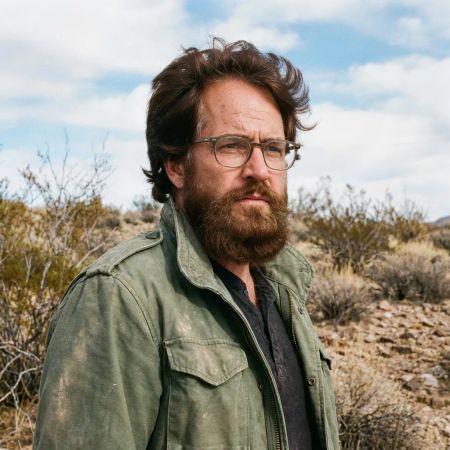
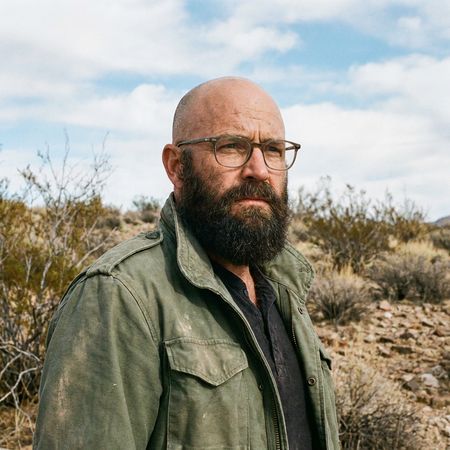
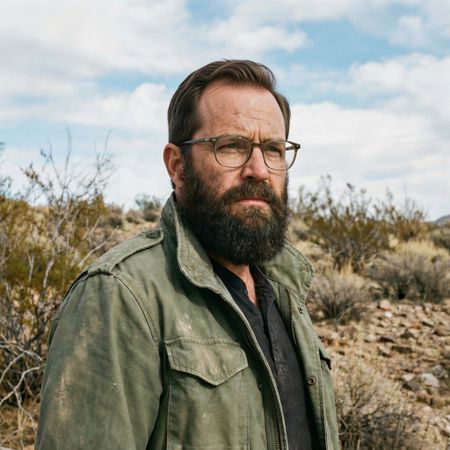
AI Judge Analysis
FLUX.2 [pro]
- + Successfully added a very full and thick head of hair.
- + High level of detail in the individual hair strands.
- + Maintains the background and jacket perfectly.
- − Significantly altered the color and texture of the original beard.
- − The facial structure looks slightly aged/morphed compared to the source.
Grok Imagine Image Pro
- + Excellent preservation of the original facial features and beard.
- + The added hair has a very natural and realistic hairline.
- + Near-perfect source preservation of non-edited areas.
- − The hair is somewhat less 'thick' than requested compared to Model A.
Verdict: FLUX.2 [pro] provided a very thick and voluminous hairstyle but failed to preserve the original beard, making it a significantly lighter color. Grok Imagine Image Pro succeeded in adding a realistic head of hair while keeping the man's face and beard identical to the source image, leading to a much more successful edit overall.
Over-the-top cartoon caricature
Editing“Create a caricature of me and my job. Make it exaggerated and humorous, incorporating my profession as a tv show anchor and my love for dogs and hockey.”
AI Judge Analysis
FLUX.2 [pro]
- + Excellent caricature style that captures the woman's likeness in a cartoon format.
- + Clean, vector-style illustration with high visual coherence.
- + Successfully integrates all requested elements: news desk, microphones, dogs, and hockey rinks/sticks.
Grok Imagine Image Pro
- + Highly exaggerated and humorous facial features, fitting the 'caricature' prompt well.
- + Includes clever text elements like 'Pups & Pucks' and 'Puppy of the Day'.
- + Great variety of dogs and specific hockey props like the Stanley Cup and jersey.
- − The facial likeness is significantly less accurate to the source subject compared to Model A.
- − Some minor artifacts, such as the hockey stick blending into the dog's head/helmet area.
Verdict: FLUX.2 [pro] (Model A) created a very polished cartoon that maintains a strong likeness to the original photo while incorporating all the thematic elements. Grok Imagine Image Pro (Model B) leaned much further into the 'exaggerated and humorous' aspect of a caricature, creating a funnier and more creative scene, though it lost the woman's actual facial likeness in the process. Model B is the better fit for the specific 'caricature' and 'humorous' instructions, whereas Model A is better if preserving identity is the priority.
Adorable Baby Animals in Sunny Meadow
Text-to-Image“Hyper-photorealistic scene of fluffy baby animals—a golden retriever puppy, tabby kitten, baby bunny, and red fox kit—with big expressive eyes and ultra-detailed soft fur, playfully chasing butterflies and tumbling together in a lush wildflower meadow, warm golden sunrise light with god rays and dew sparkles, joyful wholesome vibe, 8K masterpiece.”
AI Judge Analysis
FLUX.2 [pro]
- + Excellent fur texture and lighting integration.
- + Natural-looking interactions between animals.
- + High aesthetic quality with beautiful bokeh and dew effects.
- − Missed the baby bunny completely.
- − Puppy has an anatomically strange extra-large paw raised in the air.
Grok Imagine Image Pro
- + Successfully included all four requested animals plus extra kittens.
- + Captures the 'tumbling' and 'chasing' aspects of the prompt very well.
- + Strong adherence to the 'god rays' and 'wildflower meadow' setting.
- − The fox kit has a confusing anatomical structure where its lower body/tail meets its legs while on its back.
- − Slightly less 'photorealistic' and more 'digital art' in style compared to Model A.
Verdict: Grok Imagine Image Pro is the winner for its superior prompt adherence, including the golden retriever, kitten, fox, and the bunny which FLUX.2 [pro] missed entirely. While FLUX.2 [pro] has slightly more convincing fur textures and artistic lighting, Grok Imagine Image Pro better captured the playful chaos and the specific list of characters requested.
Studio Ghibli Anime Style
Editing“Transform this photo into a Studio Ghibli–inspired illustration. Use soft pastel colors, hand-painted textures, gentle lighting, dreamy backgrounds, and a warm, nostalgic mood”
AI Judge Analysis
FLUX.2 [pro]
- + Excellent Ghibli-accurate character design and facial features.
- + Perfectly captures the requested hand-painted texture and soft pastel color palette.
- + Preserves the composition and poses of the original meme perfectly.
- − The man's expression is slightly more neutral than the comical 'duck face' in the original.
Grok Imagine Image Pro
- + Successfully translates the image into a watercolor illustration style.
- + Retains the specific facial expressions (especially the man's surprise) very well.
- + Good use of soft, dreamy lighting in the background.
- − The line art and character style are more generic anime than specifically Ghibli-inspired.
- − Textures look more digital/smudged than the requested hand-painted feel.
Verdict: FLUX.2 [pro] followed the aesthetic instructions much more accurately, delivering a result that truly looks like a Studio Ghibli cel painting with specific paper textures and character designs. While Grok Imagine Image Pro maintained the original facial expressions slightly better, its art style is a more generic watercolor anime look that lacks the iconic Ghibli charm found in FLUX.2 [pro].
Golden Hour Stroll
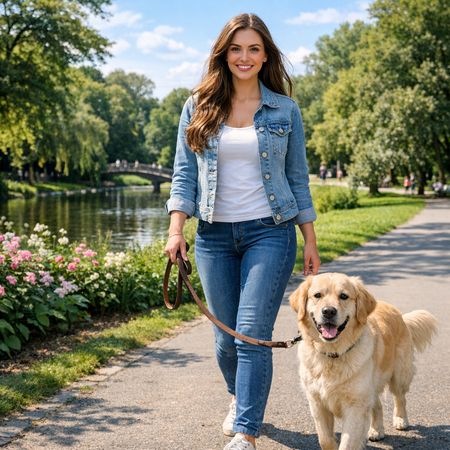
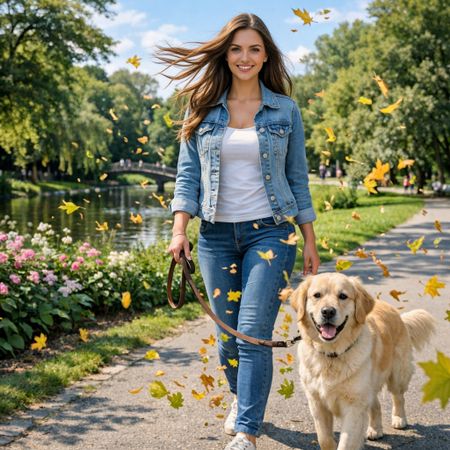
Image Editing“Add dynamic motion to this photo: make hair blow in the wind, add leaves flying, energetic and lively feel.”
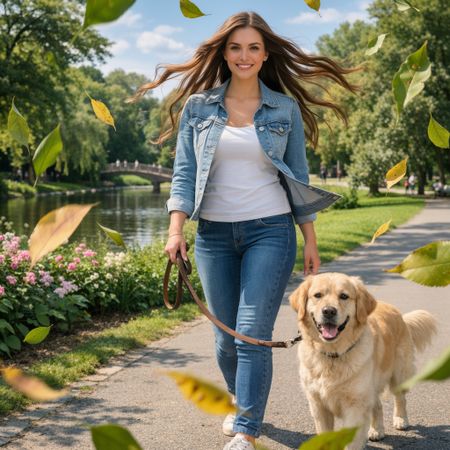
AI Judge Analysis
FLUX.2 [pro]
- + Excellent hair motion effect
- + Seamless preservation of the original person and dog
- + Deeply integrated leaf elements with motion blur
- − Large foreground leaves are a bit distracting
- − Minor change to the jacket's collar shape
Grok Imagine Image Pro
- + Natural leaf distribution
- + Excellent preservation of the source image identity
- + Convincing hair wind effect
- − Leaves look slightly like stickers overlaying the image
- − Less motion blur on the flying leaves compared to Model A
Verdict: Both models succeeded impressively at this edit, maintaining the exact features of the woman and the dog from the source image. FLUX.2 [pro] created more dynamic hair and a better sense of depth with motion-blurred leaves, while Grok Imagine Image Pro provided a more subtle and perhaps more realistic distribution of leaves.
Vintage Cafe Logo
Text-to-Image“Vintage minimalist restaurant logo for "Caffè Florian", retro cloche dome with steam and "Est. 1720" banner, classic typography, warm brown and cream tones, subtle texture on light background, vector emblem style.”
AI Judge Analysis
FLUX.2 [pro]
- + Excellent adherence to the 'warm brown and cream' color palette.
- + Superior integration of the banner and cloche within the emblem composition.
- + Very clean, professional vector aesthetic with subtle paper texture.
- − The 'Est. 1720' text on the banner is slightly less sharp than the main title.
Grok Imagine Image Pro
- + Clear, legible typography for both the name and the date.
- + Accurately includes all requested elements including the cloche and steam.
- − Included a gray/silver tone that deviates from the 'warm brown and cream' prompt.
- − The steam graphic is overly thick and looks less like a vapor trail than the version in Model A.
- − The composition feels a bit more generic and less like a 'vintage minimalist' emblem.
Verdict: Both models followed the prompt instructions, but FLUX.2 [pro] produced a more cohesive and aesthetically pleasing design. FLUX.2 [pro] better captured the requested color palette and vintage minimalist style, whereas Grok Imagine Image Pro introduced a gray cloche that clashed with the brown tones and featured less refined graphics.
Apollo 11: Journey to Tranquility
Text-to-Image“Create a clean, modern vector infographic poster about the Apollo 11 mission. NASA-inspired palette (navy, white, muted red, light gray). Flat-vector style, crisp lines, consistent iconography, subtle gradients only. Steps (stop at landing): 1. Launch (Saturn Vicon) 2. Earth Orbit (Earth + orbit ring icon) 3. Translunar (trajectory arc icon) 4. Lunar Orbit (Moon + orbit ring icon) 5. Descent (lunar module descending icon) 6. Landing (lunar module on the surface icon) Small supporting elements (minimal text): • Crew strip: three silhouette icons with only last names: Armstrong, Aldrin, Collins. • Landing site marker: Moon pin labeled "Tranquility" only. Layout constraints: generous margins, large readable labels, clean background with subtle stars. Vector-only, print-poster look, high resolution.”
AI Judge Analysis
FLUX.2 [pro]
- + Excellent adherence to the 'flat-vector' style with crisp lines and a professional aesthetic.
- + Integrated layout that uses the vertical space effectively to tell a story.
- + Clear, large typography for headings that is easy to read.
- − Failed to include all 6 requested steps, missing Lunar Orbit and Landing as distinct numbered sections.
- − Sub-text consists of illegible gibberish placeholder text.
- − The trajectory graphic in the center is somewhat confusingly laid out.
Grok Imagine Image Pro
- + Perfect adherence to the 6-step prompt, illustrating every specific stage requested.
- + Superior text rendering, including accurate names for the crew and clear labels for all steps.
- + Consistent iconography contained within circular frames, creating a very clean infographic look.
- − The composition is a bit sparse with significant empty gray space on the sides.
- − The red trajectory arc icon for 'Translunar' is a bit abstract compared to other icons.
Verdict: While FLUX.2 [pro] has a more visually striking aesthetic and better use of the dark navy palette, Grok Imagine Image Pro is the much better infographic. Grok followed the instructions perfectly, including all 6 specific steps with accurate, legible text, whereas FLUX missed several steps and included gibberish text.
FLUX.2 [pro]
Black Forest Labs' state-of-the-art image generation model with maximum quality and speed, supporting text-to-image and multi-reference image editing with up to 4MP output
Grok Imagine Image Pro
xAI's premium image generation model offering higher fidelity output and stronger performance on single-image editing benchmarks compared to the standard Grok Imagine model