FLUX.2 [max] vs Grok Imagine Image Pro
Head-to-head across 13 challenges
FLUX.2 [max]
23.1%
win rate
Ties
15.4%
Grok Imagine Image Pro
61.5%
win rate
Challenge Results
Geometric Composition
Text-to-Image“A glass cube on a wooden table. Inside the cube is a small blue sphere. On top of the cube sits a red book. A green plant is behind the cube, partially visible through the glass. Soft window light from the left.”
AI Judge Analysis
FLUX.2 [max]
- + Excellent rendering of sharp glass edges and corners.
- + Very realistic leather texture on the red book cover.
- + Sophisticated lighting with soft window light and realistic refractions on the table.
- − The plant in the background is so blurry it is difficult to see 'through' the glass as requested.
- − The mirrored base inside the cube creates a reflection that slightly clutters the composition.
Grok Imagine Image Pro
- + Clearly demonstrates the plant visible through the glass panels of the cube.
- + Coherent placement of all requested elements with a natural photographic style.
- + Accurate spatial relationship between the sphere, the cube, and the light source.
- − The glass cube has wavy, irregular thickness that looks more like molded plastic or heavy melted glass than a precise cube.
- − The lighting is slightly flatter and less cinematic than the competitor.
Verdict: FLUX.2 [max] produces a higher quality, more aesthetically pleasing image with superior textures and lighting, though it fails slightly on the transparency requirement by over-blurring the background plant. Grok Imagine Image Pro follows the plant-through-glass instruction better, but the glass cube itself is distorted and lacks the geometric precision seen in the FLUX output.
Candid Street Photography
Text-to-Image“A candid street photo of an elderly Japanese man repairing a red bicycle in light rain, reflections on wet pavement, shallow depth of field, 50mm lens, natural skin texture, imperfect framing, motion blur from passing cars, cinematic but realistic, no stylization.”
AI Judge Analysis
FLUX.2 [max]
- + Excellent depiction of motion blur in passing cars
- + High realism in skin textures and clothing details
- + Natural interaction between the man's hands and the bicycle spokes
- − The 'imperfect framing' request resulted in a very tight crop that cuts off the back of the bike
Grok Imagine Image Pro
- + Strong reflection on wet pavement
- + Good sense of depth and street atmosphere
- + Clearly shows the tool being used for repair
- − Low-quality hand details with floating/mangled fingers on the wrench
- − The bike's kickstand is clipping through the pavement
- − Motion blur on cars is less pronounced than requested
Verdict: FLUX.2 [max] captures the technical aspects of the prompt much better, specifically the motion blur and the realistic, non-stylized skin textures. While Grok Imagine Image Pro provides a nice composition with better reflections, it fails on anatomy and physical consistency, such as the man's hands and the bike's kickstand.
Modern Clean Menu
Text-to-Image“Modern minimalist restaurant menu design, white background with colorful food photos in grid, sections for appetizers/pizza/mains, bold sans-serif fonts, vibrant accents, clean professional layout for casual dining.”
AI Judge Analysis
FLUX.2 [max]
- + Includes realistic pricing and descriptive text placeholders.
- + Features clear, vibrant typography for section headers.
- + Strong organizational layout resembling a real-world functional menu.
- − The text content is largely gibberish/nonsense words.
- − The photo grid is slightly cluttered with overlapping elements.
Grok Imagine Image Pro
- + Exceptionally clean 3x3 grid layout with high-quality food photography.
- + Very high image resolution and professional lighting for food items.
- + Strict adherence to the minimalist aesthetic requested.
- − Lacks any menu pricing or item descriptions.
- − Missing typical menu functional details like contact info or branding.
Verdict: FLUX.2 [max] creates a more realistic menu layout that includes pricing, categories, and social media icons, feeling like a functional piece of graphic design despite the garbled text. Grok Imagine Image Pro produces a much more visually stunning and minimalist grid with superior food photography, but it functions more as a mood board than a complete menu design. FLUX.2 is the winner for better capturing the specific 'sections for' and 'menu design' aspects of the prompt.
Pose & Character Mashup
Editing“Use Image 1 as the exact pose reference and Image 2 as the character reference. Recreate the person/character from Image 2 in the exact dynamic pose and body position from Image 1. Keep the exact face, hair, clothing style/details, and expression from Image 2. Match the lighting and environment of Image 1. The final image must show the character from Image 2 performing the precise action/pose from Image 1 with perfect anatomy and natural integration.”
AI Judge Analysis
FLUX.2 [max]
- + Successfully transferred the character, including sunglasses, scarf, and clothing details
- + Excellent preservation of facial likeness from Image 2
- + Well-executed lighting that matches the yellow studio environment
- − The pose is similar but not an 'exact' match of the contortion/twist from Image 1
- − Anatomy of the feet and legs is slightly awkward compared to the source
Grok Imagine Image Pro
- + Perfectly replicates the complex pose and body position from Image 1
- − Completely failed to use the character from Image 2, essentially just providing a higher-quality version of the person in Image 1
- − Ignored the clothing, scarf, and accessories (sunglasses) requested from the character reference
Verdict: FLUX.2 [max] followed the complex instructions much better than Grok Imagine Image Pro, successfully merging the character from Image 2 into the pose of Image 1. While FLUX.2 [max] struggled slightly with the exactness of the extreme body twist, Grok Imagine Image Pro failed the character reference requirement entirely, merely recreating the subject from the pose reference.
The Capybara Taxi Driver
Text-to-Image“Photorealistic scene inside a yellow New York taxi at night. A capybara is driving, wearing a yellow taxi driver cap and a dark jacket. It has a calm, professional expression and both front paws on the steering wheel. In the back seat sits a human businesswoman in a coat, looking at her phone with a completely normal, bored expression (as if this is just another normal ride). Through the windows you can see the streets of Manhattan at night with blurred lights. Realistic taxi interior, photorealistic, detailed fur and fabric, 35mm lens, night lighting with reflections, shallow depth of field.”
AI Judge Analysis
FLUX.2 [max]
- + Excellent photorealistic lighting and textures
- + Natural capybara anatomy relative to the driver's seat
- + Very high level of detail in the car interior and dashboard
- − The capybara appears to have human-like hands/gloves rather than paws
- − The profile angle makes it harder to see the passenger's expression clearly
Grok Imagine Image Pro
- + Perfectly captures the 'bored' expression of the human passenger
- + Excellent text rendering on the driver's cap (NYC TLC Medallion)
- + Both front paws are clearly visible on the steering wheel as requested
- − The capybara's head is disproportionately large for the vehicle interior
- − The steering wheel placement looks a bit awkward relative to the capybara's body
Verdict: Both models followed the prompt exceptionally well, but Grok Imagine Image Pro wins for superior adherence to the specific character interactions and expressions, particularly the bored look of the businesswoman and the text on the hat. While FLUX.2 [max] has slightly better lighting and interior realism, Grok's composition tells the 'normal day in New York' story more effectively.
Bald man challenge
Image Editing“Give the person a full, thick head of natural hair with realistic texture, density, and a natural hairline. Preserve facial features and lighting.”
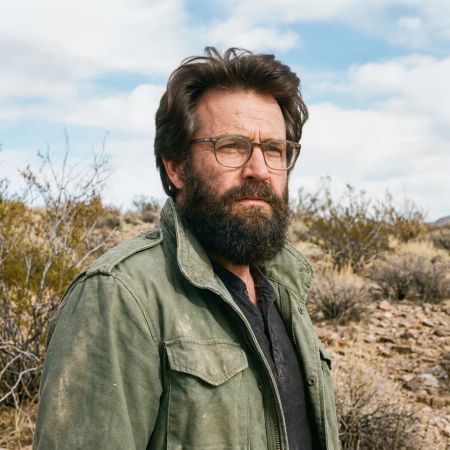
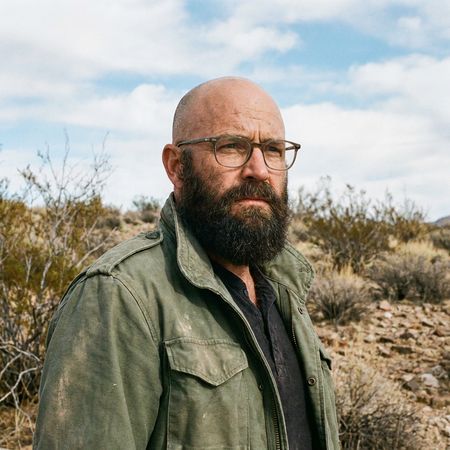
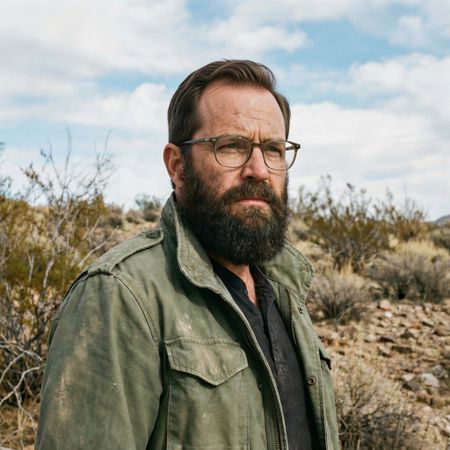
AI Judge Analysis
FLUX.2 [max]
- + Successfully added a very full and thick head of hair as requested.
- + Preserved the background and clothing precisely.
- + Maintained the original facial features and lighting setup.
- − The hair volume is a bit exaggerated, looking slightly like a wig.
- − The blend between the sideburns and the new hair is slightly messy.
Grok Imagine Image Pro
- + Natural and realistic hair texture and styling.
- + Excellent integration of the new hairline with the existing forehead and temples.
- + Perfect preservation of the original image's identity and environment.
- − The hair is somewhat less 'thick' than Model A, though more realistic.
Verdict: Both models did an excellent job of preserving the original image's details. FLUX.2 [max] provided more volume, but Grok Imagine Image Pro produced a much more realistic and believable result that integrates seamlessly with the man's existing beard and features.
Isometric Miniature Diorama Scenes
Text-to-Image“Create a clear, 45° top-down isometric miniature 3D cartoon scene of Japan's signature dish: sushi, with soft refined textures, realistic PBR materials, gentle lighting, on a small raised diorama base with minimal garnish and plate. Solid light blue background. At top-center: 'JAPAN' in large bold text, 'SUSHI' below it, small flag icon. Perfectly centered, ultra-clean, high-clarity, square format.”
AI Judge Analysis
FLUX.2 [max]
- + Perfect text rendering and alignment
- + Excellent 45° isometric diorama composition
- + Clean, refined 3D cartoon textures
- − The sushi models are slightly more simplified and less detailed than model B
Grok Imagine Image Pro
- + Higher detail on individual sushi grains and fish textures
- + Good text clarity
- + Pleasing soft lighting
- − Missed the 'isometric 45 top-down' perspective, opting for a standard 3D perspective
- − Missing the 'small raised diorama base' (uses a simple plate/board)
Verdict: FLUX.2 [max] followed the complex layout instructions much better, delivering a true 45-degree isometric diorama with perfectly centered text. While Grok Imagine Image Pro had slightly more realistic textures for the food itself, it failed to capture the isometric diorama style requested in the prompt.
Over-the-top cartoon caricature
Editing“Create a caricature of me and my job. Make it exaggerated and humorous, incorporating my profession as a tv show anchor and my love for dogs and hockey.”
AI Judge Analysis
FLUX.2 [max]
- + Excellent cute cartoon style that simplifies features based on the source image.
- + Captures the denim shirt from the original photo as a detail preservation.
- + Highly coherent composition with a TV set and hockey rink background.
- − The caricature style is very 'safe' and cute rather than 'exaggerated and humorous'.
- − Faces of the background hockey-dogs are a bit repetitive.
Grok Imagine Image Pro
- + Perfectly interprets 'exaggerated' with large eyes and a wide, comedic grin.
- + Excellent integration of text and specific details like the hockey sticks, pucks, and trophy.
- + Highly creative 'Pups & Pucks' theme that directly addresses all parts of the prompt.
- − The hand holding the hockey stick is physically impossible (thumbs on wrong side/backwards).
- − Loss of resemblance to the original subject's facial structure in favor of extreme caricature.
Verdict: FLUX.2 [max] creates a high-quality, polished cartoon that maintains the subject's likability and clothing, but it feels more like a Bitmoji than an exaggerated caricature. Grok Imagine Image Pro much better captures the spirit of 'exaggerated and humorous' with a wild facial expression and clever thematic details like the 'Puppy of the Day' wall, despite some anatomical errors in the hands.
Adorable Baby Animals in Sunny Meadow
Text-to-Image“Hyper-photorealistic scene of fluffy baby animals—a golden retriever puppy, tabby kitten, baby bunny, and red fox kit—with big expressive eyes and ultra-detailed soft fur, playfully chasing butterflies and tumbling together in a lush wildflower meadow, warm golden sunrise light with god rays and dew sparkles, joyful wholesome vibe, 8K masterpiece.”
AI Judge Analysis
FLUX.2 [max]
- + Perfect adherence to the animal count with exactly one puppy, kitten, bunny, and fox.
- + Excellent lighting and atmosphere with subtle god rays and realistic dew sparkles on the grass.
- + Highly realistic fur texture and naturalistic animal proportions.
- − The background is slightly more blurred, reducing the visibility of the 'lush' meadow detail.
- − The composition is a bit linear, with the animals spanning horizontally.
Grok Imagine Image Pro
- + Dynamic and playful posing, especially with the fox kit rolling on its back.
- + Vibrant colors and a very clear depiction of the golden sunrise and god rays.
- + Excellent butterfly variety and placement to create a 'chase' feel.
- − Failed the count requirement by including two tabby kittens instead of one.
- − The lighting on the animals feels slightly artificial and 'cut-out' compared to the background.
- − The bunny's anatomy is a bit stiff and lacks the 'fluffy' detail requested compared to other elements.
Verdict: FLUX.2 [max] followed the prompt more accurately by including exactly one of each animal requested, whereas Grok Imagine Image Pro included two kittens. FLUX.2 [max] also achieved a more believable photographic quality with superior integration of light and dew, while Grok Imagine Image Pro felt more like a digital illustration despite its charming and energetic composition.
Studio Ghibli Anime Style
Editing“Transform this photo into a Studio Ghibli–inspired illustration. Use soft pastel colors, hand-painted textures, gentle lighting, dreamy backgrounds, and a warm, nostalgic mood”
AI Judge Analysis
FLUX.2 [max]
- + Excellent Ghibli-inspired color grading with warm, nostalgic tones
- + Beautiful soft-focus and painterly texture application
- + Perfect capturing of the classic anime eye and blush style
- − The facial expressions are slightly softened, losing some of the sharp 'disdain' of the original girlfriend
Grok Imagine Image Pro
- + Strong watercolor-like hand-painted textures
- + Superior preservation of the specific character expressions, especially the man's shock
- + Clearer line work that mimics animation cells effectively
- − Colors feel a bit cooler and more literal compared to the 'warm/nostalgic' request
Verdict: Both models performed exceptionally well at transforming the famous 'distracted boyfriend' meme into a Ghibli style while maintaining the composition and identity of the source. FLUX.2 [max] leans more into the soft, dreamy atmosphere and lighting requested, whereas Grok Imagine Image Pro does a better job of preserving the specific comedic intensity of the original facial expressions while using a beautiful watercolor technique.
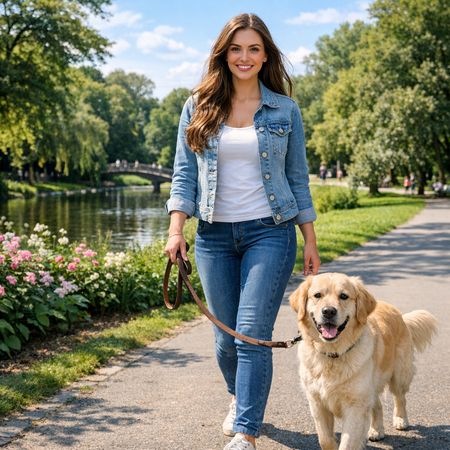
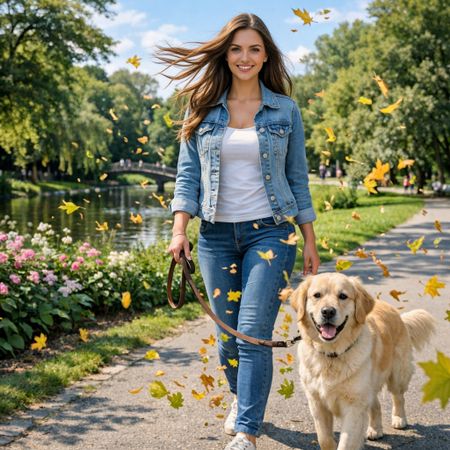
Golden Hour Stroll
Image Editing“Add dynamic motion to this photo: make hair blow in the wind, add leaves flying, energetic and lively feel.”
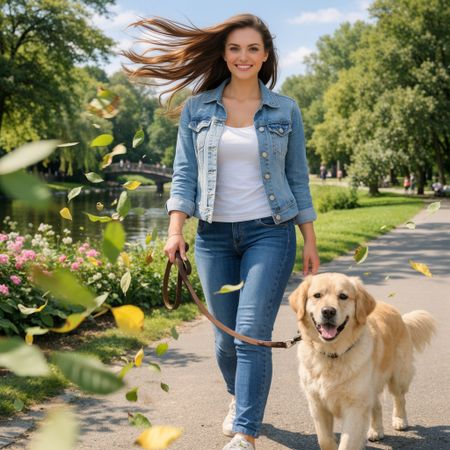
AI Judge Analysis
FLUX.2 [max]
- + Successfully added significant wind effect to the hair.
- + Perfectly preserved the character's facial features and the dog's appearance.
- + Maintained the exact color profile and lighting of the original.
- − The added leaves are very thin and look somewhat like digital artifacts or 'floating needles'.
- − The left hand changed position slightly, though it remains anatomically correct.
Grok Imagine Image Pro
- + The added leaves look like realistic maple leaves with varied colors and motion blur.
- + The hair motion is natural and follows the direction of the wind consistently.
- + The overall image preservation is excellent for both the human and the dog.
- − One or two leaves near the woman's face are a bit distracting.
- − Slight alteration to the background trees, though barely noticeable.
Verdict: Both models did an excellent job of preserving the original source image while applying the requested edits. Grok Imagine Image Pro is the winner because the 'flying leaves' are much higher quality and more recognizable as leaves compared to the thin streaks in FLUX.2 [max].
Vintage Cafe Logo
Text-to-Image“Vintage minimalist restaurant logo for "Caffè Florian", retro cloche dome with steam and "Est. 1720" banner, classic typography, warm brown and cream tones, subtle texture on light background, vector emblem style.”
AI Judge Analysis
FLUX.2 [max]
- + Perfect text rendering for both the main title and the date banner.
- + Exceptional minimalist vector style with harmonious warm brown and cream tones.
- + High-quality subtle paper texture on the background that enhances the vintage feel.
- − The steam is a bit thin/faint compared to the rest of the illustration.
Grok Imagine Image Pro
- + Clear and bold typography that is easy to read.
- + Accurate interpretation of the cloche dome icon.
- − The 'banner' for the date feels more like a solid block than a traditional banner ribbon.
- − Texturing is very subtle to the point of being nearly flat.
- − The color palette feels slightly more modern and less 'vintage' than requested.
Verdict: FLUX.2 [max] produced a superior emblem that perfectly captures the 'vintage minimalist' aesthetic with sophisticated line work and a beautiful banner design. While Grok Imagine Image Pro followed the prompt instructions well, its composition feels more basic and less like a professional restaurant logo compared to the refined output of FLUX.2 [max].
Apollo 11: Journey to Tranquility
Text-to-Image“Create a clean, modern vector infographic poster about the Apollo 11 mission. NASA-inspired palette (navy, white, muted red, light gray). Flat-vector style, crisp lines, consistent iconography, subtle gradients only. Steps (stop at landing): 1. Launch (Saturn Vicon) 2. Earth Orbit (Earth + orbit ring icon) 3. Translunar (trajectory arc icon) 4. Lunar Orbit (Moon + orbit ring icon) 5. Descent (lunar module descending icon) 6. Landing (lunar module on the surface icon) Small supporting elements (minimal text): • Crew strip: three silhouette icons with only last names: Armstrong, Aldrin, Collins. • Landing site marker: Moon pin labeled "Tranquility" only. Layout constraints: generous margins, large readable labels, clean background with subtle stars. Vector-only, print-poster look, high resolution.”
AI Judge Analysis
FLUX.2 [max]
- + Excellent typography and clean vector styling.
- + Includes all requested astronaut names correctly.
- + Strong color palette adherence with a dark navy background that makes the icons pop.
- − The sequence of steps is illogical (3 is Lunar Orbit, but 4 is Translunar).
- − The icon for Translunar is a duplicate of the moon icon rather than a trajectory arc.
Grok Imagine Image Pro
- + Perfect logical ordering of all 6 requested steps in a vertical timeline.
- + Excellent use of the 'trajectory arc' icon for the Translunar phase as requested.
- + Very clean, balanced composition that feels like a professional infographic.
- − The text for the names at the bottom is slightly small and less legible than Model A.
- − The background is very light, making it feel slightly less like 'space' than Model A.
Verdict: While FLUX.2 [max] has bolder icons and great text rendering, it fails the basic logic of an infographic by placing the steps in the wrong order and using the wrong icon for the Translunar phase. Grok Imagine Image Pro followed the prompt instructions perfectly, creating a logical 6-step timeline with accurate iconography for each phase.
FLUX.2 [max]
Black Forest Labs' flagship image generation model delivering state-of-the-art quality with exceptional realism, precision, and consistency for both text-to-image and advanced image editing
Grok Imagine Image Pro
xAI's premium image generation model offering higher fidelity output and stronger performance on single-image editing benchmarks compared to the standard Grok Imagine model